


How to Create Opportunities Automatically in GoHighLevel
How to Create Sales Opportunities Automatically Using the Create Opportunity Action in GoHighLevel
A lead submits a form, books a call, or reaches the point where your team considers them sales-ready. The contact exists in your CRM but no opportunity is created. Unless someone remembers to add that person to the pipeline manually, the lead can disappear from the sales process.
That gap is where the GoHighLevel Create Opportunity Action becomes valuable. A workflow can automatically turn the right contact into a trackable opportunity and place it in the correct pipeline stage.
What Is the Create Opportunity Action in GoHighLevel?
In GoHighLevel, a contact is the person or business record, while an opportunity represents a potential sale connected to that contact. Opportunities live inside pipelines, and pipeline stages represent the steps a deal moves through.
The Create Opportunity action automatically creates a new opportunity when a workflow reaches that step. You select the pipeline and starting stage and can configure available details such as the opportunity name, source, status, value, duplicate behavior, and supported fields. HighLevel also notes that ownership behavior can depend on your opportunity settings.
The key distinction is simple: Create Opportunity creates a new record. Updating an existing opportunity is handled separately. HighLevel has also been moving away from the older combined Create/Update Opportunity action in favor of separate Create Opportunity and Update Opportunity actions.
Why Automating Opportunity Creation Matters
Manual opportunity creation works until leads start arriving from several sources. If pipeline entry depends on memory, some leads will be added late or missed entirely.
Automating opportunity creation creates consistency. When the defined workflow event occurs, the opportunity is created using the same pipeline logic every time. That improves visibility, reduces repetitive CRM work, and creates a reliable handoff between lead capture and sales execution.
How the Create Opportunity Action Works
The basic flow looks like this:
Workflow Trigger → Lead Meets Conditions → Create Opportunity → Opportunity Enters Pipeline → Sales Process Continues
For example, a workflow might start when a specific lead form is submitted. When it reaches the Create Opportunity action, GoHighLevel creates the opportunity in the configured pipeline and stage. HighLevel’s documentation confirms that form submissions can be used as the starting point for this type of automation.
The Create Opportunity action does not, by itself, send follow-ups, assign tasks, or move the deal through later stages. Those outcomes require separately configured workflow steps or sales activity.
How to Set Up the Create Opportunity Action
1. Open or Create a Workflow
Create a new GHL workflow or edit an existing one. Start with the event that should justify creating a sales opportunity.
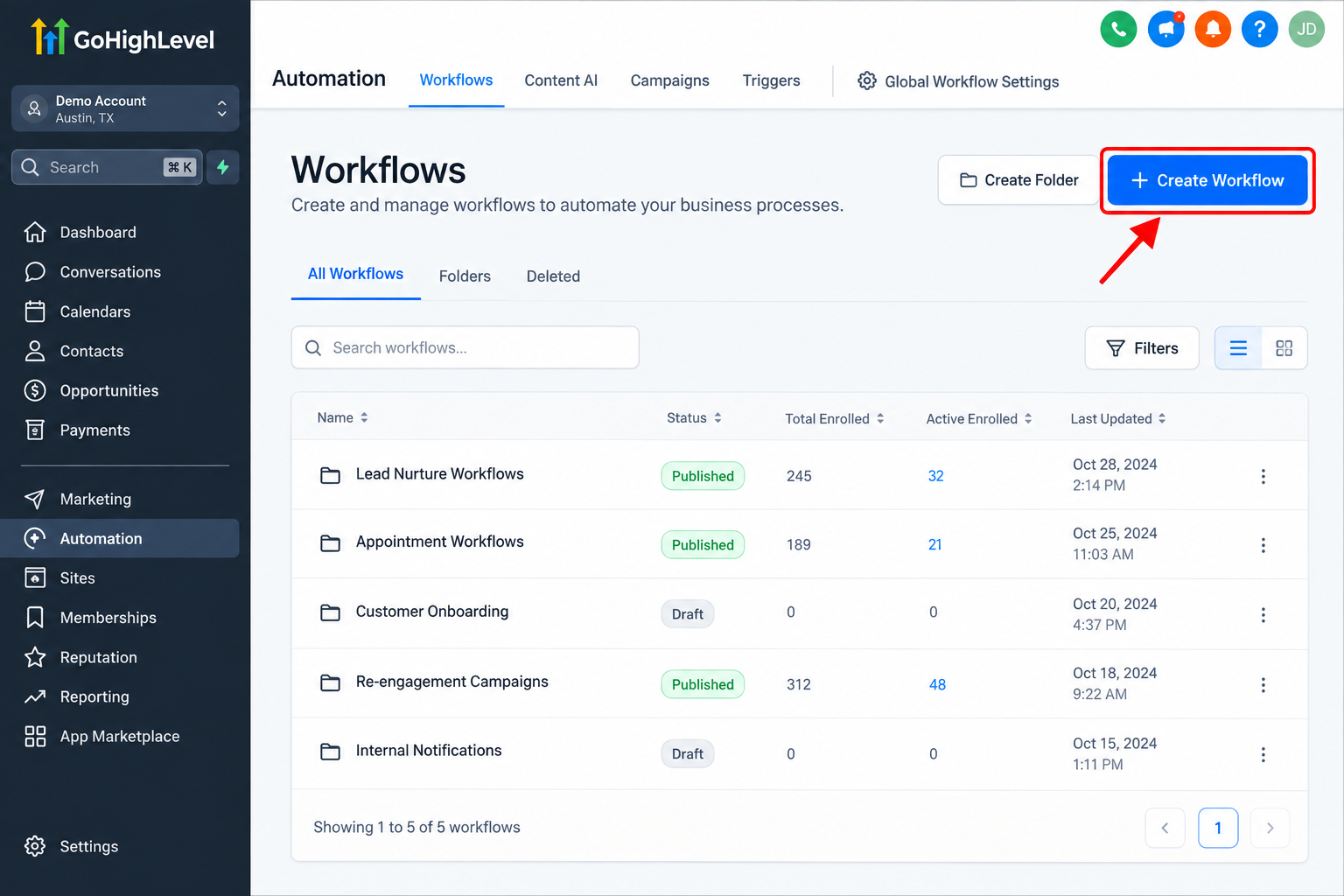
2. Choose the Right Trigger
Select a trigger that represents meaningful sales intent. Ask whether that event truly deserves a deal in your pipeline.
3. Add Create Opportunity
Add the Create Opportunity action. This is the step that creates the sales opportunity for the contact.
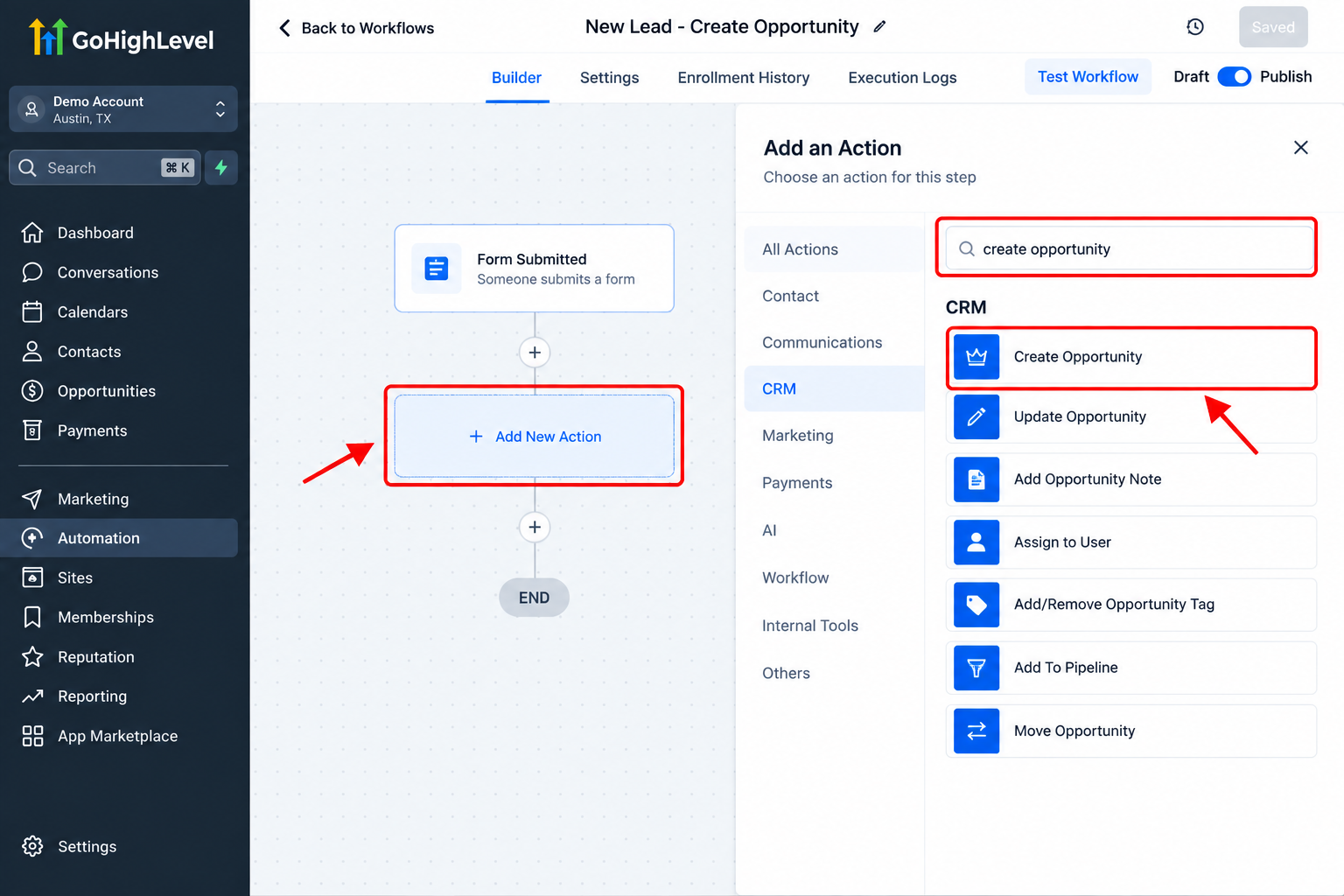
4. Select the Pipeline and Stage
Choose the pipeline that matches the process and the stage where this opportunity should begin. In HighLevel, the pipeline is required; the stage can be selected directly in the action.
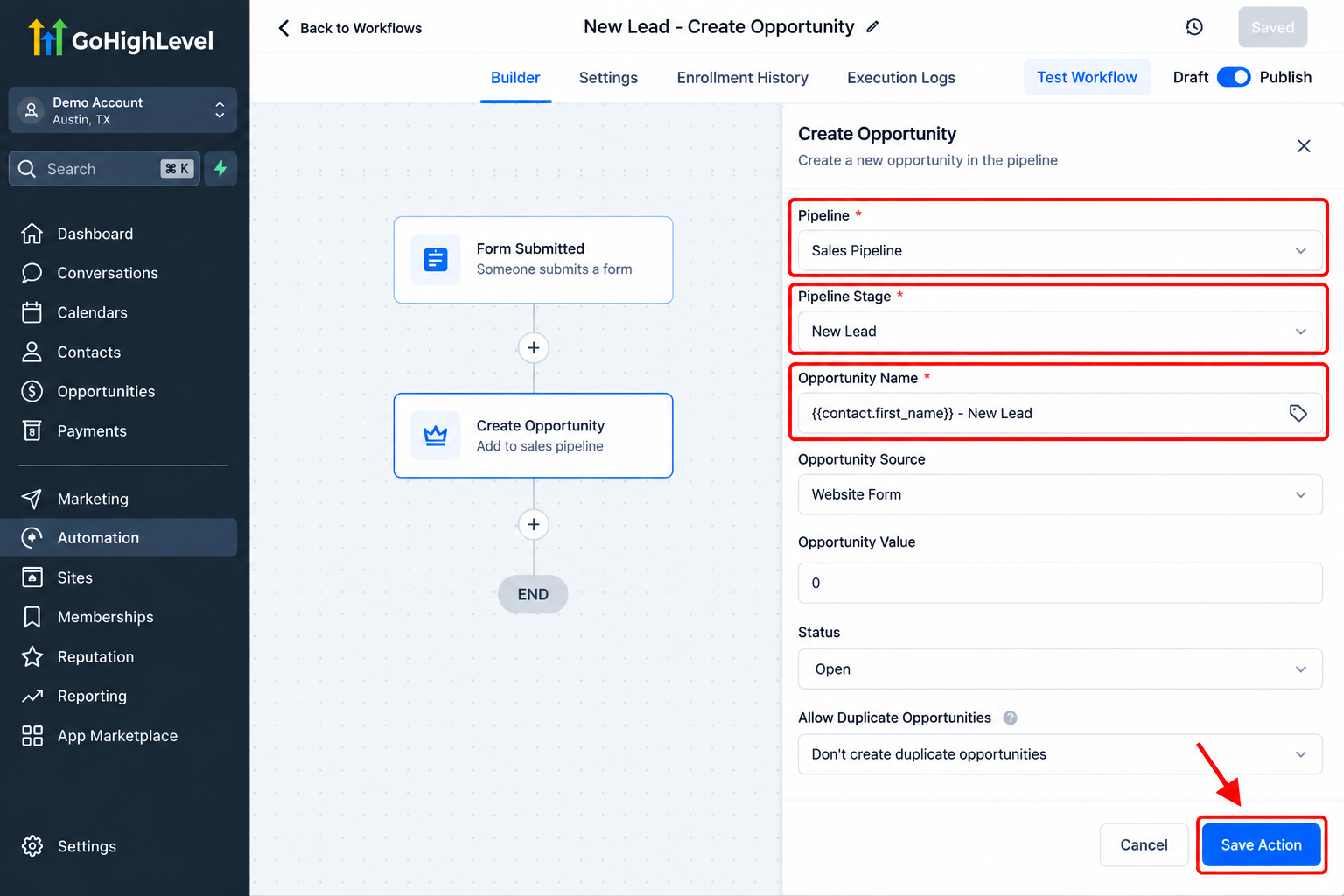
5. Configure Opportunity Details
Set the fields that matter to your process. Current options include opportunity name, source, status, value, duplicate-opportunity behavior, and supported custom fields. Use information your team will actually rely on.
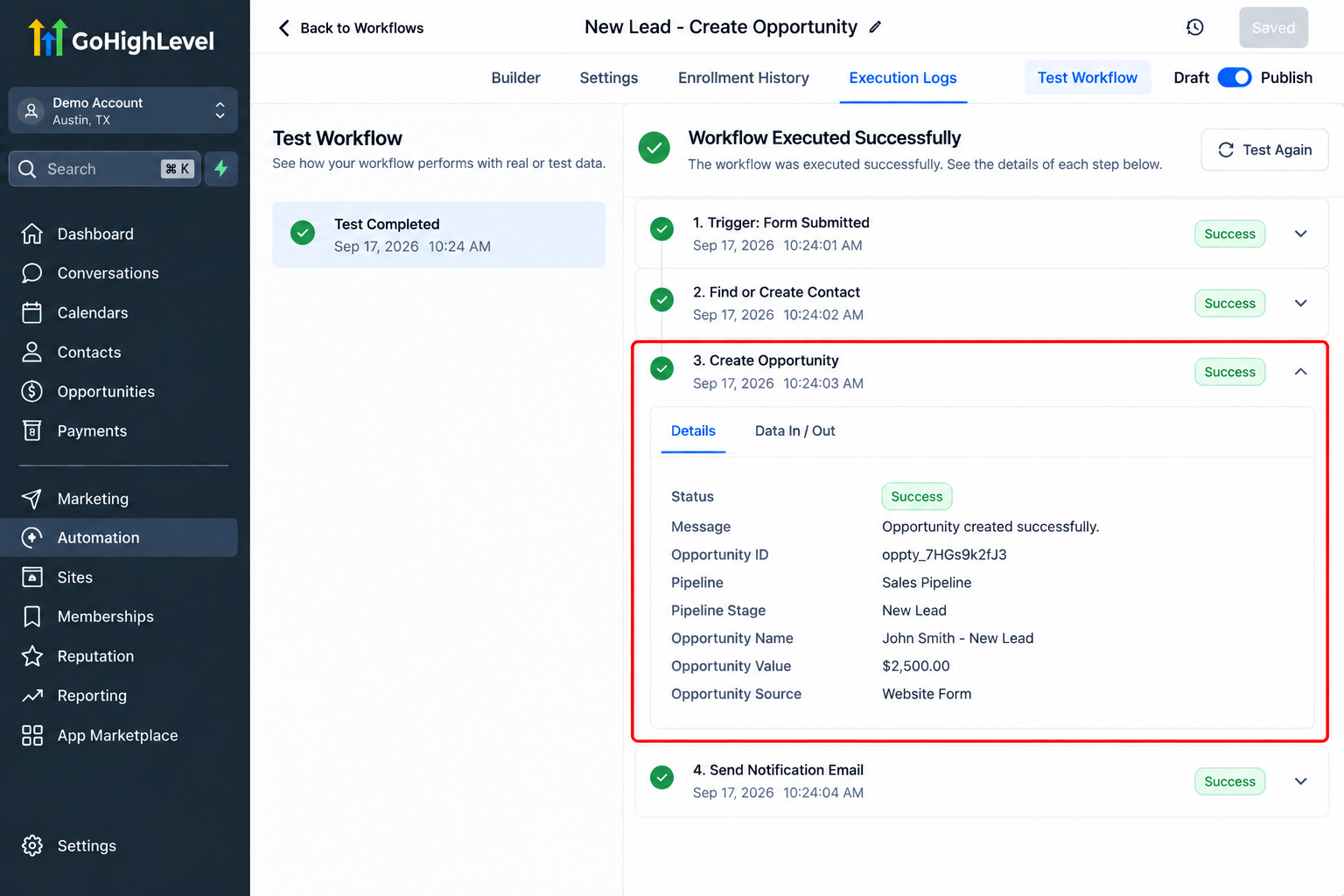
6. Save and Test
Run the workflow with test data before sending live leads through it. Confirm the trigger fires and the opportunity appears in the correct pipeline and stage. HighLevel recommends testing and refining workflows before activation.
Practical Example: Home-Service Estimate Requests
Imagine a roofing company with a website estimate form.
A prospect submits the form and enters a workflow. The workflow then uses the GoHighLevel Create Opportunity Action to create an opportunity in the sales pipeline and place it in a “New Estimate Request” stage.
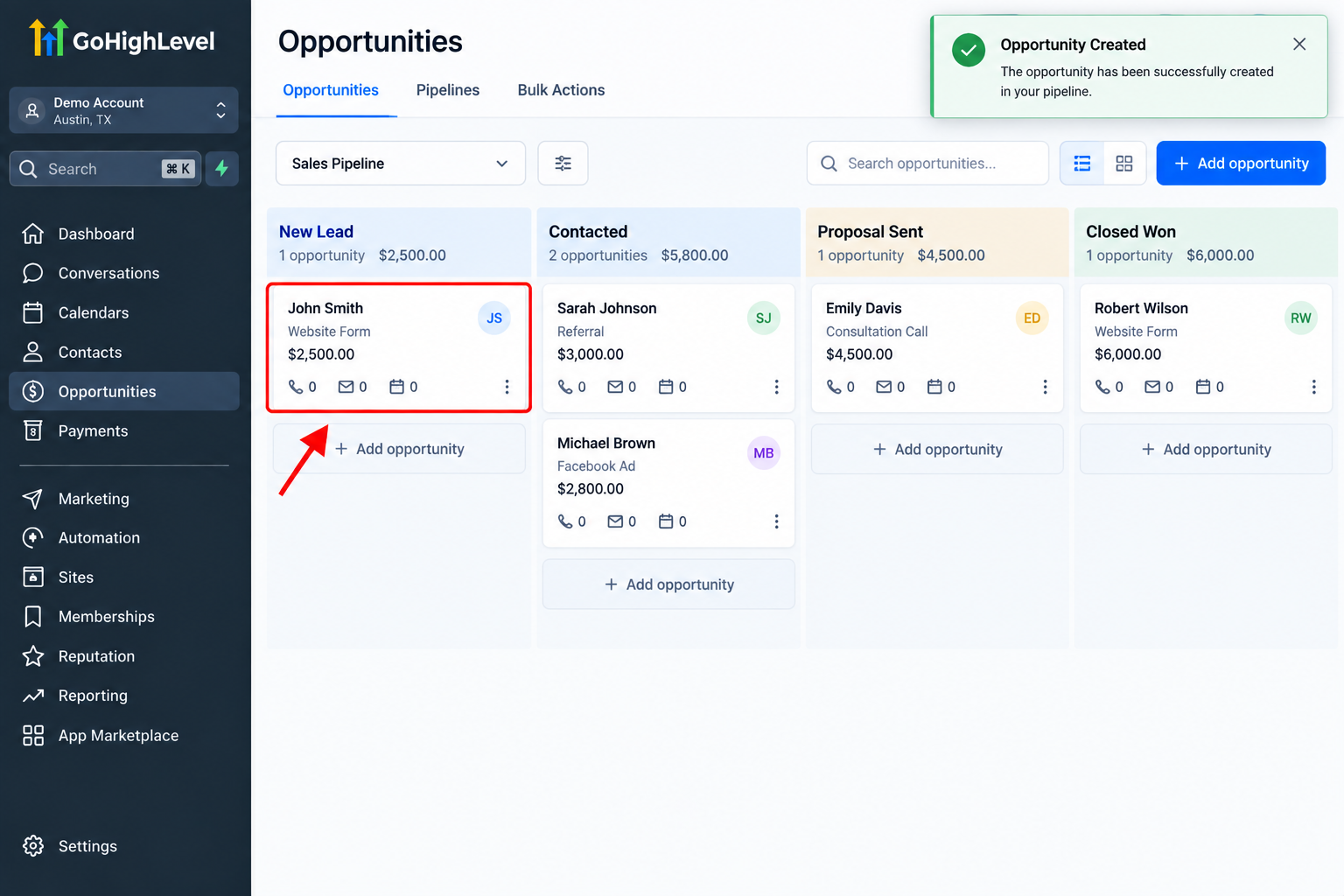
The sales team can now see that prospect on the opportunity board. Notifications, messages, tasks, or follow-up steps can be added separately if needed.
This distinction keeps the automation clean: opportunity creation handles the pipeline record, while other workflow actions handle the next steps in the sales process.
Best Practices for Better Sales Pipeline Automation
Use clear pipeline and stage names that reflect your real process. Create opportunities only when a contact reaches a meaningful sales point; turning every contact into an opportunity can make genuine deals harder to spot.
Pay attention to duplicate settings. HighLevel can prevent or allow additional opportunities for the same contact, so configure this based on whether repeat inquiries should represent separate deals.
Also review your GHL workflows periodically. If your qualification process or pipeline changes, the automation should change with it.
Common Mistakes to Avoid
Common problems include creating opportunities for unqualified contacts, choosing the wrong pipeline or starting stage, and building overlapping workflows that create unwanted duplicates.
Another mistake is treating opportunity creation as the entire sales automation. Creating the record is only the handoff. Qualification, follow-up, ownership changes, stage movement, and closing logic should be configured separately where needed.
Testing is equally important. A workflow that technically runs but sends opportunities into the wrong stage can create more confusion instead of improving organization.
Conclusion
The real value of the GoHighLevel Create Opportunity Action is not simply saving a manual click. It creates a reliable bridge between lead activity and an organized sales pipeline.
When it is built around meaningful triggers, sensible stages, and clean opportunity data, it helps create a more consistent and scalable sales process exactly what effective GoHighLevel CRM automation should do.
Frequently Asked Questions (FAQs)
1. What is the Create Opportunity action in GoHighLevel?
The Create Opportunity action is a workflow action that automatically creates a new opportunity for a contact and places it into a selected sales pipeline and stage based on your workflow setup.
2. Can GoHighLevel create opportunities automatically?
Yes. GoHighLevel can automatically create opportunities through workflows when a configured trigger occurs, such as a form submission or another qualifying workflow event.
3. What is the difference between a contact and an opportunity in GoHighLevel?
A contact is the person or business stored in your CRM. An opportunity represents a potential sale connected to that contact and is tracked inside a GoHighLevel sales pipeline.
4. Does the Create Opportunity action update existing opportunities?
No. The Create Opportunity action is designed to create a new opportunity. Updating an existing opportunity should be handled with the appropriate opportunity update action or workflow logic.
5. How can I avoid duplicate opportunities in GoHighLevel?
Use appropriate duplicate-opportunity settings and make sure multiple workflows are not creating opportunities for the same event. Testing your workflows before activation can also help prevent unwanted duplicates.
6. When should I use the GoHighLevel Create Opportunity action?
Use it when a contact reaches a point that should be tracked by your sales team, such as requesting an estimate, becoming qualified, booking a sales appointment, or completing another meaningful sales-related action.
Need Expert Help with GoHighLevel?
New to GoHighLevel and ready to get started? Buy your GoHighLevel account here and launch with confidence.
Already know what you need and want our team to handle everything, from complete setup and customization to funnels, workflows, automations, CRM, and pipelines? Click here.



