

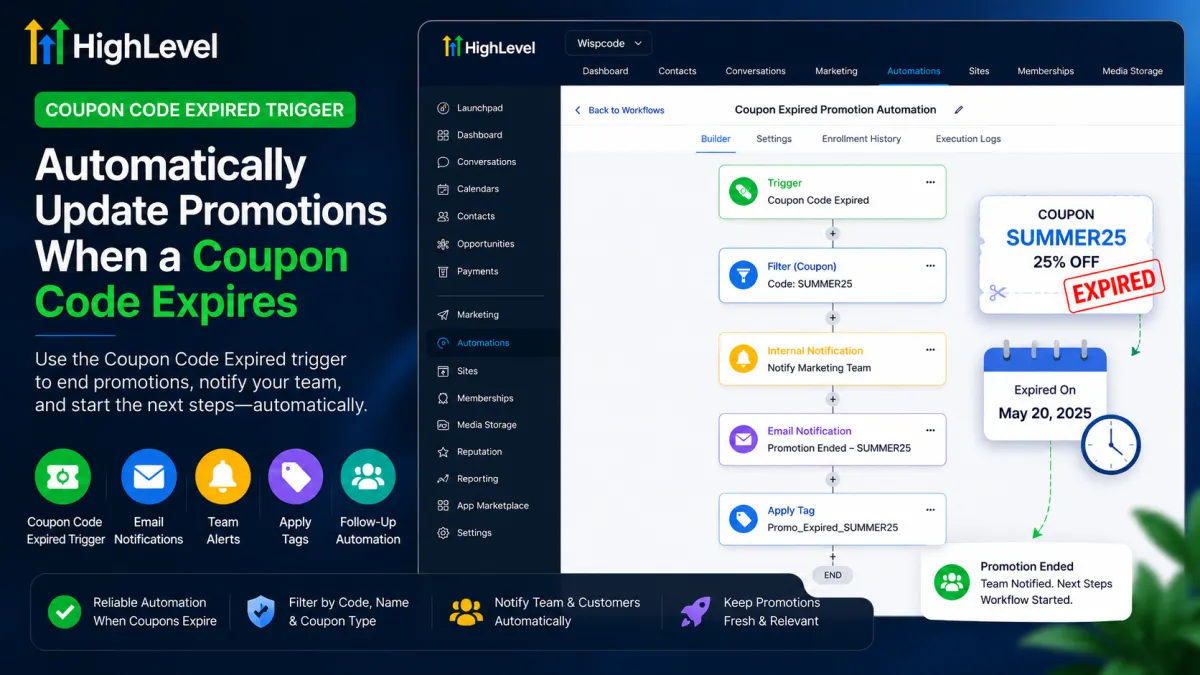
GoHighLevel Coupon Code Expired Trigger Automation
How to Automatically Update Promotions When a Coupon Code Expires Using the Coupon Code Expired Trigger in GoHighLevel
Limited-time promotions often create a simple problem: the coupon expires, but someone still has to manage what happens afterward. Without automation, teams can forget notifications or follow-up steps.
GoHighLevel’s Coupon Code Expired workflow trigger gives businesses a reliable event to start that process automatically. When a coupon reaches its scheduled expiration date and becomes inactive, a workflow can begin the follow-up actions you have designed.
What Is the Coupon Code Expired Trigger in GoHighLevel?
The Coupon Code Expired trigger is a workflow trigger found under the Payments category. It fires when a coupon reaches its scheduled expiration date and becomes inactive.
This is different from a customer attempting to use an expired coupon. The trigger is based on the coupon’s expiration event—not simply an unsuccessful attempt to apply the code.
It is also important not to confuse it with other coupon triggers. Coupon Code Applied concerns a coupon being applied, Coupon Code Redeemed concerns redemption, and Coupon Redemption Limit Reached concerns the coupon reaching its configured redemption limit. Coupon Code Expired specifically handles scheduled expiration.

Why This Trigger Matters for Promotion Management
When a coupon becomes inactive, the business may still need to notify its team, organize contacts, manage opportunities, or begin follow-up. It provides a dependable starting point instead of relying on manual reminders.
The basic lifecycle is:
Promotion runs → coupon reaches expiration → trigger fires → configured workflow actions execute.
How to Set Up the Coupon Code Expired Trigger
To build the automation:
Open the relevant GoHighLevel sub-account and go to Automation/Workflows.
Create a new workflow or open the workflow that should handle the promotion.
Add a workflow trigger.
Under Payments, select Coupon Code Expired.
Configure filters if the workflow should respond only to particular coupons.
Add the actions that should occur after the trigger fires.
Review and test the workflow before using it with a live promotion.
The trigger detects the expiration event; the actions determine what happens afterward.

Understanding the Available Filters
The trigger supports these filters:
Coupon Code: Useful for targeting a specific code, such as
SUMMER25.Coupon Name: Useful when identifying a particular configured coupon by name.
Coupon Type: Can distinguish between amount-based and percentage-based coupons.
Filters help prevent unrelated expirations from entering the wrong workflow. With no filters, the workflow can respond to coupon expiration events generally; specific filtering is useful when an account has multiple campaigns.
Example: Automating the End of a 25% Off Promotion
Imagine a business running a summer promotion:
SUMMER25 — 25% Off
The coupon has a defined expiration date. Instead of asking the marketing team to remember what needs to happen afterward, the business creates a workflow using the Coupon Code Expired trigger and filters it for SUMMER25.

The logic could be:
SUMMER25 expires → trigger fires → workflow actions execute → internal and customer follow-up occurs according to the business rules.
For example, it could notify the marketing team, apply a tag, and manage a relevant opportunity or follow-up process.
The trigger starts the process; it does not decide the next steps.
What Can You Automate After the Trigger Fires?

After the trigger starts the workflow, appropriate actions can handle the response. Depending on the use case, you can use:
Email notifications for team or customer communication.
SMS notifications where appropriate and configured.
Internal notifications to alert staff.
Tags for segmentation or internal organization.
Opportunity management when the expiration affects a sales process.
Follow-up workflows for contacts or opportunities that need further automation.
However, the trigger itself does not automatically create a replacement coupon, extend the expired coupon, change an offer price, edit a funnel page, or update a website banner. Those outcomes require appropriate actions or additional automation.
Common Mistakes to Avoid
A few mistakes can cause confusion:
Confusing coupon triggers: Applied, Redeemed, Redemption Limit Reached, and Expired represent different events.
Assuming an attempted use triggers expiration: Entering an already-expired coupon is not what this trigger is designed to detect.
Using overly broad conditions: Multiple campaigns can make unfiltered workflows respond to unrelated expirations.
Skipping testing: Validate the workflow before relying on it for an important promotion.
Expecting a replacement coupon: The trigger starts automation; it does not independently create a new coupon.
Confusing workflow logic with website changes: Updating promotional content requires the appropriate mechanism.
Building without a defined outcome: Decide what should happen after expiration before adding actions.
Best Practices for Reliable Coupon Expiration Automation
Start with the business outcome. Decide exactly what should happen when the promotion ends, then build the workflow around that requirement.
Use specific filters when the workflow belongs to one campaign. Keep coupon names and workflow names clear so the automation is easy to understand and maintain.
Remember the core relationship: Coupon Code Expired = event starter; workflow actions = response.
Keeping that distinction clear makes your GoHighLevel coupon automation easier to test, troubleshoot, and scale across future promotions.
Conclusion
The GoHighLevel Coupon Code Expired trigger is a practical building block for coupon expiration automation and promotion management. When a coupon reaches its scheduled expiration date and becomes inactive, it can start a workflow that handles the next steps according to your business logic.
Whether the response is a notification, tag, opportunity action, or follow-up workflow, the goal is the same: make promotion management more consistent and less dependent on manual reminders.
Frequently Asked Questions
1. What is the Coupon Code Expired trigger in GoHighLevel?
The Coupon Code Expired trigger is a workflow trigger under the Payments category. It starts a workflow when a coupon reaches its scheduled expiration date and becomes inactive.
2. When does the Coupon Code Expired trigger fire?
It fires when the coupon reaches its configured expiration date and becomes inactive. It is not triggered simply because a customer tries to use an expired coupon.
3. Does the Coupon Code Expired trigger detect when someone enters an expired coupon?
No. The trigger is designed to respond to the coupon reaching its scheduled expiration date, not to an individual customer attempting to use an already-expired coupon.
4. Where can I find the Coupon Code Expired trigger in GoHighLevel?
You can find it in Automation/Workflows when adding a workflow trigger. The trigger is located under the Payments category.
5. What filters are available for the Coupon Code Expired trigger?
The available filters include Coupon Code, Coupon Name, and Coupon Type. Coupon Type can distinguish between amount-based and percentage-based coupons.
6. Can I trigger a workflow only when a specific coupon expires?
Yes. You can use the Coupon Code filter to target a specific coupon, such as SUMMER25, rather than allowing unrelated coupon expiration events to enter the workflow.
7. What is the difference between Coupon Code Expired and Coupon Code Applied?
Coupon Code Expired relates to a coupon reaching its scheduled expiration date. Coupon Code Applied relates to a coupon being applied. They represent different workflow events and should be used for different automation requirements.
Need Expert Help with GoHighLevel?
New to GoHighLevel and ready to get started? Buy your GoHighLevel account here and launch with confidence.
Already know what you need and want our team to handle everything, from complete setup and customization to funnels, workflows, automations, CRM, and pipelines? Click here.



