

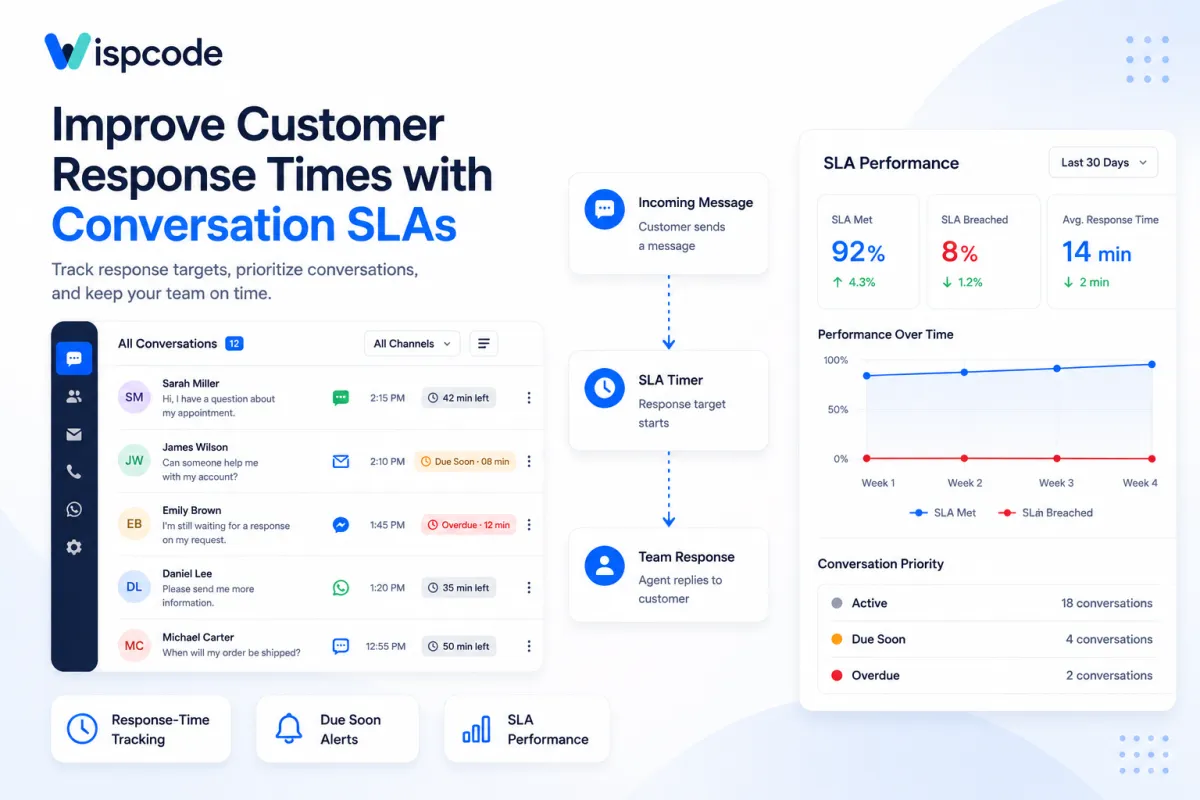
Improve Customer Response Times with GoHighLevel Conversation SLAs: Step by Step Guide
How to Improve Customer Response Times Using Conversation SLAs in GoHighLevel
Introduction
Fast customer communication becomes harder as your business grows. A small team may be able to remember which SMS, email, or chat needs attention, but once conversations begin arriving across multiple channels, relying on memory is risky.
A customer asks a question. A new lead replies to an SMS. Someone sends an email. Another person starts a web chat. Without a clear response-time process, important conversations can sit unanswered while your team focuses on less urgent tasks.
Conversation SLAs in GoHighLevel provide a practical way to solve this problem.
Conversation SLAs let you establish response-time goals for incoming customer messages and give your team visual timers showing which conversations are on track, approaching their deadline, or already overdue. Combined with inbox prioritization, reporting, and workflow-based escalation patterns, SLAs can help create a more consistent customer communication process.
Here is how they work and how to use them effectively.
What Are Conversation SLAs in GoHighLevel?
SLA stands for Service Level Agreement. In the context of GoHighLevel Conversations, an SLA is essentially a response-time target for incoming customer conversations.
When a new customer message arrives, HighLevel can apply an SLA timer based on the settings you have configured.
The timer provides a clear visual indication of how much time remains before the response target is missed.
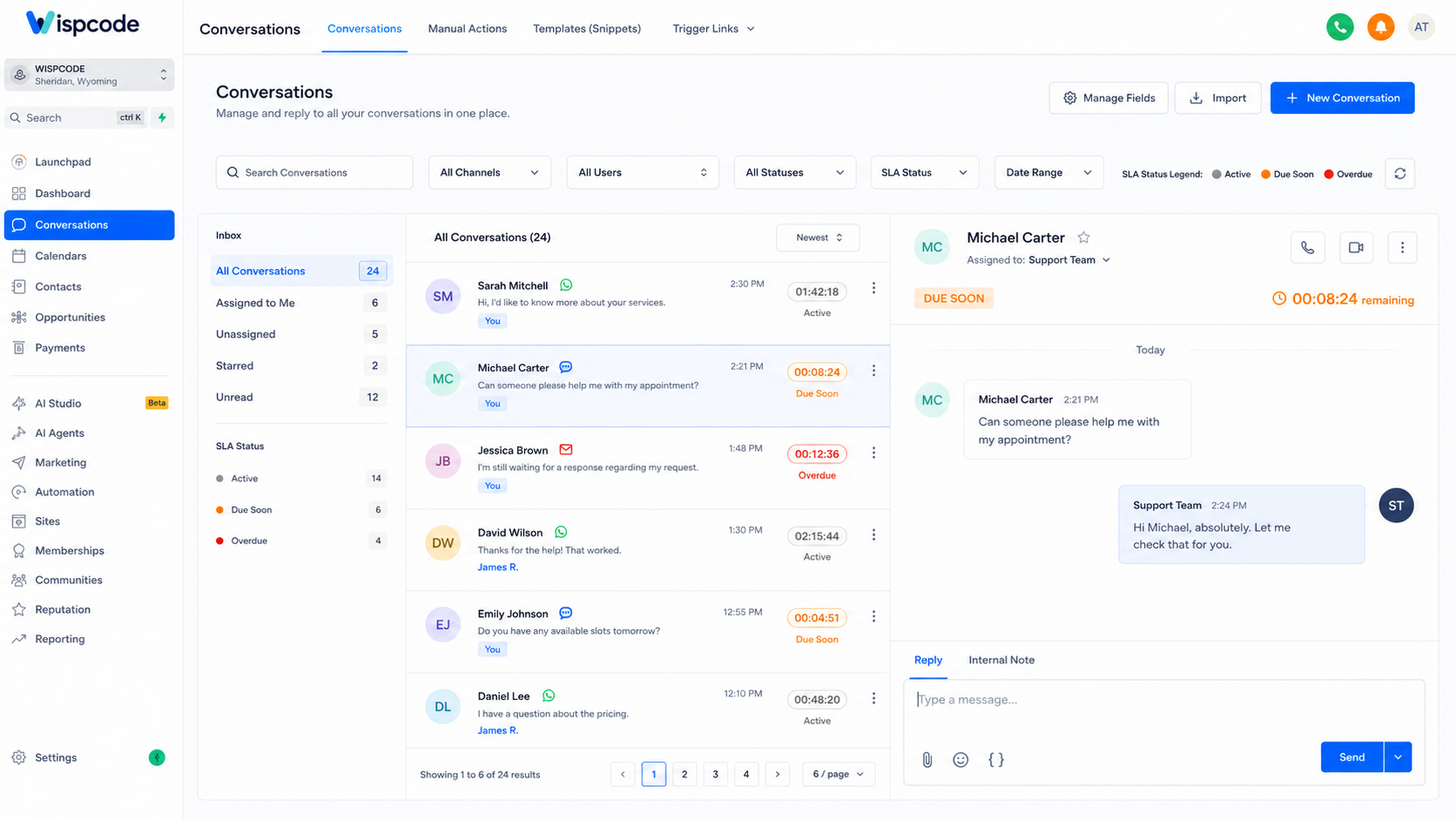
HighLevel uses three SLA states:
Active: The conversation is still within the allowed response time.
Due Soon: The conversation is approaching its response deadline.
Overdue: The configured response time has been exceeded.
Inside Conversations, these states are represented with grey, orange, and red timers, respectively.
Instead of asking team members to mentally track how long every customer has been waiting, the inbox itself helps identify conversations requiring attention.
Is There a Conversations SLA Workflow Trigger?
This distinction is important when building automation.
GoHighLevel currently supports Conversation SLA tracking, but its documentation does not list a native SLA workflow trigger that automatically starts a workflow when a conversation becomes Due Soon or Overdue.
Therefore, you should not build a workflow expecting:
SLA becomes overdue → SLA workflow trigger fires → Manager receives notification
That specific SLA-triggered workflow is not currently documented as available.
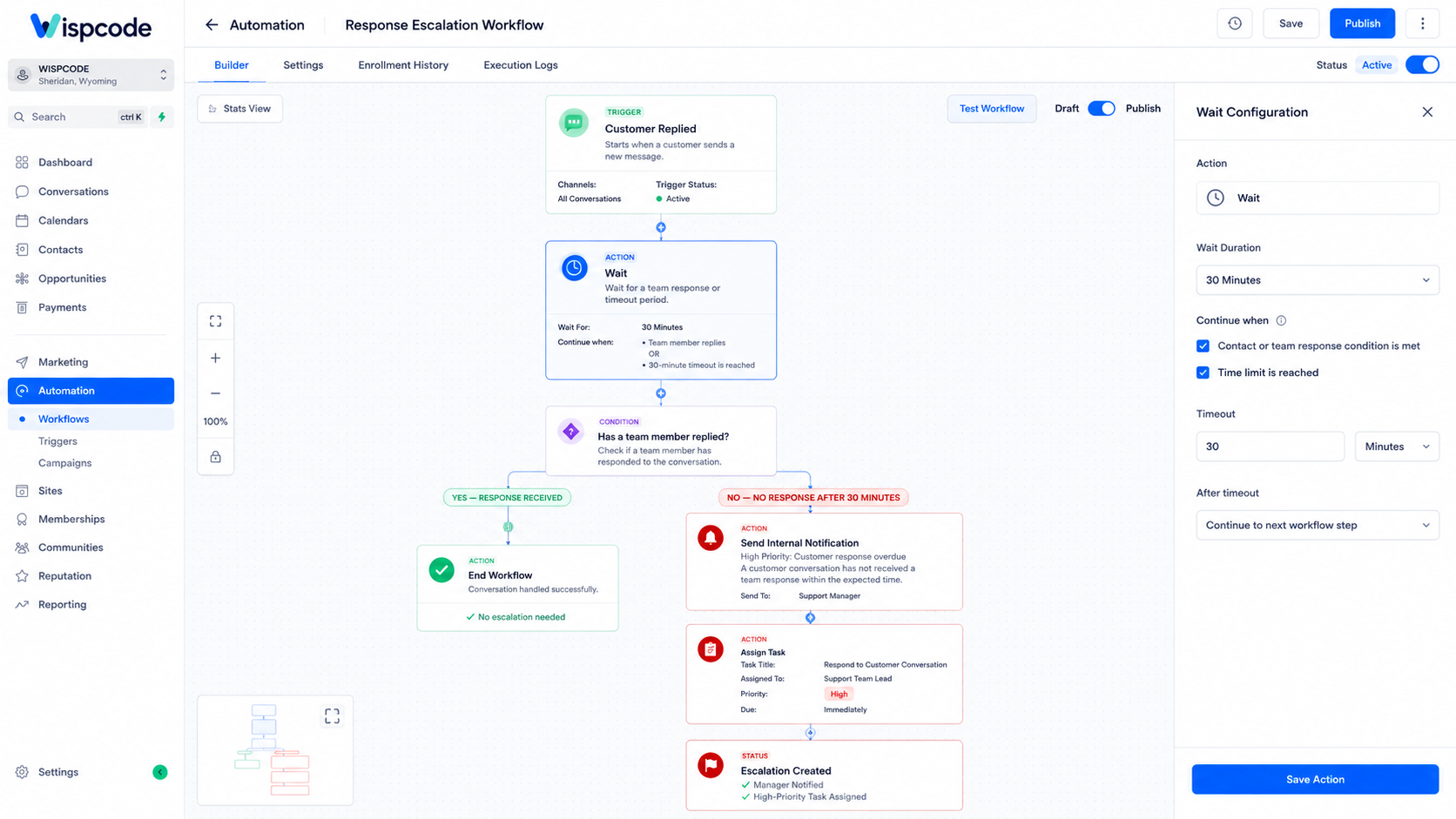
However, HighLevel provides a separate User Replied workflow event that can be combined with Customer Replied, Wait steps, and timeout logic to build response-time escalation workflows.
This gives businesses two useful systems:
Conversation SLAs help teams visually track and report response performance.
Workflow response monitoring can help automate escalation when a team member has not replied within a defined period.
Understanding this difference prevents you from designing an automation around a feature that does not exist.
Why Response-Time Tracking Matters
Without a defined response target, “reply quickly” means something different to every team member.
One person may consider 10 minutes acceptable. Another may respond several hours later. Managers also have little visibility into which conversations need immediate attention.
Conversation SLAs create a measurable standard.
For example, you might decide that incoming SMS conversations should receive a faster response than email conversations.
HighLevel supports both a Common SLA, where the same target applies across channels, and Channel-Specific SLAs, where different communication channels can have different response targets.
This flexibility is useful because customer expectations often vary depending on how they contact a business.
How to Set Up Conversation SLAs in GoHighLevel
Before creating advanced escalation processes, configure the native SLA system correctly.
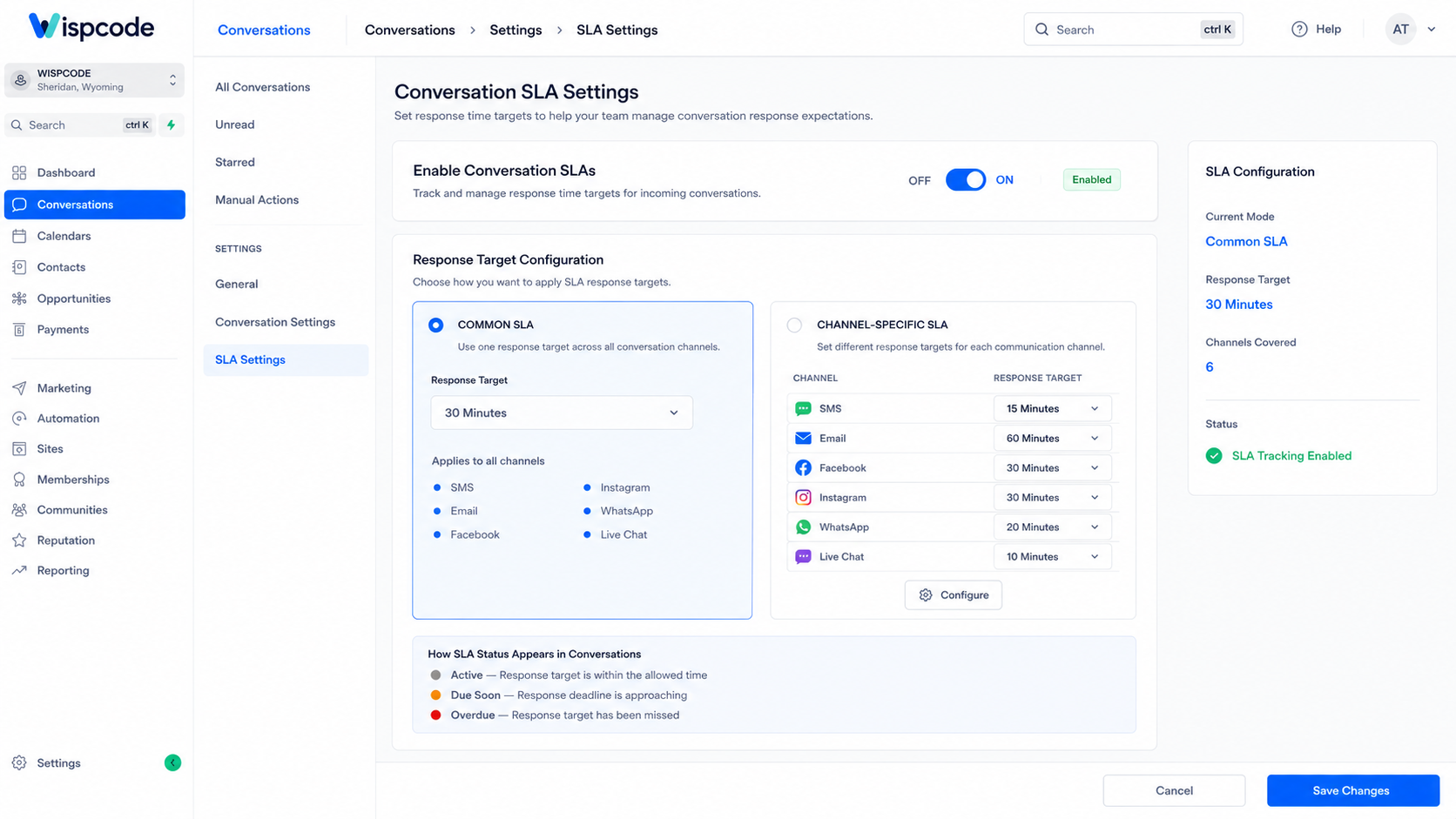
Step 1: Enable Conversation SLAs
Open your GoHighLevel sub-account and navigate to:
Conversations → Settings → SLA Settings
Enable SLA Settings to begin configuring response-time targets.
HighLevel's current documentation notes that Conversation SLAs are supported on the redesigned Conversations experience.
Step 2: Choose Common or Channel-Specific SLAs
Next, decide whether all channels should follow the same response target.
With a Common SLA, one rule applies across supported conversation channels.
For example:
"All customer conversations should receive a response within one hour".
Alternatively, choose Channel-Specific SLA to define different targets.
A business might want SMS conversations handled quickly while allowing more time for email responses.
The correct targets should reflect your staffing, operating model, and realistic response expectations.
Step 3: Configure Due Soon and Overdue Timing
HighLevel lets you define when a conversation should enter the Due Soon state and when it becomes Overdue.
Due Soon acts as an early warning.
Instead of discovering a missed response only after the deadline has passed, team members can see conversations approaching the limit and prioritize them first.
Once the maximum response time is exceeded, the SLA moves to Overdue.
This creates a simple visual hierarchy inside the inbox:
Grey → Orange → Red
Agents can quickly understand which conversations require attention without opening every thread.
Step 4: Decide How Workflow Messages Affect SLAs
Automated messages can complicate response-time measurement.
Suppose a customer sends a question and immediately receives an automated acknowledgement. Should that count as the response, or should the SLA continue until a person replies?
HighLevel lets you control this behavior.
You can configure the SLA to:
Count all workflow automation messages as valid responses
Ignore automation messages as valid responses
Count messages from selected workflows only
This setting matters because an automated acknowledgement and a meaningful human response are not always the same thing.
If your SLA is intended to measure human support responsiveness, you may prefer not to let a generic automated message stop the timer.
Step 5: Configure AI Agent Response Behavior
HighLevel also lets you decide whether responses from an AI Agent should satisfy the SLA.
You can allow an AI response to stop the SLA timer or require the timer to continue until a human team member responds.
Choose the option based on what your SLA is actually intended to measure.
If an AI Agent is authorized to fully handle certain conversations, counting its response may make sense. If your goal is specifically measuring human follow-up, continuing the timer may provide more useful information.
Step 6: Save and Test Your SLA Settings
Once your configuration is complete, save it and test the experience using new incoming messages.
This is particularly important because changes to SLA settings apply to new incoming messages, rather than retroactively rewriting the SLA rules for existing conversations.
Test different channels and verify that your timers behave as expected before using SLA performance as an operational KPI.
How Teams Can Prioritize Conversations Using SLA Status
Creating an SLA only helps if your team actually uses it.
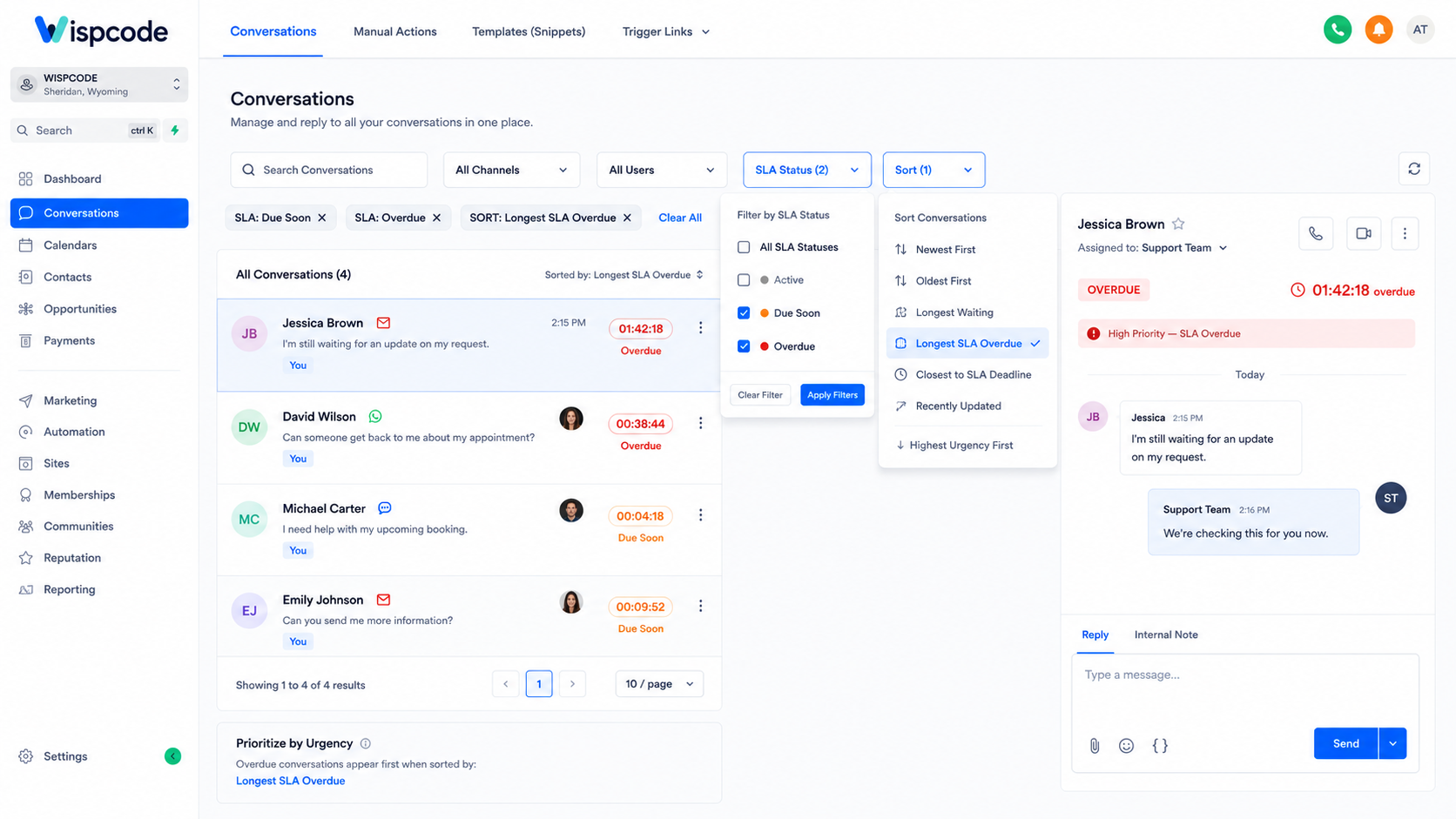
GoHighLevel Conversations provides SLA filtering and sorting capabilities that make response prioritization easier.
Teams can filter conversations by statuses such as:
Active
Due Soon
Overdue
They can also sort using options including Longest SLA Overdue and Next SLA Target.
The first helps surface conversations that have been waiting beyond their target for the longest period.
The second helps agents identify which conversation is closest to reaching its SLA deadline.
This is more effective than simply working through messages based on whichever thread happens to appear first.
Building Workflow-Based Response Escalations
Although SLA status itself is not currently documented as a workflow trigger, HighLevel supports another method for building timed response escalation.
The workflow can begin when a customer replies.
A simplified structure looks like this:
Customer Replied → Wait for User Replied → Timeout → Escalate
For example, you could:
Start a workflow using Customer Replied.
Add a Wait step that checks for User Replied.
Set an appropriate timeout.
If a user replies within the allowed period, continue or exit the process.
If no user replies before the timeout, trigger an escalation action.
The timeout branch could send an internal notification, create a task, or take another supported workflow action to alert the appropriate team member.
HighLevel also documents using a User Replied goal when you want a contact to exit remaining reminder or escalation steps after a human response occurs.
This does not turn SLA status into a workflow trigger. Instead, it creates a separate response-monitoring workflow that can complement your native Conversation SLA system.
Practical Use Cases for Conversation SLAs
Local Service Businesses
A roofing, HVAC, plumbing, cleaning, or other service company may receive new inquiries through several channels.
An SLA helps staff identify inquiries that have been waiting too long, while an escalation workflow can provide additional internal reminders when no human response occurs within a chosen timeframe.
Agencies
Agencies managing conversations for clients need clear accountability.
Conversation SLAs give managers a consistent way to evaluate whether incoming customer messages are being handled within expected timeframes.
Channel-specific targets can also help when an agency manages several communication methods.
Sales Teams
Sales conversations can become difficult to prioritize when a pipeline generates a high volume of messages.
SLA timers make waiting conversations more visible so representatives can focus on contacts approaching their response deadline.
Customer Support Teams
Support teams can use Conversation SLAs to create clear response expectations across the inbox.
Rather than treating every conversation identically, agents can use Due Soon and Overdue indicators to organize their workload around urgency.
Measure Performance with the SLA Performance Dashboard
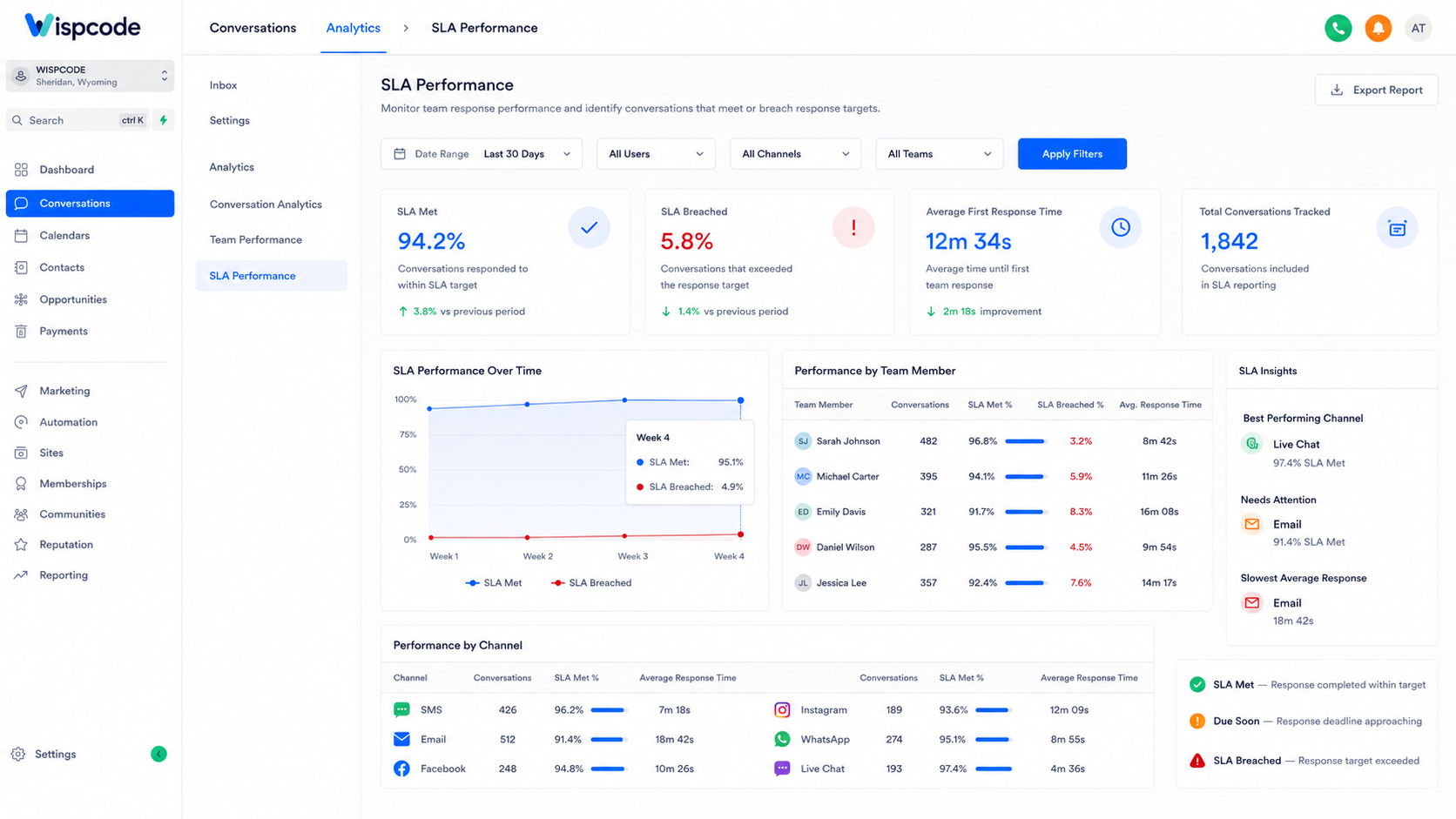
GoHighLevel also provides an SLA Performance Dashboard inside Conversations.
Admins can access it through:
Conversations → Analytics → SLA Performance
The dashboard includes metrics such as:
SLA Met % – the percentage of completed SLA evaluations that received a response within the configured target.
SLA Breached % – the percentage where the response target was missed.
Average Response Time- the average response time for messages with completed SLA evaluations where a response was sent.
You can also review performance by user and channel.
This makes SLA tracking more than an inbox management feature. Managers can use the data to identify recurring delays, compare response performance across channels, and determine where processes or staffing may need improvement.
HighLevel also provides SLA widgets for Dashboards and Custom Reports, allowing businesses to build reporting views around SLA met rates, breaches, average response time, and performance.
Best Practices for GoHighLevel Conversation SLAs
Set Realistic Response Targets
An aggressive SLA looks impressive until your team misses it constantly.
Base response targets on staffing levels, channel expectations, and actual operating capacity.
Be Intentional About Automated Replies
Decide whether an automated workflow message genuinely satisfies your definition of a response.
If the purpose of your SLA is measuring human follow-up, allowing every automated acknowledgement to stop the timer may give you a misleading picture of performance.
Use Channel-Specific Targets When Necessary
Not every channel needs the same response window.
Configure targets around how your customers actually communicate rather than forcing one standard across every channel.
Review SLA Performance Regularly
Do not configure SLAs and forget about them.
Review SLA Met %, SLA Breached %, average response time, user performance, and channel performance regularly to identify patterns.
If one channel repeatedly breaches its target, investigate why before simply shortening or extending the SLA.
Common Mistakes to Avoid
Treating SLA Status as a Workflow Trigger
Conversation SLAs and workflow triggers are related concepts, but they are not the same feature.
Do not assume an SLA Due Soon or Overdue state can directly start a workflow unless HighLevel officially adds that functionality.
Setting Unrealistic Deadlines
If your team cannot consistently meet a five-minute target, configuring a five-minute SLA does not improve customer service. It simply creates constant breaches.
Letting Automation Hide Human Response Problems
If every automated acknowledgement counts as a successful response, your SLA metrics may not reflect how long customers actually wait for a person.
Configure automation-response behavior according to the outcome you genuinely want to measure.
Ignoring Overdue Conversations
SLA indicators only create visibility. Your team still needs an operating process for handling conversations that become Due Soon or Overdue.
Make ownership and escalation responsibilities clear.
Frequently Asked Questions(FAQ's)
1. What is a Conversation SLA in GoHighLevel?
A Conversation SLA sets response-time targets for incoming customer messages and helps teams identify Active conversations, Due Soon, or Overdue.
2. Does GoHighLevel have an SLA workflow trigger?
No. GoHighLevel currently supports Conversation SLA tracking, but SLA status itself is not documented as a native workflow trigger.
3. Can GoHighLevel automate response-time escalations?
Yes. You can use Customer Replied, User Replied, Wait steps, and timeout logic to build workflows that escalate when a human response is delayed.
4. Can I set different SLA times for different channels?
Yes. GoHighLevel supports channel-specific SLAs, allowing you to configure different response targets based on communication channels.
5. How can I track SLA performance in GoHighLevel?
Use the SLA Performance Dashboard to monitor SLA Met %, SLA Breached %, average response time, and performance by user or channel.
Conclusion
Improving customer response times requires more than telling your team to “reply faster.” You need clear targets, visibility into waiting conversations, and a reliable process for handling delays.
Conversation SLAs in GoHighLevel provide that foundation by applying response-time goals to incoming conversations and making Active, Due Soon, and Overdue conversations easy to identify.
Combined with SLA filtering, sorting, performance reporting, and a separate Customer Replied → User Replied workflow pattern for timed escalation, businesses can build a much more structured response-management system.
The key is understanding what each feature actually does. Conversation SLAs help you measure and prioritize response times, while workflows can support response monitoring and escalation using available events and conditions.
Used together correctly, they can help your team respond more consistently, identify bottlenecks earlier, and create a more accountable customer communication process.
Need Expert Help with GoHighLevel?
New to GoHighLevel and ready to get started? Buy your GoHighLevel account here and launch with confidence.
Already know what you need and want our team to handle everything, from complete setup and customization to funnels, workflows, automations, CRM, and pipelines? Click here.



