

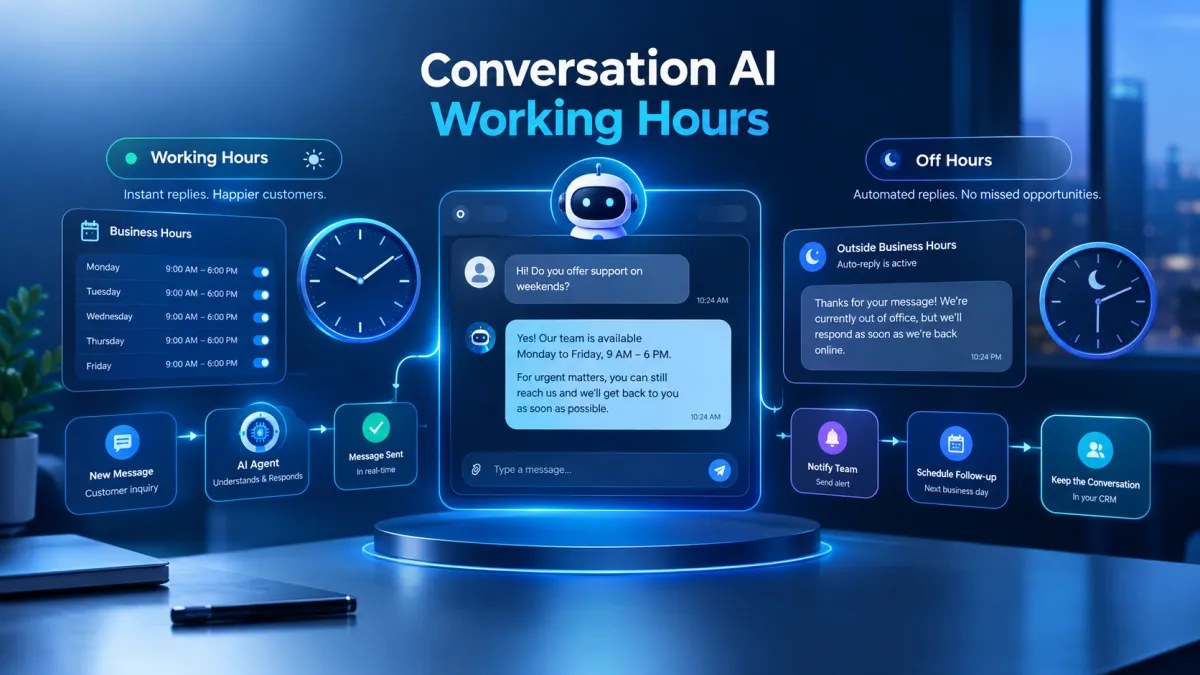
Conversation AI Working Hours Update
GoHighLevel Working Hours for Conversation AI Agent
When an AI agent is available to respond to customers around the clock, businesses may need more control over when those responses happen. A customer who contacts a business outside its operating hours may still need an acknowledgement, while the business may not want its AI agent actively responding at every hour of the day.
GoHighLevel is introducing Working Hours for Conversation AI, giving businesses greater control over when their Conversation AI agents respond. Businesses can define working days and hours for individual agents, decide which channels follow those schedules, and configure what happens when customers reach out during closed periods.
What Is Working Hours for Conversation AI?
Working Hours allows businesses to align a Conversation AI Agent with their actual operating schedule. The feature is configured separately for each agent, meaning different agents can have completely different working schedules.
Businesses can choose specific days and times when an agent should actively respond. If Working Hours is not enabled, the agent continues responding at any time as it does today.
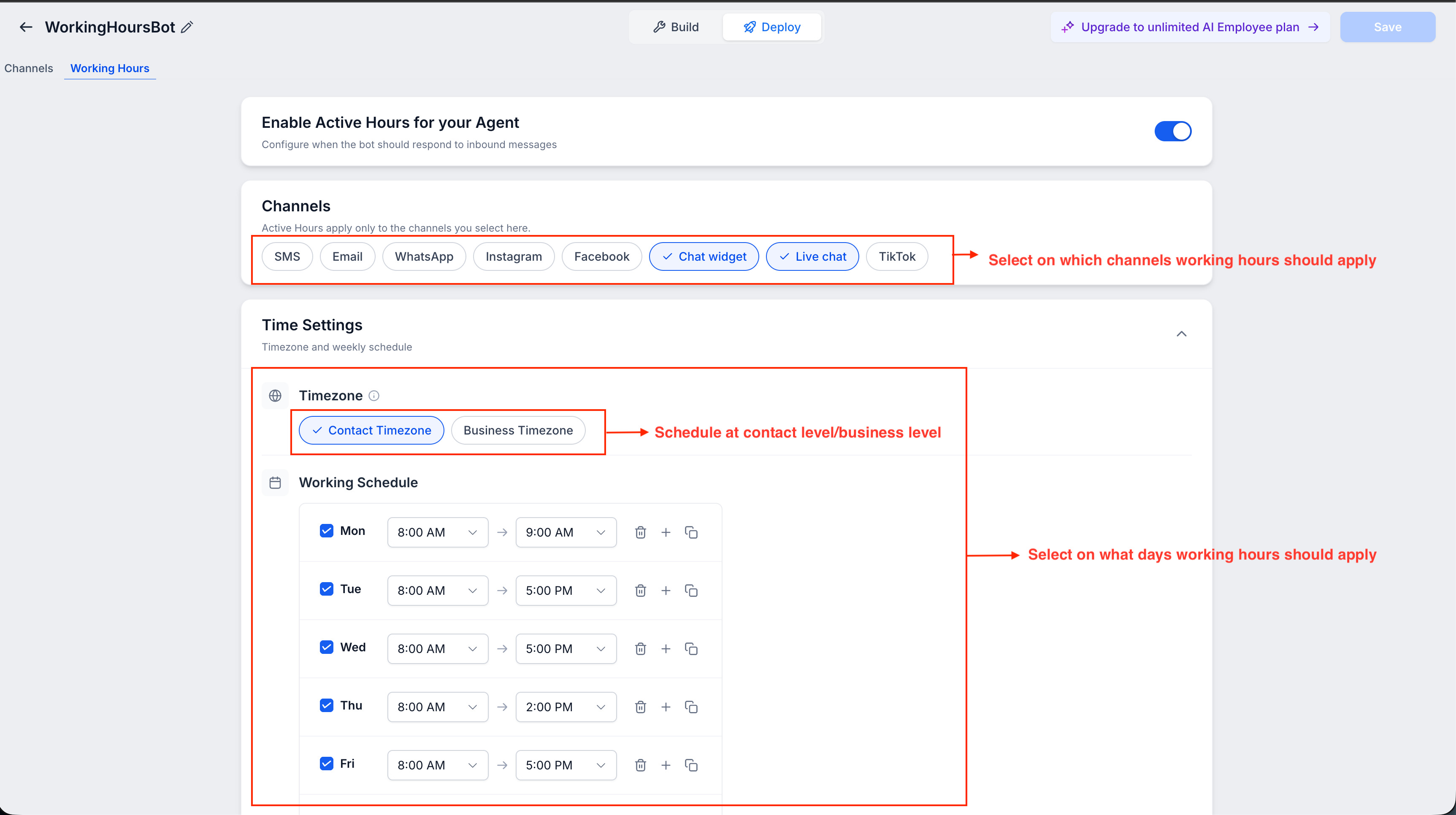
1. Flexible Working Hours for Each Agent
Each Conversation AI Agent can have its own schedule. Businesses can select the days and times when an agent should respond and can configure different hours for individual days.
Multiple time slots can also be added to accommodate breaks or split shifts. This provides flexibility when an agent needs to follow a schedule that is not the same throughout the day.
2. Choose Which Channels Follow Working Hours
Working Hours does not have to apply to every communication channel. Businesses can select the channels that should follow the configured schedule.
Supported channels include SMS, Email, WhatsApp, Instagram, Facebook, Chat Widget, Live Chat, and TikTok. Channels that are not selected can continue responding 24/7.
This gives businesses control over how their GoHighLevel Conversation AI behaves across different channels.
3. Contact or Business Timezone
The Working Hours schedule can operate according to either the contact's local timezone or the business timezone.
This allows businesses to determine which timezone should control the AI working hours when customers reach out.
What Happens When a Conversation Continues After Hours?
Working Hours does not necessarily stop an ongoing conversation immediately when business hours end.
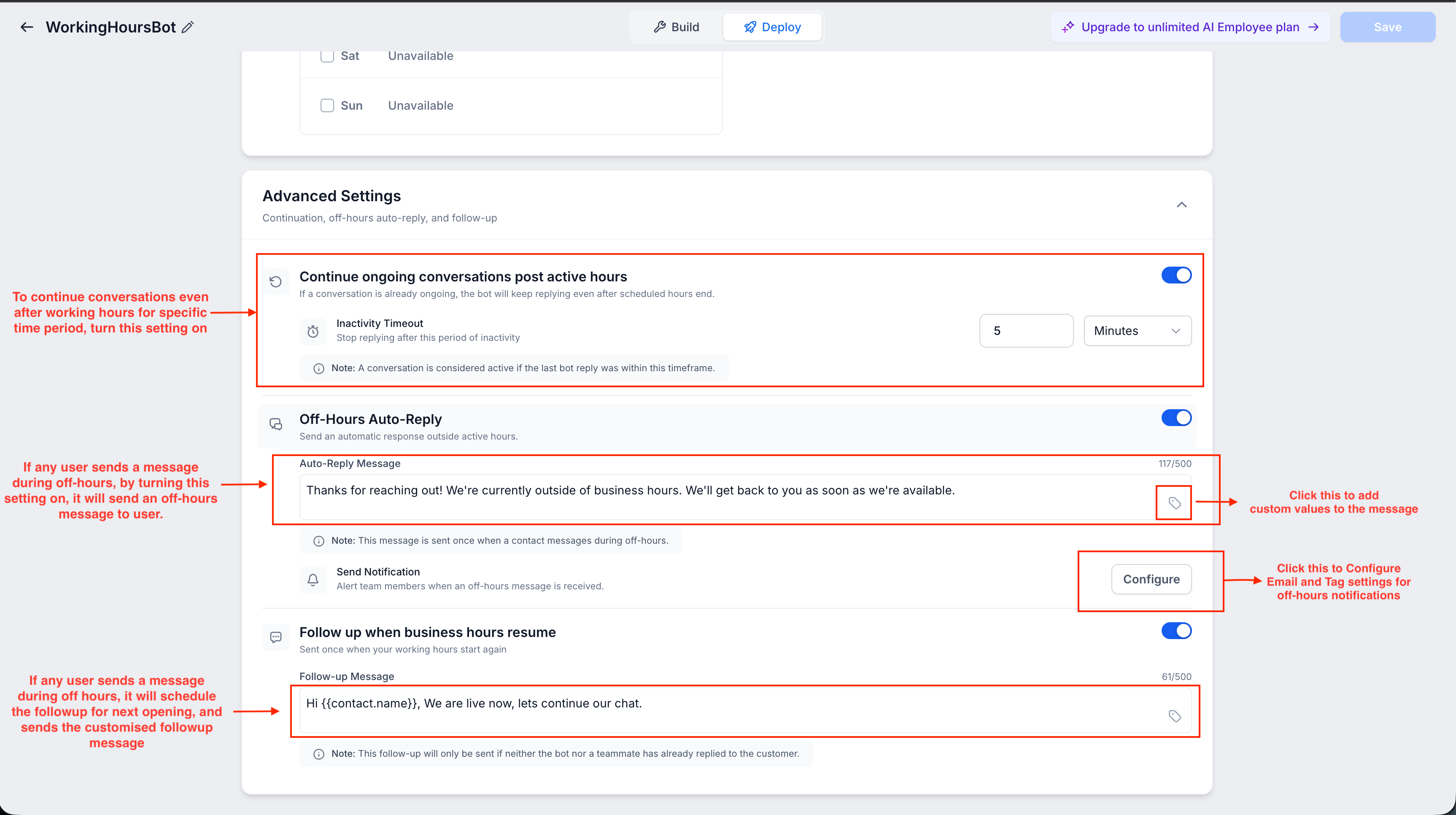
4. Ongoing Conversations Can Continue
If a conversation started during working hours, the AI agent can continue replying after closing time until the conversation becomes inactive.
This means an active conversation can continue beyond the scheduled closing time rather than being interrupted simply because the business has entered a closed period.
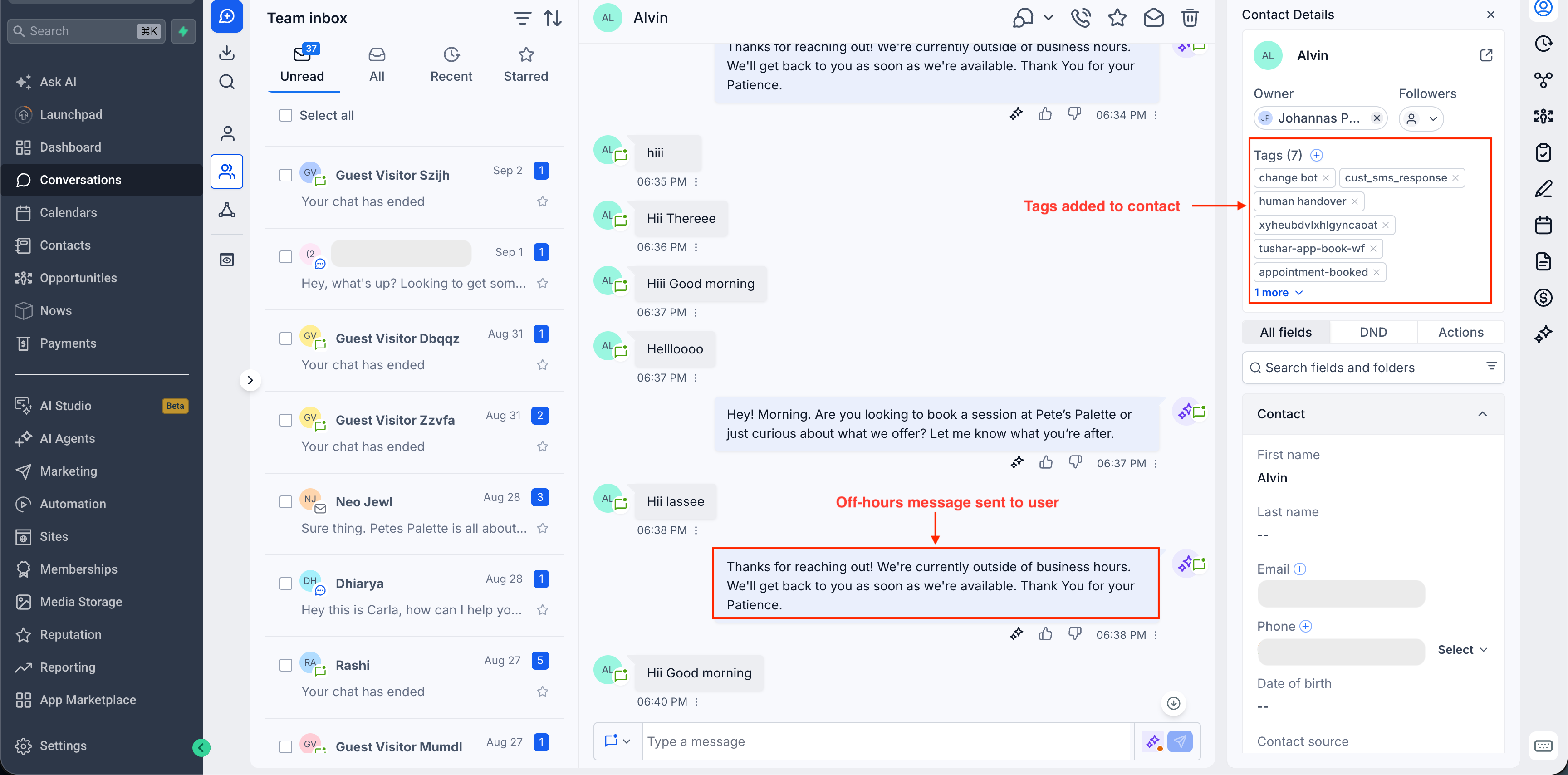
5. Off Hours Auto Reply
Businesses can also configure an automatic acknowledgement for customers who message during closed periods.
The Off Hours Auto Reply can contain a custom message and can be personalized using supported custom values. The acknowledgement is triggered once during each closed period, so customers do not receive the same acknowledgement for every message they send after hours.
6. Notify Your Team About After Hours Messages
After hours messages can also trigger email notifications for the appropriate people. Notifications can be sent to admins, users, assigned users, selected team members, or custom email addresses.
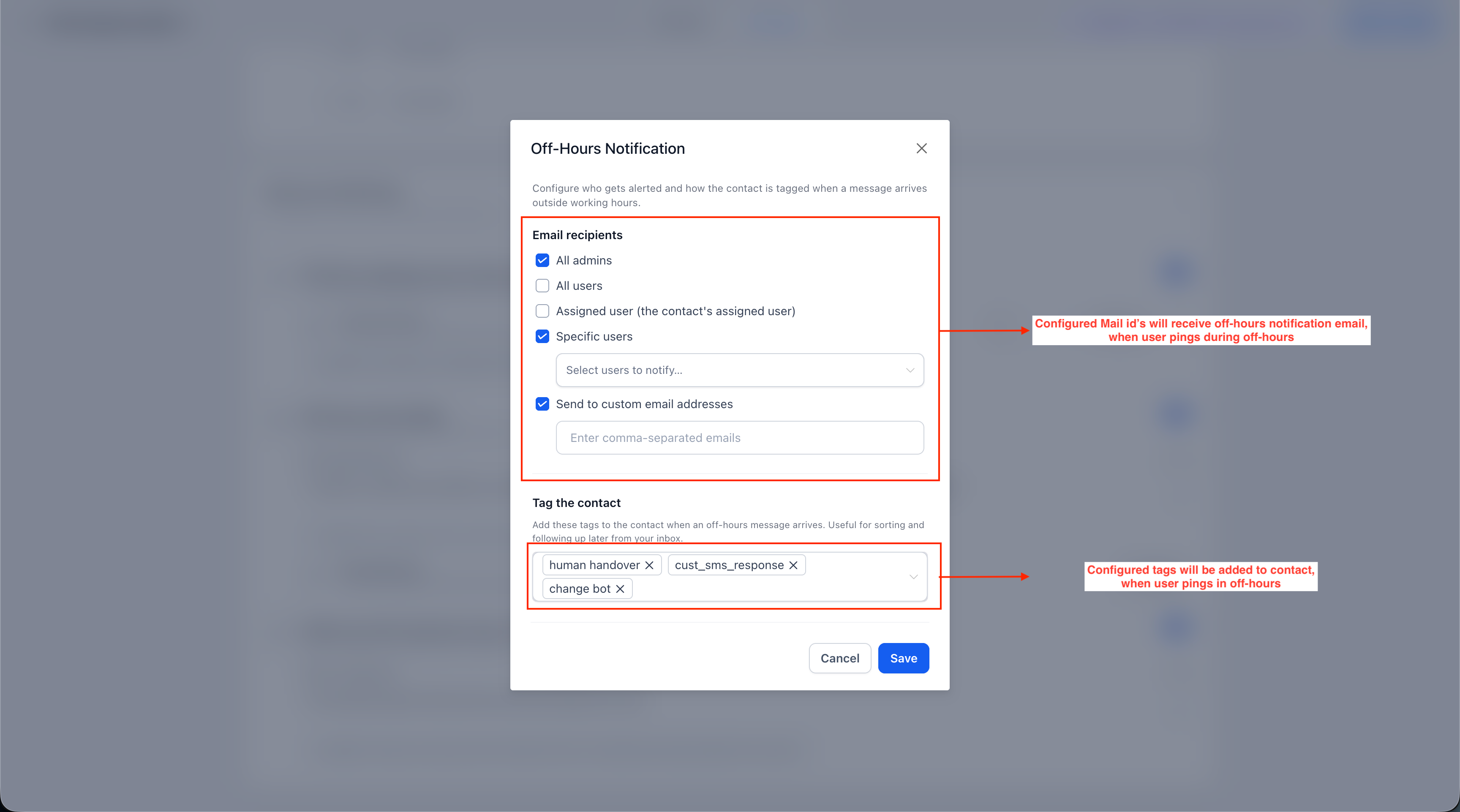
This gives the team visibility when customers reach out while the business is closed.
7. Automatically Tag After Hours Contacts
Businesses can select tags that are automatically added to contacts who message outside business hours.
These tags make it easier to identify and filter contacts who reached out during a closed period, helping teams manage those conversations when needed.
8. Follow Up When Business Hours Resume
GoHighLevel can automatically send a follow up when the business reopens if the customer has not already received a response from the AI agent or a team member.
However, if the customer has already received a response from either the agent or a team member, the business hours follow up is skipped.
Important Notes About Working Hours
Working Hours is optional, and different agents can have completely different schedules because the setting is configured per agent.
The schedule only affects the channels selected for that agent. Other channels continue operating normally. In Suggestive Mode, suggestions can still be generated after working hours for the team.
If Followup Hours is configured for Advanced Follow Up, the agent's Working Hours takes priority for channels included in the agent's schedule.
Agents can also be manually activated outside their Working Hours when needed through the conversation panel.
Frequently Asked Questions
What is GoHighLevel Conversation AI Working Hours?
Working Hours lets businesses define when individual Conversation AI Agents should actively respond to customers.
Can different AI agents have different schedules?
Yes. Working Hours is configured separately for each agent, allowing different agents to have different schedules.
Can Working Hours apply only to specific channels?
Yes. Businesses can select which supported channels should follow the configured Working Hours.
What happens when a customer messages after hours?
Businesses can configure an Off Hours Auto Reply, team notifications, contact tags, and a follow up when business hours resume.
Can an AI agent continue an existing conversation after closing time?
Yes. If the conversation started during working hours, the agent can continue replying after closing time until the conversation becomes inactive.
Conclusion
Working Hours for Conversation AI gives businesses more control over when their GoHighLevel AI Agents respond while still providing structured handling for after hours customer messages. With flexible schedules, channel specific control, timezone options, automatic acknowledgements, team notifications, contact tagging, and business hours follow up, businesses can configure Conversation AI around their actual operating hours.
Need Expert Help with GoHighLevel?
New to GoHighLevel and ready to get started? Buy your GoHighLevel account here and launch with confidence.
Already know what you need and want our team to handle everything, from complete setup and customization to funnels, workflows, automations, CRM, and pipelines? Click here.



