

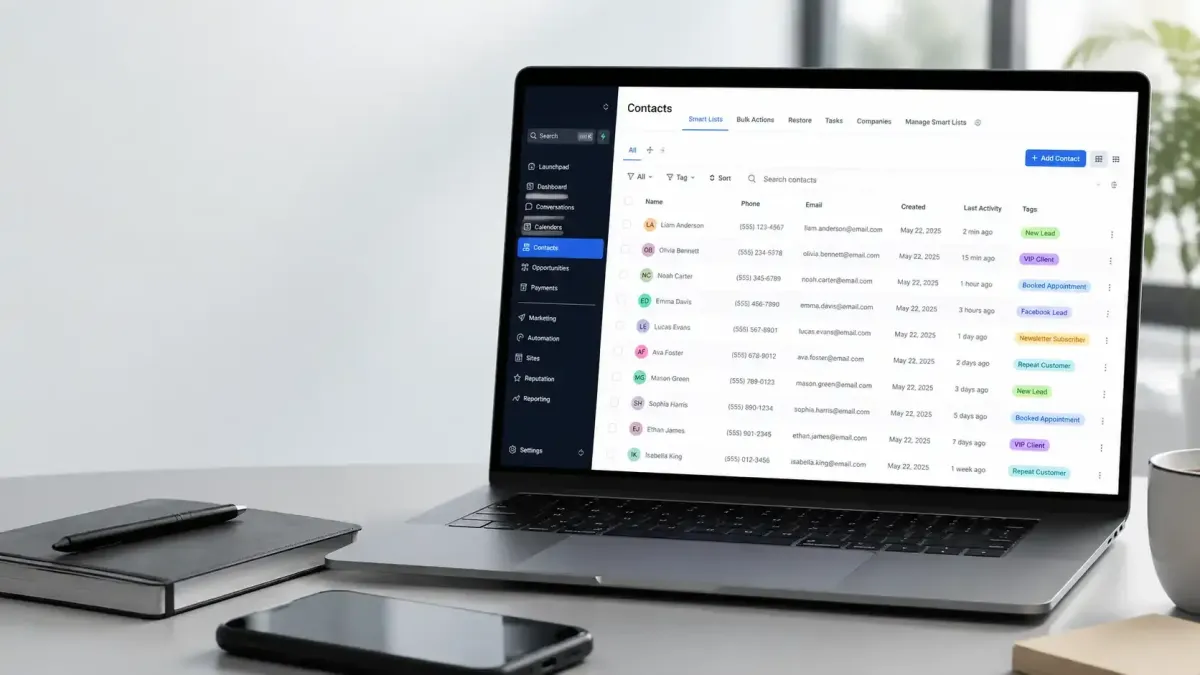
Organize Contacts Efficiently
How to Organize Contacts Using Tags in GoHighLevel
As your business grows, so does your contact database. What starts as a few dozen leads can quickly become hundreds or even thousands of contacts, making it difficult to keep track of who they are, where they came from, and what stage of the customer journey they're in. Simply storing contacts inside a CRM is not enough if you want to communicate effectively and stay organized.
This is where GoHighLevel Tags become incredibly useful. Tags provide a simple yet powerful way to categorize contacts based on their interests, lead source, appointment status, purchases, or engagement. Whether you're managing leads for a marketing agency, a healthcare practice, a real estate business, or a coaching company, learning How to Organize Contacts Using Tags in GoHighLevel can make your CRM more efficient and easier to manage.
What Are Tags in GoHighLevel?
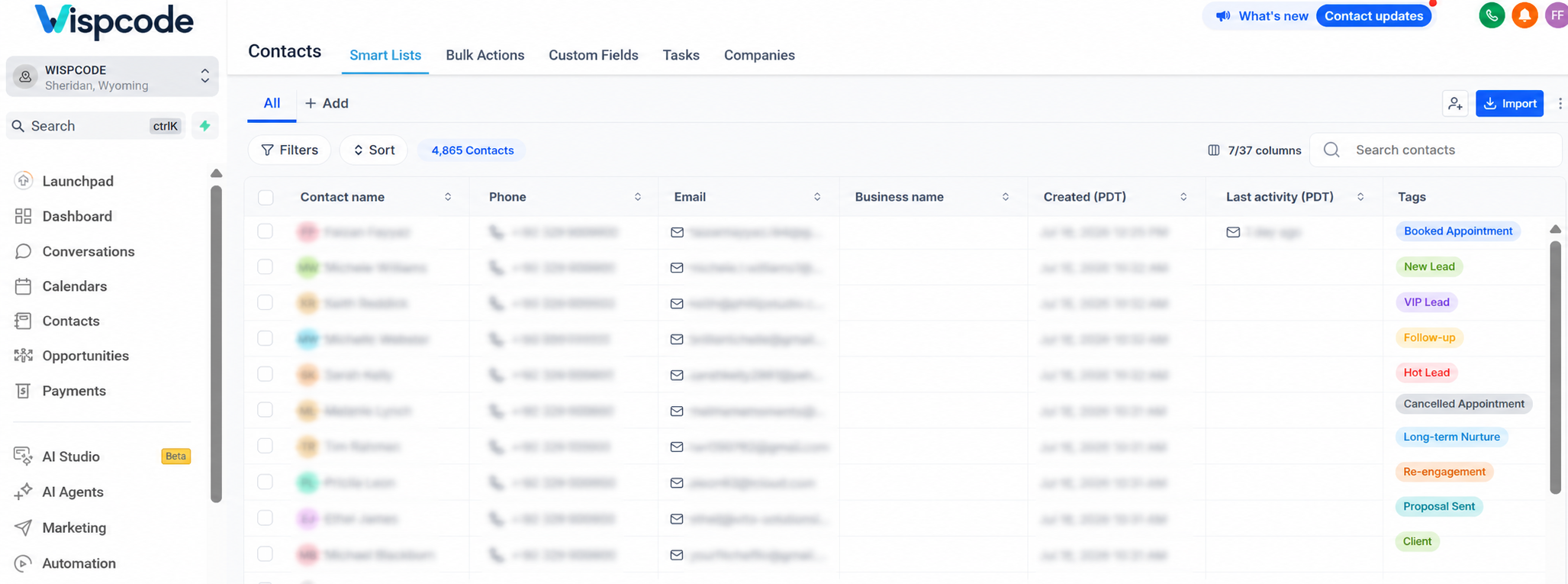
Tags are customizable labels that you can attach to contacts within your GoHighLevel CRM. They help identify specific characteristics or actions related to a contact without changing their core information.
Unlike folders, which organize files, or pipelines, which track opportunities through different sales stages, tags are flexible labels that can describe almost anything about a contact. A single contact can have multiple tags, making it easy to classify people in several ways at once.
For example, a contact could be tagged as:
New Lead
Facebook Lead
Booked Appointment
Interested in Service A
This flexibility makes tags one of the most effective tools for Contact Management and CRM Organization.
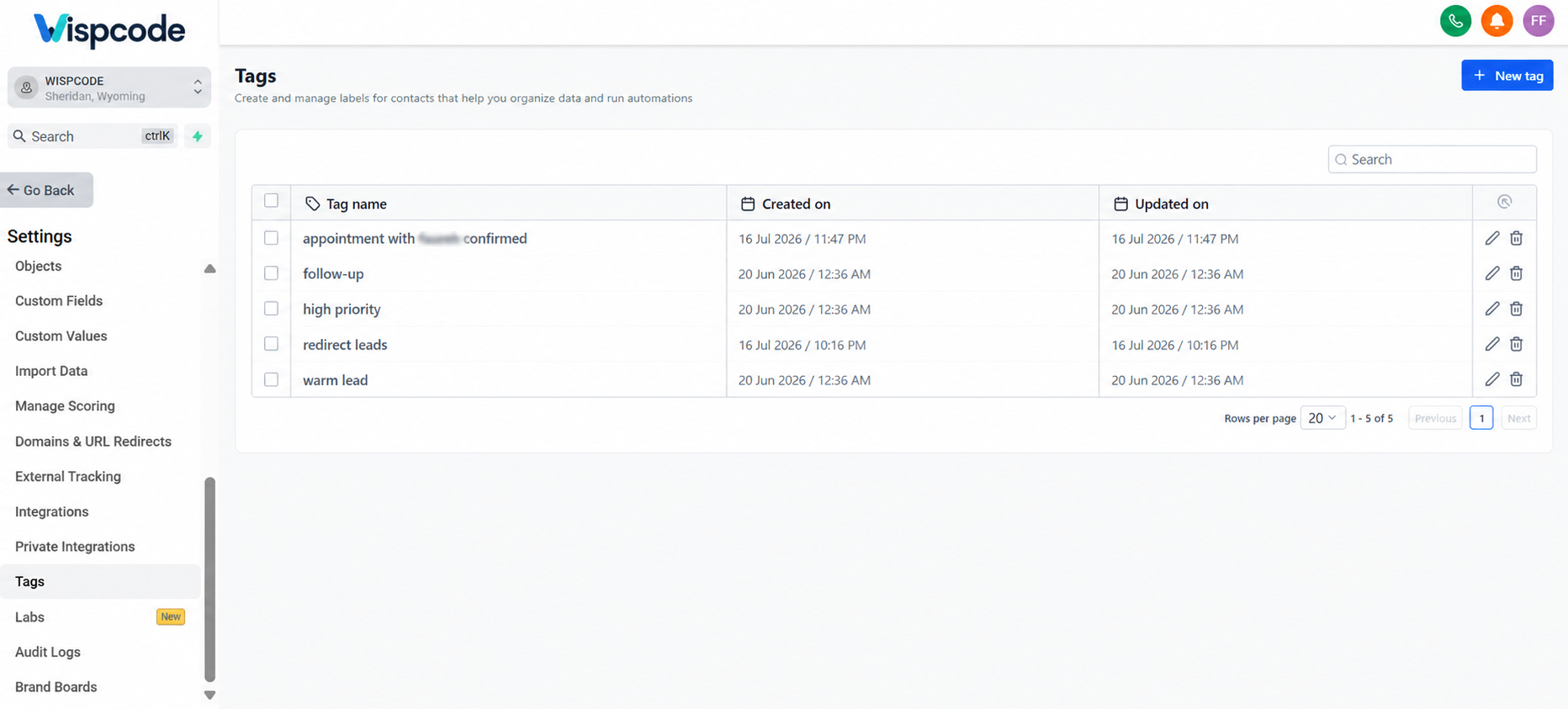
Why Contact Organization Matters
Without a structured system, managing a growing contact list becomes increasingly difficult. Businesses often experience challenges such as:
Large databases that are difficult to search
Sending emails or SMS messages to the wrong audience
Poor contact segmentation
Missed follow-ups with potential customers
Difficulty identifying different customer types
Lost sales opportunities due to inconsistent organization
Tags solve many of these problems by creating a clear organizational system. Instead of manually reviewing every contact, you can quickly filter and group people based on the tags assigned to them. This makes communication more accurate and helps your team work more efficiently.
How Tags Work in GoHighLevel
Using tags is straightforward, whether you prefer managing contacts manually or automating your CRM.
Create Custom Tags
You can create tags that match your business processes and naming conventions. This allows you to organize contacts according to your own workflow rather than relying on fixed categories.
Assign Tags Manually
When viewing a contact record, you can manually add or remove tags whenever needed. This is helpful when updating customer information after a conversation or changing a contact's status.
Apply Tags Automatically
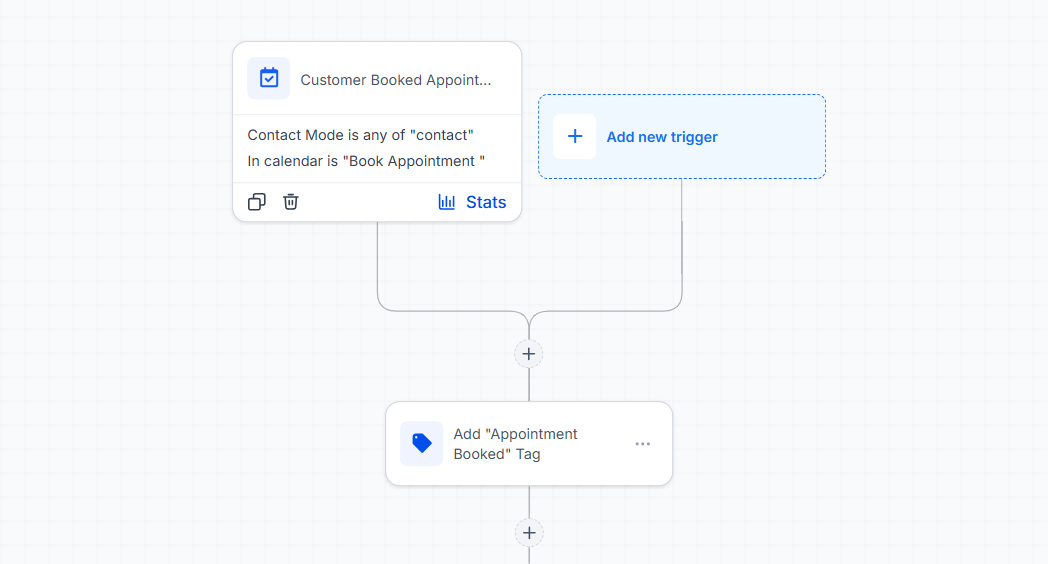
One of the biggest advantages of GoHighLevel Automation is the ability to apply tags automatically through workflows. Tags can be added after events such as:
Form submissions
Appointment bookings
Purchases
Workflow completion
Manual contact updates
Customer interactions that trigger workflow actions
Automation reduces repetitive work while keeping your contact records consistently updated.
Update or Remove Tags
As contacts move through your sales or service process, their tags should evolve as well. Removing outdated tags and applying new ones helps maintain accurate customer records and supports better Lead Management.
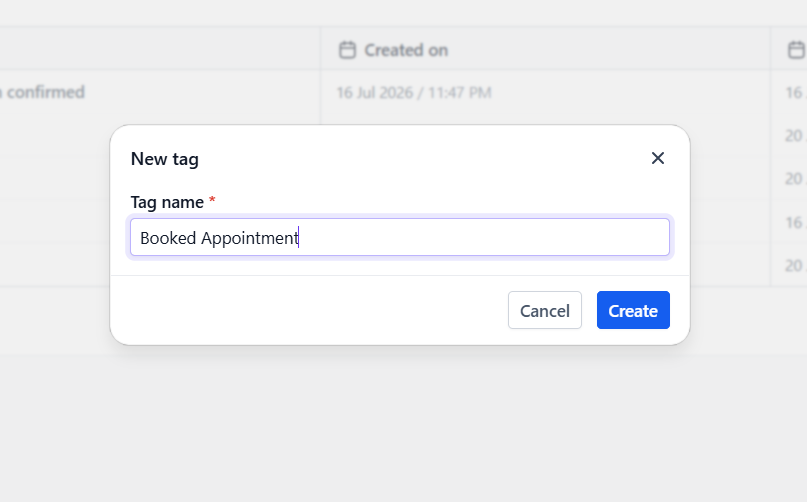
Recommended Tag Categories
Instead of random tags, organize them.
For example
Lead Source
Facebook
Google Ads
Organic Search
Referral
Customer Status
New Lead
Qualified
Proposal Sent
Customer
Lost
Interests
Website Design
CRM Setup
Automation
SEO
Engagement
Webinar
Ebook Download
Free Trial
Appointment Booked
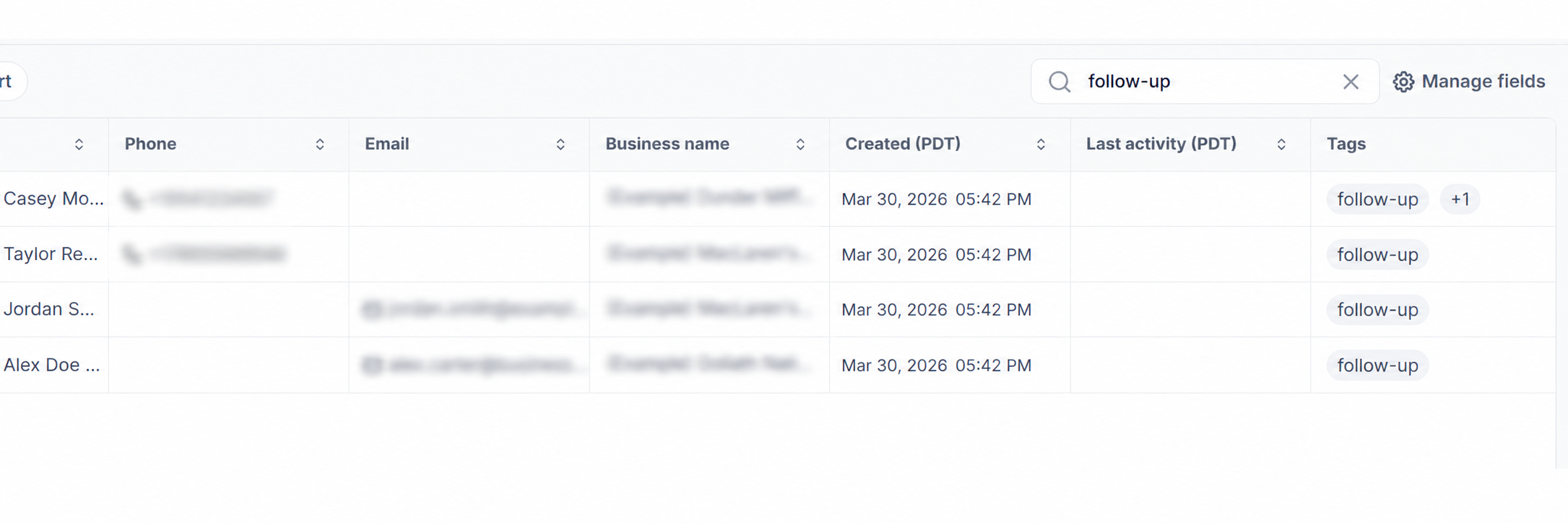
These labels make filtering contacts much easier. Instead of searching through your entire CRM, you can instantly locate a specific audience for follow-ups, email campaigns, or internal reporting.
Benefits of Using Tags
A well-planned tagging system offers practical advantages that improve daily CRM management.
Better Contact Organization
Tags create a structured database where contacts are easier to identify and manage.
Easier Contact Segmentation
Grouping contacts by interests, lead sources, or customer status allows for more relevant communication.
Faster Searches
Rather than searching individual records, you can quickly filter contacts based on one or more tags.
More Personalized Communication
Knowing exactly who your audience is helps you send messages that match their interests and current stage of the customer journey.
Improved Marketing Campaigns
Well-organized tags help ensure campaigns reach the right audience instead of sending generic messages to everyone.
Better Workflow Automation
Tags can trigger or support automated workflows, reducing manual work and improving operational consistency.
Cleaner CRM Management
Regularly updated tags keep your CRM organized and prevent outdated information from causing confusion.
Improved Customer Experience
Accurate organization allows businesses to respond more appropriately to customer needs, resulting in more relevant interactions.
Easier Reporting and Filtering
Tags simplify filtering contacts for analysis, internal reviews, and campaign planning.
Best Practices for Using Tags
Following a few simple guidelines can make your tagging system much more effective over time.
Create a consistent naming system. Standardized names prevent confusion across your team.
Keep tags simple and descriptive. Clear labels are easier to understand and maintain.
Avoid creating unnecessary tags. Too many tags make your CRM harder to manage.
Remove outdated tags regularly. Keeping information current improves accuracy.
Use automation whenever possible. Automated tagging reduces human error and saves time.
Review your tag structure as your business grows. Business processes change, so your organization system should evolve as well.
Avoid duplicate tags. Similar tags with different names create unnecessary complexity.
Train team members to use tags consistently. Everyone should follow the same tagging standards to maintain clean data.
Common Mistakes to Avoid
Even though tags are simple to use, poor management can reduce their effectiveness.
Some common mistakes include:
Creating too many tags without a clear purpose
Using vague or confusing tag names
Never removing outdated or irrelevant tags
Applying tags inconsistently across team members
Forgetting to automate repetitive tagging tasks
Using tags when custom fields would better store permanent customer information
Keeping your tagging strategy focused and organized helps ensure your CRM remains useful instead of becoming cluttered.
Conclusion
Learning How to Organize Contacts Using Tags in GoHighLevel is one of the easiest ways to improve the overall organization of your CRM. Tags provide a flexible system for categorizing contacts, simplifying Contact Segmentation, supporting GoHighLevel Workflows, and making customer information easier to manage.
A well-organized CRM helps businesses save time, communicate with the right audience, automate routine processes, and maintain stronger customer relationships. By creating a thoughtful tagging strategy and following consistent CRM Best Practices, you'll build a cleaner, more efficient system that supports your team's growth. Investing a little time in using tags effectively today can make everyday CRM management significantly easier in the long run.
Frequently Asked Questions (FAQ)
1. What are tags in GoHighLevel?
Tags are customizable labels that help organize contacts based on factors like lead source, interests, appointment status, or customer activity. A contact can have multiple tags for better organization and segmentation.
2. Can GoHighLevel add tags automatically?
Yes. GoHighLevel workflows can automatically add or remove tags after actions such as form submissions, appointment bookings, purchases, or other workflow triggers.
3. What's the difference between tags and custom fields?
Tags are flexible labels used for organization and automation, while custom fields store permanent information like company name, phone number, or preferred service.
4. Why should I use tags in my CRM?
Tags make it easier to filter contacts, create targeted marketing campaigns, automate workflows, and keep your CRM organized as your contact database grows.
5. How can I create an effective tagging system?
Use clear, consistent tag names, avoid creating unnecessary tags, automate tagging whenever possible, and regularly review your tags to keep your CRM accurate and organized.
Need Expert Help with GoHighLevel?
New to GoHighLevel and ready to get started? Buy your GoHighLevel account here and launch with confidence.
Already know what you need and want our team to handle everything, from complete setup and customization to funnels, workflows, automations, CRM, and pipelines? Click here.



