

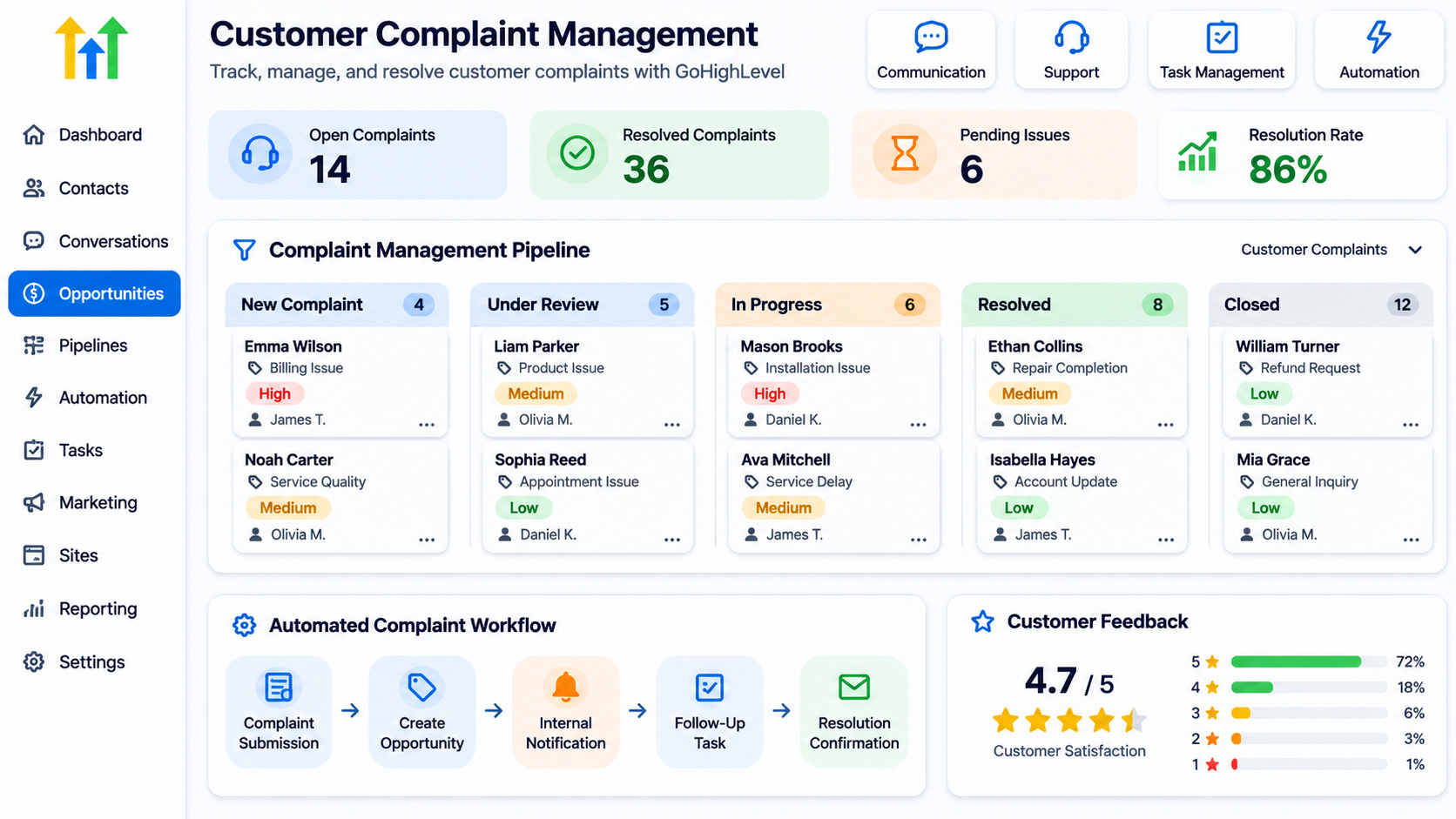
How to Create a Customer Complaint Tracking System in GoHighLevel
How to Create a Customer Complaint and Resolution Tracking System in GoHighLevel
Customer complaints are inevitable, but losing track of them is preventable. When businesses overlook complaints, delay responses, or fail to communicate effectively, they risk damaging customer relationships and their reputation.
GoHighLevel provides CRM and automation tools that businesses can configure to create a structured customer complaint tracking system. Although it is not a dedicated help desk platform, its pipelines, workflows, custom fields, and communication tools can help teams manage complaints from submission to resolution.
Why Businesses Need a Complaint and Resolution Tracking System
Businesses without a structured complaint management process often experience missed follow-ups, unclear responsibilities, delayed resolutions, and inconsistent customer communication.
A centralized system helps businesses organize complaints, assign responsibilities, monitor outstanding issues, and maintain customer communication.
With GoHighLevel CRM automation, teams can reduce repetitive administrative tasks while maintaining greater visibility into customer service operations.
How to Build a Customer Complaint Tracking System in GoHighLevel
Step 1: Create a Dedicated Complaint Management Pipeline
Navigate to Opportunities → Pipelines and create a pipeline named Customer Complaint Management.
Add the following stages:
New Complaint
Under Review
Assigned
Resolution in Progress
Awaiting Customer Response
Resolved
Closed
These are custom stages that represent the complaint resolution journey. Each complaint becomes an opportunity, allowing team members to monitor its progress through the pipeline.
Step 2: Create Custom Fields for Complaint Information
Navigate to Settings → Custom Fields and create opportunity-level fields for:
Complaint category
Complaint description
Priority level
Complaint reference
Resolution notes
Resolution date
Use contact fields for customer information and opportunity fields for individual complaints.
This distinction allows businesses to maintain separate complaint records for returning customers without overwriting previous complaint details.
Step 3: Build a Customer Complaint Submission Form
Navigate to Sites → Forms → Builder and create a customer complaint form.
Include the customer's name, email address, phone number, complaint category, and issue description.
Use contact-level custom fields to collect complaint information through the form. Configure the Create Opportunity workflow action to copy these values into corresponding opportunity-level fields.
Test repeat submissions to ensure each complaint retains its own information.
Step 4: Automate Complaint Registration and Acknowledgment
Navigate to Automation → Workflows and create a workflow using the Form Submitted trigger. Filter it by your complaint form.
Configure the following actions:
Create Opportunity in the complaint pipeline.
Send an acknowledgment email or SMS.
Send an internal notification.
Add a follow-up task.
Enable duplicate opportunity creation when separate complaints from the same customer must generate individual records. Review repeated workflow enrollment settings and prevent accidental duplicate submissions.
Step 5: Assign Complaints Based on Category or Priority
Use If/Else conditions to distribute complaints according to their submitted category or priority.
For example, billing complaints can generate tasks for the finance team, while service complaints can notify the operations manager.
Assign an opportunity owner to establish clear responsibility without unnecessarily changing the customer's existing contact owner.
This approach improves accountability and supports more organized customer service automation.
Step 6: Configure Follow-Ups and Escalation
Create a separate workflow using the Opportunity Created trigger and filter it by your complaint pipeline.
Add a 24-hour Wait action, followed by an If/Else condition checking whether the complaint remains unresolved.
If it does, send an internal reminder to the responsible manager.
Enable the multiple-opportunity workflow setting so individual complaints have separate executions. Escalation conditions and deadlines must be configured and tested manually.
Step 7: Manage Customer Communication and Resolution
Use GoHighLevel Conversations to communicate with customers while updating the relevant complaint opportunity as work progresses.
Record resolution details, complete assigned tasks, and document actions taken.
Create another workflow using the Pipeline Stage Changed trigger, filtered to the complaint pipeline and Resolved stage.
Configure it to send a resolution confirmation email. Close the complaint after completing the necessary verification or customer confirmation.
Step 8: Collect Customer Feedback and Monitor Performance
Create a feedback survey and send its link through your resolution workflow.
Monitor performance indicators such as total complaints, unresolved issues, common categories, customer satisfaction, and average resolution time.
GoHighLevel pipeline views and filters provide visibility into complaint records. Survey responses support customer feedback management, while advanced calculations, including average resolution time, may require exports, spreadsheets, or additional integrations.
Real-World Example: Home Improvement Company
Imagine a customer reporting incomplete kitchen renovation work.
After submitting a complaint form, a new opportunity is created, and the operations manager receives a notification.
The manager investigates the issue, arranges a follow-up visit, and moves the opportunity to Resolved once repairs are completed.
The customer receives a resolution confirmation and feedback survey.
This structured complaint resolution workflow helps the company maintain accountability throughout the process.
Best Practices and Common Mistakes to Avoid
Maintain separate opportunity records for individual complaints.
Assign clear responsibilities and internal response deadlines.
Keep workflows simple and prevent automation loops.
Review duplicate submissions before creating additional records.
Protect sensitive customer information.
Test workflows before publishing.
Avoid closing complaints before confirming resolution.
Conclusion
A properly configured GoHighLevel complaint management system helps businesses improve accountability, customer communication, and operational efficiency.
By combining pipelines, custom fields, workflows, and feedback surveys, businesses can establish a reliable customer resolution tracking process.
Start building your complaint management system today and turn customer concerns into opportunities to strengthen long-term customer trust.
Frequently Asked Questions
1. Can GoHighLevel manage customer complaints?
Yes. Businesses can configure its CRM, opportunities, pipelines, and workflows to manage complaints.
2. Can complaint follow-ups be automated?
Yes. Configured workflows can automate acknowledgments, reminders, and resolution confirmations.
3. How can businesses track unresolved complaints?
Use dedicated pipeline stages and opportunity filters to identify outstanding complaints.
4. Can multiple complaints from one customer be tracked separately?
Yes. Create separate opportunities and store complaint-specific information in opportunity custom fields.
5. Can GoHighLevel collect customer feedback after resolution?
Yes. Businesses can send feedback survey links through configured resolution workflows.
Need Expert Help with GoHighLevel?
New to GoHighLevel and ready to get started? Buy your GoHighLevel account here and launch with confidence.
Already know what you need and want our team to handle everything, from complete setup and customization to funnels, workflows, automations, CRM, and pipelines? Click here.