

GoHighLevel Calendar AI: Simplifying Calendar Setup and Booking
GoHighLevel Calendar AI: A Simpler Way to Set Up and Manage Booking Calendars
Setting up a booking calendar can feel more complicated than it should, especially for someone using GoHighLevel for the first time. Instead of immediately knowing which calendar to create, what settings to choose, or how to confirm that everything works correctly, new users now have a more guided starting point. With the introduction of GoHighLevel Calendar AI, users can describe what they need and move through a guided setup experience designed to take them from needing a calendar to having a configured calendar and making a first booking.
What Is GoHighLevel Calendar AI?
Calendar AI is being introduced to make the initial calendar setup experience easier for new GoHighLevel users. Rather than requiring users to figure out the appropriate calendar type before starting, they can simply describe their use case.
Calendar AI then recommends and creates the appropriate calendar based on that description.
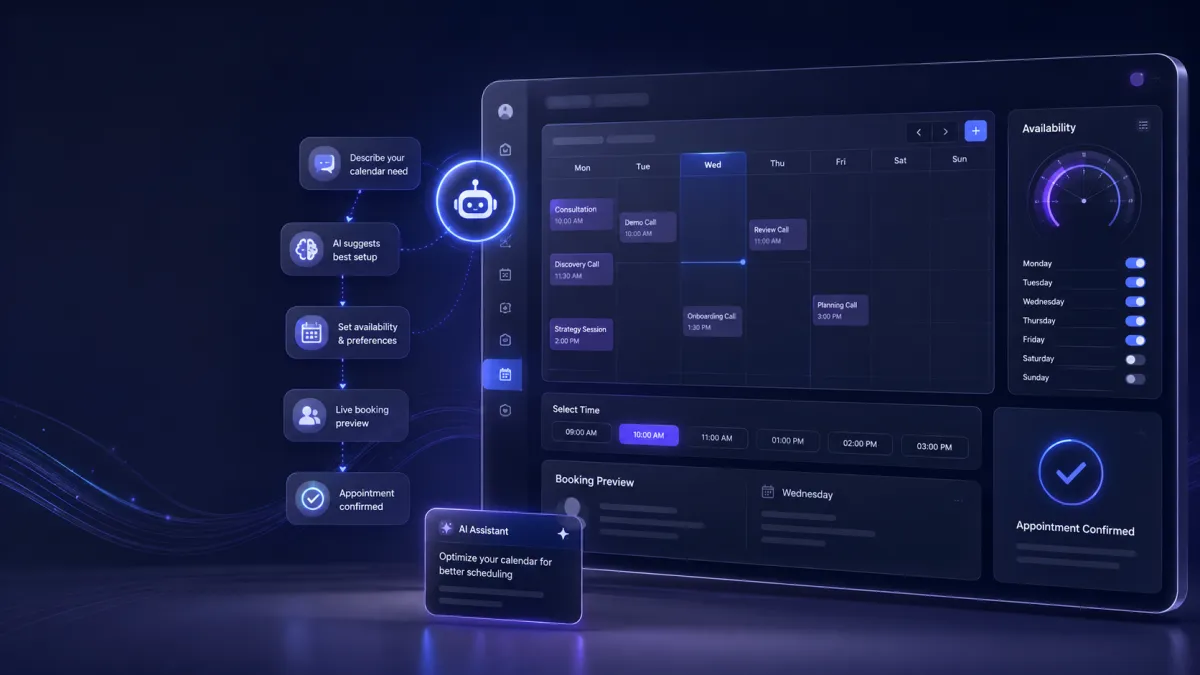
The experience is designed around a simple progression: describe what you need, configure the important details, preview the booking experience, and complete a test appointment.
This makes Calendar AI less about figuring out where to begin and more about guiding users through the setup process.

Describe What You Need Instead of Choosing a Calendar Type
One of the key parts of the new experience is how users begin the setup process.
Instead of trying to determine which calendar type they should create, users can explain their needs in their own words. Calendar AI uses that information to recommend and create the appropriate calendar.
For new users, this provides a more straightforward starting point. The user does not have to begin by understanding every available calendar option. They can focus first on explaining what they want their booking experience to look like.
Configure Your Calendar With Guided Steps
Once the appropriate calendar has been created, Calendar AI guides users through several important configuration details.
Users can add team members, configure availability, and choose a meeting location.
These details are important because they directly shape how the booking calendar is presented to people who want to schedule an appointment. By bringing these setup elements into the guided experience, Calendar AI helps users work through the configuration instead of having to figure out each part independently.
The process keeps the focus on getting the calendar configured and ready for actual bookings.
Preview the Booking Calendar Before Testing It
Another useful part of the experience is the live preview of the booking calendar.
Instead of completing the configuration without seeing the resulting booking experience, users can view a live preview during setup. This gives them an opportunity to see the calendar they are creating as they move through the configuration process.
The preview is especially useful as a confirmation step because users can see the booking calendar before moving on to testing it.
Book a Test Appointment
After completing the setup, Calendar AI allows users to book a test appointment.
This provides a practical way to confirm that the newly configured calendar can be used for booking. Rather than stopping immediately after configuration, the setup experience continues through an actual test booking.
For new users, this creates a clearer path from calendar creation to a working booking experience.

Explore Calendar Capabilities With AI
Calendar AI is also designed to help users discover Calendar capabilities.
Users can ask questions about Calendar or choose from preset prompts. This gives them another way to explore what they can do within the Calendar experience without needing to already know exactly what to ask.
The combination of questions and preset prompts makes Calendar AI part of the broader discovery experience, not only the initial setup process.

Calendar Troubleshooting Is Coming Next
GoHighLevel is also extending Calendar AI to address a common Calendar support question: why a specific booking slot is not appearing on the booking widget.
This troubleshooting capability is described as an upcoming extension of Calendar AI, so it should be viewed separately from the current guided setup experience.
When available, Calendar AI will use the customer's Calendar configuration to identify why a particular slot is not available and explain what needs to change.
This could provide a more direct way to understand configuration related booking issues. Instead of simply seeing that a specific time slot is unavailable, the upcoming capability is intended to help identify the reason behind that availability issue and the configuration change needed to address it.
What This Update Means for GoHighLevel Users
The main focus of GoHighLevel Calendar AI is making the Calendar experience easier to navigate, particularly for new users.
The journey begins with a simple description of what the user needs. From there, Calendar AI recommends and creates the appropriate calendar, guides users through team members, availability, and meeting location, provides a live booking calendar preview, and allows a test appointment after setup.
Users can also explore Calendar capabilities through questions and preset prompts.
The upcoming troubleshooting capability adds another dimension to the experience by focusing on a common question about unavailable booking slots.
Overall, this update moves the GoHighLevel calendar setup experience toward a more guided process. Instead of expecting new users to understand every setup decision before they begin, Calendar AI helps connect the initial request with calendar configuration, preview, and testing in a more structured journey.
Frequently Asked Questions
What is GoHighLevel Calendar AI?
GoHighLevel Calendar AI is a guided experience that helps users describe their calendar needs, recommends and creates the appropriate calendar, and guides them through key setup steps.
Can users describe what kind of calendar they need?
Yes. Users can describe their use case instead of having to figure out which calendar type to create.
What can users configure during the guided setup?
Users can add team members, configure availability, and choose a meeting location.
Can users preview their booking calendar?
Yes. Calendar AI provides a live preview of the booking calendar during the setup experience.
Can users test the calendar after setup?
Yes. Once setup is complete, users can book a test appointment.
Need Expert Help with GoHighLevel?
New to GoHighLevel and ready to get started? Buy your GoHighLevel account herea and launch with confidence.
Already know what you need and want our team to handle everything, from complete setup and customization to funnels, workflows, automations, CRM, and pipelines? 5Click here.



