
How to Find Friction Points in a GoHighLevel Booking Journey
How to Find Friction Points in a GoHighLevel Booking Journey
Introduction
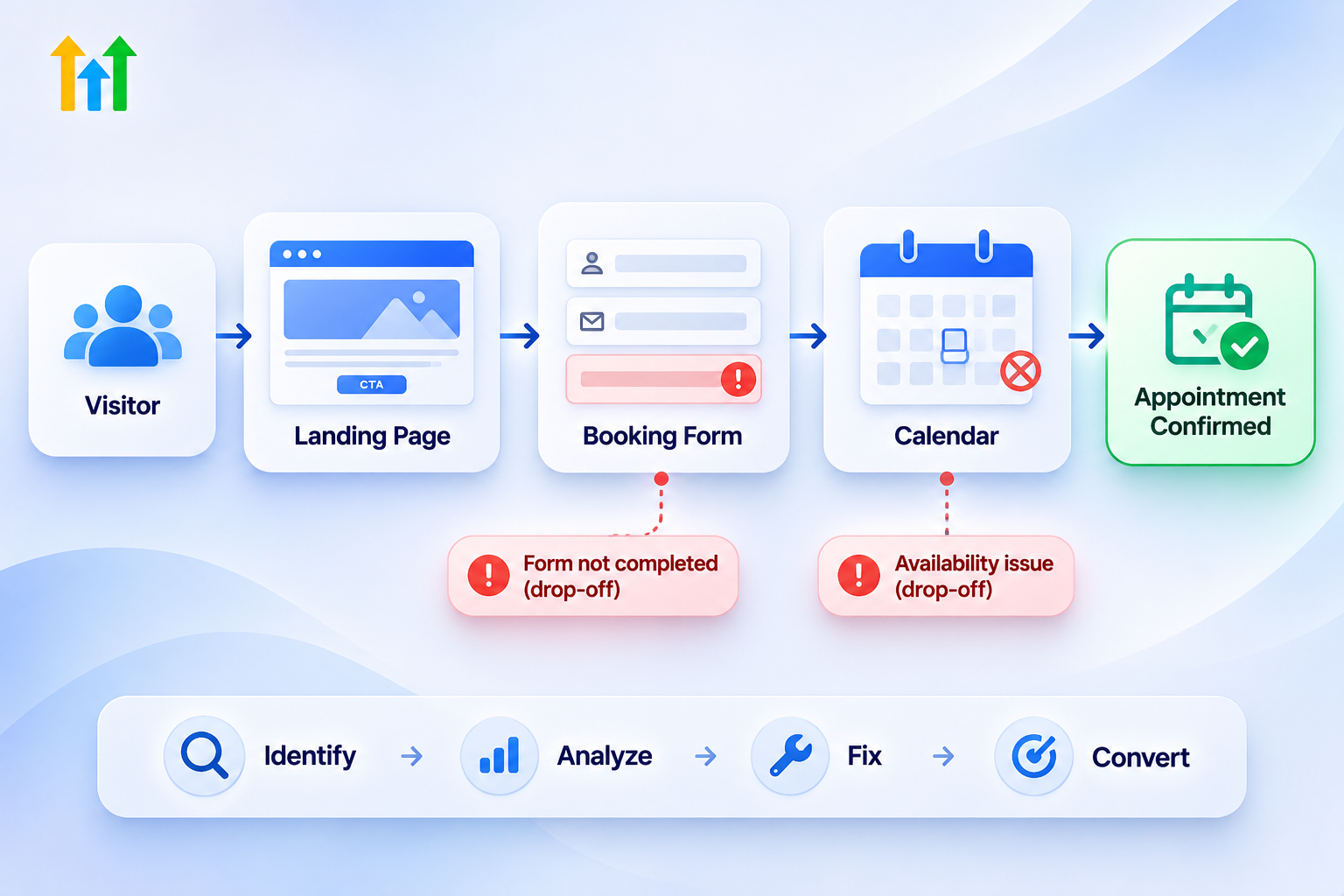
A booking journey can look simple on the surface: a prospect lands on a page, chooses a time, submits their information, and receives a confirmation. But behind that simple experience are several points where people can hesitate, abandon the process, choose the wrong option, or fail to complete their booking.
The challenge is that a low booking rate does not always tell you "where" the problem is.
The issue could be the funnel page, the call to action, the booking calendar, the information requested before scheduling, the available time slots, or what happens after someone books.
If you use GoHighLevel, you have several tools that can help you investigate these stages. Funnel statistics can show page views and opt-in activity, while appointment reporting can provide insight into bookings, sources, calendars, cancellations, and reschedules. Workflows can also help you understand what happens after an appointment is created or its status changes.
The goal is not simply to get more bookings. It is to identify exactly where prospects are experiencing unnecessary friction and improve that part of the journey.
What Is a Booking Journey?
A booking journey is the series of steps a prospect takes before and around scheduling an appointment.
A typical journey might look like this:
Traffic → Landing Page → Lead Capture → Booking Page → Calendar Selection → Appointment → Confirmation → Follow-Up
Not every business will use the same structure. Some may send visitors directly to a calendar, while others may capture lead information before presenting a scheduling option.
The important point is that every additional step creates another opportunity for a prospect to stop.
For example, a visitor may submit a form but never schedule. Another prospect may reach the calendar but leave without selecting a time. Someone else may book successfully but later cancel or reschedule.
These are different problems and should not be treated as one conversion issue.
Why Booking Friction Matters
A funnel can generate plenty of traffic and still produce disappointing appointment results.
Suppose 1,000 people visit a funnel page. If 200 submit the initial form but only 20 eventually book an appointment, the problem may not be traffic.
There could be friction somewhere between the initial conversion and the completed booking.
This is why analyzing only total leads or total appointments can be misleading.
Instead, break the journey into stages and ask:
How many people reach the page?
How many submit the form?
How many continue toward scheduling?
How many appointments are actually booked?
Which calendars receive the bookings?
How many appointments are cancelled or rescheduled?
Where does the largest drop-off occur?
Once you identify the weakest stage, you have a much clearer starting point for optimization.
Step 1: Map the Entire Booking Journey
Before changing anything, document the current experience.
Start from the prospect's perspective rather than the CRM's perspective.
Open the funnel or booking experience yourself and go through the process from beginning to end.
Record each step, including:
Landing page
Call to action
Form or lead capture
Calendar page
Required booking information
Available appointment times
Confirmation
Follow-up communication
Look for anything that feels unnecessary or confusing.
For example, a prospect may have to answer too many questions before seeing available appointment times. Or the call to action may promise one thing while the booking page presents something different.
Mapping the journey first prevents you from optimizing one stage while overlooking a larger issue elsewhere.
Step 2: Use Funnel Statistics to Find Drop-Offs
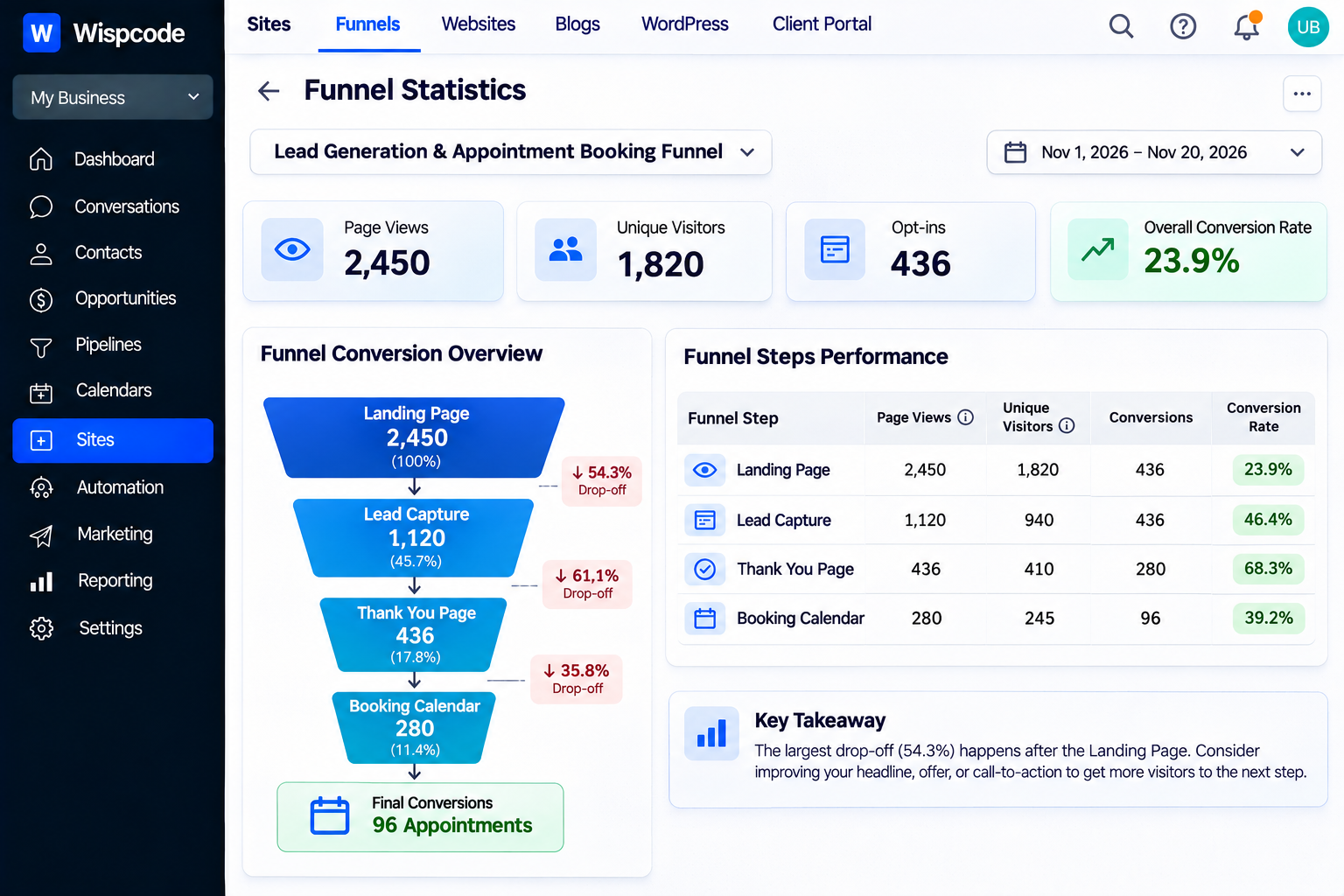
If your booking journey starts inside a GoHighLevel funnel, use the funnel's built-in statistics to understand how visitors move through the pages.
GoHighLevel's funnel statistics can show page views, unique views, opt-ins, opt-in rates, sales, conversion rates, and revenue-related metrics where applicable. You can also filter the statistics using custom date ranges.
Pay particular attention to the transition between pages.
For example:
Page A: High traffic
Page B: Significant drop in visitors
Page C: Low number of completed opt-ins
That pattern tells you where further investigation is needed.
However, do not automatically assume that the page with the largest drop is poorly designed. Traffic sources, audience intent, page purpose, and other factors can affect the numbers.
Use the statistics as a signal for investigation, not as proof of the cause.
Step 3: Check the Call to Action
A prospect should understand what happens after clicking your booking call to action.
Review the language surrounding your button or link.
Ask:
Is the next step obvious?
Does the button clearly communicate the action?
Does the page explain what the appointment is for?
Is there unnecessary copy between the visitor and the booking option?
Does the booking experience match the promise made on the previous page?
Small inconsistencies can create uncertainty.
For example, if a landing page says "Get Your Free Strategy Call" but the next page presents a calendar labeled something completely different, the prospect may hesitate.
The booking experience should feel like a continuation of the same conversation.
Step 4: Review the Calendar Experience
Once a prospect reaches the calendar, examine the actual scheduling experience.
Check the available appointment times, calendar selection, booking instructions, and required information.
If a prospect reaches the calendar but cannot find a convenient time, the issue may be availability rather than interest.
Also check whether the correct calendar is being used.
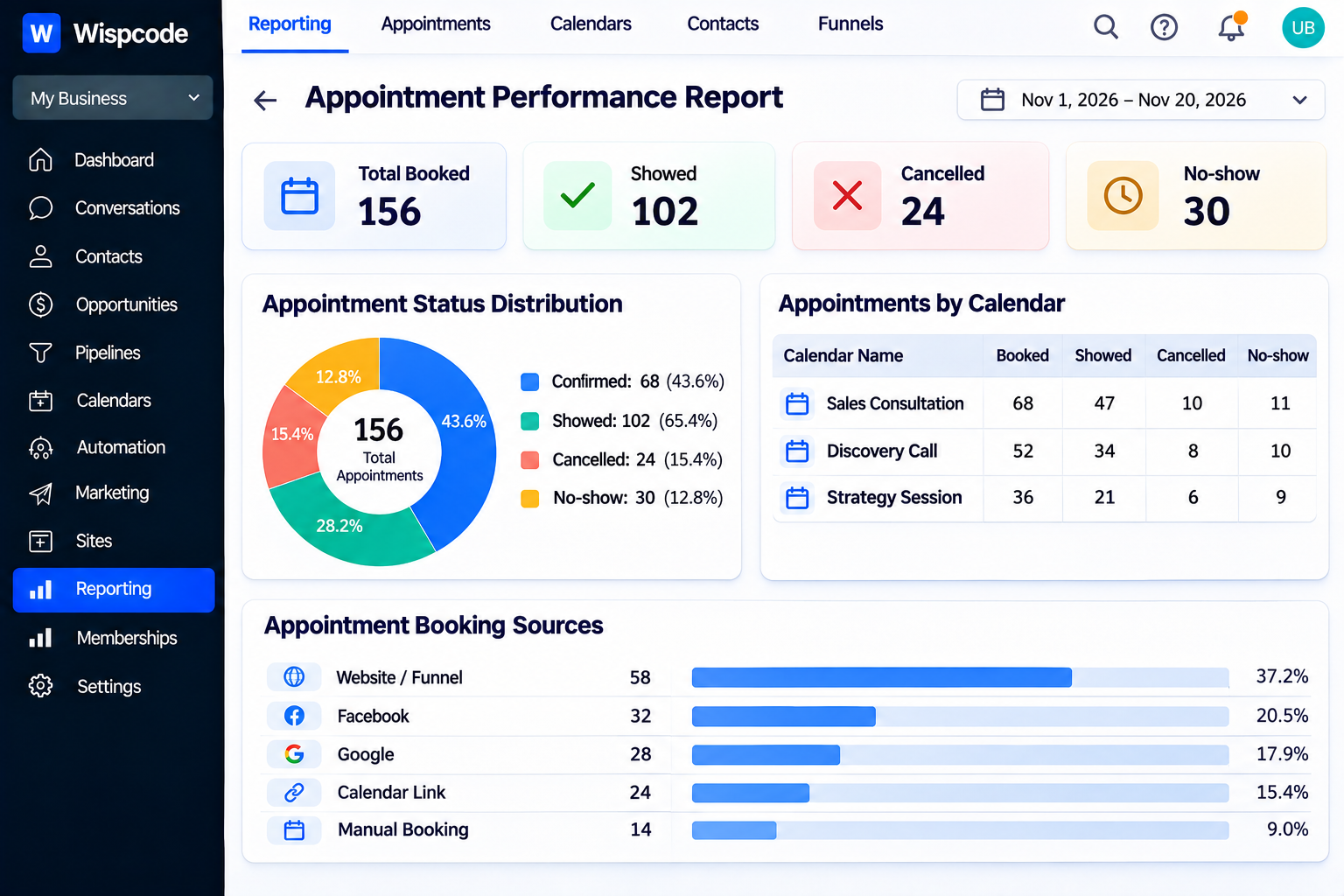
HighLevel's appointment reporting can provide information about appointment sources and channels, including funnels and users, as well as booking volume by calendar.
This can help you determine whether one calendar consistently performs differently from another.
Do not assume every calendar should produce the same result. Different appointment types, audiences, team members, and availability can naturally produce different booking patterns.
Step 5: Review the Information You Ask For
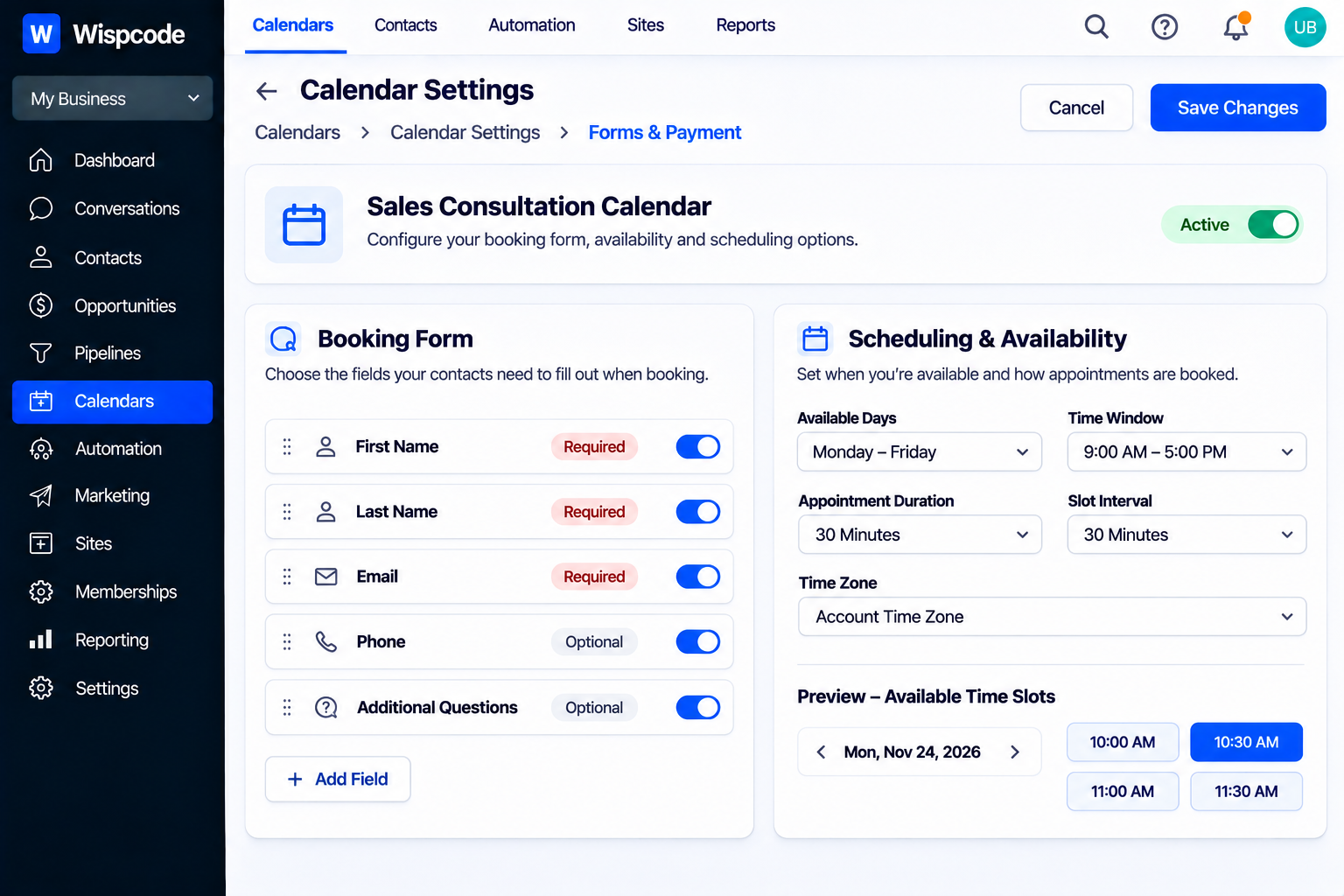
If you connect a custom form to a GoHighLevel calendar, visitors can be required to provide additional information during the booking process. GoHighLevel states that this information can be saved to the contact's CRM record for use in follow-up and qualification.
That can be useful, but more questions can also make the booking process feel heavier.
Review every required field and ask:
Do we genuinely need this information before the appointment?
If a field is not necessary for scheduling, qualification, or a legitimate business requirement, consider whether it belongs in the booking experience at all.
The goal is not to collect the maximum amount of information.
The goal is to collect the information that serves a clear purpose.
Step 6: Investigate Appointment Outcomes
A completed booking does not necessarily mean the journey is working perfectly.
After someone schedules, examine what happens next.
HighLevel's appointment reporting provides counts by appointment status and can help identify cancellations and reschedules.
For example, if a particular calendar produces many bookings but also a high number of cancellations, the issue may occur after the initial booking.
That could point you toward areas such as:
Appointment expectations
Confirmation messaging
Reminder timing
Appointment relevance
Scheduling availability
Follow-up experience
You should not assume that cancellation automatically means the booking journey itself failed. Instead, treat cancellation and rescheduling patterns as additional evidence about the customer experience.
Step 7: Check Your Appointment Automation
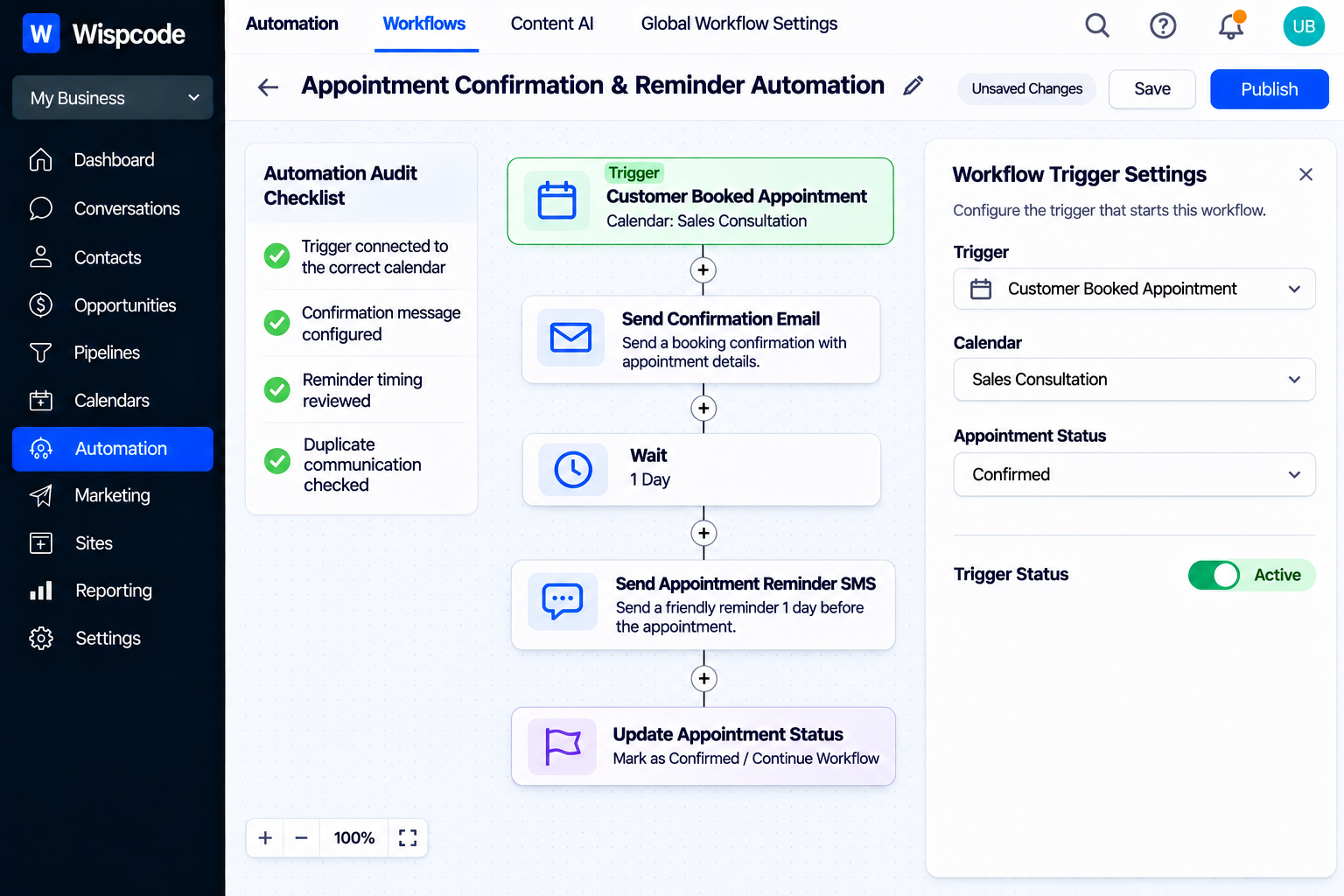
GoHighLevel workflows can respond to appointment-related events.
The "Customer Booked Appointment" trigger can activate when a customer independently books through a booking link or online scheduling system. It can also be filtered by calendar or calendar group.
The "Appointment Status" trigger can respond when an appointment is scheduled or when its status changes, allowing businesses to automate actions around confirmations, cancellations, show-ups, and no-shows.
Review these workflows carefully.
Ask:
Does the correct workflow trigger?
Is the correct calendar selected?
Are the expected confirmation messages being sent?
Are cancellation and no-show situations handled?
Are contacts entering the wrong workflow?
Are multiple workflows communicating with the same contact?
Automation itself can become a friction point when it creates confusing or contradictory communication.
Step 8: Test the Journey as a Real Customer
One of the most effective ways to find friction is to experience the process yourself.
Do not only inspect the workflow builder.
Actually:
Open the funnel.
Submit the form.
Continue to the booking experience.
Select an available time.
Complete the booking.
Check the confirmation.
Review the contact record.
Observe the resulting workflow activity.
If possible, test the journey using different devices and browsers.
You are looking for practical issues that analytics alone may not reveal.
For example, a page may technically work while still being confusing. A calendar may technically load while presenting limited availability. A confirmation may technically send while providing unclear instructions.
Data tells you "where to look. A real test can help reveal what the customer experiences.
Step 9: Compare Calendars and Booking Sources
If your business uses multiple calendars, avoid analyzing all appointments as one group.
HighLevel's Appointment Report includes information such as appointment sources and channels, top-performing calendars, appointment counts, cancellation patterns, and reschedule patterns.
Use these insights to compare similar booking experiences.
For example, suppose you have:
Sales Consultation
Discovery Call
Demo Call
If one calendar receives significantly fewer bookings, investigate what makes its journey different.
Compare the page, offer, appointment description, available times, form requirements, and follow-up.
The objective is not to automatically copy the highest-performing calendar. It is to identify meaningful differences that could explain the performance gap.
Step 10: Make One Change at a Time
Once you identify a likely friction point, resist the temptation to change everything simultaneously.
If you change the headline, form, calendar, appointment length, availability, and follow-up automation at the same time, you will have difficulty determining which change affected the outcome.
Instead, prioritize the most obvious problem.
For example:
Problem: Many visitors reach the booking page, but few complete the appointment.
Investigation: Review calendar availability and required booking information.
Change: Simplify unnecessary booking requirements.
Next step: Monitor the booking data again.
This creates a more controlled optimization process.
Common Booking Friction Points to Look For
When auditing a GoHighLevel booking journey, common areas worth investigating include:
Unclear Next Step
Visitors do not immediately understand what they should do next.
Too Much Information
The booking process asks for information that is not necessary at that stage.
Limited Availability
Prospects cannot find appointment times that work for them.
Mismatched Messaging
The landing page and booking page communicate different offers or expectations.
Confusing Calendar Selection
Multiple appointment options make it difficult to choose the correct one.
Weak Follow-Up
A prospect books but does not receive clear confirmation or useful next-step information.
Automation Problems
A workflow triggers incorrectly, targets the wrong calendar, or sends unnecessary communication.
These issues should be investigated rather than assumed to be the cause of poor performance.
Use Appointment Data to Prioritize Improvements
Not every friction point deserves immediate attention.
Start with the largest meaningful problem supported by your data.
For example, if your funnel receives substantial traffic but very few people reach the booking stage, investigate the pages and calls to action before changing appointment reminders.
If people book frequently but cancellations are high, investigate the post-booking experience instead.
If one calendar performs differently from another, compare the booking experience and audience before making changes.
This approach keeps optimization focused.
Common Mistakes to Avoid
Looking Only at Total Appointments
A high appointment count does not automatically mean the booking journey is efficient.
Blaming the Calendar Too Quickly
A low booking rate may originate earlier in the funnel.
Changing Too Many Things at Once
Multiple simultaneous changes make results harder to interpret.
Ignoring Cancellations and Reschedules
The booking itself is only one part of the customer journey.
Overloading the Booking Form
Collecting unnecessary information can add friction without improving qualification.
Assuming Automation Is Always Helpful
Automation should make the journey clearer and more timely. Poorly configured automation can create the opposite experience.
Conclusion
Finding friction in a GoHighLevel booking journey is less about guessing what customers dislike and more about systematically examining each stage.
Start by mapping the journey. Then use funnel statistics to identify page-level drop-offs, appointment reporting to understand booking patterns, and appointment workflows to review what happens before and after a booking. GoHighLevel provides reporting and automation tools that can help you investigate these different stages.
Most importantly, do not treat every low conversion rate as the same problem.
A prospect who never reaches the calendar has a different experience from someone who reaches the calendar but cannot find a suitable time. Someone who books and later cancels represents another type of friction entirely.
Break the journey into stages, identify the strongest evidence of a problem, make focused improvements, and continue monitoring the results.
A smoother booking journey is not created by adding more automation. It is created by removing the unnecessary steps, confusion, and obstacles that prevent interested prospects from taking the next step.
Need Expert Help with GoHighLevel?
New to GoHighLevel and ready to get started? Buy your GoHighLevel account here and launch with confidence.
Already know what you need and want our team to handle everything, from complete setup and customization to funnels, workflows, automations, CRM, and pipelines? Click here.