

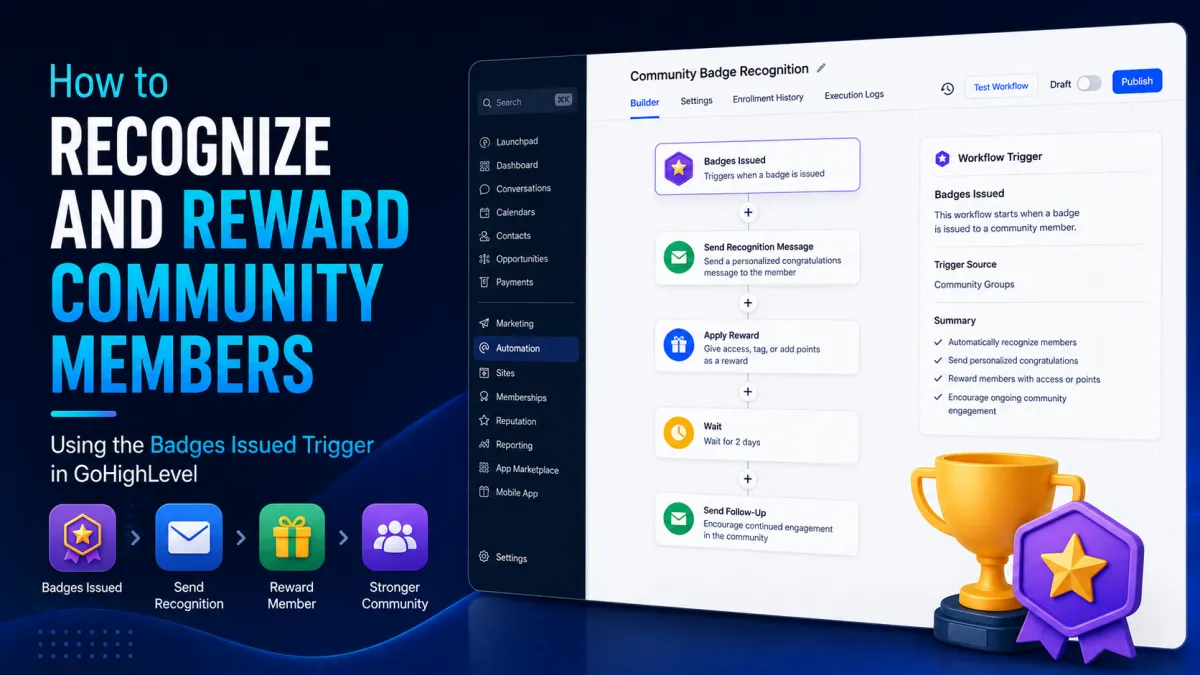
How to Recognize and Reward Community Members Using the Badges Issued Trigger in GoHighLevel
How to Recognize and Reward Community Members Using the Badges Issued Trigger in GoHighLevel
People participate more when their progress is noticed. In a community, a simple badge can turn an otherwise invisible achievement into something members can see, celebrate, and remember.
GoHighLevel makes it possible to take that recognition a step further with the Badges Issued trigger. Instead of letting a badge be the end of the experience, you can use the badge-issued event as the starting point for a workflow that sends a congratulatory message, updates the contact record, starts another automation, or delivers a configured reward or next step.
The result is a more connected experience where recognition happens at the right moment rather than days later.
What Is the Badges Issued Trigger in GoHighLevel?
The GoHighLevel Badges Issued Trigger starts a workflow when a specified badge is awarded to a contact. According to HighLevel's current documentation, the trigger can respond when the selected badge is issued whether the badge was awarded manually, through the Issue Badge workflow action, or through another supported method.
Think of the trigger as an event detector:
A badge is issued → the workflow starts → your configured follow-up actions run.
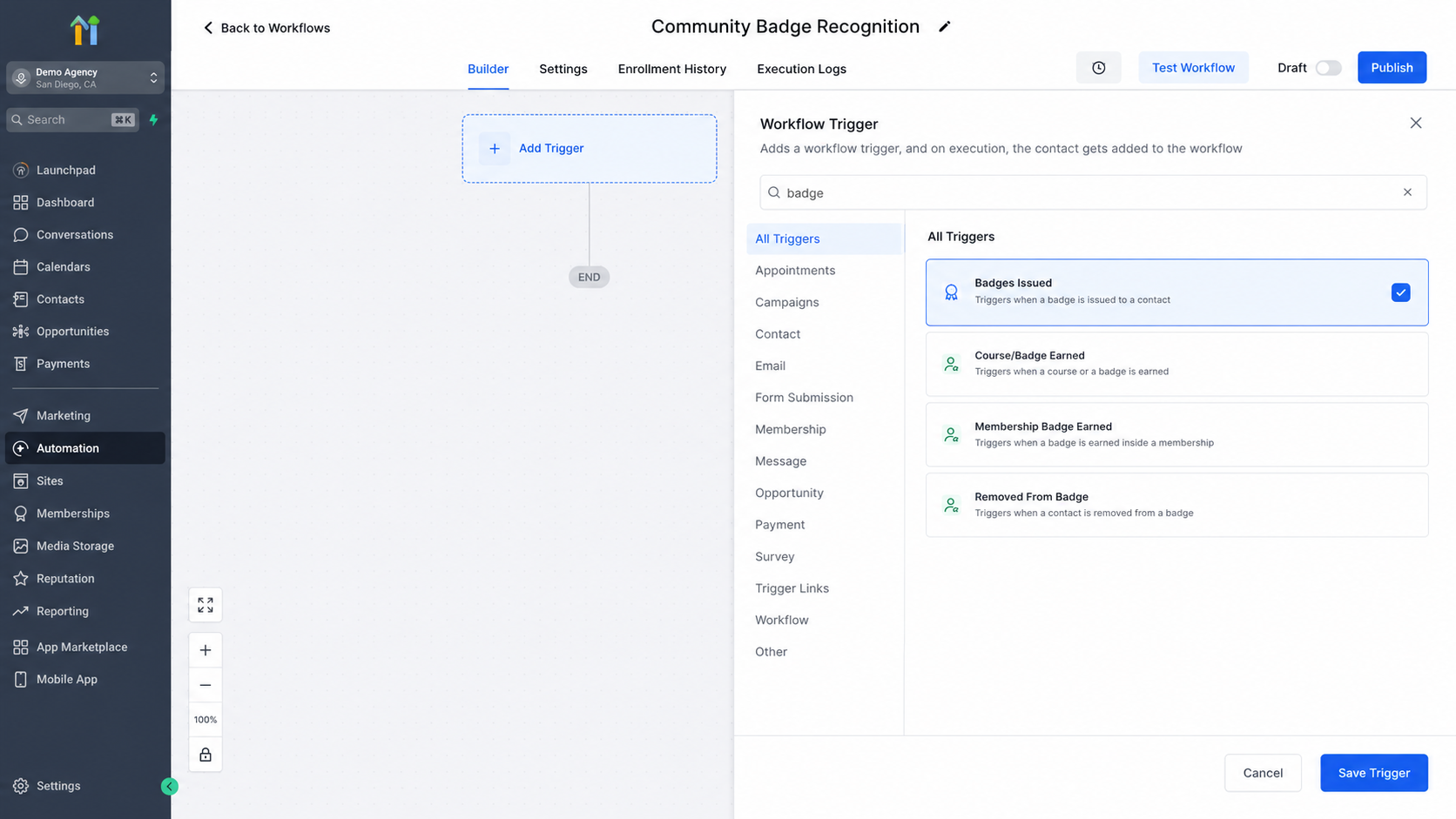
The badge itself represents recognition within your configured experience. It might acknowledge a milestone, participation, progress, or another achievement you have chosen to recognize.
This distinction is important: the Badges Issued trigger does not itself constitute the reward. It simply provides the event that allows your workflow to respond. What happens afterward depends on the actions and logic you configure.
Why Automate Recognition After a Badge Is Issued?
Manual recognition can work for a small community, but it becomes difficult to maintain as membership grows. Automated recognition gives you a consistent way to respond whenever an important badge is awarded.
A well-designed workflow can help you:
Recognize members immediately after an achievement.
Maintain consistent communication across your community.
Personalize follow-up based on the member's journey.
Encourage members to continue participating.
Connect recognition with other customer or membership processes.
Turn a digital badge into a more meaningful member experience.
HighLevel specifically describes badge automation as a way to connect badge awards with follow-up actions such as congratulatory communication, contact updates, and additional automation.
How to Build a Badge Recognition Workflow
The basic automation concept is straightforward:
Badges Issued Trigger → Optional Workflow Logic → Recognition or Follow-Up Actions
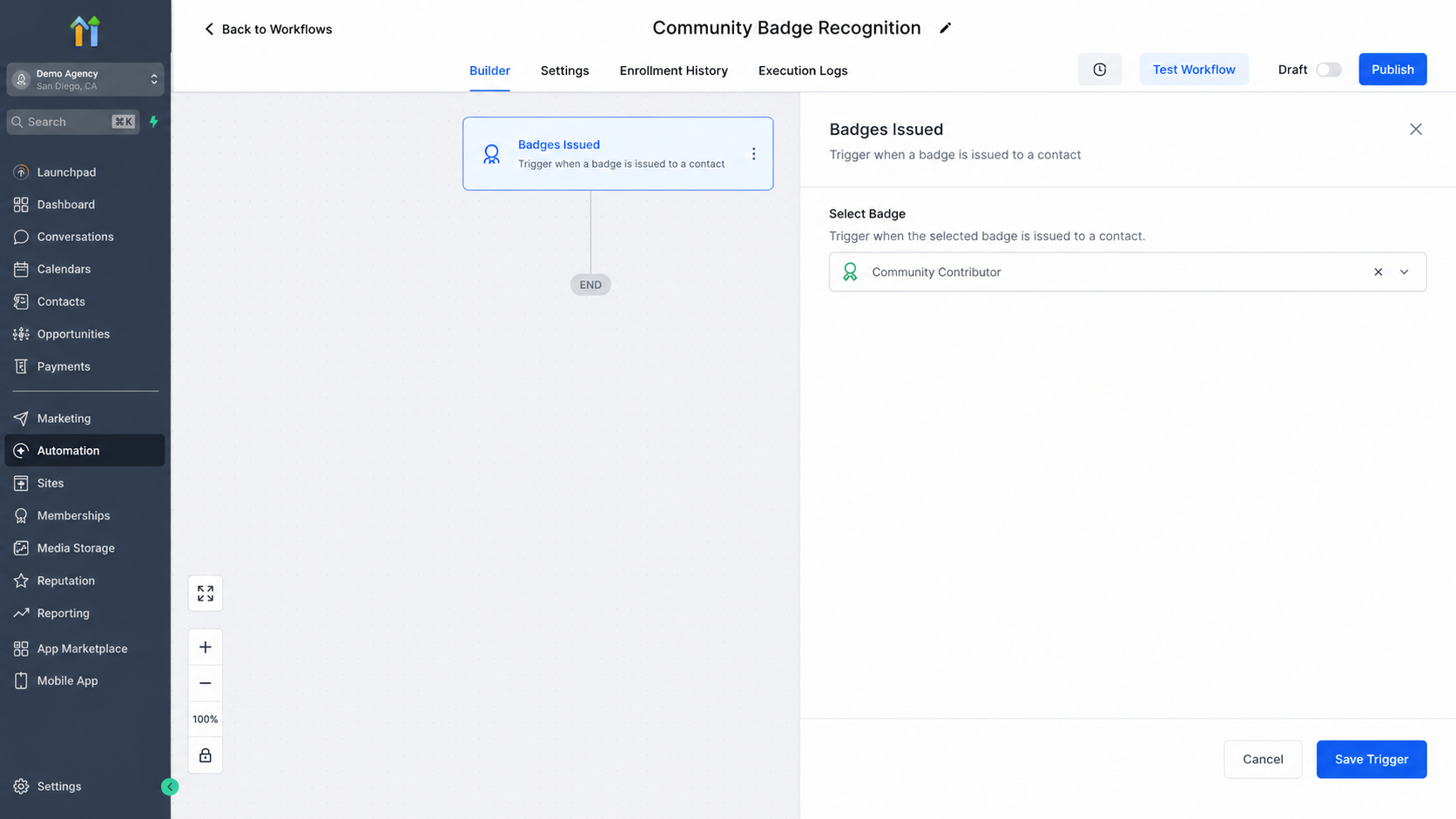
Start by creating a workflow in GoHighLevel and selecting the Badges Issued trigger. Configure it for the badge you want to use as the starting event.
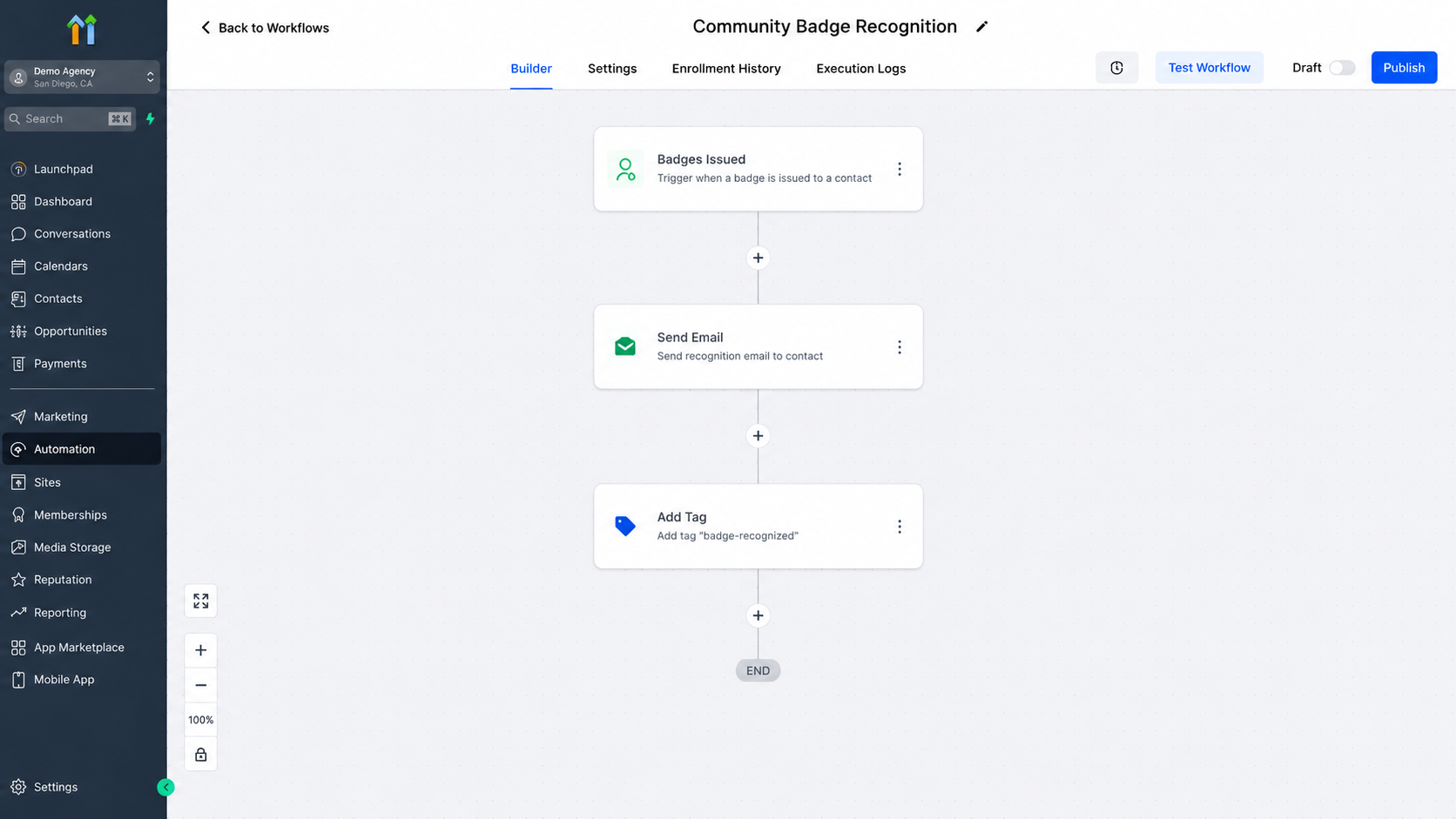
Once the trigger is configured, add the actions that should happen after the badge is issued.
For example, your workflow could send a personalized email or SMS congratulating the member. You could also update an appropriate contact property, add or remove a tag, create a task, move a contact through an appropriate pipeline process, or start another workflow when those actions fit your business process. These are examples of follow-up actions documented by HighLevel for badge-triggered workflows.
You can also place appropriate conditions or logic between the trigger and the follow-up actions when your use case requires additional control.
The important idea is to keep the workflow focused: the badge issuance starts the automation; your workflow actions create the resulting experience.
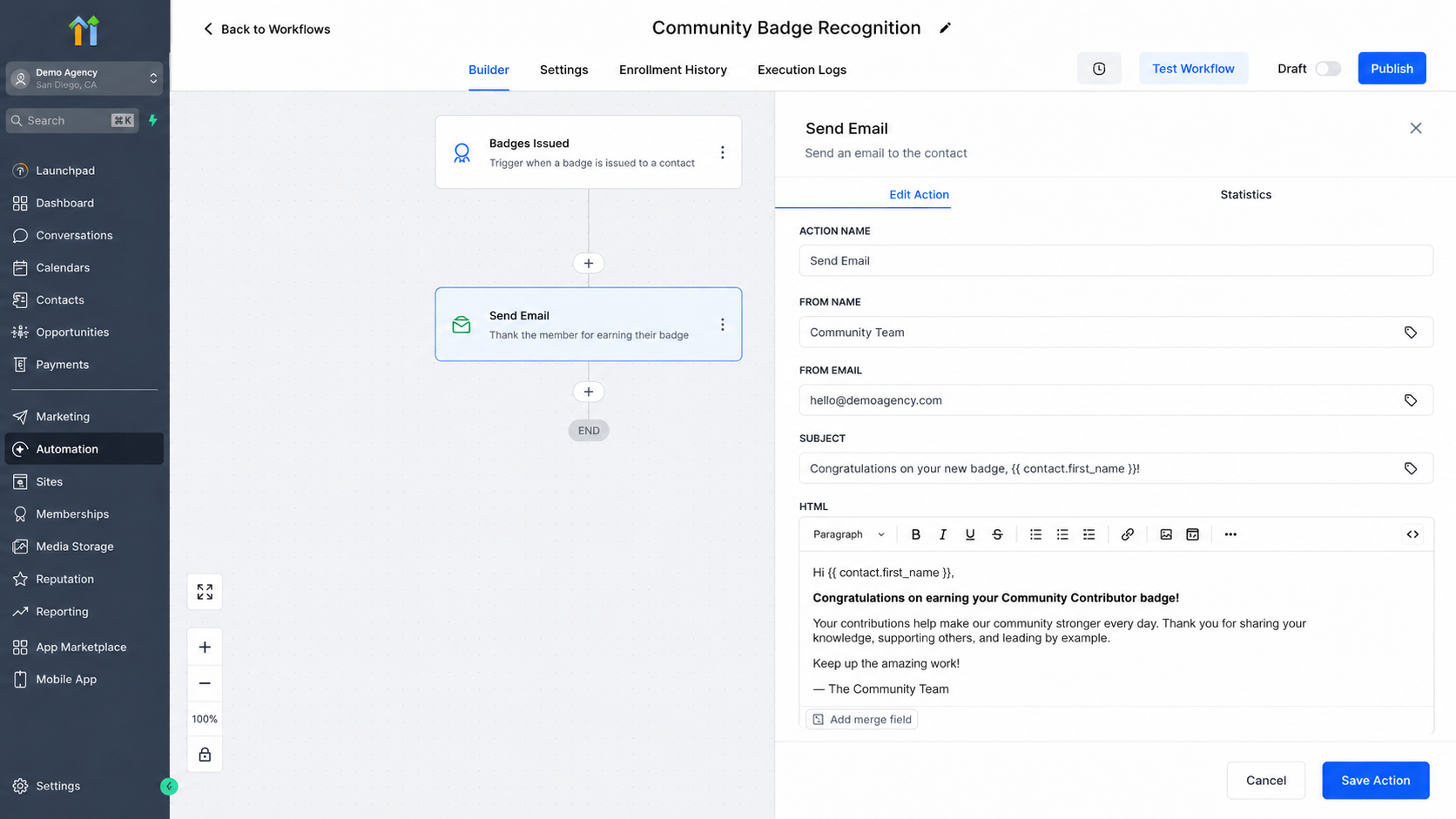
A Real-World Example
Imagine you operate a paid learning community where members receive badges for meaningful participation.
A member earns an important milestone badge. Once GoHighLevel registers that the badge has been issued, your workflow begins.
A practical sequence could look like this:
Badge is issued: The selected achievement badge is awarded to the member.
Workflow starts: The Badges Issued trigger detects the event.
Recognition message: The member receives a personalized congratulatory email or SMS.
Follow-up: The workflow performs an appropriate configured contact update or starts another automation.
Reward experience: If your business offers a reward for that milestone, the workflow can communicate or initiate the configured process for that reward.
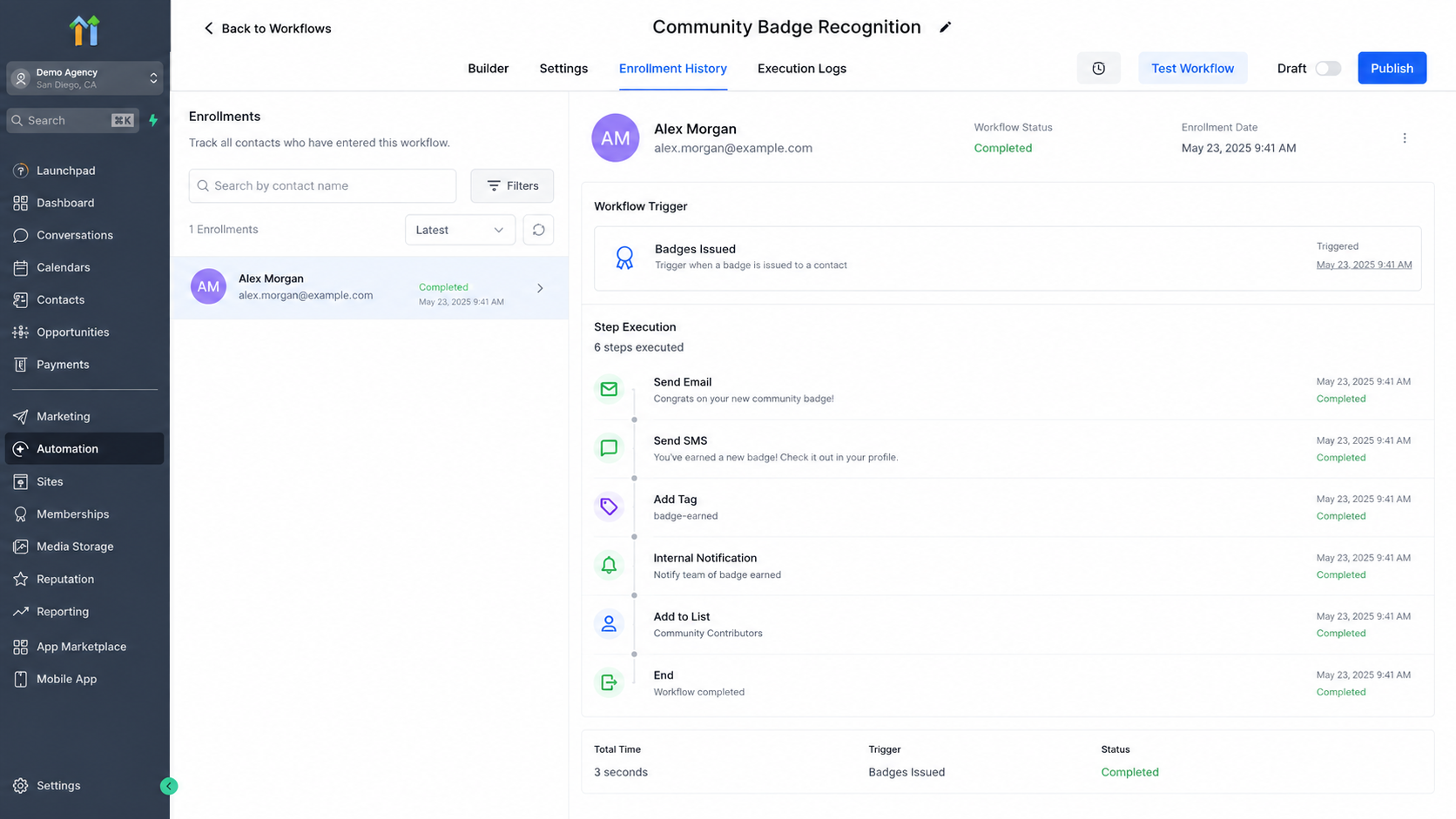
Enrollment History helps confirm that the badge event triggered the recognition workflow successfully.
For example, your message might congratulate the member on reaching the milestone and explain what they can do next. If your business has a special offer associated with that achievement, the communication could include the relevant offer rather than requiring an administrator to contact the member manually.
This approach makes the badge feel like part of a larger journey instead of an isolated credential.
Best Practices for Badge-Based Automation
Keep recognition personal. Use the member's information where appropriate so the message feels like genuine recognition rather than an automated notification.
Do not over-automate. Not every badge needs a long sequence of messages. Reserve stronger follow-up for milestones that genuinely matter to your members.
Match the response to the achievement. A major milestone may justify a reward or additional opportunity, while a smaller achievement may only need a short congratulatory message.
Avoid duplicate communication. Review your existing workflows before activating a badge-based automation so members do not receive overlapping messages from multiple workflows.
Test before going live. HighLevel recommends testing badge automation so you can verify that the badge event and subsequent workflow actions behave as expected.
Monitor the experience. After activation, review how members respond and refine your messaging, timing, and follow-up where necessary.
Turn Every Badge Into a Better Member Experience
A badge does more than mark an achievement. With the GoHighLevel Badges Issued Trigger, it can become the starting point for timely recognition, personalized communication, and meaningful follow-up.
The key is to think beyond simply awarding the badge. Detect the achievement, recognize the member, and then guide them toward the next valuable step. When configured thoughtfully, badge-based workflow automation can turn a small moment of recognition into a stronger and more engaging community experience.
FAQs
1. What is the Badges Issued Trigger in GoHighLevel?
The Badges Issued Trigger starts a GoHighLevel workflow when a configured badge is issued to a contact. It allows you to automatically respond to the badge event with appropriate workflow actions.
2. Does the Badges Issued Trigger automatically reward a community member?
No. The trigger only starts the workflow. Any reward, message, follow-up, or other action must be configured separately within the workflow.
3. What can I do after a badge is issued?
Depending on your workflow requirements and the actions available in your GoHighLevel account, you can send communications, update contact information, apply tags, create tasks, or continue the contact through another automation.
4. Can I send a congratulatory message automatically?
Yes. You can configure an appropriate communication action after the Badges Issued Trigger so members receive timely recognition when they earn a badge.
5. Can badge automation be used for community engagement?
Absolutely. Badge-based automation can help recognize participation, celebrate milestones, encourage continued activity, and create a more personalized community experience.
6. Should every badge trigger the same workflow?
Not necessarily. Different achievements may deserve different responses. Where the available trigger configuration and workflow logic support it, you can design appropriate paths for different badge-related scenarios.
7. Can I use a badge as the starting point for another automation?
Yes. A badge-issued event can be used as the starting point for additional workflow-based follow-up when that fits your business process.
8. How can I prevent members from receiving duplicate messages?
Review your existing workflows before activating a badge automation. Make sure another workflow is not already responding to the same event or sending similar communications.
Need Expert Help with GoHighLevel?
New to GoHighLevel and ready to get started? Buy your GoHighLevel account here and launch with confidence.
Already know what you need and want our team to handle everything, from complete setup and customization to funnels, workflows, automations, CRM, and pipelines? Click here.



