

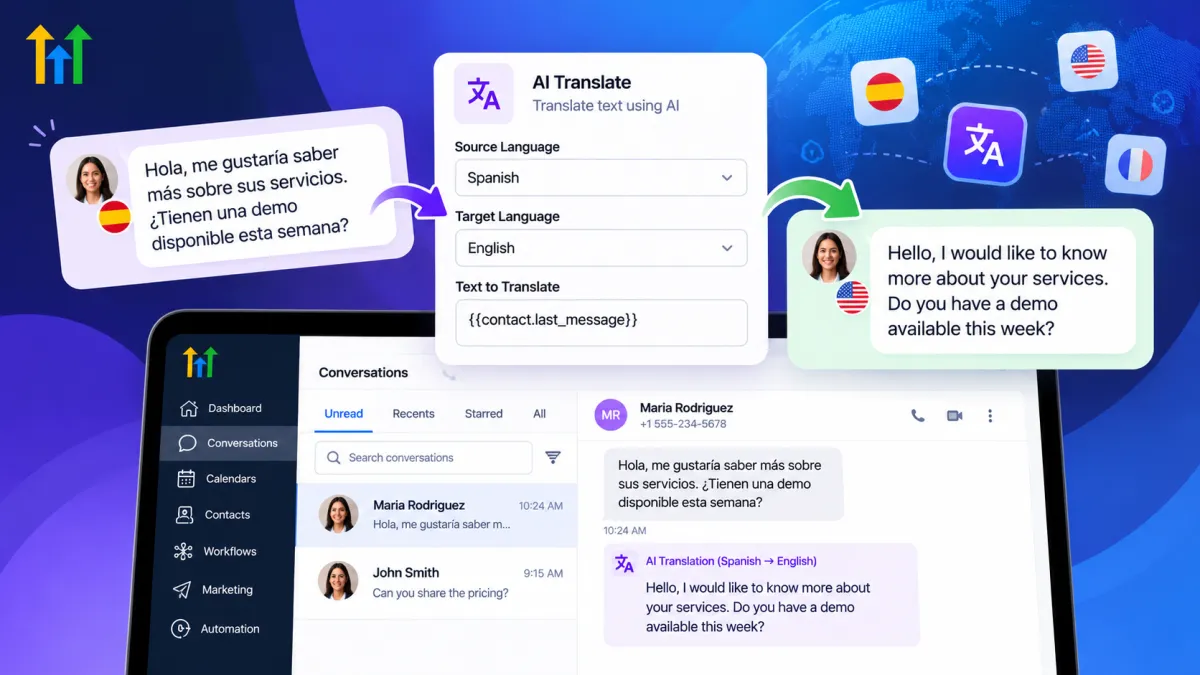
How to Use GoHighLevel AI Translate Action
How to Translate Customer Conversations Automatically Using the AI Translate Action in GoHighLevel
A customer sends your business a message, but there is one problem: it is written in a language your team does not speak fluently. Someone has to copy the text, open a translation tool, translate it, return to the CRM, and decide what to do next.
For an occasional message, that may be manageable. For a business serving customers across multiple languages, it quickly becomes repetitive.
The GoHighLevel AI Translate Action provides another option. Instead of treating translation as a separate manual task, businesses can incorporate it directly into GoHighLevel workflow automation, allowing text to be translated and the resulting output to be used later in the workflow.
What Is the GoHighLevel AI Translate Action?
AI Translate is an AI-powered action available inside HighLevel's workflow builder. Its purpose is straightforward: take provided text in one language and translate it into another language.
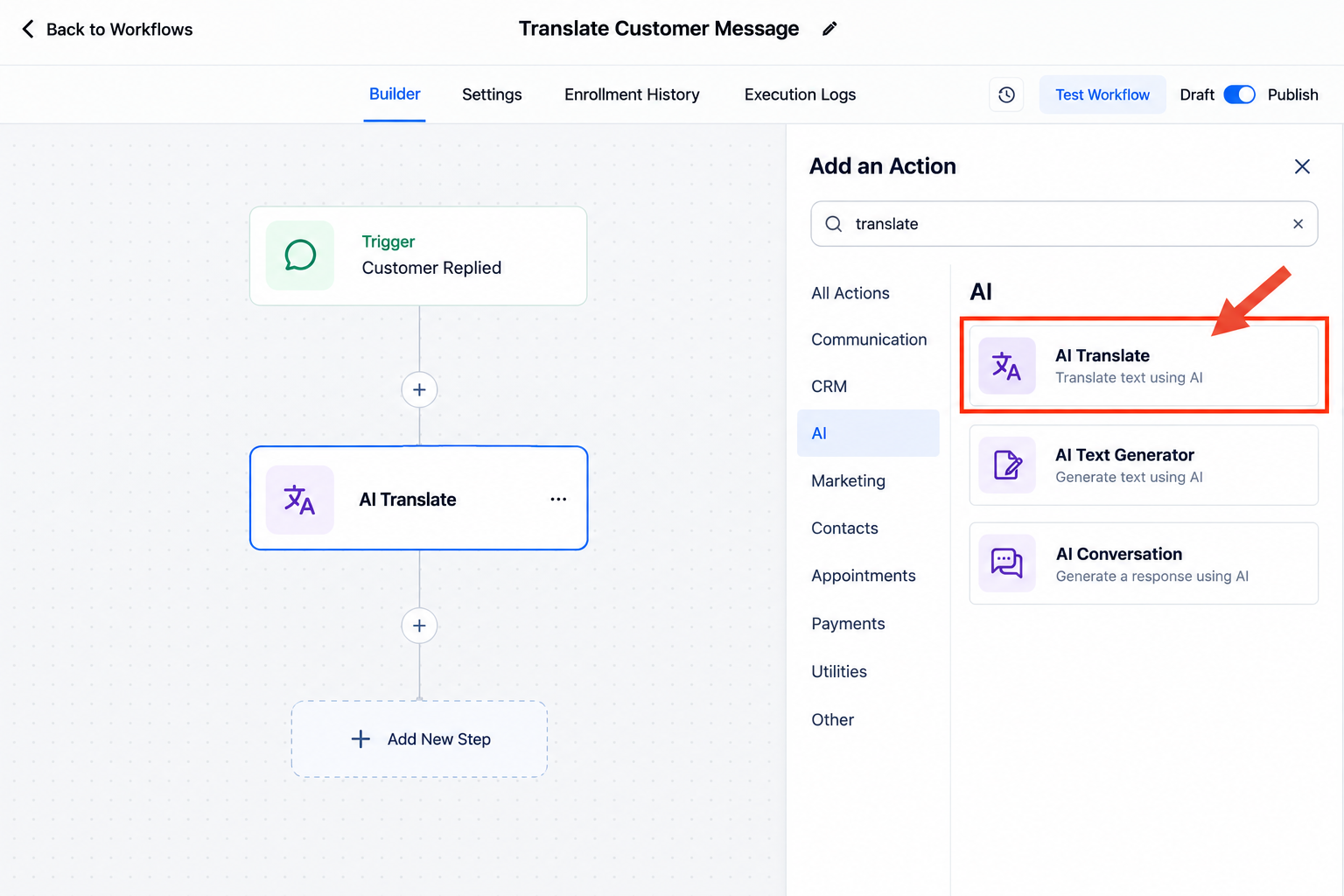
It is important to understand what that means in practice.
AI Translate is a workflow action, not a standalone system that automatically translates every customer conversation by itself. The surrounding workflow determines when the action runs, what text is provided to it, and what happens with the translated result.
HighLevel's documentation shows that users configure a source language, target language, and input text. The input can be static text or dynamic data inserted using variables. Once the action runs, its translated response becomes available as a workflow variable that can be referenced in a later step.
That makes translation one component of a larger automation rather than an isolated task.
Why Automatic Translation Matters
Language barriers can create operational friction long before they create a customer-service problem.
A team may need to move between its CRM and external translation tools simply to understand or prepare communication. Multiply those manual steps across dozens of leads or customers, and multilingual communication becomes harder to manage consistently.
GoHighLevel translation automation can reduce that repetitive work by keeping translation within an existing workflow.
This can be particularly useful for agencies working across different markets, businesses receiving international leads, and teams whose customers have different language preferences.
The objective is not to replace multilingual employees or professional translators. It is to make routine translation easier to incorporate into automated processes.
How Does the AI Translate Action Work?
The exact workflow will depend on what your business wants to accomplish, but the underlying structure is relatively simple.
A typical workflow concept could look like this:
Relevant workflow event → AI Translate → translated output → subsequent workflow action
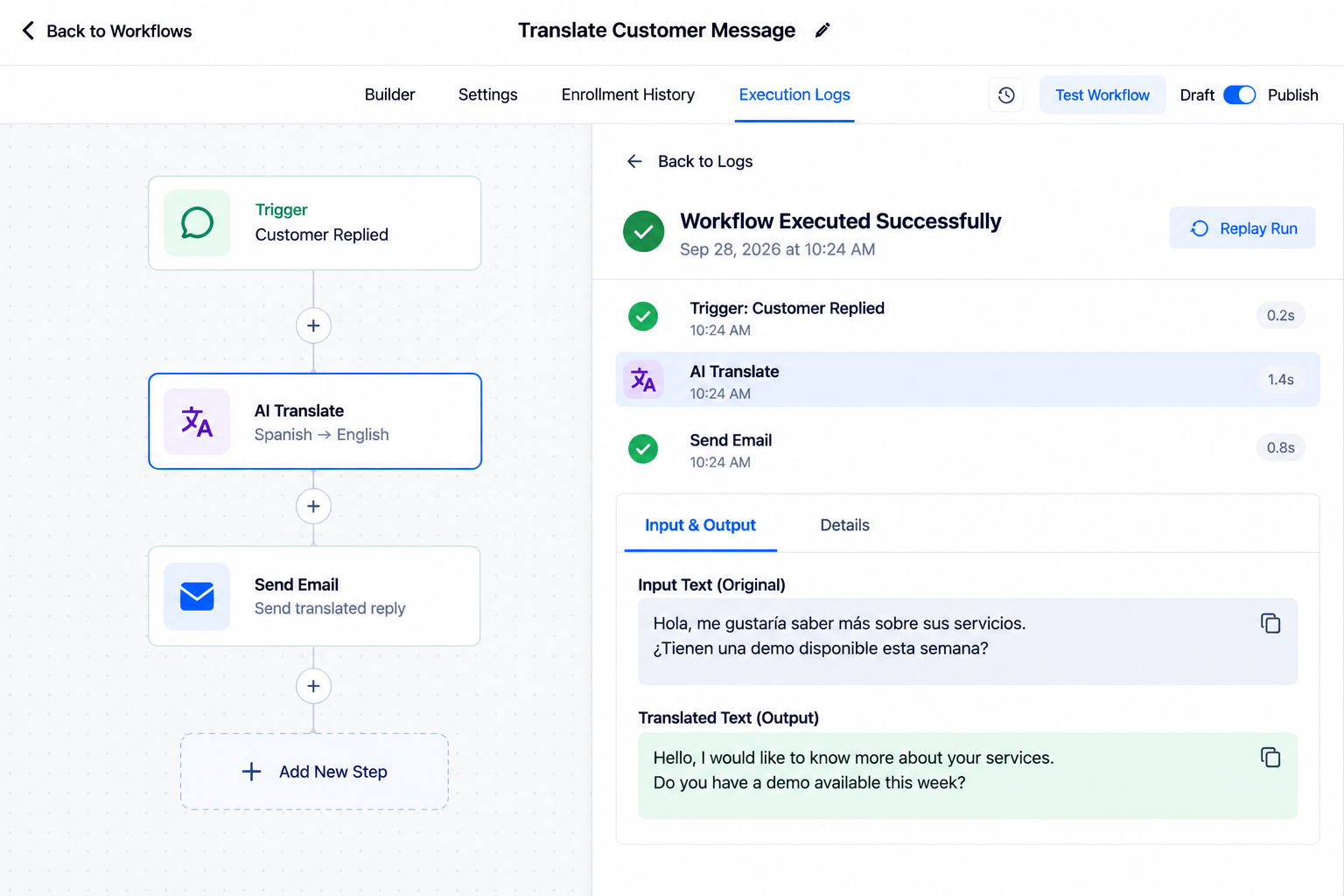
Within the AI Translate action, HighLevel currently lets you give the action a name, select the language the original content is written in, choose the language it should be translated into, and provide the input text. That text can include dynamic information from the workflow.
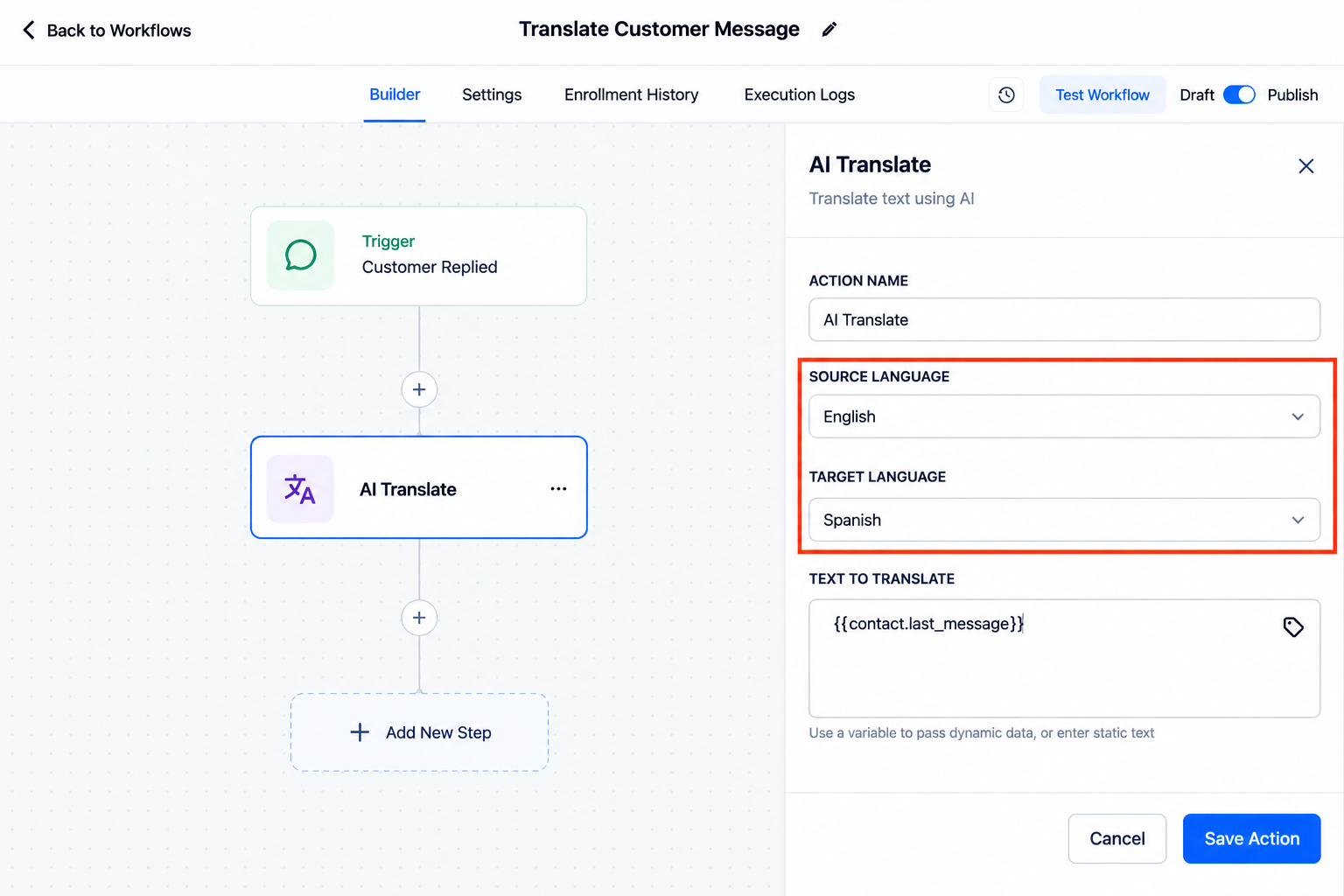
After processing the text, the action produces translated content that can be referenced as a custom workflow variable in a subsequent action.
HighLevel's own example demonstrates translating a welcome message and then inserting the translation output into a later Send Email action. Its documentation also describes translated output being usable in subsequent communication or internal-notification steps.
This separation is useful: AI Translate handles the translation, while the rest of your workflow controls what happens before and after it.
A Practical Multilingual Communication Example
Imagine a company works with both English- and French-speaking leads.
For contacts who should receive French communication, the business could create workflow logic that supplies English text to the GoHighLevel AI Translate Action, translates it from English to French, and then references that translated output in the appropriate later workflow step.
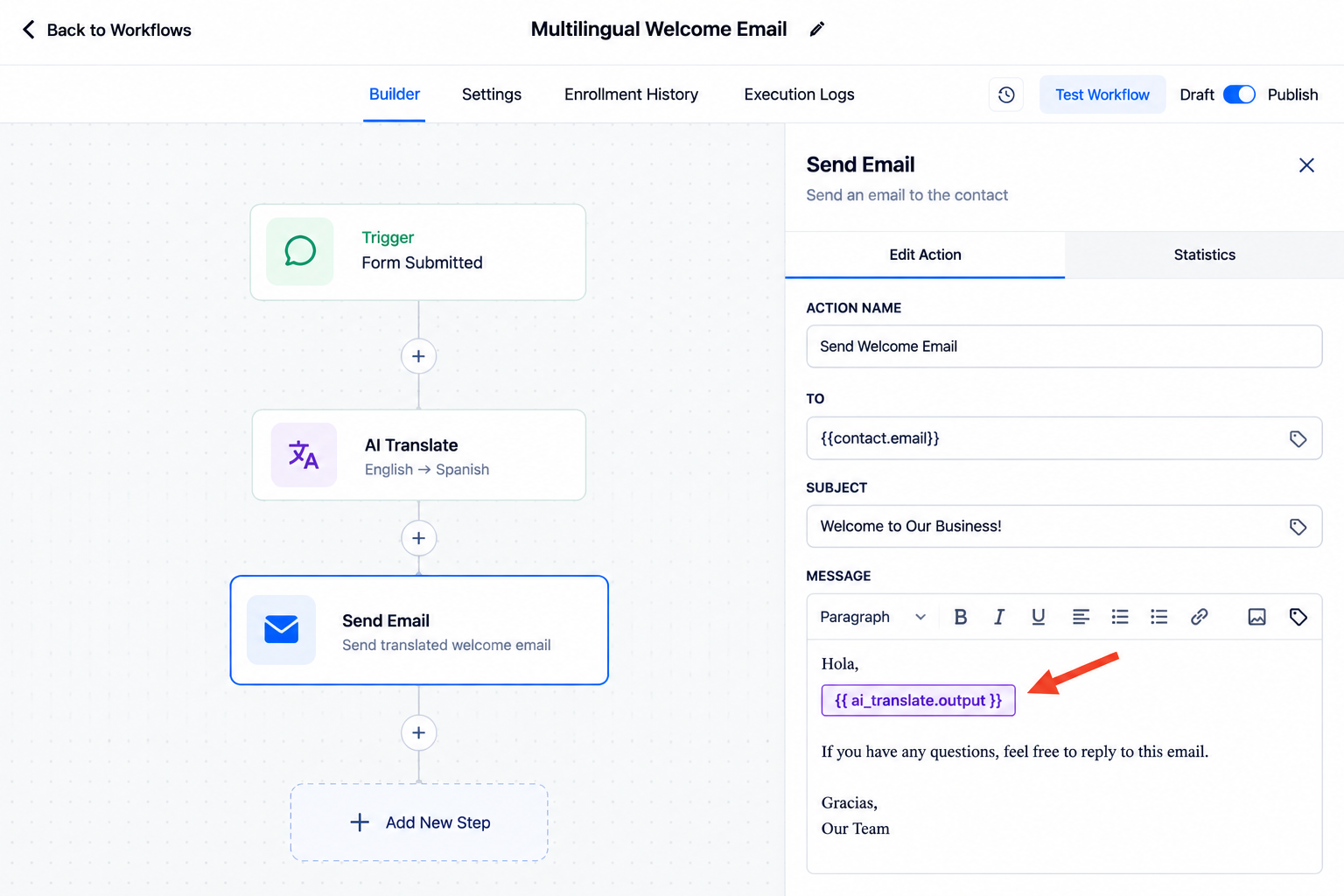
For example:
A relevant contact enters the workflow.
The workflow reaches AI Translate.
English content is supplied as the input.
The action translates that content into French.
A later action references the translated output.
HighLevel specifically documents a similar example involving a new contact, a French language preference, a translated welcome message, and a subsequent email.
The important point is that the translation does not define the entire automation. Your workflow logic still determines which contacts should reach that action and how its result should be used.
Best Use Cases for GoHighLevel AI Translate
Customer support: Teams can incorporate translation into workflows designed to help staff process multilingual customer communication more efficiently.
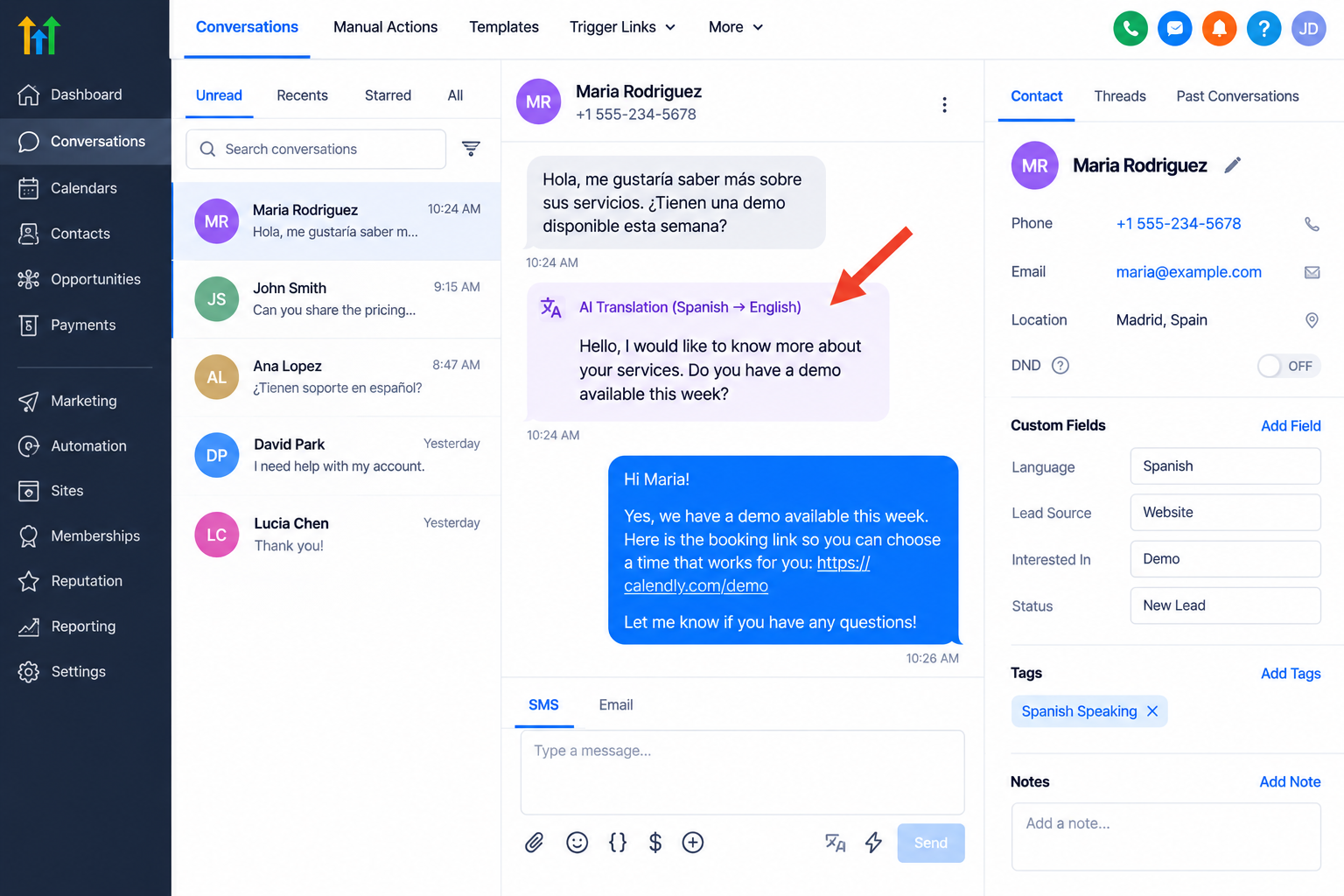
International lead management: Businesses receiving leads across different markets can build language considerations into their lead-management processes instead of relying entirely on manual translation.
Appointment communication: Where appropriate workflow logic and customer language information are available, standard appointment-related text can be translated before being used in a later communication step.
Multilingual sales teams: Translation can help teams process or prepare routine text when prospects and staff do not share the same primary language.
Agencies: Agencies serving clients across multiple regions can create more structured multilingual workflows without making external translation a manual step every time.
Benefits of AI Translation Inside GoHighLevel
The biggest advantage is operational simplicity. Teams can reduce repetitive copying and pasting between HighLevel and separate translation tools.
Because translated content remains part of the workflow, businesses can also build more centralized processes for multilingual customer communication.
As volume increases, that becomes especially useful. Instead of asking staff to repeat the same translation process manually, businesses can define intentional workflow paths and reuse them where appropriate.
Best Practices and Limitations
AI-generated translation should still be treated as machine-generated content.
Test your workflow thoroughly before publishing it, and review translations that involve contracts, financial information, legal language, sensitive customer issues, or wording where subtle differences in meaning matter.
Context is equally important. A short sentence can have different meanings depending on the conversation around it, so avoid assuming that every isolated translation will perfectly preserve nuance, tone, or intent.
Also review your available HighLevel settings and current documentation when building the workflow, because product interfaces, availability, and AI functionality can change over time.
Conclusion
The GoHighLevel AI Translate Action gives businesses a practical way to bring translation directly into workflow automation.
Its value is not that it magically manages every multilingual conversation. Its value comes from being a reusable workflow step: provide text, translate it into the intended language, and make the resulting content available to whatever appropriate step comes next.
For businesses already using HighLevel to manage leads and customer communication, that can make multilingual processes more organized, scalable, and easier to manage while still leaving room for human review when accuracy and nuance matter most.
Frequently Asked Questions
1. What is the GoHighLevel AI Translate Action?
The GoHighLevel AI Translate Action is a workflow action that translates provided text from a selected source language into a selected target language. The translated output can then be referenced in subsequent workflow steps.
2. Can GoHighLevel automatically translate customer conversations?
GoHighLevel can incorporate AI-powered translation into automated workflows, but the AI Translate Action does not independently translate every customer conversation. The workflow must determine when translation occurs, what text is translated, and how the translated output is used.
3. Can I use the translated text in other GoHighLevel workflow actions?
Yes. The translated output generated by the AI Translate Action can be referenced as a workflow variable in subsequent supported workflow actions, allowing translation to become part of a larger automation.
4. What businesses can benefit from GoHighLevel AI Translate?
It can be useful for businesses serving multilingual customers, international leads, agencies working across different markets, customer support teams, and sales teams that regularly handle communication in multiple languages.
5. Is the GoHighLevel AI Translate Action 100% accurate?
AI-generated translations should not be assumed to be 100% accurate. Businesses should review important or sensitive translations, particularly those involving legal, financial, contractual, or highly nuanced communication.
Need Expert Help with GoHighLevel?
New to GoHighLevel and ready to get started? Buy your GoHighLevel account here and launch with confidence.
Already know what you need and want our team to handle everything, from complete setup and customization to funnels, workflows, automations, CRM, and pipelines? Click here.



