

How to Extract Customer Data Automatically Using the AI Extract Data Action in GoHighLevel
How to Extract Customer Data Automatically Using the AI Extract Data Action in GoHighLevel
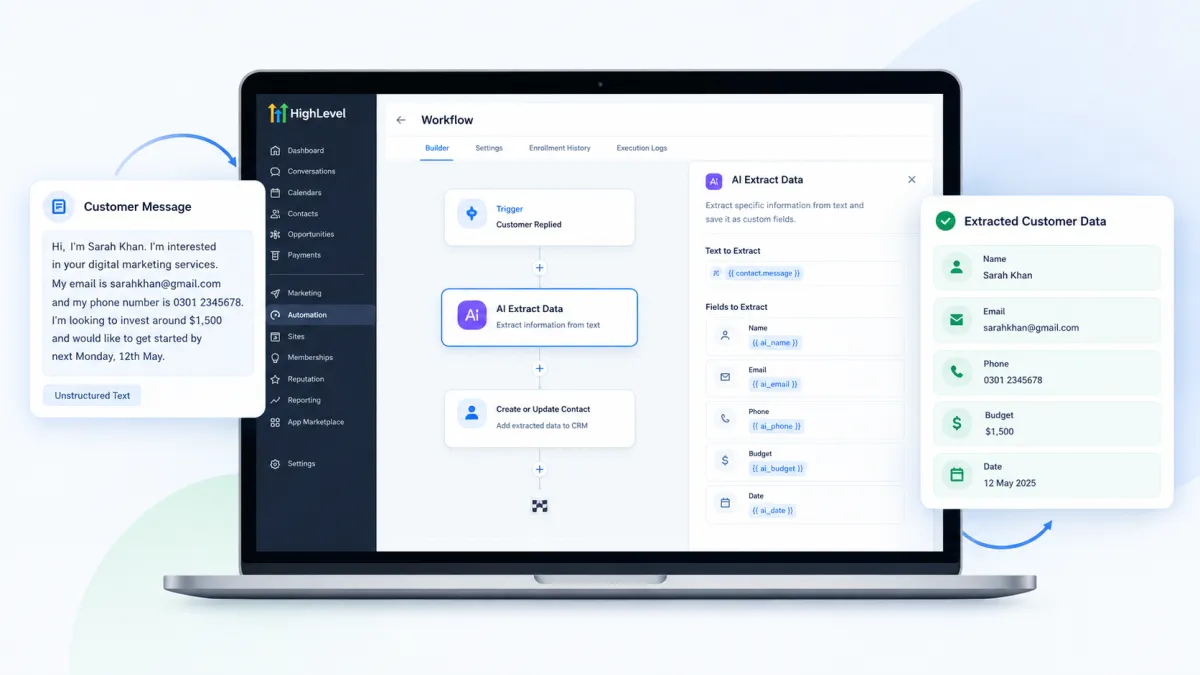
A customer can give you their name, phone number, budget, order details, or service requirements in a message, email, webhook payload, or another block of text. The problem is that useful information is not always delivered in a clean format that your CRM can immediately use. Someone may have to read the message, find the important details, copy them, and enter them into the right fields. GoHighLevel’s AI Extract Data Action helps automate this part by turning unstructured text into structured information that can be used by later steps in a workflow.
What Is the AI Extract Data Action in GoHighLevel?
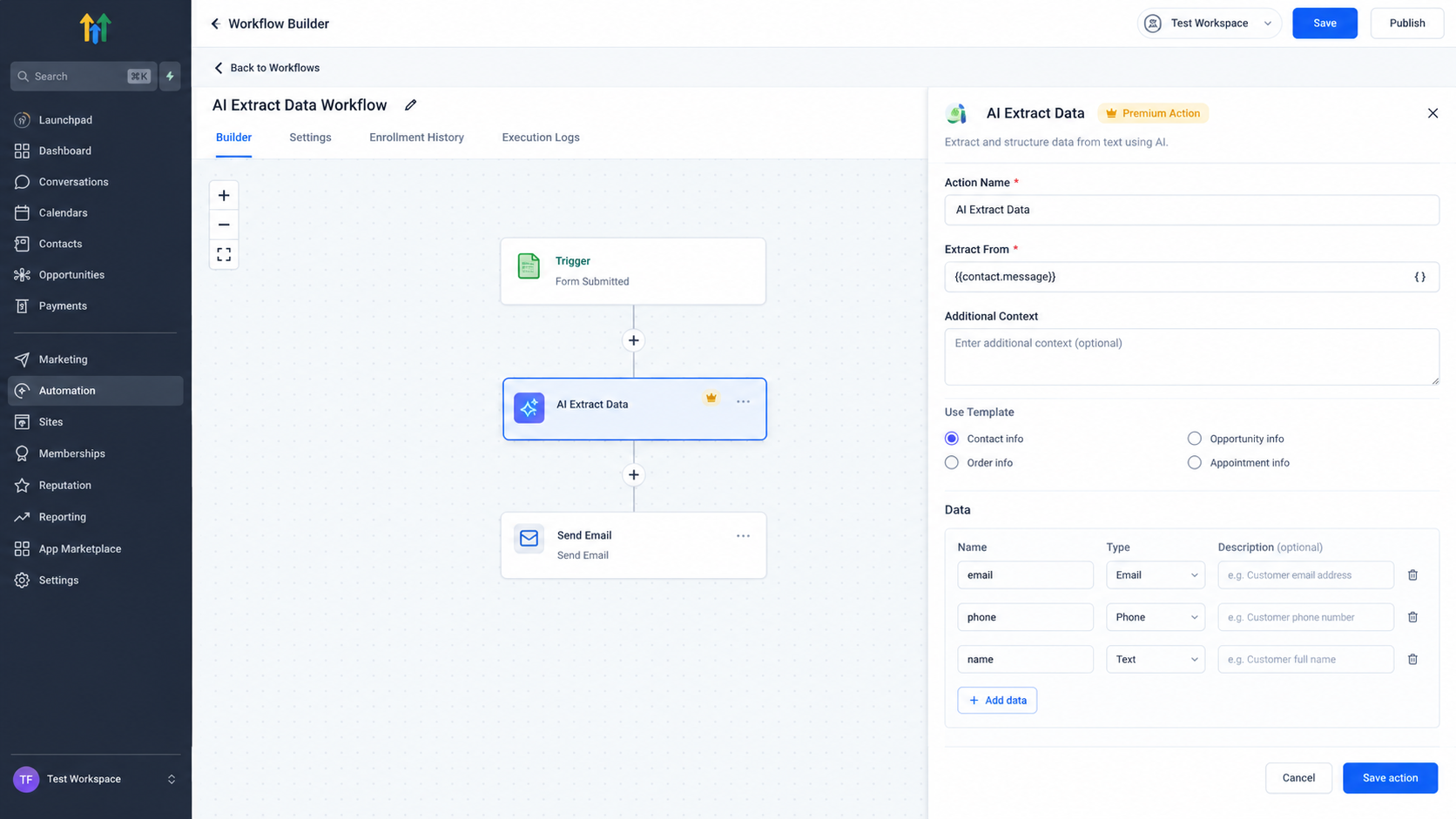
The AI Extract Data Action is a workflow action that uses AI to identify specific information from unstructured text and return it as structured workflow values.
Instead of manually searching through a large block of text, you define the information you want to extract. This could include a customer name, email address, phone number, budget, order ID, amount, date, or other information that matches the supported data types.
The action supports Text, Email, Phone, Number, and Date data types. GoHighLevel also provides templates for common extraction requirements, including Contact Info, Opportunity Info, Order Info, and Appointment Info. These templates can be edited to match the information your workflow actually needs.
How the AI Extract Data Action Works
The process is straightforward. Your workflow provides the action with a text based input, and the AI looks through that input for the fields you have defined.
For example, suppose a lead notification contains this information in plain text:
“John Smith is looking for a roof replacement. His budget is around $8,000 and he would like the work completed next month.”
You could configure the action to extract the customer name, budget, and timeline. Instead of treating the entire message as one piece of text, the workflow receives these details as separate structured values.
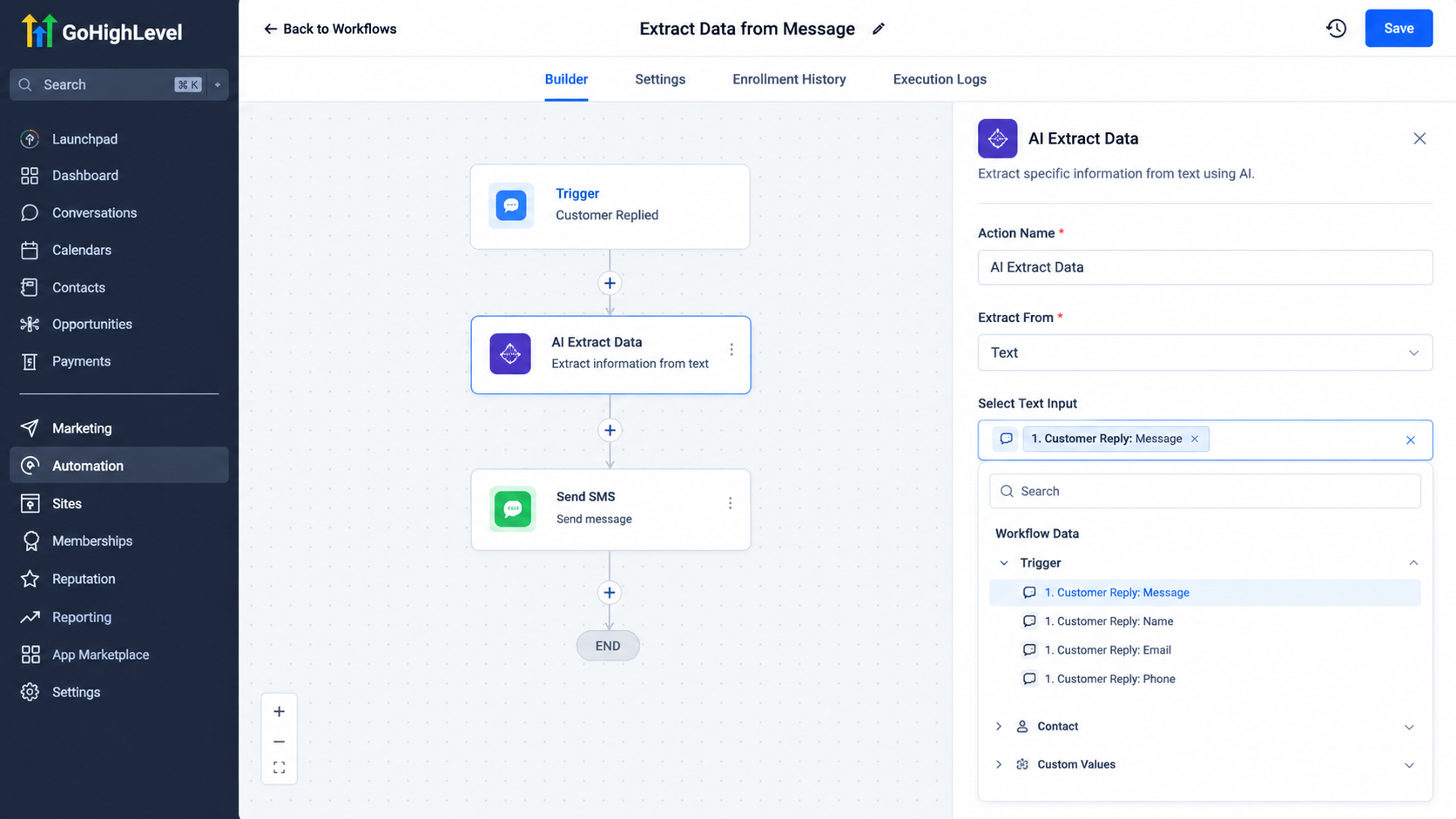
You can also provide Additional Context. This is optional information that helps the AI understand what type of content it is analyzing and what it should look for. This can be particularly useful when the source text has a format that may vary.
How to Use AI Extract Data in a Workflow
Start by opening the workflow where you want to perform the extraction and add the AI Extract Data action.
Next, choose the text that the action should analyze in the Extract From field. The available input can come from a text based value available in the workflow, such as an email body, SMS content, webhook payload, form response text, or output from a previous action.
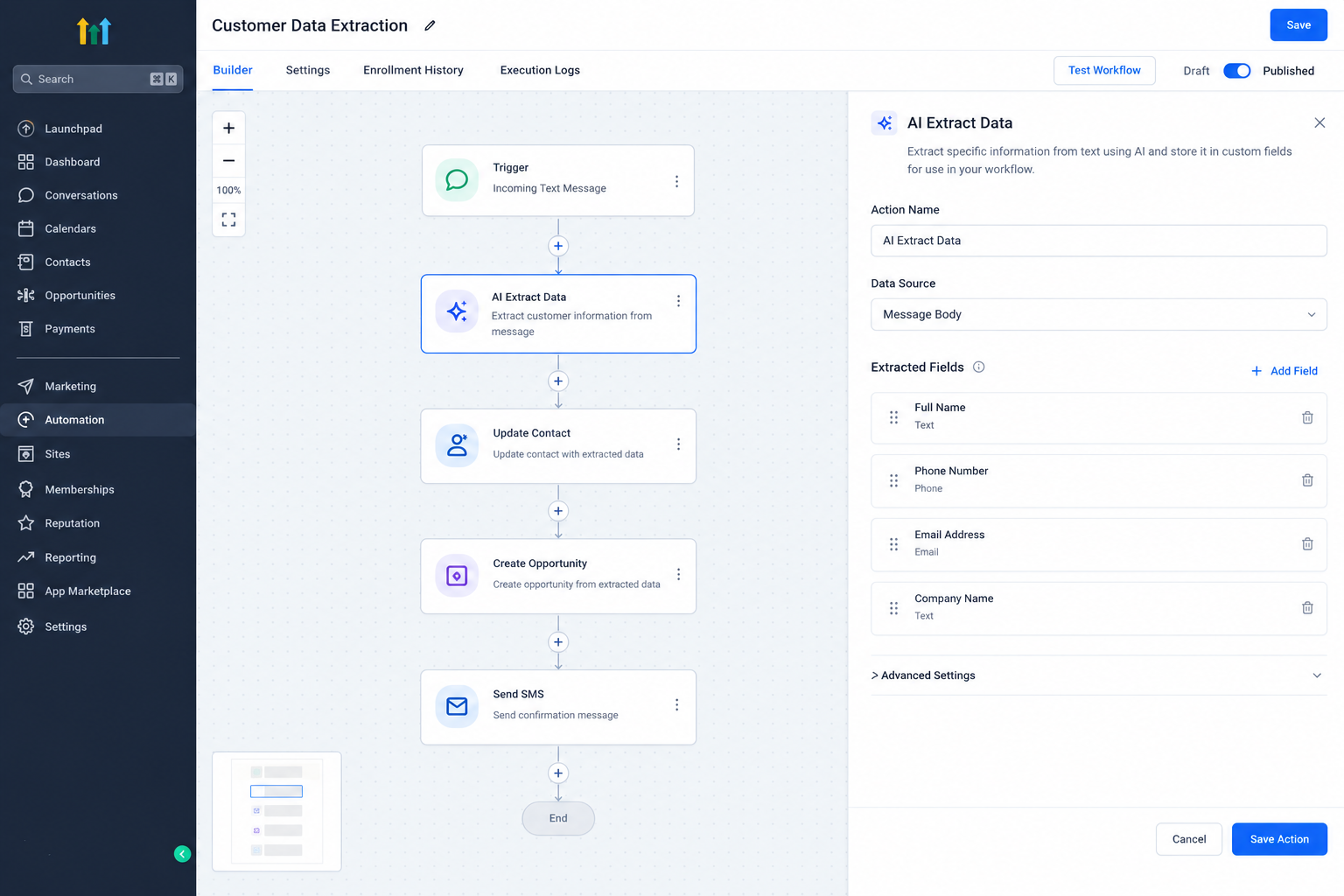
After selecting the input, define the information you want to extract. You can start with one of the available templates or create your own fields.
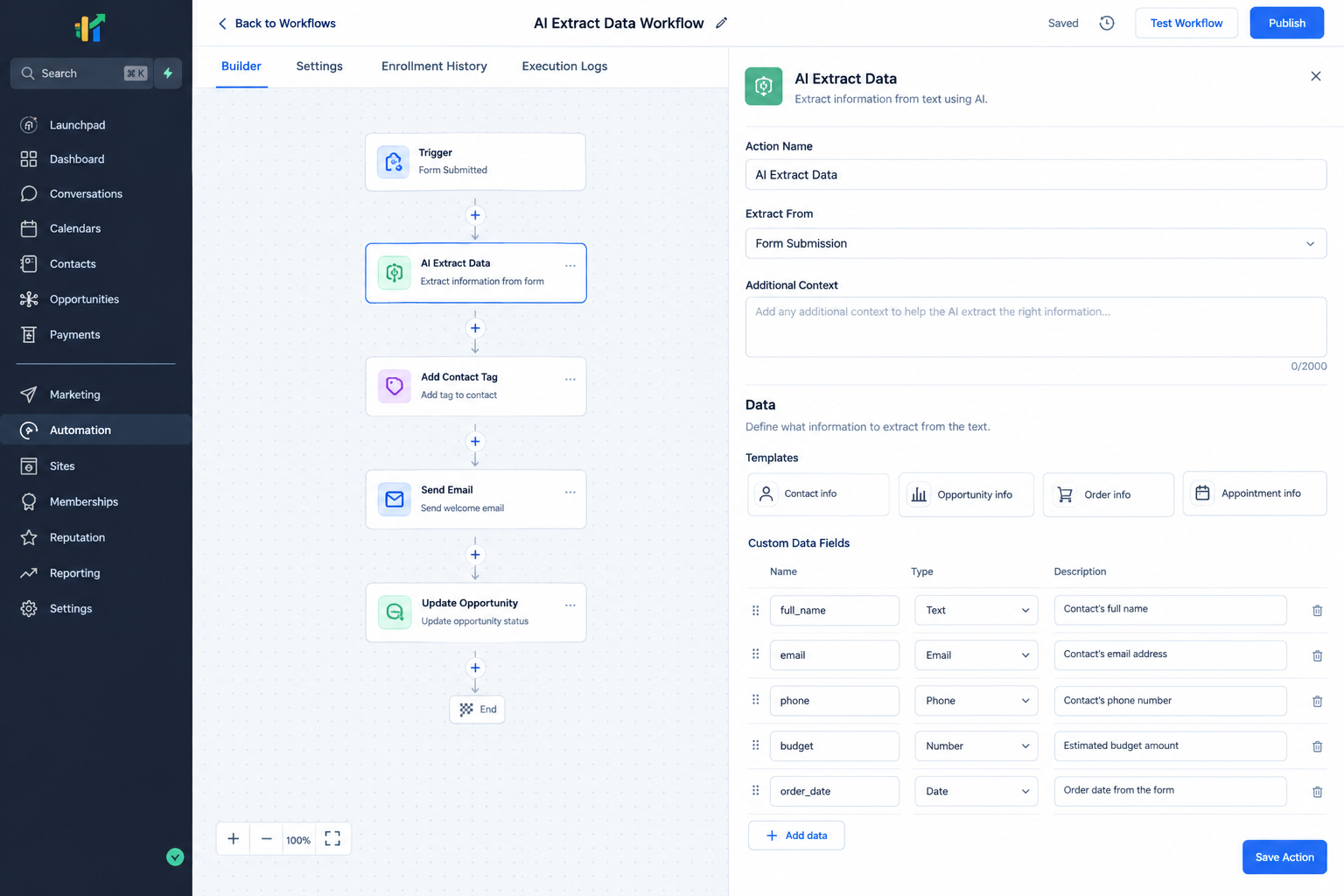
For each field, specify its name, data type, and an optional description. A clear description can give the AI more guidance about what information it should identify.
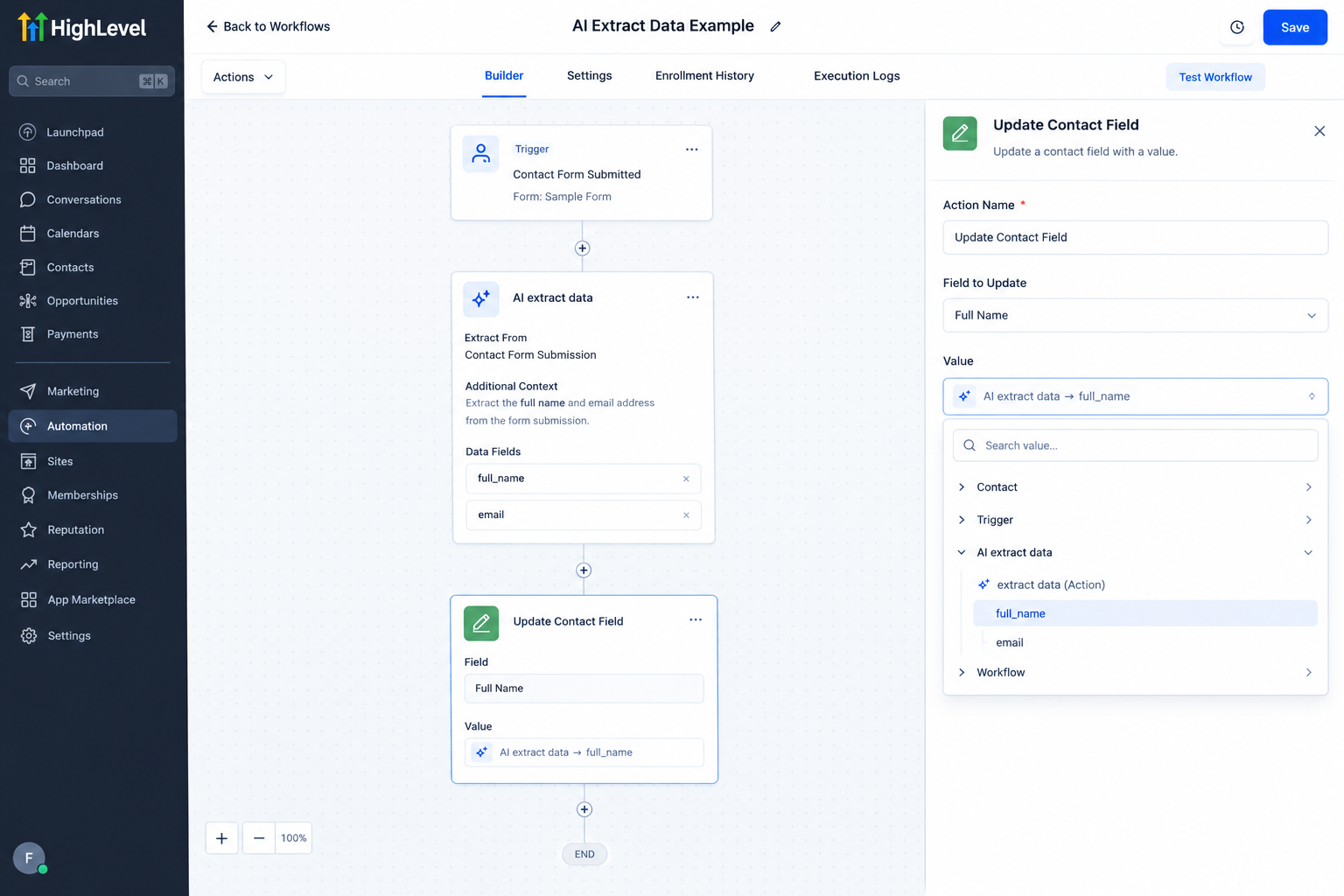
Once the action is saved, the extracted values become available through the custom value picker in subsequent workflow actions.
This is an important part of the process. AI Extract Data does not automatically save the extracted information to a contact or opportunity. The values remain available within the workflow, so you need a later action to store or use them.
A Practical Example
Imagine a business receives lead notifications by email. The email contains the prospect’s name, email address, phone number, budget, and service request, but the information is presented as plain text.
A workflow can receive the email and pass the relevant email content to AI Extract Data. The action can then extract the fields the business needs, such as name, email, phone, and budget.
A later workflow action can use those extracted values to create or update a contact. The workflow can also use the information in an opportunity, notification, or other downstream action.
The benefit is not that AI replaces the CRM. It helps convert information that arrives as unstructured text into values that the CRM workflow can actually work with.
Why AI Data Extraction Matters for Businesses
Many businesses receive customer information from more sources than their CRM fields can directly capture. Important details may arrive through emails, messages, external systems, or webhook data.
When this information remains buried inside text, automation becomes harder. AI Extract Data provides a bridge between unstructured information and structured workflow data.
Once the values are extracted, they can support processes such as updating contact information, creating opportunities, sending notifications, personalizing messages, or making workflow decisions with If Else conditions.
This makes GoHighLevel workflow automation more useful when the starting information is not already organized into separate CRM fields.
Best Practices for Better Extraction
Keep the fields focused on information your workflow actually needs. Defining unnecessary fields can make the extraction less useful.
Use clear field descriptions when the information could be ambiguous. Additional Context can also help explain what type of text the AI is processing.
Finally, always think about what should happen after extraction. Since the action only makes the values available to later workflow steps, add the appropriate downstream action to store or use the information.
Conclusion
The AI Extract Data Action gives GoHighLevel workflows a practical way to work with information hidden inside unstructured text. By defining the fields you need, extracting them from available workflow data, and passing the results into later actions, businesses can reduce manual data entry and build more useful automation around customer information.
Frequently Asked Questions (FAQs)
1. What can GoHighLevel AI Extract Data extract?
It can extract structured values from text using supported types such as Text, Email, Phone, Number, and Date.
2. Where can AI Extract Data get information from?
It can work with text based workflow values including email content, SMS messages, webhook payloads, form response text, and previous workflow outputs.
3. Does AI Extract Data automatically update the contact?
No. The extracted values are available to later workflow actions. You need another action to save them to a contact, opportunity, or another destination.
4. Do I have to use an extraction template?
No. Templates are optional. You can modify a template or create your own fields based on the information your workflow needs.
5. Is AI Extract Data a premium action?
Yes. HighLevel identifies AI Extract Data as a premium workflow action, and executions can incur additional charges.
Need Expert Help with GoHighLevel?
New to GoHighLevel and ready to get started? Buy your GoHighLevel account here and launch with confidence.
Already know what you need and want our team to handle everything, from complete setup and customization to funnels, workflows, automations, CRM, and pipelines? Click here.



