

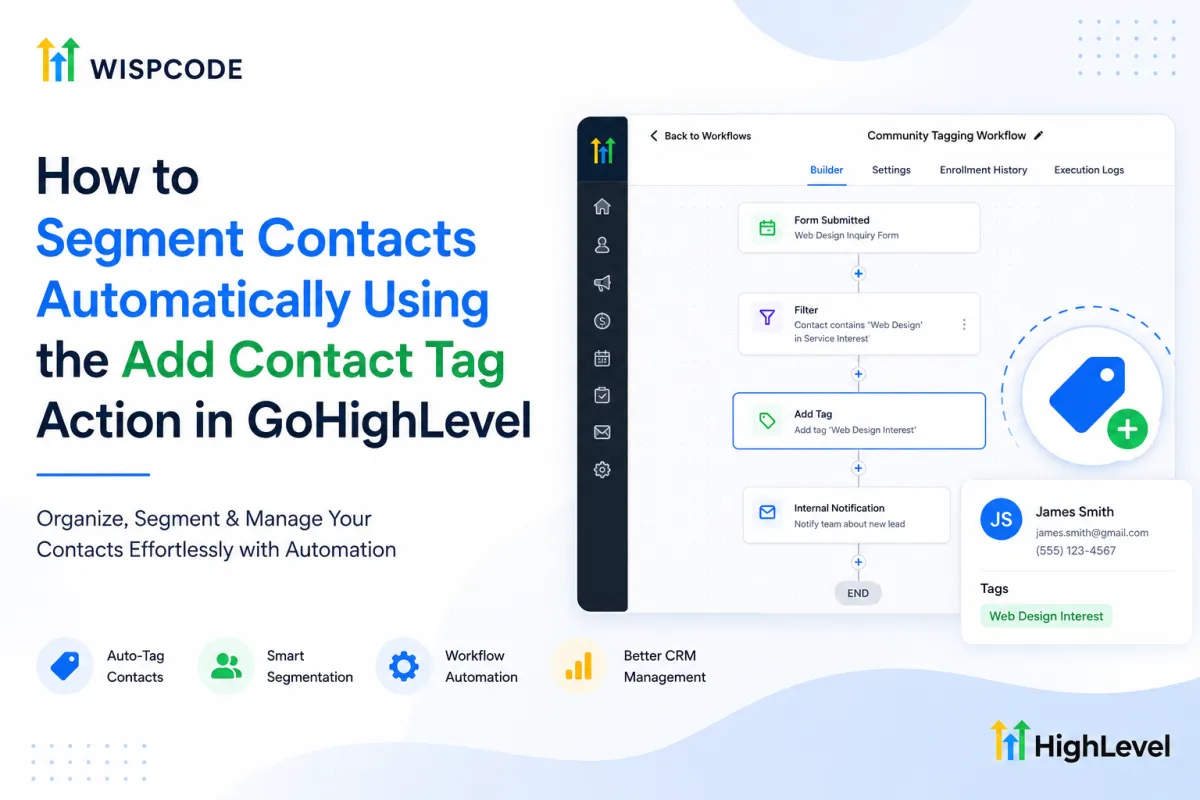
How to Segment Contacts Using Add Contact Tag in GoHighLevel
How to Segment Contacts Automatically Using the Add Contact Tag Action in GoHighLevel
Managing a small contact database is relatively simple. But once hundreds or thousands of leads, prospects, and customers enter your CRM, keeping them properly organized can become a challenge. Without clear segmentation, your team may struggle to identify where contacts came from, what they are interested in, or which follow-up process applies to them.
This is where the GoHighLevel Add Contact Tag action can help. By adding tags automatically through workflows, you can organize contacts based on predefined criteria without asking your team to manually update every record.
Used correctly, automated tagging can make your GoHighLevel CRM cleaner, easier to manage, and more scalable as your contact database grows.
What Is Contact Segmentation in GoHighLevel?
Contact segmentation means organizing your CRM contacts into meaningful groups based on information or criteria that matter to your business.
For example, you might want to separate:
New leads from existing customers
Contacts from different lead sources
People interested in different products or services
Contacts who completed a specific form
Leads requiring different follow-up strategies
GoHighLevel tags can support this organization. A tag is essentially a label associated with a contact that helps your team identify or categorize that person.
For example, an agency might use tags such as Facebook Lead, SEO Interest, Web Design Lead, or Existing Customer.
Instead of manually applying these labels every time a contact takes a relevant action, you can use GoHighLevel CRM automation to handle the tagging consistently.
What Is the GoHighLevel Add Contact Tag Action?
The GoHighLevel Add Contact Tag action is an action available inside workflows. When a contact reaches this step, the workflow applies the selected tag to that contact.
However, there is an important distinction to understand: the Add Contact Tag action does not independently determine how a contact should be segmented.
The workflow logic controls when the contact reaches the action. This can involve the workflow trigger, filters, conditions, and other steps you configure.
The process can be understood simply as:
Contact meets defined criteria → Workflow runs → Add Contact Tag action executes → Selected tag is added
This makes the action useful because tagging becomes part of a larger automation strategy rather than a separate manual task.
How to Automatically Segment Contacts Using Add Contact Tag
You do not need a complicated automation to start using GoHighLevel contact tagging. A simple workflow can handle many common segmentation tasks.
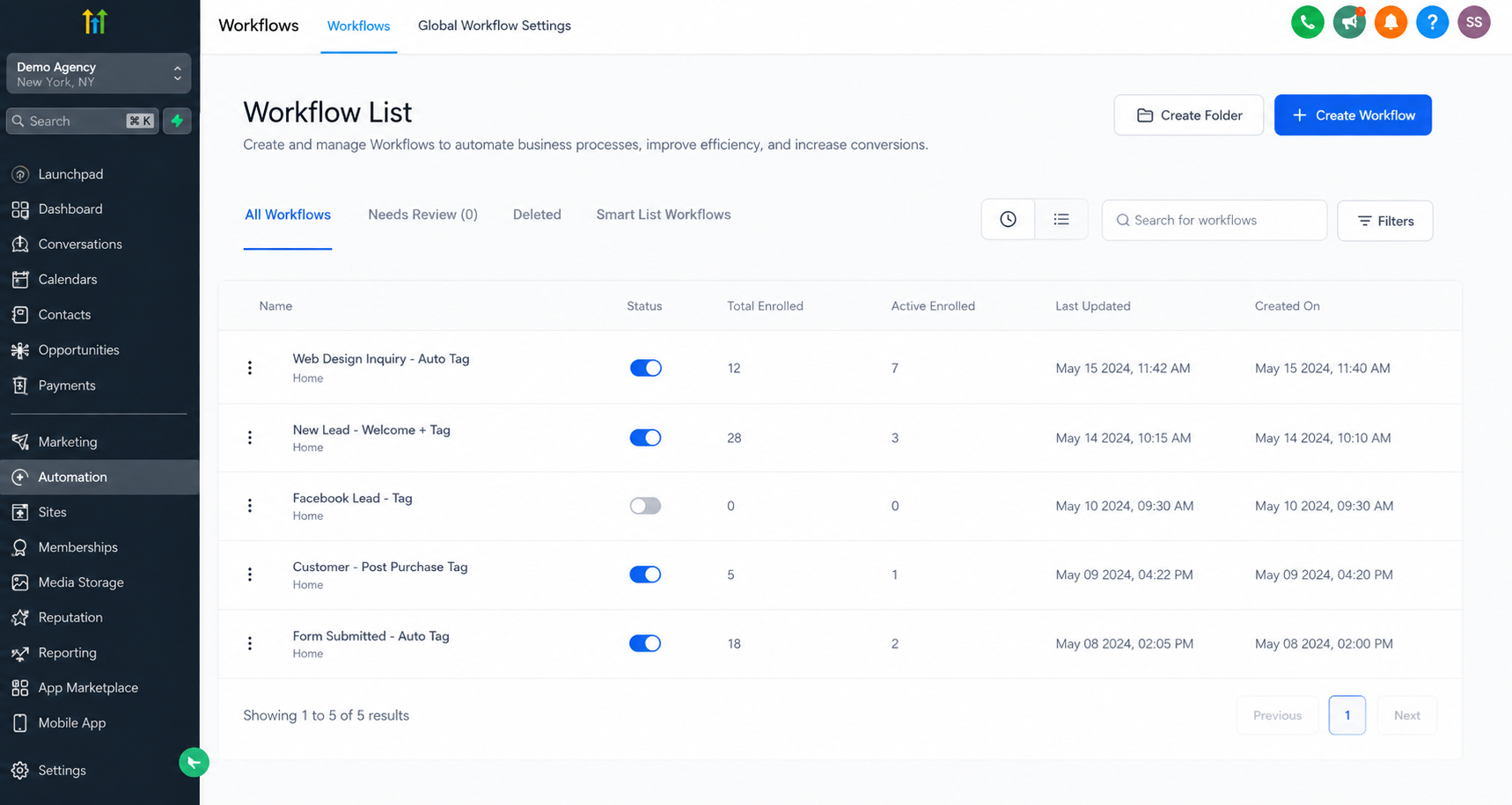
Step 1: Decide What You Want to Segment
Start by identifying a meaningful contact group.
For example, imagine you run a marketing agency offering web design and SEO. You may want contacts interested in web design to receive a Web Design Interest tag.
Having a clear purpose before building the workflow prevents unnecessary tags from accumulating in your CRM.
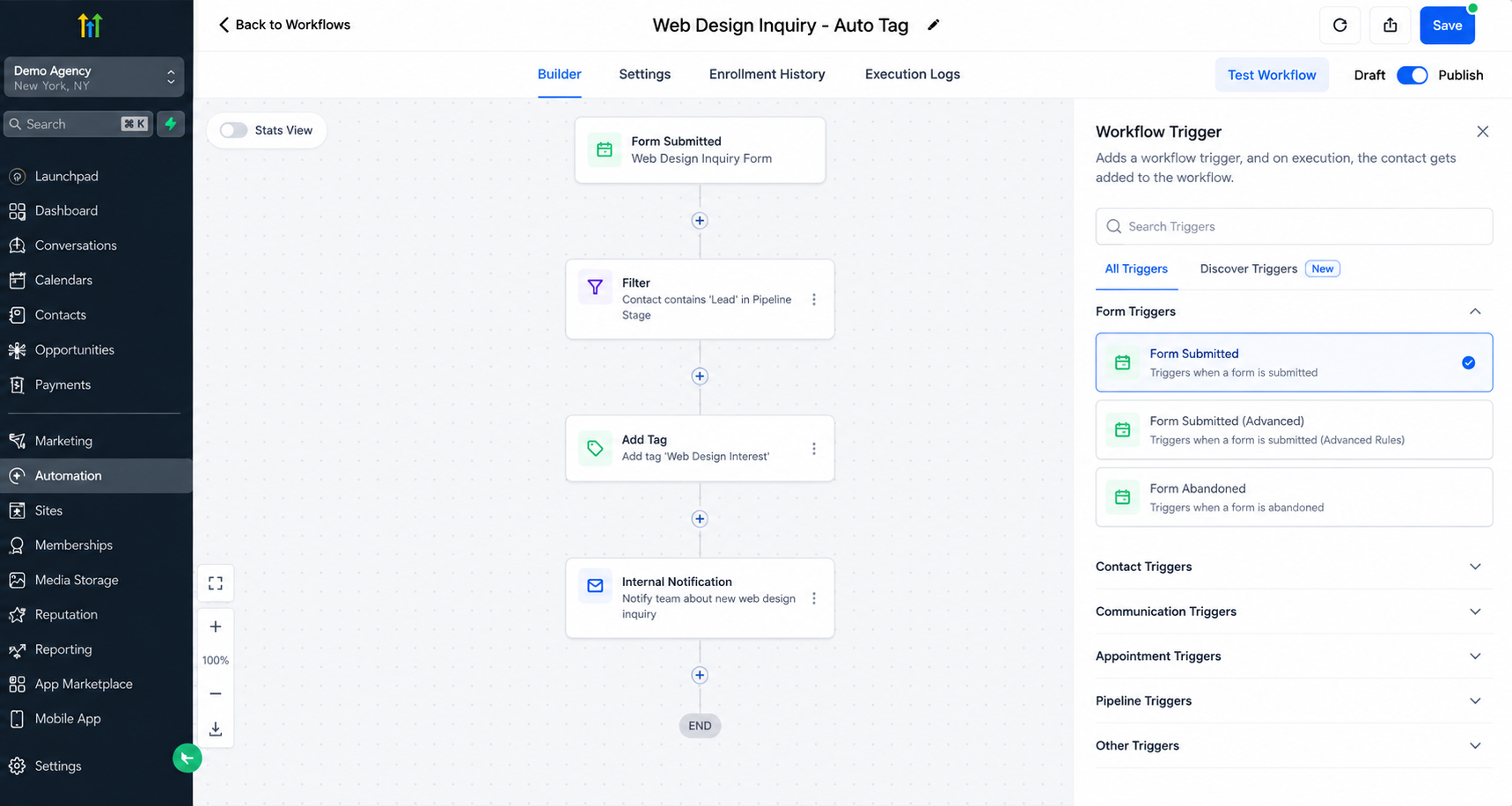
Step 2: Define the Workflow Entry Logic
Next, configure the workflow around the event or criteria that should identify the contact.
For example, if someone completes a specific web design inquiry form, that form activity could be used as part of the workflow setup.
Where necessary, use appropriate filters, conditions, or workflow logic to control which contacts continue through the automation.
Step 3: Add the Contact Tag Action
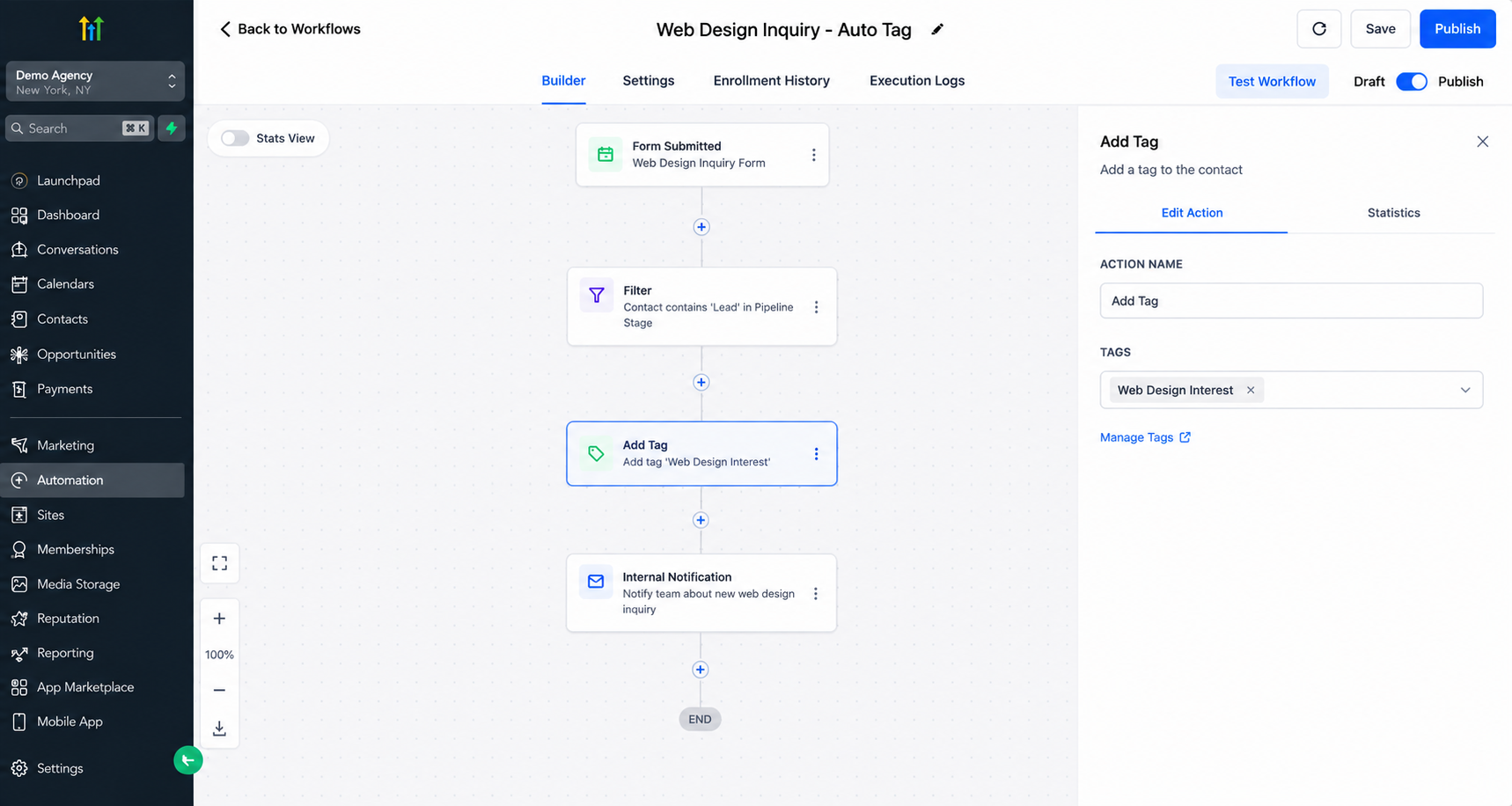
At the appropriate point in the workflow, add the Add Contact Tag action.
Select the tag you want the workflow to apply. In our example, that could be Web Design Interest.
When an eligible contact reaches this step, the selected tag is added to their contact record.
Step 4: Use the Tag as Part of Your CRM Strategy
Once contacts are tagged consistently, your team can use those labels to make contact groups easier to identify and organize.
Tags can also support broader CRM processes, including segmentation, Smart Lists, and workflow logic where appropriate.
The goal is not simply to create more tags. Each tag should have a clear business purpose.
Practical Use Cases for Automated Contact Tagging
There are several realistic ways businesses can automate contact tagging in GoHighLevel.
Lead source segmentation: If your workflow has the necessary information to identify a contact's source, you can apply tags such as Facebook Lead or Website Lead.
New leads vs. customers: Tags can help distinguish prospects from existing customers, giving team members useful context when reviewing contact records.
Product or service interest: Businesses offering multiple services can categorize contacts based on their demonstrated interest. An agency, for example, might use SEO Interest, Web Design Interest, and Automation Interest.
Form submissions: When a contact completes a particular form, a workflow can apply a tag associated with that action, such as Consultation Form Submitted.
Follow-up categories: Tags can help organize contacts who require different follow-up strategies, provided your workflow logic accurately determines which category applies.
Lifecycle and internal categorization: Businesses can also create tags that represent useful internal CRM categories and update them as contacts move through relevant processes.
Benefits of Automated Contact Tagging
As your database grows, automated tagging can reduce the amount of repetitive CRM administration required from your team.
Key benefits include:
Less manual contact management
More consistent CRM organization
Easier contact segmentation
Better-targeted follow-up
Cleaner workflow management
Faster identification of different contact groups
More scalable CRM processes
Consistency is particularly important. When multiple team members manually create or apply tags, naming and usage can become inconsistent. Well-planned GoHighLevel workflow actions can make tagging more standardized.
Best Practices for GoHighLevel Tags
Automation is most useful when your tagging structure remains organized.
Create a consistent naming convention. For example, lead-source tags could follow a structure such as Source - Facebook and Source - Google.
Avoid unnecessary or duplicate tags. Having Facebook Lead, FB Lead, and Lead Facebook for the same purpose makes segmentation harder rather than easier.
Use descriptive names that your entire team can understand, and periodically review your tags to identify outdated or duplicate labels.
You should also think carefully about your workflow logic before automatically applying tags. If the workflow criteria are too broad, contacts may receive tags that do not accurately represent them.
Finally, consider whether tags need to be removed or updated when they are no longer relevant. A good tagging system should reflect useful current information rather than becoming a collection of outdated labels.
Conclusion
The GoHighLevel Add Contact Tag action can turn repetitive manual tagging into a structured part of your CRM automation.
The action itself does not decide which segment a contact belongs to. Instead, your workflow trigger, filters, conditions, and logic determine when a contact reaches the action, and the Add Contact Tag step applies the tag you selected.
When combined with a clear naming strategy and thoughtful workflow logic, automated tagging can improve GoHighLevel contact segmentation, reduce manual CRM work, support more targeted follow-up, and keep your database organized as it grows.
Review how your team currently organizes contacts in GoHighLevel. If you repeatedly apply the same tags to similar types of leads or customers, those tasks may be good opportunities for automation. A simple, well-planned tagging system can make your CRM easier to understand today and much easier to manage as your business scales.
Frequently Asked Questions
1. What does the Add Contact Tag action do in GoHighLevel?
The GoHighLevel Add Contact Tag action applies a selected tag to a contact when they reach that step in a workflow. The workflow's trigger, conditions, filters, and logic determine when the action runs.
2. Can GoHighLevel automatically tag contacts?
Yes. You can use a GoHighLevel workflow to automatically apply tags when contacts meet the criteria defined in your automation. This reduces the need to manually tag contacts.
3. Can I use tags to segment contacts in GoHighLevel?
Yes. GoHighLevel tags can help categorize contacts by factors such as lead source, service interest, customer status, form activity, or other business-defined criteria.
4. Can tags be used with other GoHighLevel workflows?
Yes. Tags can be incorporated into broader workflow logic and CRM processes. However, a tag itself does not automatically perform another action unless you configure the appropriate automation around it.
5. What are the best practices for naming GoHighLevel tags?
Use clear, descriptive, and consistent names that your team can easily understand. Avoid duplicate tags and consider structures such as Source - Facebook, Interest - Web Design, or Status - Customer to keep your CRM organized.
Need Expert Help with GoHighLevel?
New to GoHighLevel and ready to get started? Buy your GoHighLevel account here and launch with confidence.
Already know what you need and want our team to handle everything, from complete setup and customization to funnels, workflows, automations, CRM, and pipelines? Click here.



