

GoHighLevel A/B Testing Made Easy
How to Run A/B Tests on GoHighLevel Landing Pages
A landing page can attract hundreds of visitors and still generate disappointing results. Sometimes, the problem isn't your offer or advertising strategy. It could be something as simple as an unclear headline, a weak call-to-action button, or a complicated form.
Learning how to run A/B tests on GoHighLevel landing pages helps you identify what actually encourages visitors to convert. Instead of relying on assumptions, you can compare different page variations and use performance data to guide improvements.
This guide explains how A/B testing works, how to set up meaningful tests, and how to turn your findings into better landing page experiences.
What Is A/B Testing in GoHighLevel?
A/B testing, also called split testing, compares two versions of a landing page to determine which performs better against a specific goal.
For example, a plumbing company might test these headlines:
Version A: "Professional Plumbing Services You Can Trust"
Version B: "Need a Plumber? Schedule Your Free Estimate Today"
Both pages promote the same service, but their messaging differs. By comparing conversion rates, the business can see which headline generates more inquiries.
GoHighLevel split testing allows marketers to evaluate page variations in supported funnel contexts rather than making changes based entirely on personal preferences.
Why A/B Testing Matters for Landing Page Conversions
Even a visually appealing landing page can struggle to convert visitors. A/B testing helps identify potential improvements without rebuilding an entire marketing campaign.
The main benefits include understanding which messages resonate with visitors, improving lead capture experiences, and making better use of advertising budgets.
For businesses running paid campaigns, this information is especially valuable. When traffic costs money, identifying unnecessary friction can help reduce wasted opportunities.
GoHighLevel landing page optimization also connects naturally with its funnel-building and CRM capabilities, allowing businesses to manage incoming leads after they convert.
How to Run A/B Tests on GoHighLevel Landing Pages
A successful test begins with a clear objective and two carefully designed variations.
Step 1: Open Your Landing Page or Funnel
Log in to your GoHighLevel sub-account and navigate to Sites.
Open the relevant funnel under the Funnels section and select the step you want to optimize.
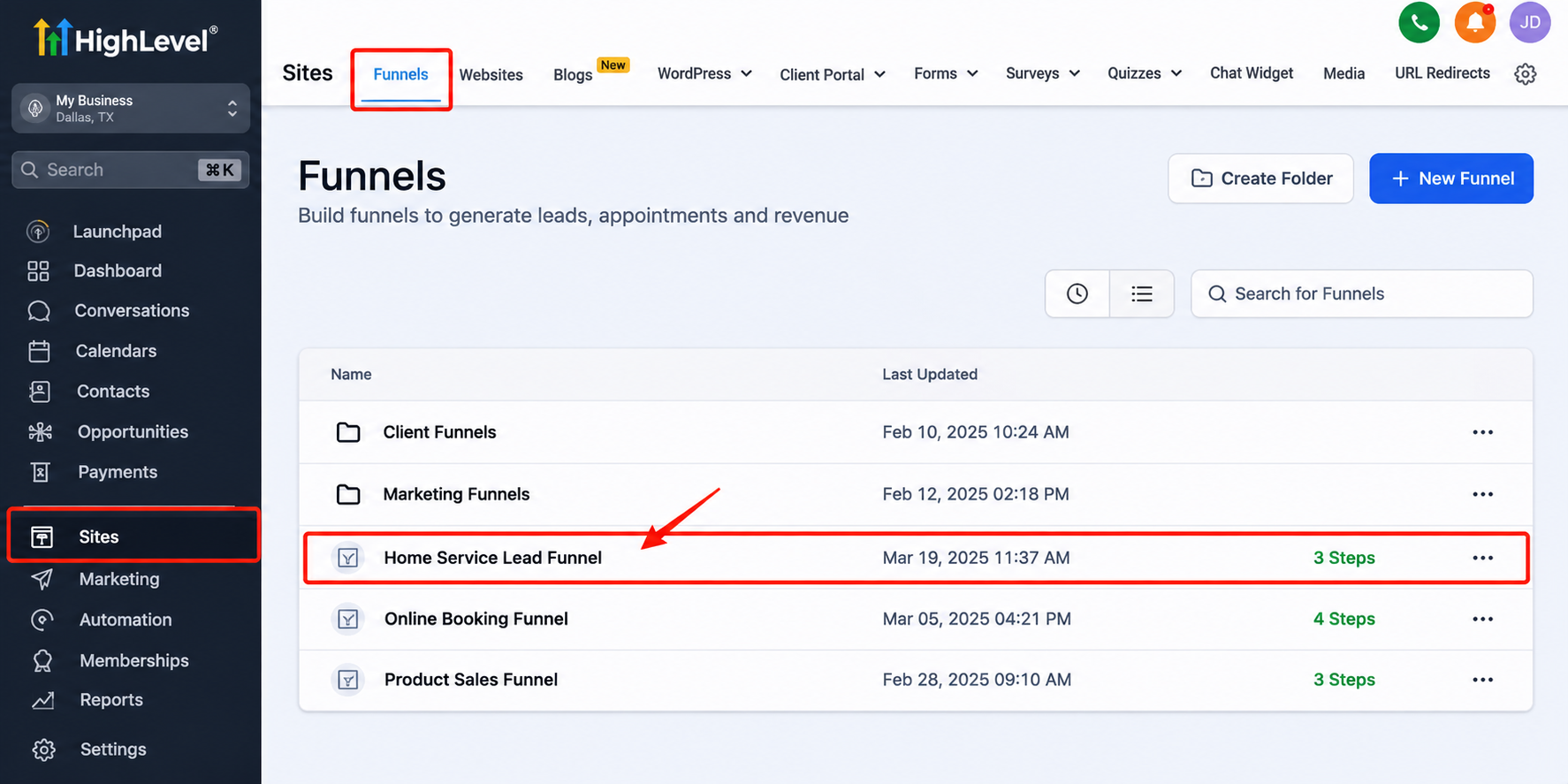
GoHighLevel provides native split-testing functionality for supported funnel steps. Website pages may have different capabilities, so verify whether your chosen page supports native testing before proceeding.
Step 2: Create a Page Variation
Within a supported funnel step, locate the available split-testing controls and create a variation of your existing page.
Keep the original as your control version. The new variation becomes the alternative you want to evaluate.
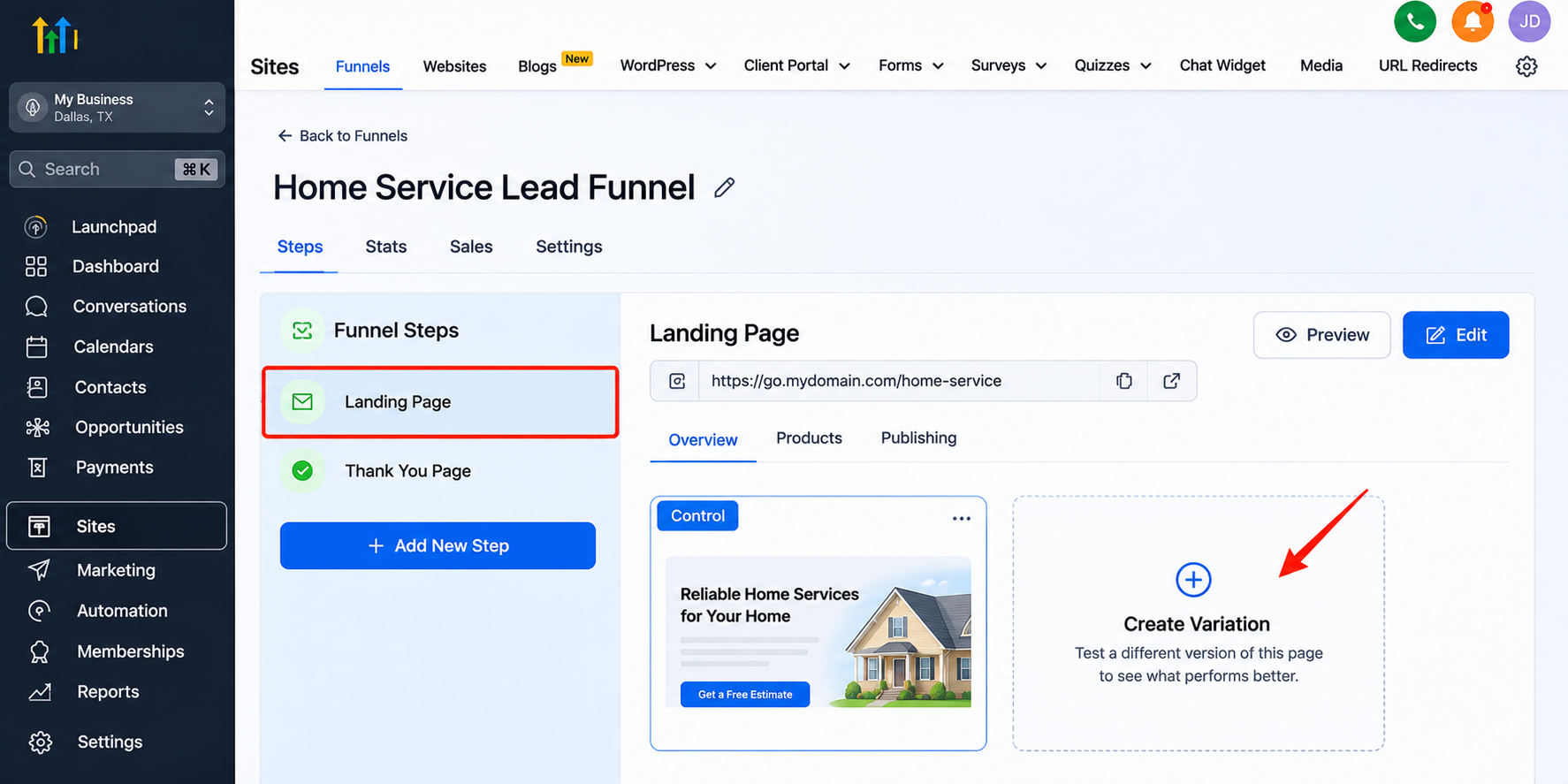
Starting with a duplicate helps maintain consistency between versions while isolating the change being tested.
Step 3: Change One Important Element
Choose one meaningful element to modify.
For example, replace a generic button labeled "Submit" with a more descriptive CTA such as "Request My Free Estimate."
You could also test a shorter form, a different hero image, or a clearer value proposition.
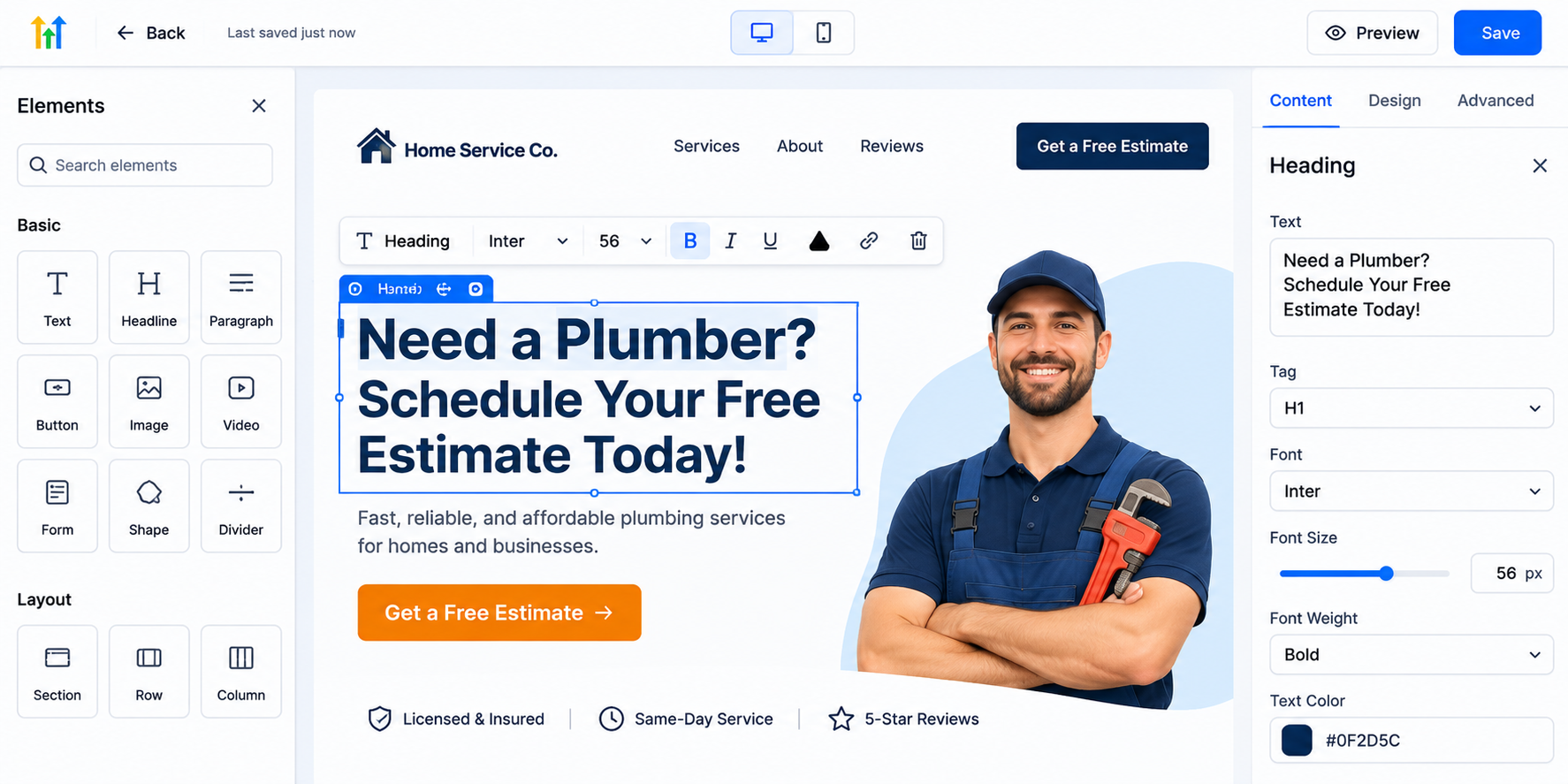
Change one major variable at a time. Otherwise, you may struggle to determine which modification influenced the results.
Step 4: Configure and Launch the Test
Where traffic distribution settings are available, configure how visitors are divided between the two variations.
An equal distribution can provide a straightforward comparison when both versions are being tested under similar conditions.
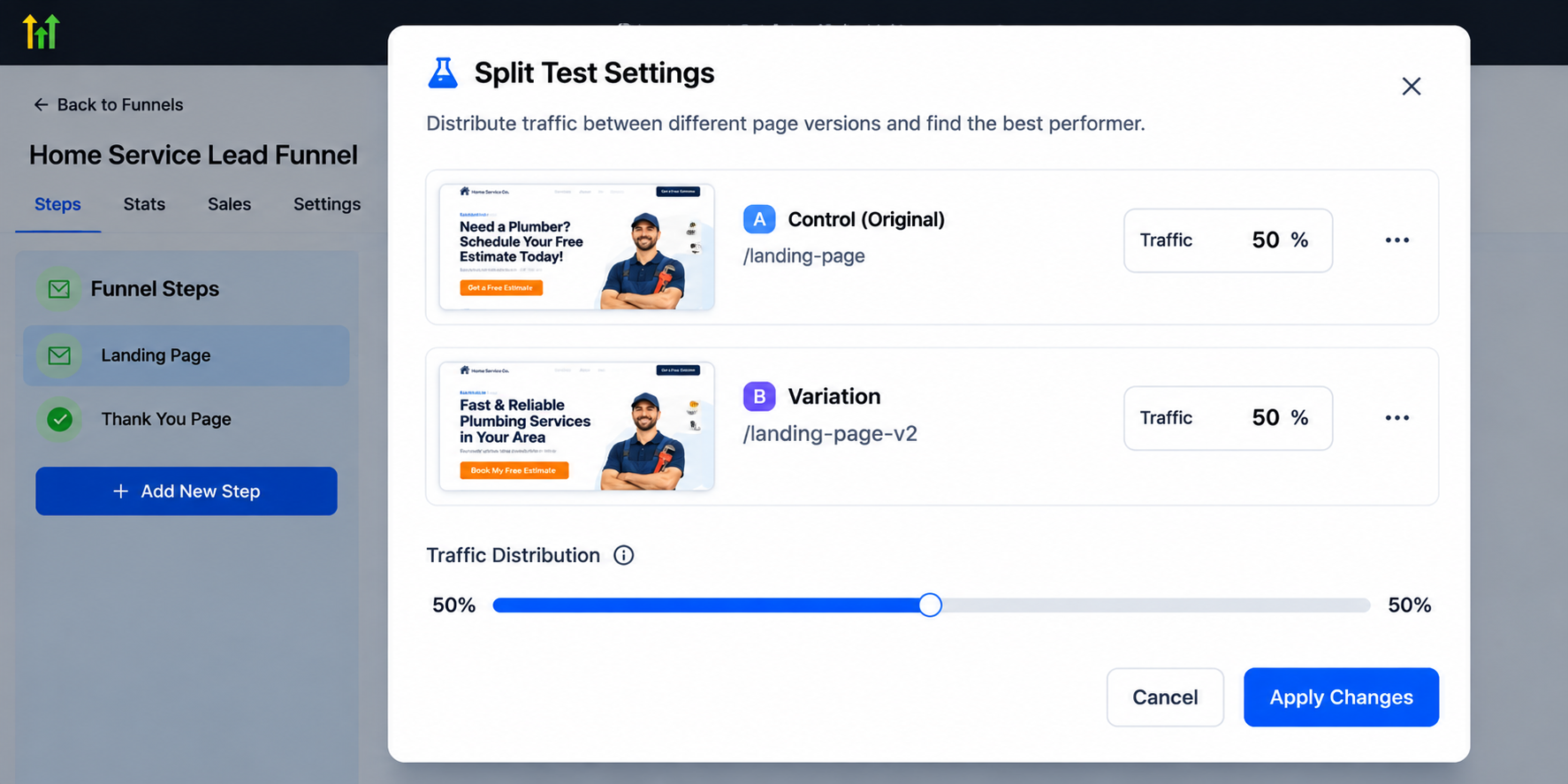
Before launching, verify that both pages display correctly, forms work, and the intended conversion action is tracked.
Also check mobile responsiveness, since visitors using different devices may experience the same page differently.
Step 5: Monitor Your Results
Review the performance information available for your funnel variations.
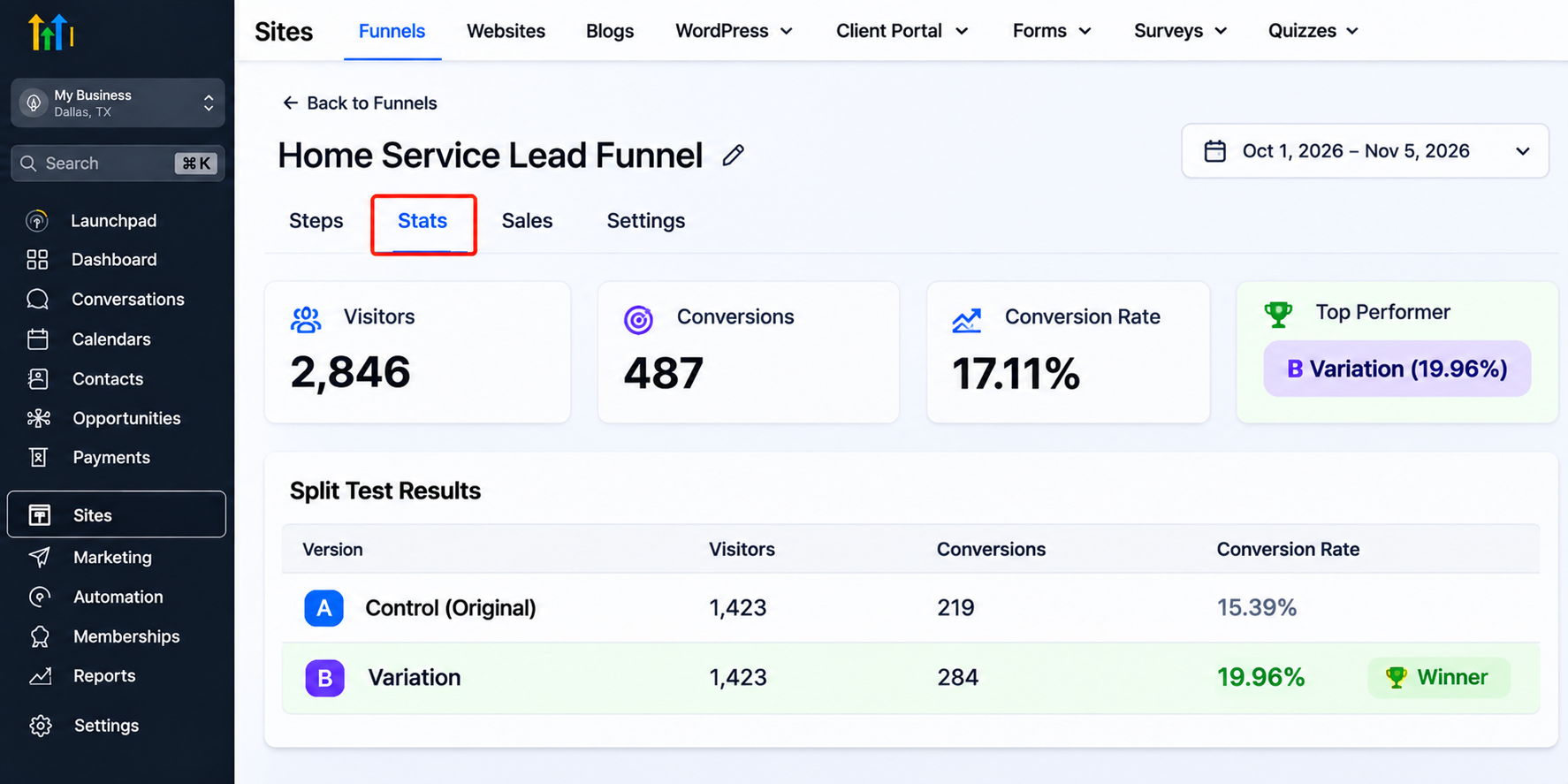
Focus on three essential measurements:
Visitors: How much traffic each variation receives.
Conversions: How many visitors complete the desired action.
Conversion rate: The percentage of visitors who convert.
Calculate conversion rate by dividing conversions by visitors and multiplying by 100.
For example, 20 conversions from 200 visitors represent a 10% conversion rate.
Step 6: Choose the Better-Performing Variation
Compare results only after collecting enough relevant data.
A variation showing a higher conversion rate after ten visits is not necessarily the winner.
Consider sample size, traffic consistency, and statistical uncertainty before making a decision.
Once you have sufficient evidence, retain the stronger variation and develop your next testing hypothesis.
What Should You A/B Test First?
Prioritize elements that directly influence a visitor's decision.
Headlines: Test clear, benefit-driven messaging against your existing headline.
CTA buttons: Compare action-oriented wording with generic labels.
Lead capture forms: Evaluate whether fewer required fields increase submissions.
Social proof: Test the placement of genuine customer reviews or testimonials.
Page layout: Compare how prominently your offer and CTA appear.
Start with the element most likely to create friction, rather than testing minor cosmetic differences.
Common A/B Testing Mistakes to Avoid
Poor testing practices can produce misleading conclusions.
Avoid changing several elements simultaneously, stopping tests after only a handful of conversions, or modifying pages while a test is running.
Traffic quality also matters. Comparing visitors from different audiences or advertising campaigns can distort your findings.
Most importantly, establish one primary conversion goal before launching and consider sample size before declaring a winner.
How GoHighLevel Supports Ongoing Landing Page Optimization
GoHighLevel combines funnel creation, supported native split testing, form-based lead capture, CRM contact management, and workflow automation.
These capabilities serve different purposes.
Split testing helps compare page performance. Funnel reporting provides measurable results. CRM and workflow tools help organize leads and automate appropriate follow-up after submission.
Together, they support a more structured approach to GoHighLevel conversion optimization without requiring every stage of the customer journey to be managed separately.
Conclusion
Successful landing page optimization isn't about constantly redesigning pages. It's about identifying meaningful opportunities, testing carefully, and learning from actual visitor behavior.
GoHighLevel provides practical tools for building landing pages, comparing funnel variations, capturing leads, and managing follow-up activities within one platform.
The most effective approach is to start small, measure consistently, and improve gradually.
Review your current landing page, identify one element that could perform better, and make your next decision based on evidence rather than guesswork.
Frequently Asked Questions (FAQs)
1. Can you run A/B tests in GoHighLevel?
Yes. GoHighLevel supports native A/B split testing for funnel pages, allowing you to compare different variations and measure their conversion performance. Availability may differ for website pages.
2. How do I create an A/B test in GoHighLevel?
Navigate to Sites > Funnels, select your funnel and the step you want to test, and use the available split-testing option to create a variation. Modify one key element, configure traffic distribution, and monitor the results.
3. What elements should I A/B test on a landing page?
Start with headlines, call-to-action buttons, form fields, hero images, testimonials, and page layouts. Testing one major element at a time helps identify which changes influence conversions.
4. How long should I run an A/B test in GoHighLevel?
There is no fixed duration. Run your test until both variations receive enough relevant traffic and conversions to support a meaningful comparison. Avoid declaring a winner based on only a few visits.
5. How do I measure A/B testing results in GoHighLevel?
Use the available funnel performance reporting to compare visitors, conversions, and conversion rates. The conversion rate is calculated by dividing conversions by visitors and multiplying by 100.
6. Does GoHighLevel automatically select the winning variation?
Do not assume GoHighLevel automatically determines a statistically significant winner. Review the available results, consider sample size and statistical uncertainty, and confirm which variation performs better before making changes.
7. Can A/B testing improve landing page conversion rates?
Yes, A/B testing can help identify changes that improve landing page conversions. However, improvements are not guaranteed. Results depend on traffic quality, page design, messaging, and testing methodology.
Need Expert Help with GoHighLevel?
New to GoHighLevel and ready to get started? Buy your GoHighLevel account here and launch with confidence.
Already know what you need and want our team to handle everything, from complete setup and customization to funnels, workflows, automations, CRM, and pipelines? Click here.