

Build a Referral System in GoHighLevel
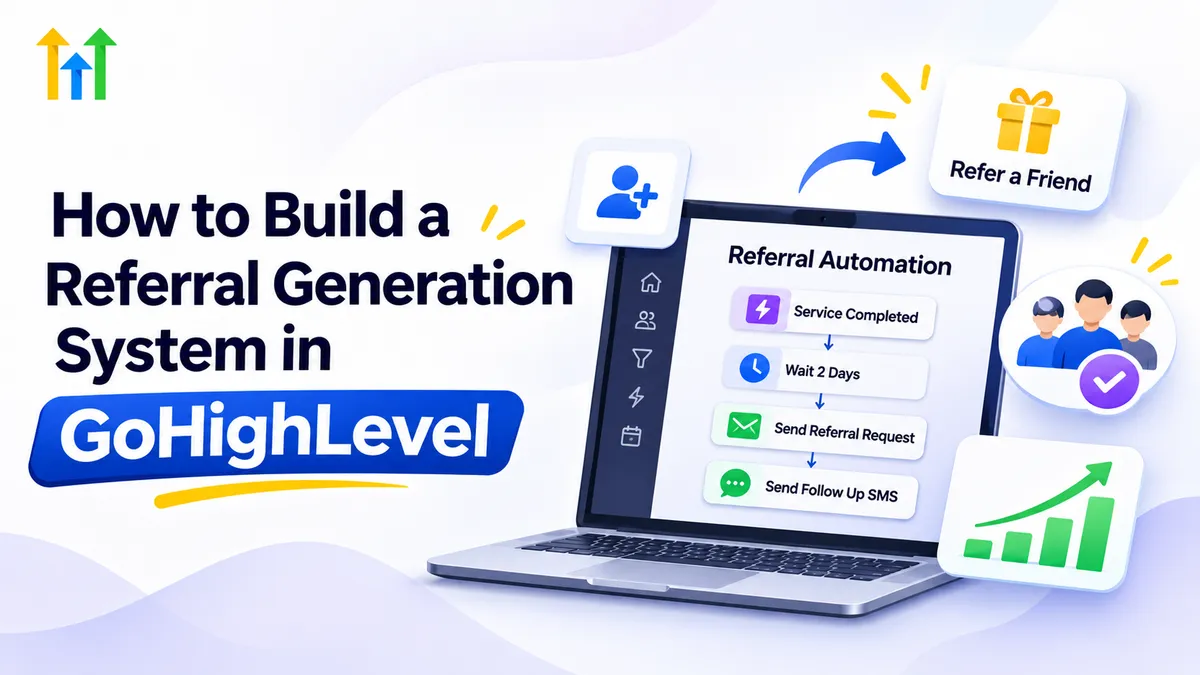
How to Build a Referral Generation System in GoHighLevel
Your happiest customers could be one of your most valuable sources of new business. Yet many companies leave referrals to chance, hoping satisfied clients will recommend them without ever making a request.
A GoHighLevel referral generation system helps turn those occasional recommendations into an organized process. By combining CRM contact management, automated follow-ups, referral forms, and lead tracking, businesses can make referrals easier to request and manage.
In this guide, you'll learn how to build a practical referral system in GoHighLevel, automate key steps, and track referred prospects from their first interaction to becoming customers.
What Is a Referral Generation System?
A referral generation system is a structured process that encourages existing customers to recommend a business to people who may need its services.
Instead of relying entirely on spontaneous word-of-mouth marketing, businesses establish a repeatable process for requesting, collecting, and managing referrals.
A typical system follows four stages: identifying satisfied customers, requesting referrals, capturing referred prospects, and following up.
With CRM automation, businesses can coordinate these activities while maintaining personalized customer relationships.
Why Use GoHighLevel for Referral Generation?
GoHighLevel brings several useful tools together, making customer referral management easier to organize.
Its CRM stores customer information, while tags and custom fields help identify referral sources. Workflows can automate timely email and SMS requests, and forms or landing pages provide convenient ways to submit referrals.
Opportunity pipelines also help teams monitor referred leads throughout the sales process.
Importantly, GoHighLevel does not automatically provide a complete customer referral program with every tracking relationship configured. Businesses typically build their own process using existing CRM features, custom fields, workflows, and sometimes integrations.
This flexibility makes GoHighLevel referral automation suitable for different business models.
How to Build a Referral Generation System in GoHighLevel
Building an effective system requires more than sending automated messages. Each step should create a clear path from customer satisfaction to referral conversion.
Step 1: Identify Customers Who Are Likely to Refer
Start by identifying customers who have had positive experiences with your business.
Useful indicators include completed projects, favorable feedback, repeat purchases, or successful service appointments.
You can organize these contacts using tags such as Satisfied Customer or Referral Eligible.
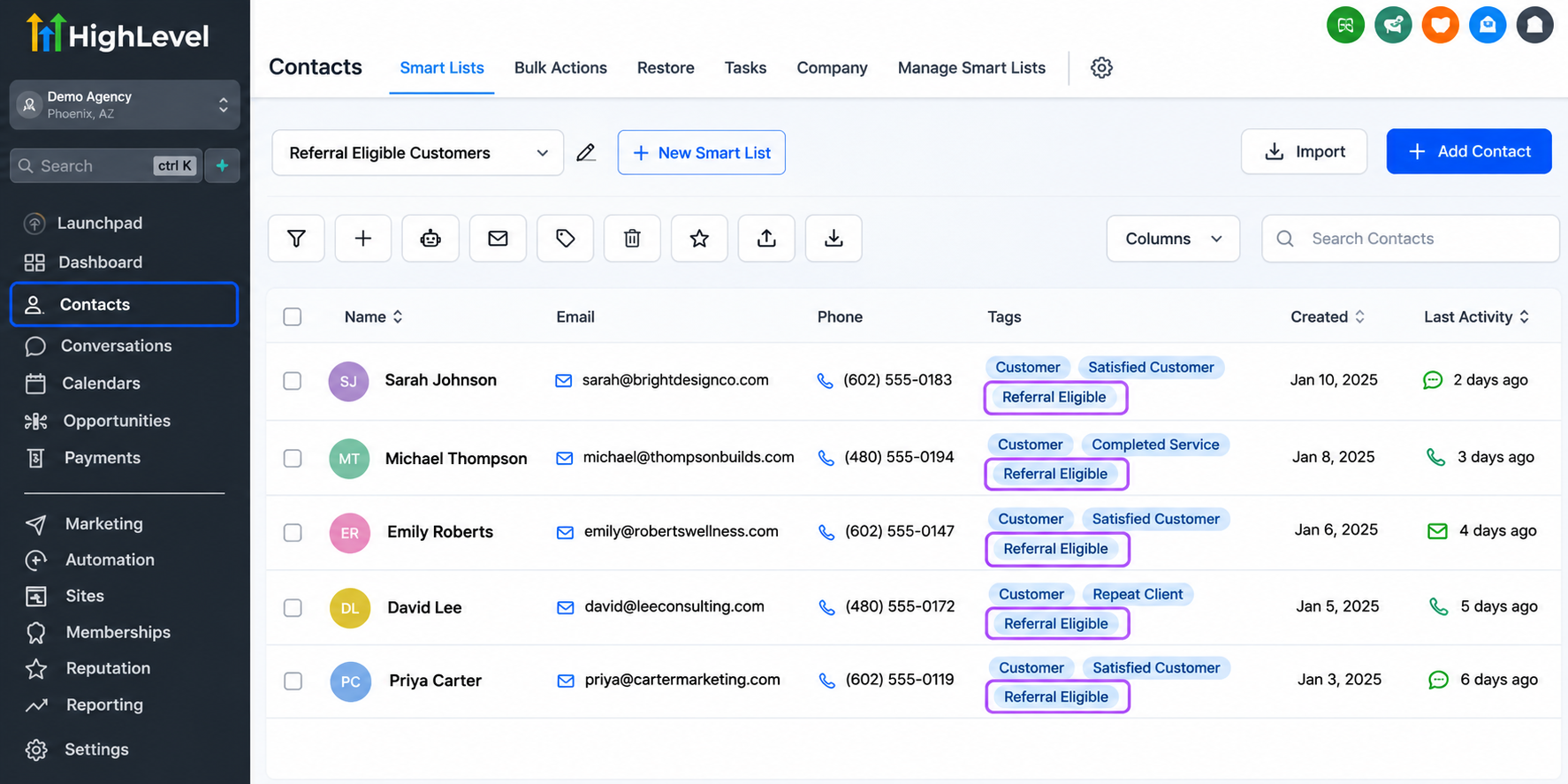
Timing matters. A plumbing company, for example, might request a referral after completing a successful repair rather than immediately after receiving an inquiry.
Step 2: Create a Referral Capture Form or Landing Page
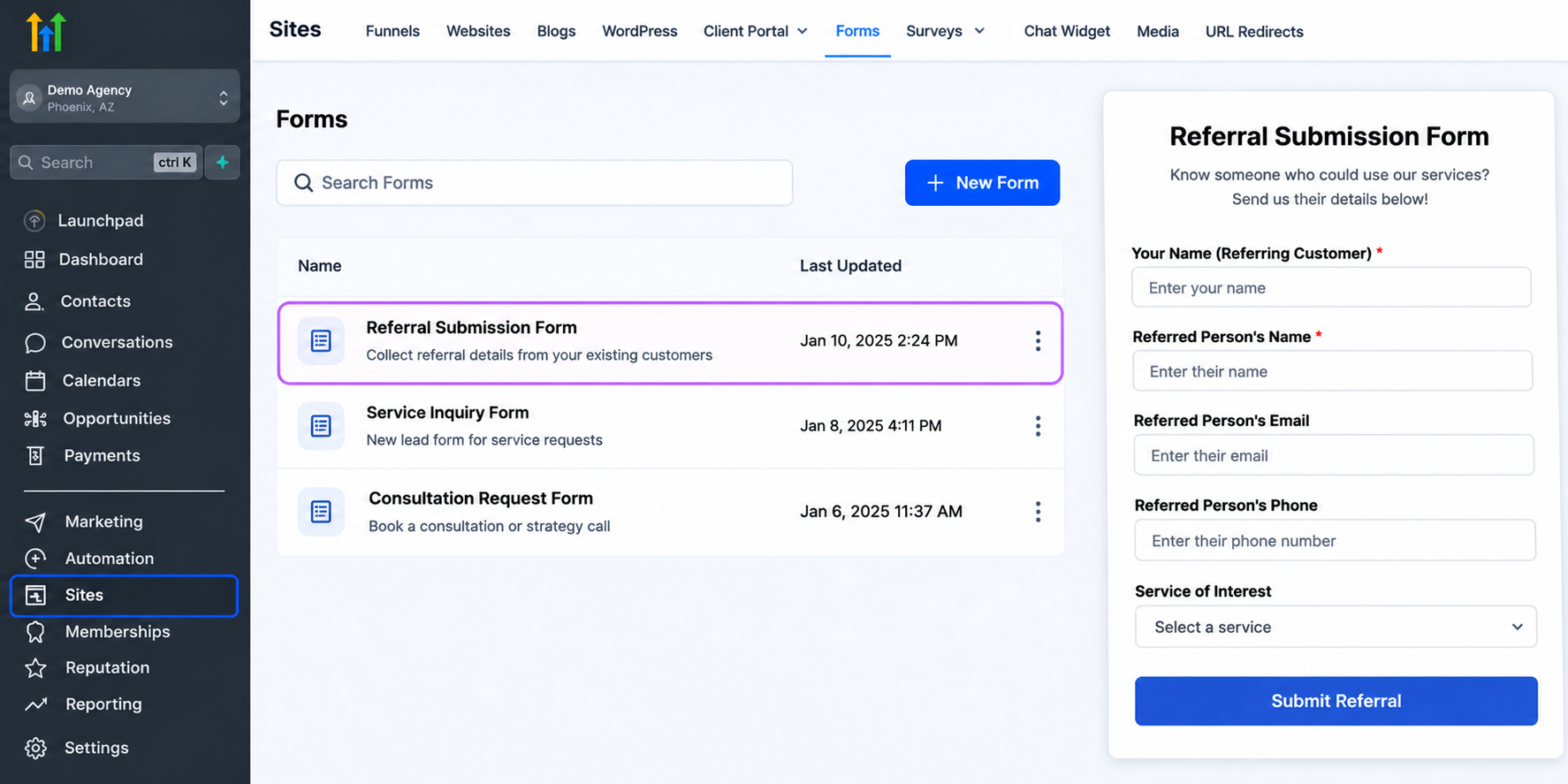
Use GoHighLevel's form builder to create a simple referral submission process.
Consider collecting:
Referring customer's name
Referred prospect's name and contact information
Referral source
Service of interest
Keep the form short to reduce unnecessary friction.
A dedicated landing page can explain the referral process and provide a convenient submission point.
Before contacting referred prospects, ensure appropriate consent and applicable privacy and messaging requirements are satisfied.
Step 3: Set Up Referral Tracking With Tags and Custom Fields
Accurate tracking helps businesses understand where their referrals originate.
Create relevant custom fields, such as Referral Source, Referred By, Referral Status, and Referral Campaign.
For example, a new contact might have Referral Source: Existing Customer and Referred By: Sarah Johnson.
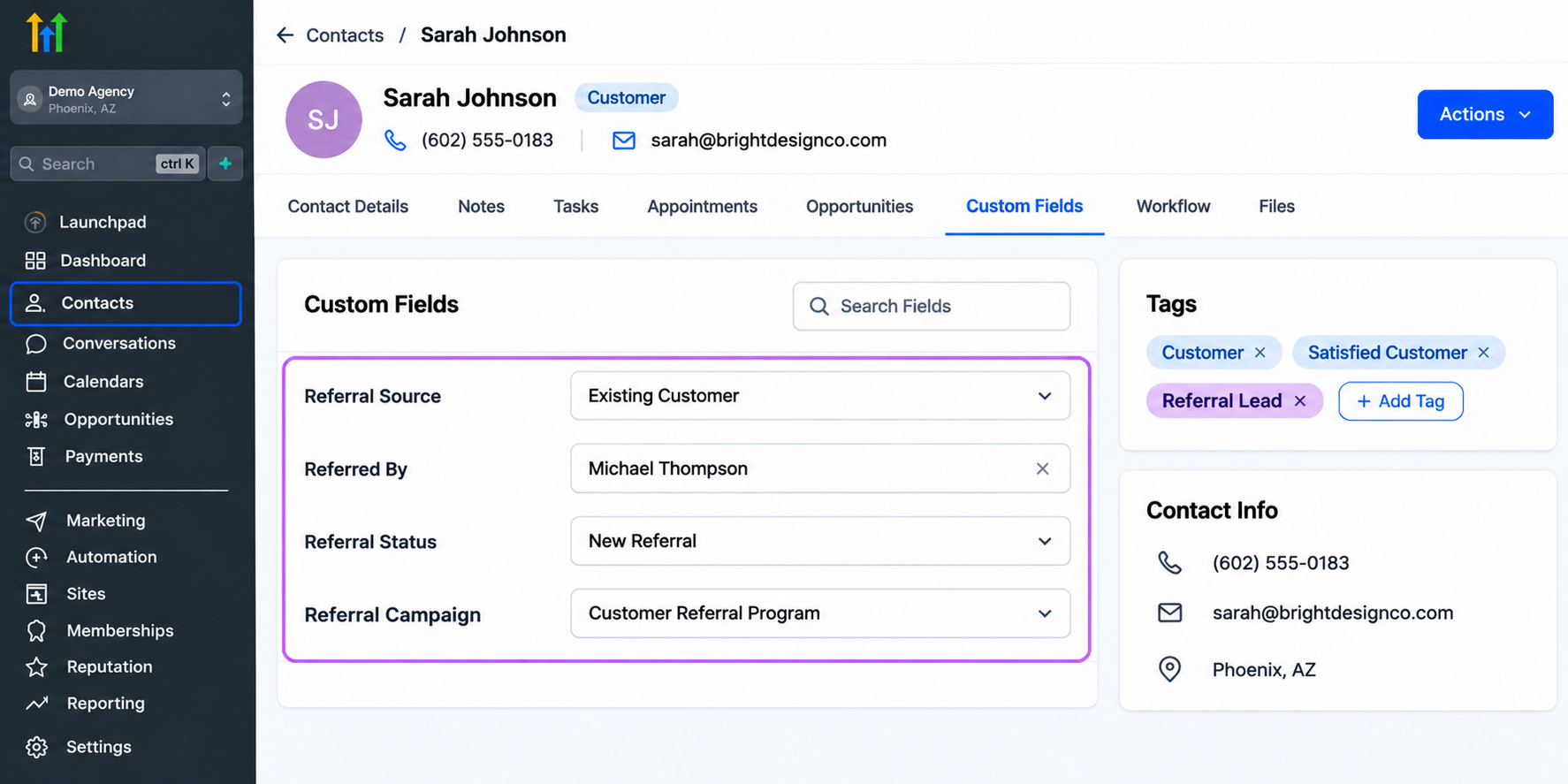
Tags can further distinguish referral leads from other inquiries.
These relationships require deliberate configuration. GoHighLevel should not be assumed to automatically associate every referring customer with their referred prospect.
Consistent data entry is essential for reliable GoHighLevel referral tracking.
Step 4: Automate Referral Requests Using Workflows
GoHighLevel CRM workflows can help send referral requests at appropriate customer milestones.
Consider this example for a home service company:
A completed job moves to a designated opportunity stage.
A workflow waits two days.
An email thanks the customer and invites them to recommend the business.
A conditional follow-up is sent only when appropriate.
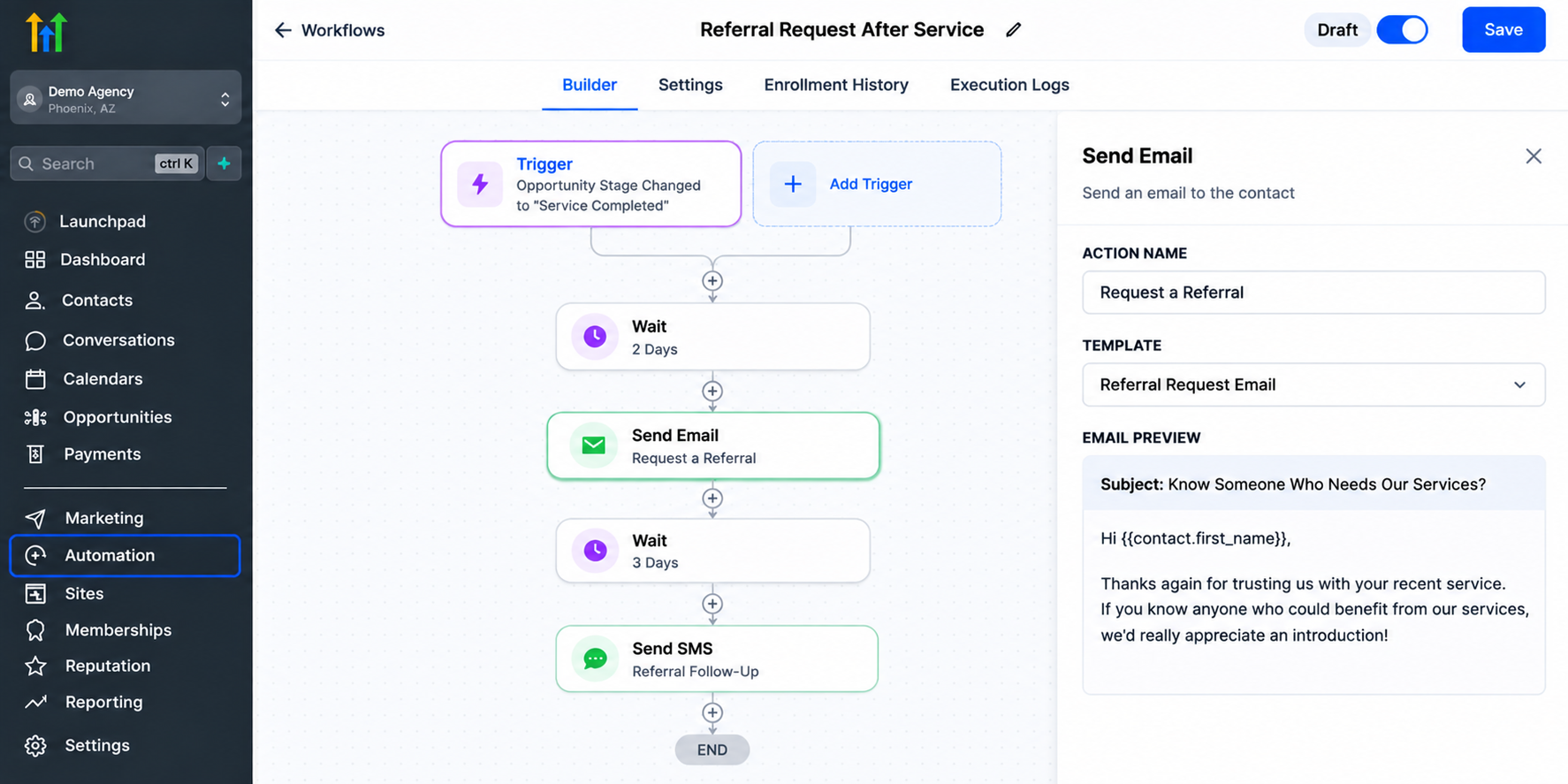
The message could say:
"Enjoying your completed project? If someone you know could benefit from our services, we'd appreciate an introduction."
Configure workflow conditions carefully to avoid duplicate requests or unnecessary messages.
Always respect communication consent, unsubscribe preferences, and applicable regulations.
Step 5: Organize Referred Leads in a Pipeline
Create an opportunity pipeline to monitor referrals as they progress.
A straightforward structure is:
New Referral
Contacted
Appointment Scheduled
Customer Won
Each stage represents a meaningful step in the referral journey.
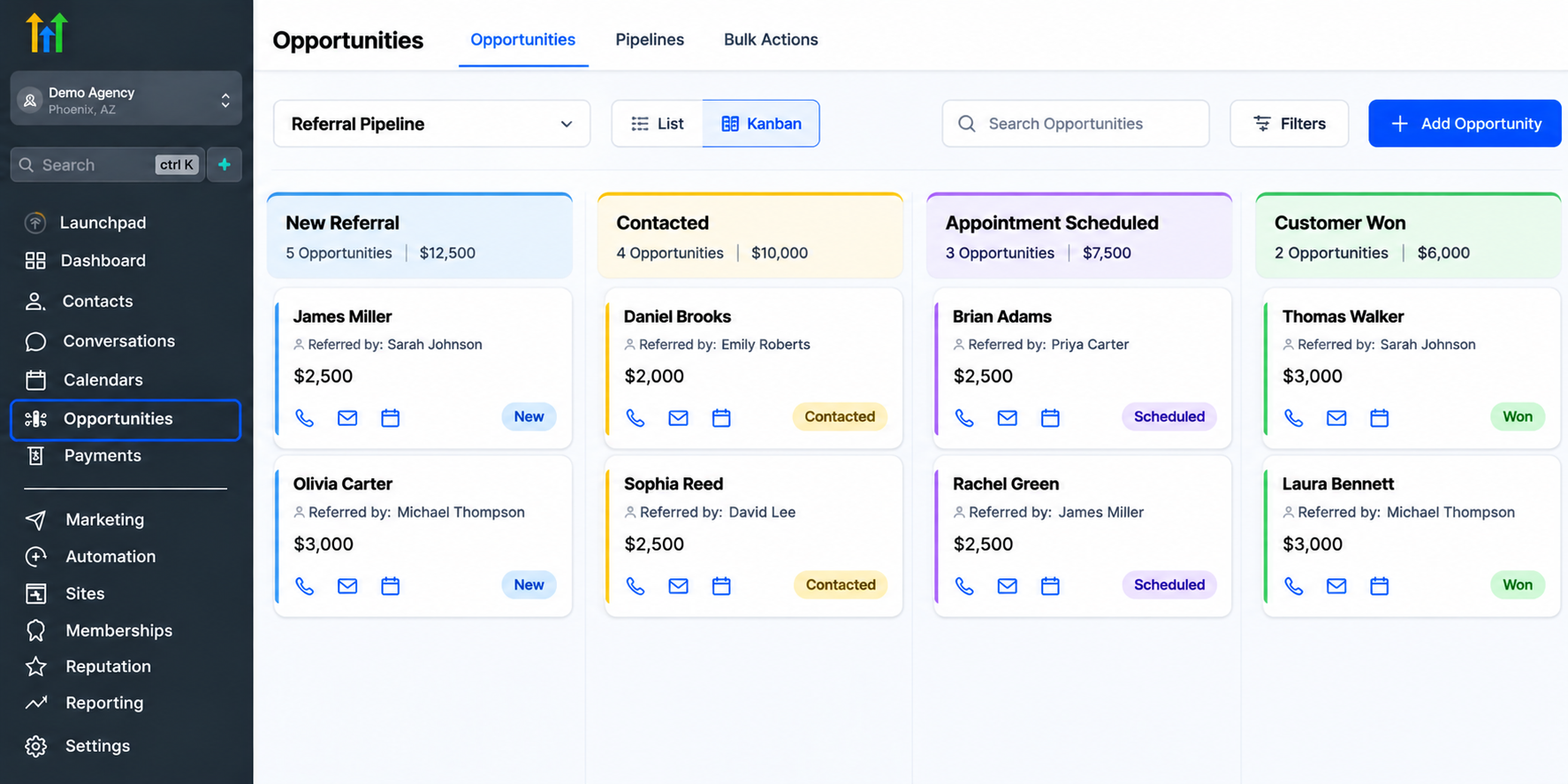
This visibility helps sales teams identify leads needing attention and maintain consistent follow-up without losing track of potential opportunities.
Step 6: Measure and Improve Referral Performance
A referral system becomes more valuable when its performance can be evaluated.
Review referral-related contacts, opportunity stages, booked appointments, and successful conversions.
Compare outcomes across referral sources using consistently populated custom fields and available reporting or exports.
Tracking may require additional configuration rather than a dedicated referral analytics dashboard.
Focus on referral quality, not simply the number of submissions.
Best Practices for Increasing Customer Referrals
Successful automated referral marketing should feel personal rather than mechanical.
Request referrals after positive customer experiences, personalize messages, and provide an easy submission process.
Avoid excessive reminders, especially when customers have already responded or declined.
Thank customers who make introductions, even when those referrals do not become paying clients.
Most importantly, maintain excellent service. Automation supports customer relationships; it cannot replace the experiences that inspire recommendations.
How Different Industries Can Benefit From Referral Automation
Different industries can adapt the same framework to their customer journeys.
Home service businesses can request referrals after successfully completed repairs or installations.
Real estate professionals can follow up with satisfied clients after closing transactions and invite appropriate introductions.
Marketing agencies can request referrals after successful project milestones or positive client feedback.
Consultants and professional service providers can incorporate personalized referral requests into their post-engagement follow-up processes.
Each approach should reflect the industry's communication practices and customer expectations.
Final Thoughts
A successful GoHighLevel referral generation system combines strong customer relationships with organized CRM processes, thoughtful automation, and consistent tracking.
Rather than depending entirely on occasional recommendations, businesses can create a repeatable approach to encouraging and managing referrals.
Start with satisfied customers, build a simple referral workflow, and improve it as you collect meaningful results.
With the right configuration, GoHighLevel can help make referral generation a more organized part of your long-term growth strategy.
Frequently Asked Questions (FAQs)
1. Can GoHighLevel automate customer referral requests?
Yes. GoHighLevel workflows can send referral requests through email or SMS after configured customer milestones. Businesses can use wait steps and conditions to control timing. However, the referral request process must be configured, and communication consent requirements must be respected.
2. How do I track customer referrals in GoHighLevel?
You can use custom fields, tags, forms, and opportunity pipelines to organize referral information. Fields such as Referral Source and Referred By help identify where leads originate. Accurate attribution depends on how information is captured and maintained.
3. Does GoHighLevel have a built-in customer referral program?
GoHighLevel offers CRM and automation tools that can support a customized customer referral system. However, a complete customer referral tracking process generally requires configuration. Its Affiliate Manager functionality should not be confused with a general customer referral management workflow.
4. Which businesses can benefit from GoHighLevel referral automation?
Home service companies, real estate professionals, marketing agencies, consultants, and other service-based businesses can use referral automation. The system is especially useful when businesses have established customer relationships and identifiable milestones for requesting recommendations.
5. How can I improve referral conversion rates in GoHighLevel?
Focus on requesting referrals at appropriate moments, simplifying referral submissions, and following up with referred prospects when permitted. Track appointment bookings and conversion outcomes to identify effective referral sources. Personalization and consistent customer service remain essential to long-term success.
Need Expert Help with GoHighLevel?
New to GoHighLevel and ready to get started? Buy your GoHighLevel account here and launch with confidence.
Already know what you need and want our team to handle everything, from complete setup and customization to funnels, workflows, automations, CRM, and pipelines? Click here.