

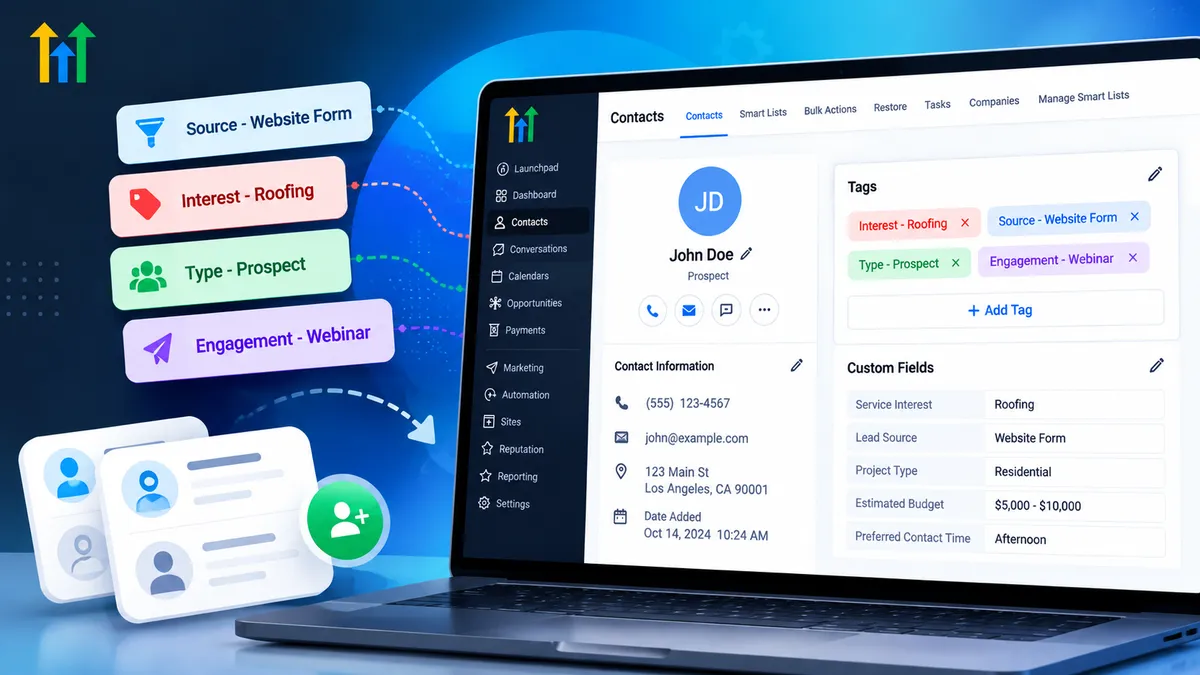
GoHighLevel Contact Tags
How to Structure GoHighLevel Contact Tags for Better CRM Organization
Managing hundreds or thousands of contacts becomes challenging when your CRM lacks a consistent organization system. Leads arrive through website forms, Facebook ads, referrals, and appointment bookings, but without clear classifications, teams can struggle to identify who needs attention.
GoHighLevel Contact Tags provide a flexible way to categorize contacts, organize lead information, and support targeted follow-up. However, creating tags without a strategy can quickly lead to confusion.
A well-planned tagging structure makes your CRM easier to navigate and helps your team build more reliable automation processes.
What Are Contact Tags in GoHighLevel?
Contact tags are labels that you can assign to individual contact records in GoHighLevel. They help identify characteristics, interests, or classifications without requiring separate contact databases.
For example, a roofing company might use the tag Interest - Roof Repair to identify prospects interested in that service.
Tags can support several CRM activities, including lead segmentation, marketing campaign organization, and workflow automation.
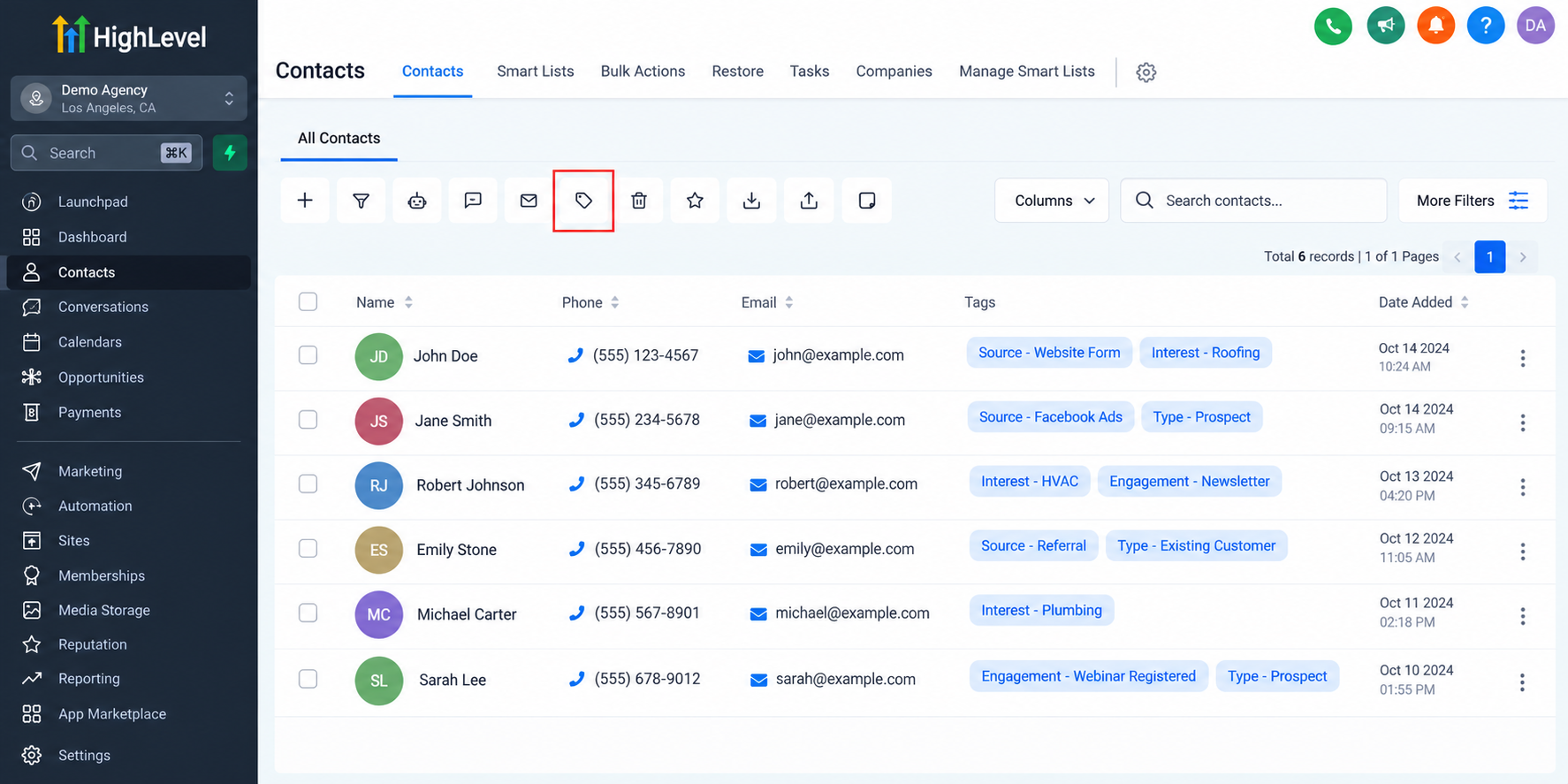
However, tags and custom fields serve different purposes. Tags are useful for flexible classifications, while custom fields are better suited for storing structured information such as property type, project budget, or preferred appointment date.
Choosing the appropriate method prevents unnecessary complexity in your contact management system.
How to Create a Consistent Contact Tag Structure
Effective GoHighLevel CRM organization begins with standardized naming conventions. Rather than creating unrelated tags whenever a new campaign launches, establish categories that reflect how your business operates.
Lead Source Tags
These identify where contacts originally entered your marketing process.
Examples include:
Source - Facebook AdsSource - Website FormSource - Referral
Service Interest Tags
These identify services that potential customers have expressed interest in.
Examples include:
Interest - RoofingInterest - PlumbingInterest - HVAC
Engagement Tags
These help classify contacts according to specific interactions or marketing activities.
Examples include:
Engagement - NewsletterEngagement - Webinar Registered
Customer Classification Tags
These distinguish different types of relationships.
Examples include:
Type - ProspectType - Existing Customer
These prefixes are recommended naming conventions, not built-in GoHighLevel tag folders or required categories.
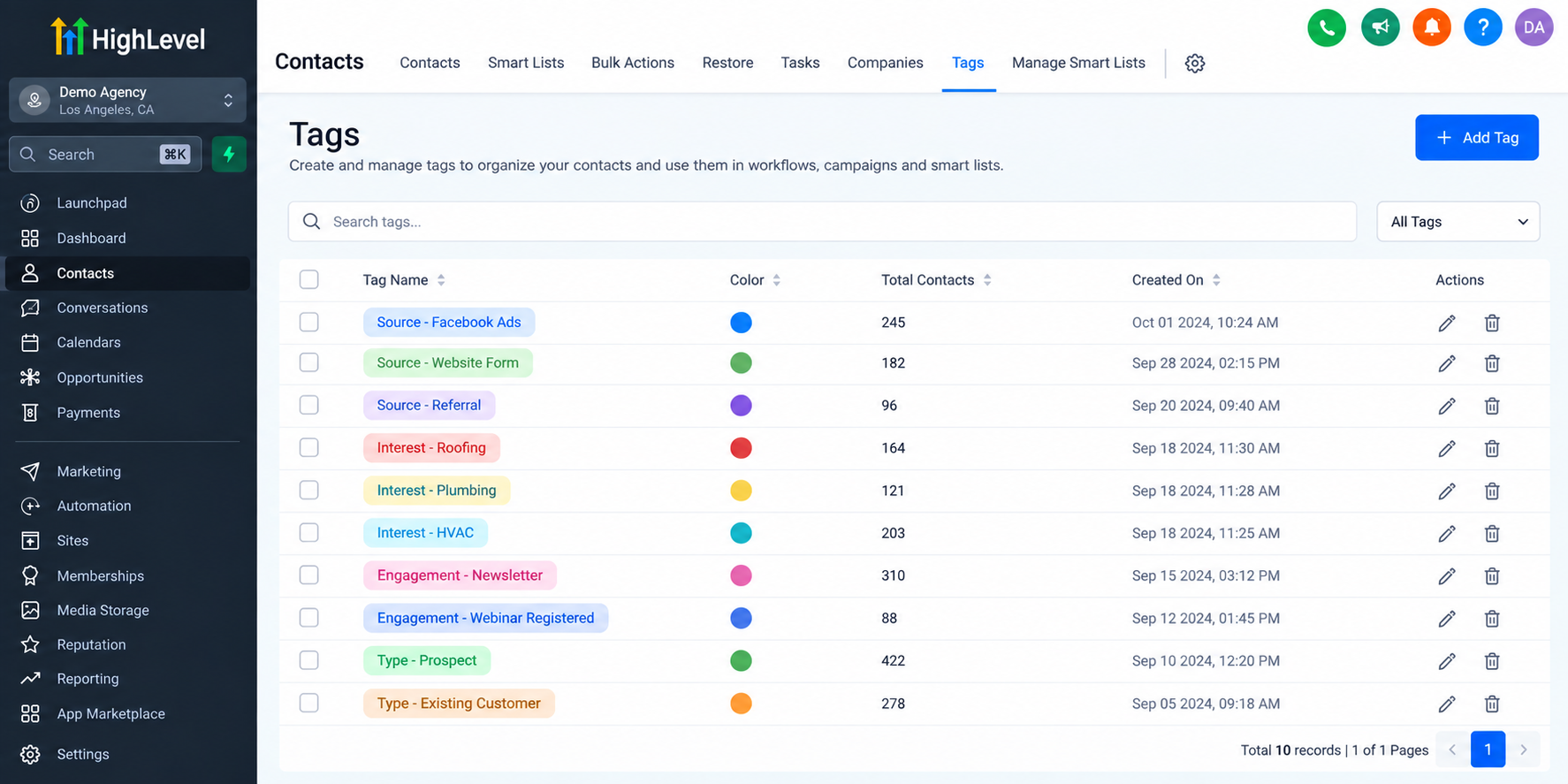
Using consistent names makes tags easier to recognize, search, and maintain as your contact database grows.
Best Practices for Managing Contact Tags
A successful CRM tagging strategy focuses on clarity rather than quantity.
Start by establishing one naming format and ensuring everyone responsible for CRM management follows it. For example, avoid creating FB Lead, Facebook Prospect, and Source - Facebook Ads when all three describe the same classification.
Before creating a new tag, check whether an existing one already serves its intended purpose.
Every tag should also have a clear business function. If a tag does not support segmentation, reporting, identification, or automation, reconsider whether it is necessary.
Review your tags periodically to identify outdated campaign labels and temporary automation tags that are no longer needed. Remove obsolete tags carefully, especially when workflows or filters may depend on them.
Finally, document important tags and their purposes. A simple internal reference helps team members understand which tags should be applied, when they should be removed, and which automations use them.
How GoHighLevel Workflows Can Use Contact Tags
One of the practical benefits of GoHighLevel Workflow Automation is the ability to use tags within configured automation processes.
Consider a roofing company receiving an inquiry through its website.
When someone submits a GoHighLevel form, the platform can create or update the contact record. A configured workflow can then apply a tag such as Interest - Roofing and initiate the appropriate follow-up sequence.
Depending on the workflow configuration, GoHighLevel can add or remove contact tags and use tag-related triggers or conditions to guide automation.
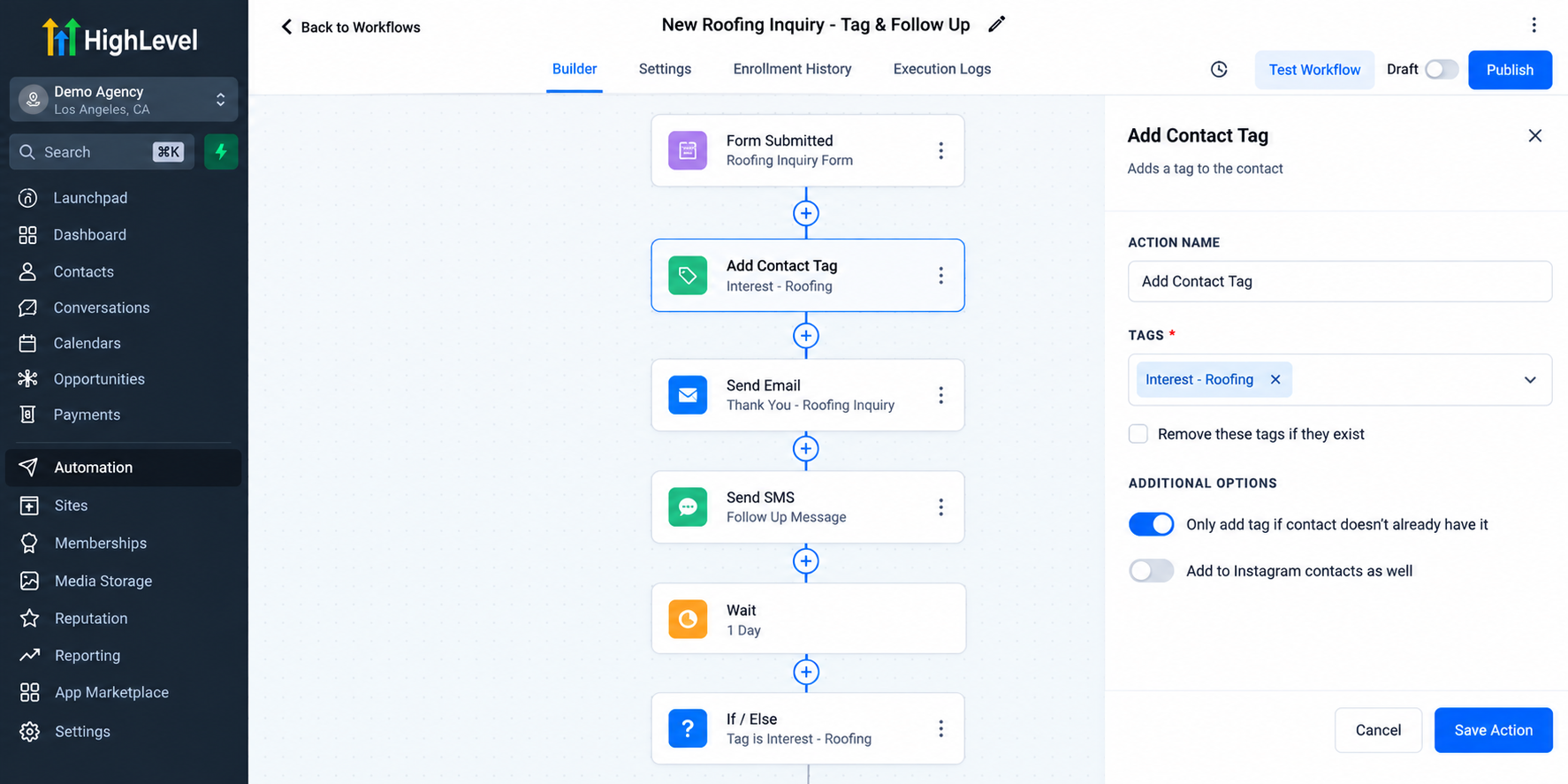
For example, adding a particular tag could trigger a follow-up workflow when that trigger has been configured.
Importantly, creating a tag alone does not activate an automation. The appropriate triggers, conditions, and actions must be configured and tested.
Using Contact Tags With Smart Lists for Better Segmentation
GoHighLevel Smart Lists help businesses organize contact views using filters.
When combined with a consistent tagging strategy, Smart Lists can make it easier to identify relevant groups within your CRM.
For example, a home services company could configure a filtered view to identify contacts carrying the Interest - HVAC tag.
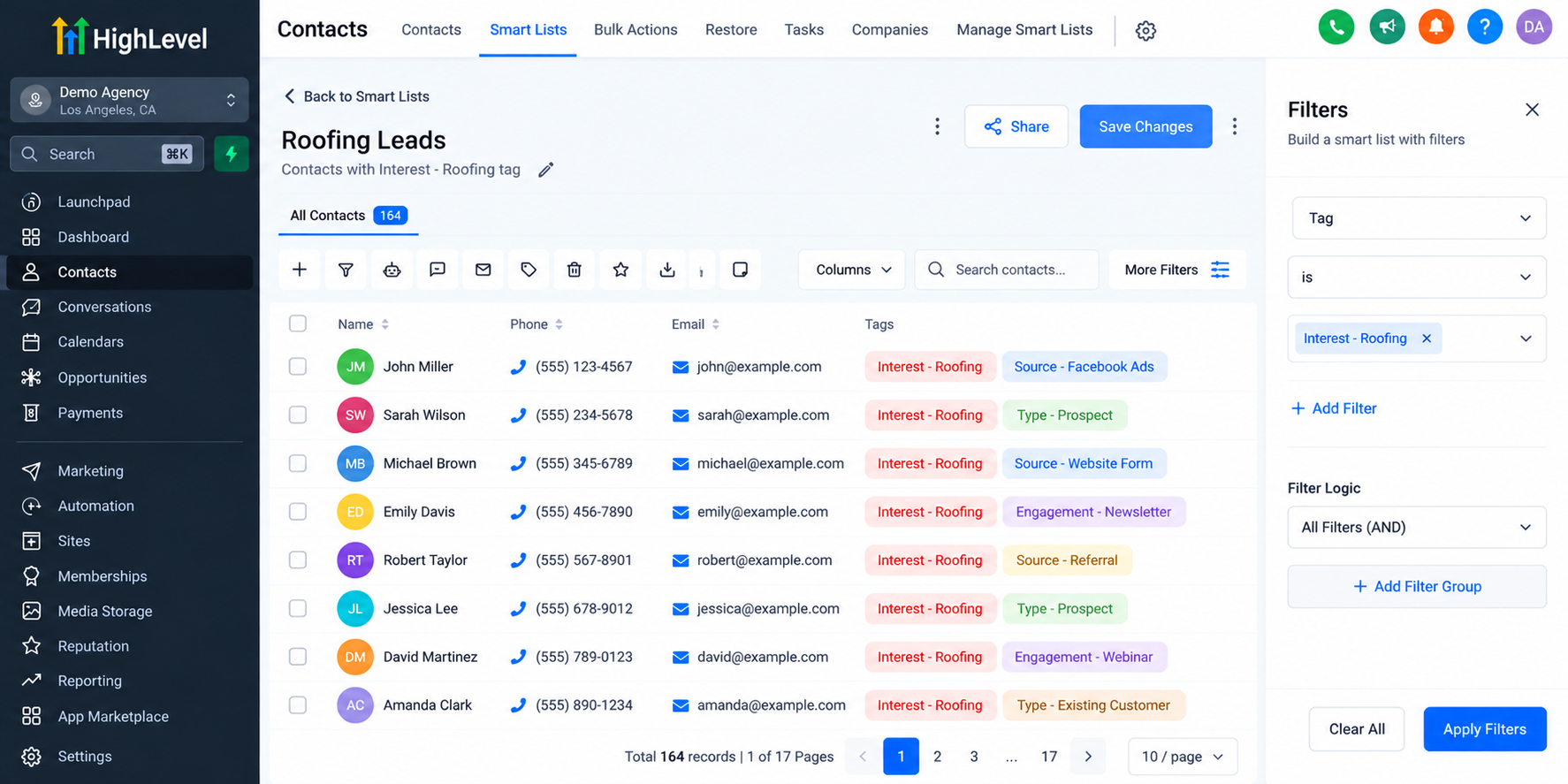
A marketing agency could similarly filter contacts associated with a particular lead source.
These filtered views help teams prioritize outreach, review contact groups, and manage follow-up activities without maintaining separate databases.
Smart Lists do not appear automatically when tags are created. Users must configure the appropriate filtering criteria.
Common Contact Tagging Mistakes to Avoid
Several common mistakes can undermine an otherwise effective GoHighLevel Contact Management system.
Creating excessive tags is one of the most frequent problems. When every minor interaction receives a permanent label, contact records become difficult to interpret.
Inconsistent naming creates similar challenges, especially when multiple team members manage the same CRM.
Another mistake is using tags to store information better suited to custom fields. For example, a numerical project budget is generally more appropriate for a custom field than a collection of budget-related tags.
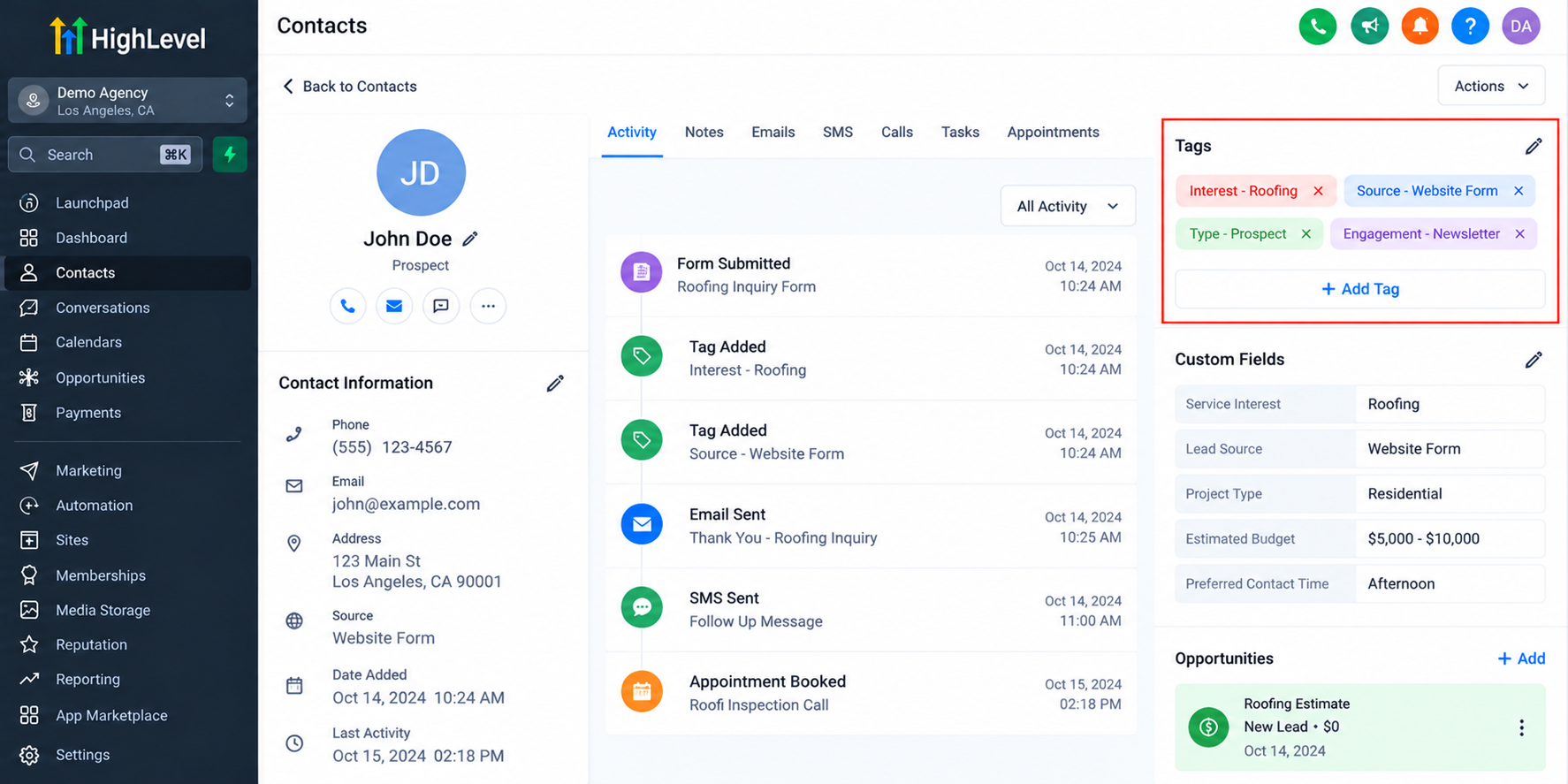
Businesses should also avoid leaving obsolete temporary tags attached to contacts indefinitely.
Most importantly, never build critical automations around poorly documented tags. Clear naming and regular maintenance make troubleshooting significantly easier.
How Better Tag Organization Supports Different Industries
Structured contact tagging can benefit businesses across different industries.
Home service companies can identify prospects interested in roofing, plumbing, or HVAC services.
Real estate agencies can categorize contacts according to buyer or seller interests.
Marketing agencies can organize contacts by campaign source or engagement activity.
Professional service providers can distinguish new inquiries from existing clients.
Each industry may require different classifications, but the underlying principle remains consistent: tags should reflect meaningful business needs.
Final Thoughts
Effective GoHighLevel Contact Tags are not about creating as many labels as possible. They are about building a clear, maintainable structure that supports everyday CRM operations.
Consistent naming conventions, purposeful classifications, and regular reviews help businesses improve contact organization and maintain more understandable automation systems.
Start by reviewing your existing tags, identifying duplicates, and establishing a naming structure your entire team can follow.
A cleaner tagging strategy creates a stronger foundation for long-term CRM management.
Frequently Asked Questions (FAQs)
1. What are contact tags in GoHighLevel?
Contact tags in GoHighLevel are customizable labels used to categorize and identify contacts within the CRM. Businesses can use them to classify lead sources, service interests, customer types, and engagement activities. Tags also support contact filtering and can be used in appropriately configured workflow automations.
2. How should businesses organize their CRM tags?
Businesses should organize CRM tags using consistent naming conventions and clearly defined categories. For example, prefixes such as Source -, Interest -, and Type - make classifications easier to recognize. Regularly reviewing duplicate, outdated, or unnecessary tags helps maintain an organized and manageable CRM database.
3. Can GoHighLevel workflows automatically add or remove tags?
Yes. GoHighLevel workflows support actions for adding and removing contact tags. Businesses can configure these actions based on specific workflow triggers and conditions. However, tags do not automatically initiate workflows unless the appropriate automation has been configured, activated, and tested.
4. What is the difference between tags and custom fields in GoHighLevel?
Tags are primarily used to classify contacts through flexible labels, such as service interests or campaign participation. Custom fields store specific information, including text, dates, numbers, or selected values. Using custom fields for structured data and tags for meaningful classifications helps keep contact records organized.
5. How do contact tags help with lead segmentation?
Contact tags help businesses identify groups of contacts that share particular characteristics or interests. For example, a company can filter contacts using service-interest tags to find relevant prospects. When combined with Smart Lists and configured workflows, tags can support more targeted marketing and follow-up activities.
Need Expert Help with GoHighLevel?
New to GoHighLevel and ready to get started? Buy your GoHighLevel account here and launch with confidence.
Already know what you need and want our team to handle everything, from complete setup and customization to funnels, workflows, automations, CRM, and pipelines? Click here.



