

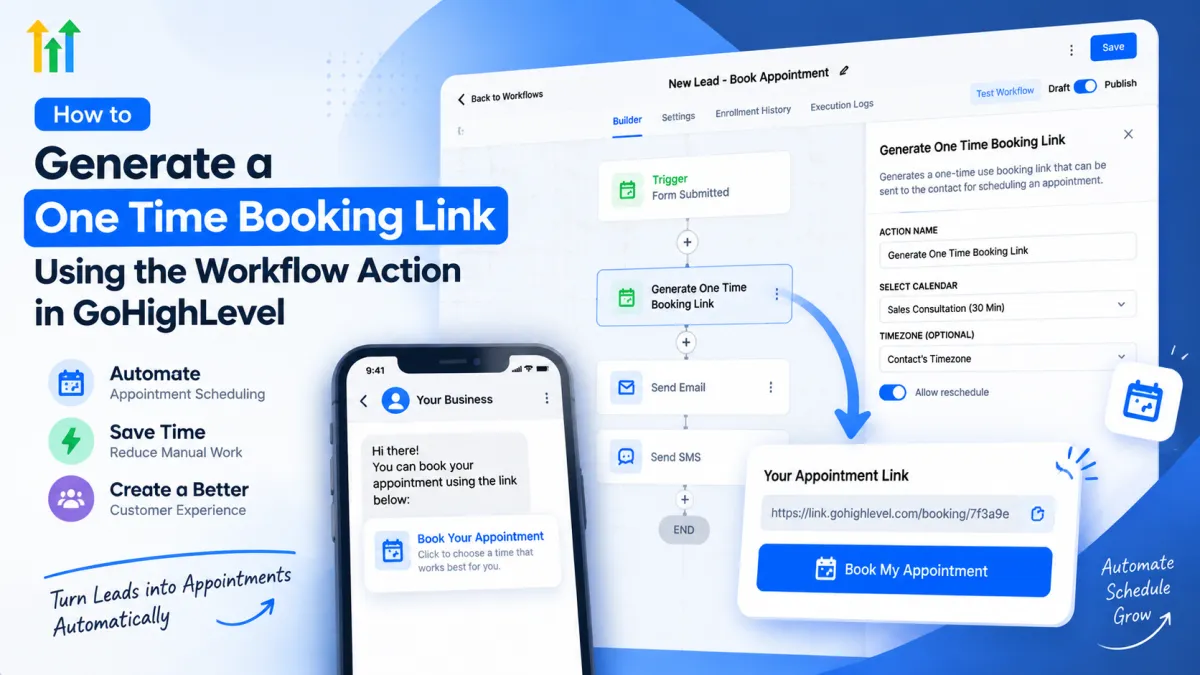
Generate One Time Booking Link in GoHighLevel for Automated Scheduling
How to Generate a One Time Booking Link Using the Generate One Time Booking Link Action in GoHighLevel
Introduction: Simplifying Appointment Scheduling With GoHighLevel Automation
For many businesses, converting leads into booked appointments is one of the biggest challenges in the sales process. A potential customer may show interest, request more information, or respond to a follow-up message but if the booking process requires too many steps, that opportunity can quickly disappear.
Businesses often face problems such as leads forgetting to schedule, sales teams manually sending calendar links, or prospects receiving generic booking pages that do not feel personalized. These small delays can create unnecessary friction between a customer and the business.
This is where GoHighLevel appointment scheduling automation becomes valuable. With tools inside GoHighLevel workflows, businesses can create smoother customer journeys and reduce manual tasks. One useful feature for this purpose is the Generate One Time Booking Link Action in GoHighLevel.
This workflow action allows businesses to create personalized booking links that can be automatically shared with contacts, making appointment scheduling faster and more convenient.
What Is the Generate One Time Booking Link Action in GoHighLevel?
The Generate One Time Booking Link Action is a workflow action inside GoHighLevel that allows you to create a unique booking link for a specific contact during an automation process.
Unlike a standard calendar link that can be shared with anyone and reused multiple times, a one-time booking link is designed for a specific booking opportunity. It creates a more personalized experience because the link is generated as part of an automated workflow for an individual contact.
For example, instead of sending every lead the same generic calendar URL, a business can trigger a workflow that generates a dedicated booking link after a lead completes a form, replies to a campaign, or reaches a specific stage in the sales pipeline.
This makes the appointment scheduling process feel more direct and intentional.
The action works as part of GoHighLevel workflows, allowing businesses to connect lead management, communication, and calendar automation together.
Why Businesses Need One-Time Booking Links
A normal calendar link works well for general scheduling, but there are situations where businesses need a more controlled and personalized booking experience.
Sales Follow-Ups
Sales teams often communicate with leads who have already shown interest. Instead of asking the prospect to visit a website and find a calendar, the workflow can automatically generate a booking link and send it directly through SMS or email.
This reduces the number of steps required before a meeting is scheduled.
High-Value Prospects
For premium services, consulting, coaching, or B2B sales, personalized communication matters.
A one-time booking link can be included in a message like:
“Thanks for your interest. You can choose a convenient time for your consultation here.”
This creates a smoother experience for prospects who are already considering a purchase.
Marketing Agencies
Agencies managing multiple clients can use GoHighLevel booking automation to create streamlined appointment processes. When a new prospect submits an inquiry form, the system can automatically send a personalized scheduling option without requiring manual follow-up.
Real Estate Businesses
Real estate professionals often need quick responses when buyers or sellers show interest. A workflow can generate a booking link after an inquiry and allow the lead to schedule a property consultation or discovery call immediately.
Coaches and Service Providers
Coaches, consultants, and service businesses can use automated booking links to move interested prospects from conversations into scheduled appointments faster.
How to Generate a One Time Booking Link in GoHighLevel
Creating a one-time booking link starts inside the GoHighLevel workflow builder.
Follow these steps:
Step 1: Create or Open a Workflow
First, navigate to the Automation section in your GoHighLevel account and create a new workflow or open an existing workflow.
Your workflow should have a trigger that starts the automation, such as:
Contact form submission
Customer reply
Pipeline stage update
Contact added to a campaign
The trigger determines when the booking link should be generated.
Step 2: Add the Generate One Time Booking Link Action
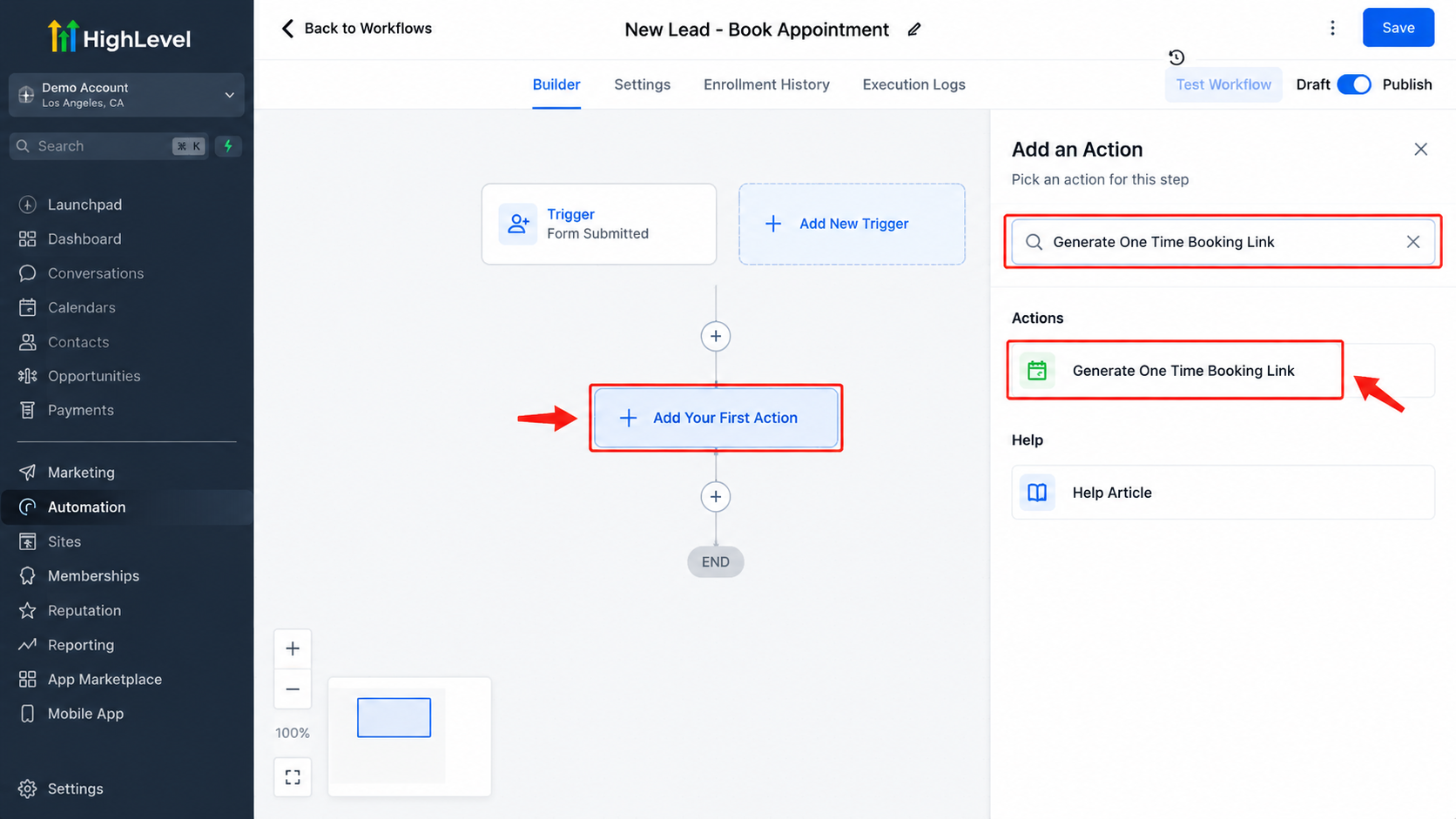
Inside the workflow builder:
Click Add Your First Action or add a new workflow step.
Search for the Generate One Time Booking Link action.
Add it to your workflow.
This tells GoHighLevel to create a unique booking link when the workflow reaches this step.
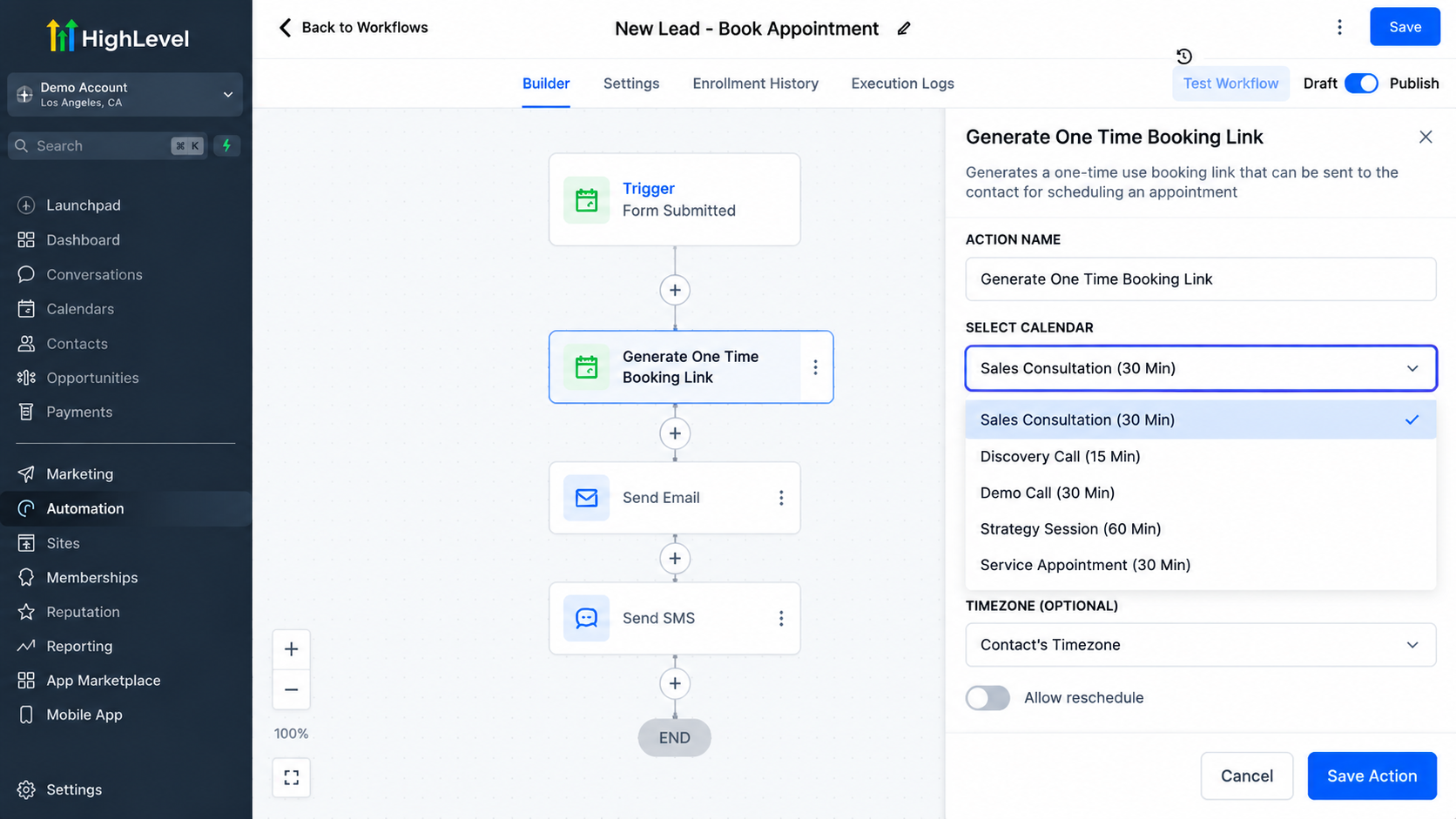
Step 3: Select the Required Calendar Details
Configure the action by selecting the appropriate calendar or booking settings based on your appointment process.
For example:
Sales consultation calendar
Demo booking calendar
Service appointment calendar
The generated link should direct the contact to the correct scheduling option.
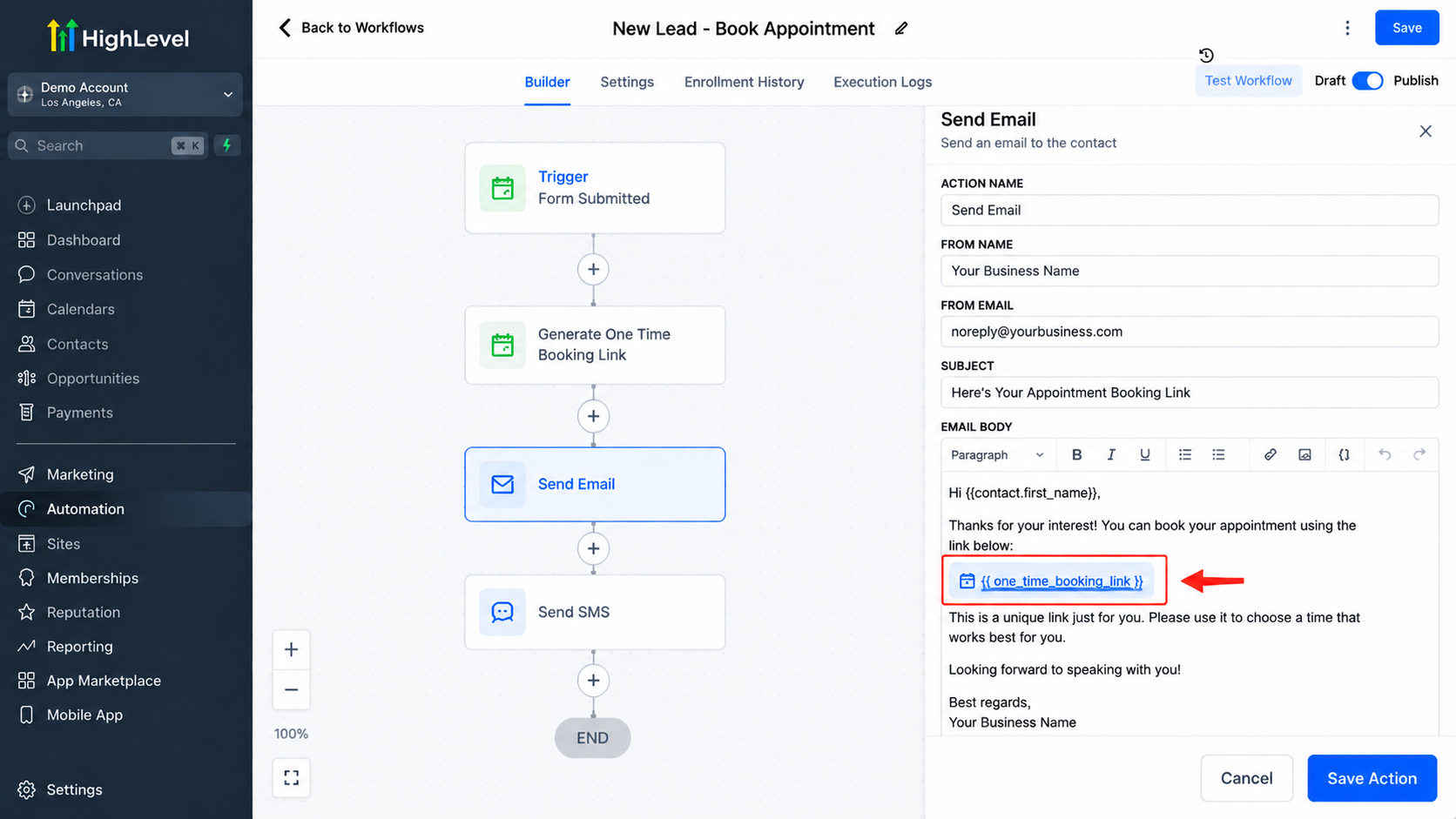
Step 4: Use the Generated Link in Communication
After generating the link, you can use it in automated communication steps such as:
SMS messages
Emails
Follow-up sequences
This allows the contact to receive the booking option immediately without waiting for a team member.
Example Workflow Using One-Time Booking Links
Imagine a marketing agency receives a new lead through a website form.
The workflow could look like this:
Lead submits form → GoHighLevel workflow starts → Generate One Time Booking Link Action runs → SMS/email is sent with booking link → Lead schedules appointment
The workflow removes several manual steps.
Without automation, a salesperson may need to:
Notice the new inquiry.
Contact the lead.
Share a calendar link.
Wait for the lead to schedule.
With GoHighLevel calendar automation, the process happens instantly.
The sales team can focus on conversations instead of repetitive scheduling tasks.
Benefits of Using One-Time Booking Links in GoHighLevel
Better Customer Experience
Customers appreciate simple processes. A personalized booking link allows them to schedule appointments quickly without searching through multiple pages.
More Personalized Communication
A one-time booking link feels more relevant because it is generated as part of a specific customer journey rather than being a generic URL.
Reduced Manual Work
Automation eliminates repetitive tasks for sales representatives, business owners, and support teams.
Improved Appointment Efficiency
When leads can immediately choose a time that works for them, businesses can reduce delays between interest and action.
Stronger CRM Booking System
Connecting workflows, calendars, and communication creates a more organized CRM booking system where every interaction follows a structured process.
Conclusion
The Generate One Time Booking Link GoHighLevel feature helps businesses create a smoother and more personalized appointment scheduling experience. Instead of relying on manual calendar sharing, businesses can use automation to deliver booking opportunities at the right moment.
By combining this action with GoHighLevel workflows, SMS, email automation, and calendar tools, businesses can build more efficient sales and customer management systems.
Whether you are running an agency, coaching business, real estate company, or service-based organization, automated booking experiences can help remove friction and make it easier for leads to take the next step.
As customer expectations continue to increase, using features like one-time booking links allows businesses to create faster, simpler, and more professional scheduling processes.
Frequently Asked Questions (FAQs)
1. What is the Generate One Time Booking Link Action in GoHighLevel?
The Generate One Time Booking Link Action in GoHighLevel is a workflow action that creates a unique appointment booking link for a specific contact. Businesses can use this action inside GoHighLevel workflows to automatically generate personalized scheduling links and send them through SMS, email, or other communication channels.
2. How is a one-time booking link different from a regular GoHighLevel calendar link?
A regular GoHighLevel calendar link can be shared publicly and reused by multiple people. A one-time booking link is generated during an automation process for a specific booking opportunity, creating a more personalized scheduling experience and reducing unnecessary steps for the customer.
3. Can I use the Generate One Time Booking Link Action inside GoHighLevel workflows?
Yes. This action is designed to work inside GoHighLevel workflows. You can trigger it after events such as form submissions, lead responses, pipeline updates, or other automation triggers, then send the generated booking link automatically to the contact.
4. What businesses can benefit from one-time booking links in GoHighLevel?
Many businesses can use one-time booking links, including marketing agencies, real estate companies, coaches, consultants, healthcare providers, and service businesses. Any business that schedules appointments with leads or customers can use this feature to create a smoother booking process.
5. Can GoHighLevel send the generated booking link automatically?
Yes. After generating the booking link inside a workflow, businesses can use GoHighLevel communication actions to send it through channels such as SMS or email. This helps leads receive scheduling options immediately without waiting for manual follow-up.
6. Do one-time booking links help improve appointment scheduling automation?
Yes. One-time booking links reduce friction by allowing leads to move from interest to appointment scheduling faster. When combined with GoHighLevel calendar automation and workflow actions, businesses can create a more efficient appointment booking process.
Need Expert Help with GoHighLevel?
New to GoHighLevel and ready to get started? Buy your GoHighLevel account here and launch with confidence.
Already know what you need and want our team to handle everything, from complete setup and customization to funnels, workflows, automations, CRM, and pipelines? Click here.



