

How to Find Sales Opportunities Automatically Using the Find Opportunity Action in GoHighLevel
How to Find Sales Opportunities Automatically Using the Find Opportunity Action in GoHighLevel
A lead can contact a business more than once, book another appointment, submit another form, or return after going quiet. If each interaction creates a new opportunity without checking the CRM first, the sales pipeline can quickly become difficult to manage. GoHighLevel helps solve this problem with the Find Opportunity action, which allows a workflow to locate an existing opportunity for a contact before taking the next step.
What Is the Find Opportunity Action?
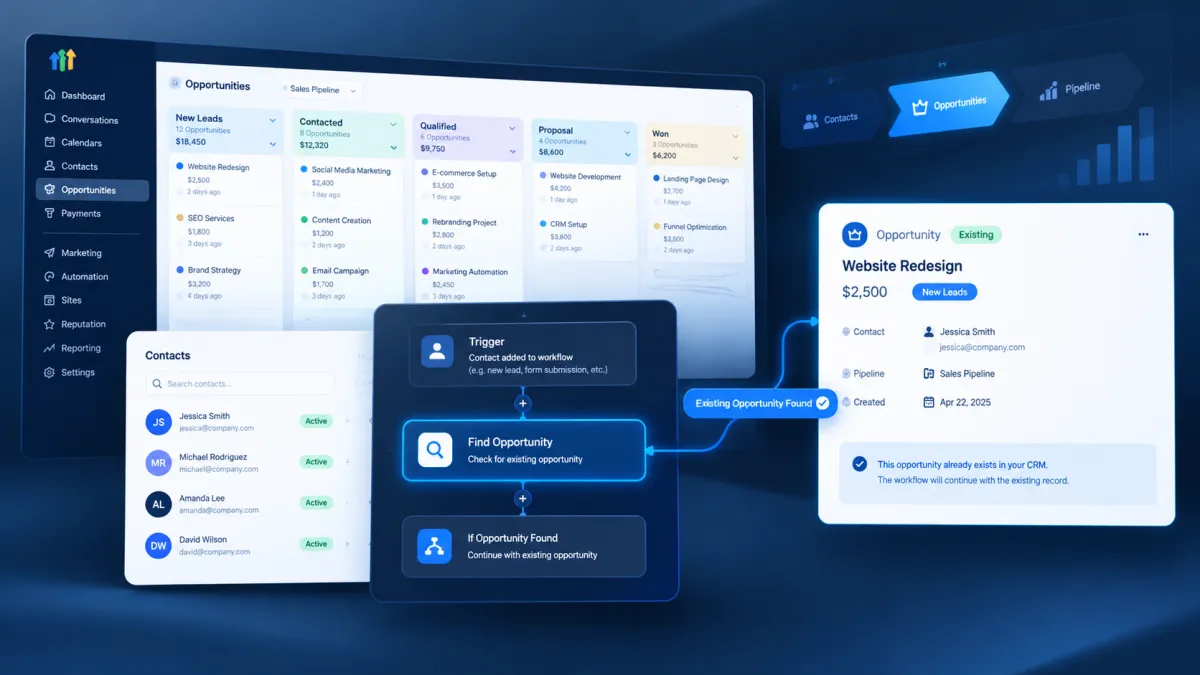
The Find Opportunity action is a GoHighLevel workflow action designed to locate an existing opportunity connected to the contact entering the workflow. Instead of creating a new opportunity immediately, the workflow can search for an opportunity that matches specific criteria.
The action lets you choose whether to find the earliest opportunity or the latest opportunity that matches your selected filters. When a matching opportunity is found, it becomes the opportunity referenced by subsequent opportunity related actions in that workflow.
This makes the action particularly useful when a workflow needs to work with an opportunity that already exists in the CRM.
Why Finding an Existing Opportunity Matters
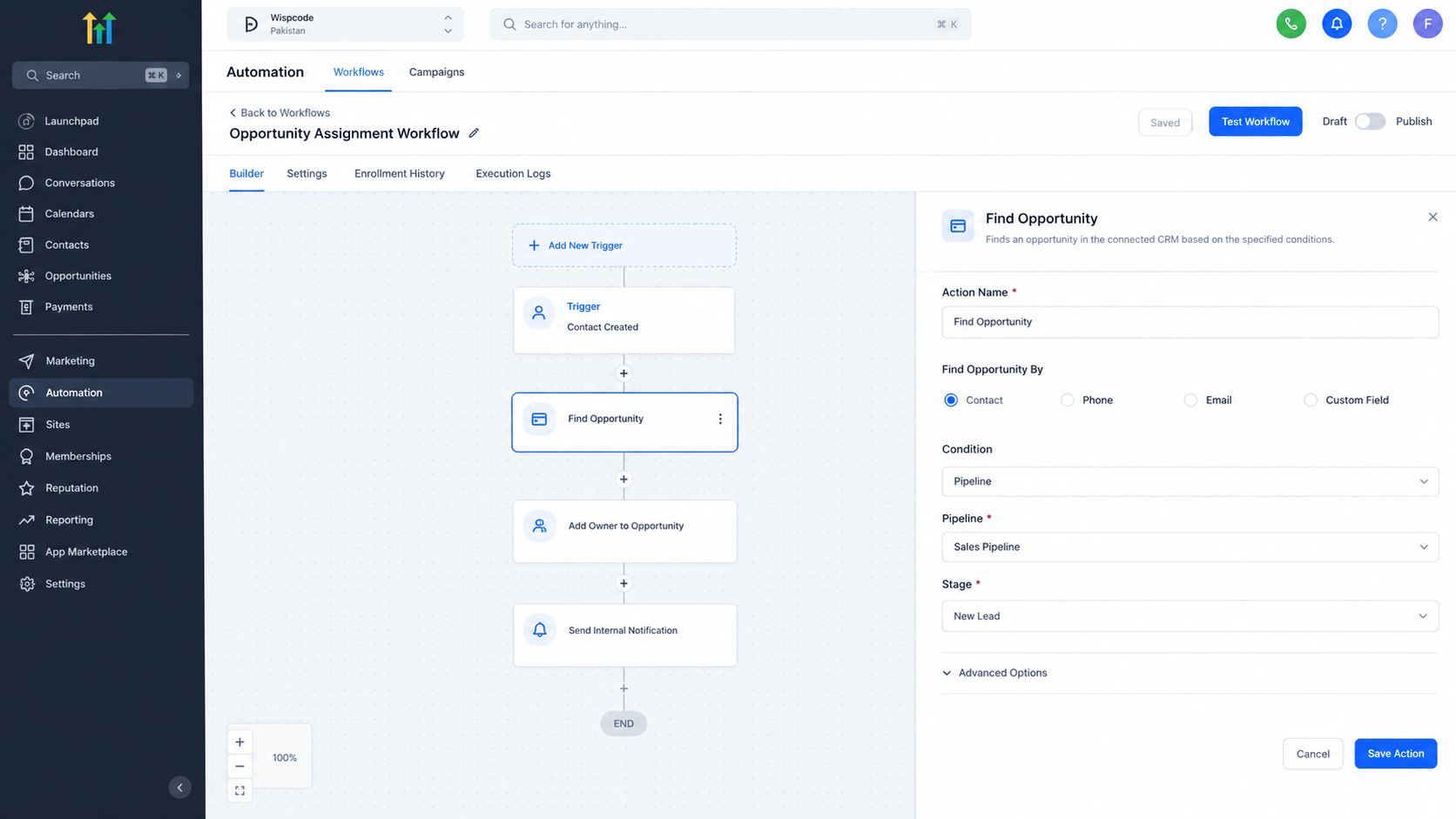
Without a reliable way to locate an existing opportunity, automation can become disconnected from the sales pipeline. A workflow may know that a contact has interacted with the business, but it still needs to identify the correct opportunity before updating or managing that record.
Find Opportunity provides that connection.
For example, a contact may already have an open opportunity when they submit a new form. Instead of treating the submission as a completely new sales record, a workflow can search for the relevant existing opportunity and continue from there.
This can reduce unnecessary manual CRM work and help businesses maintain cleaner opportunity records.
How the Find Opportunity Action Works
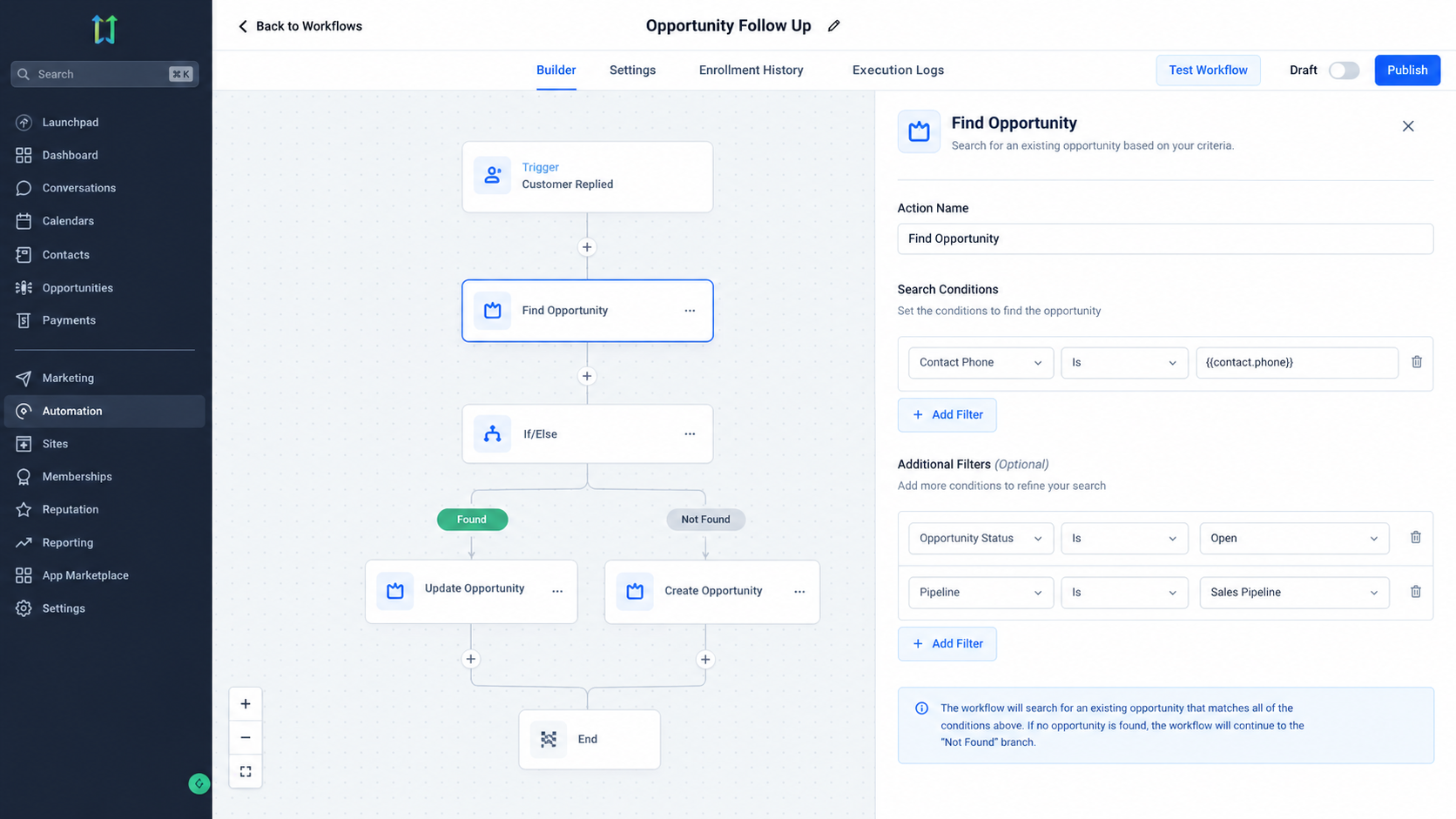
The action searches for an existing opportunity associated with the contact entering the workflow. You define filters that determine which opportunity should qualify.
The filters use AND logic. This means every condition added to the search must be satisfied for an opportunity to match. HighLevel documentation also states that the filters can reference standard or custom opportunity fields.
If more than one opportunity matches the criteria, the action returns only one record. You can configure it to select either the earliest matching opportunity or the latest matching opportunity.
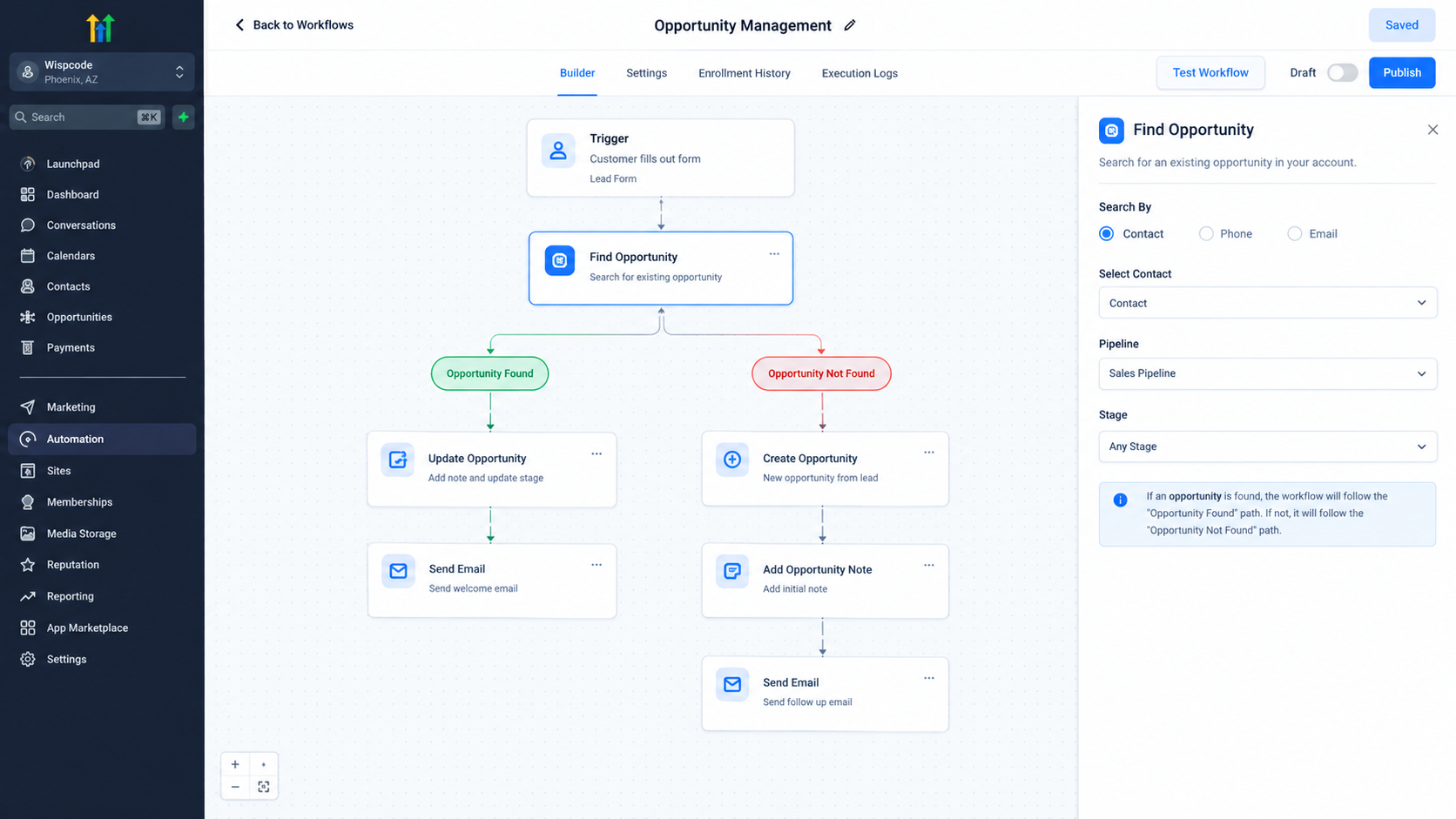
If no matching opportunity is found, the workflow follows a separate Opportunity Not Found path. If a match is found, it follows the Opportunity Found path.
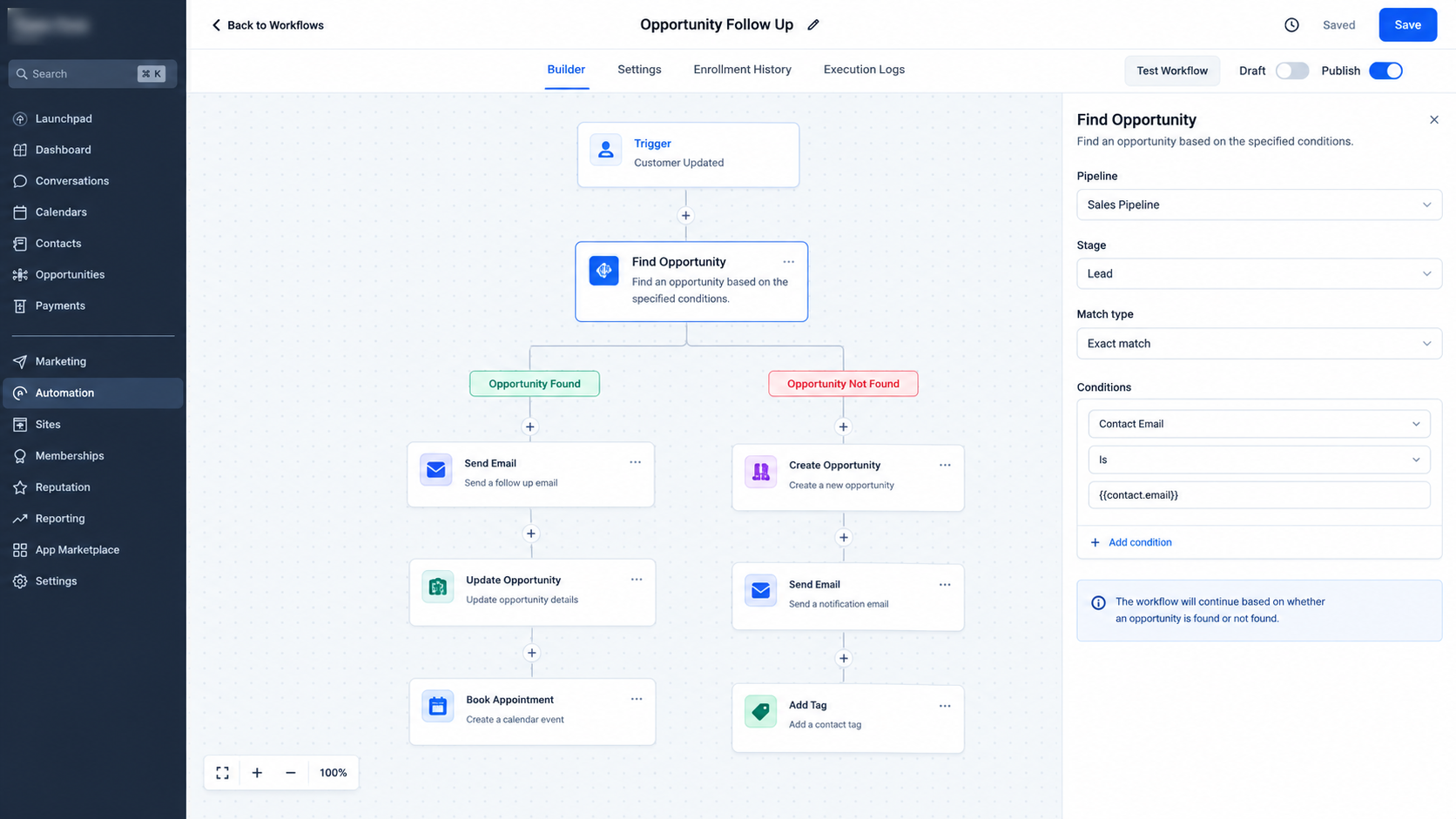
This branching behavior is important because it allows the workflow to handle both situations without treating them as the same event.
Where It Fits in a GoHighLevel Workflow
Find Opportunity is not a workflow trigger. It is an action that runs after the workflow has started.
A workflow can begin because of an event such as a form submission or another supported trigger. The Find Opportunity action can then search for an existing opportunity related to that contact.
Once an opportunity is found, later opportunity actions can work with the opportunity identified by the Find Opportunity step. HighLevel specifically documents use cases where Find Opportunity is followed by actions such as Update Opportunity or Add Owner to Opportunity.
This makes it useful as a decision point inside a larger automation rather than as a standalone automation trigger.
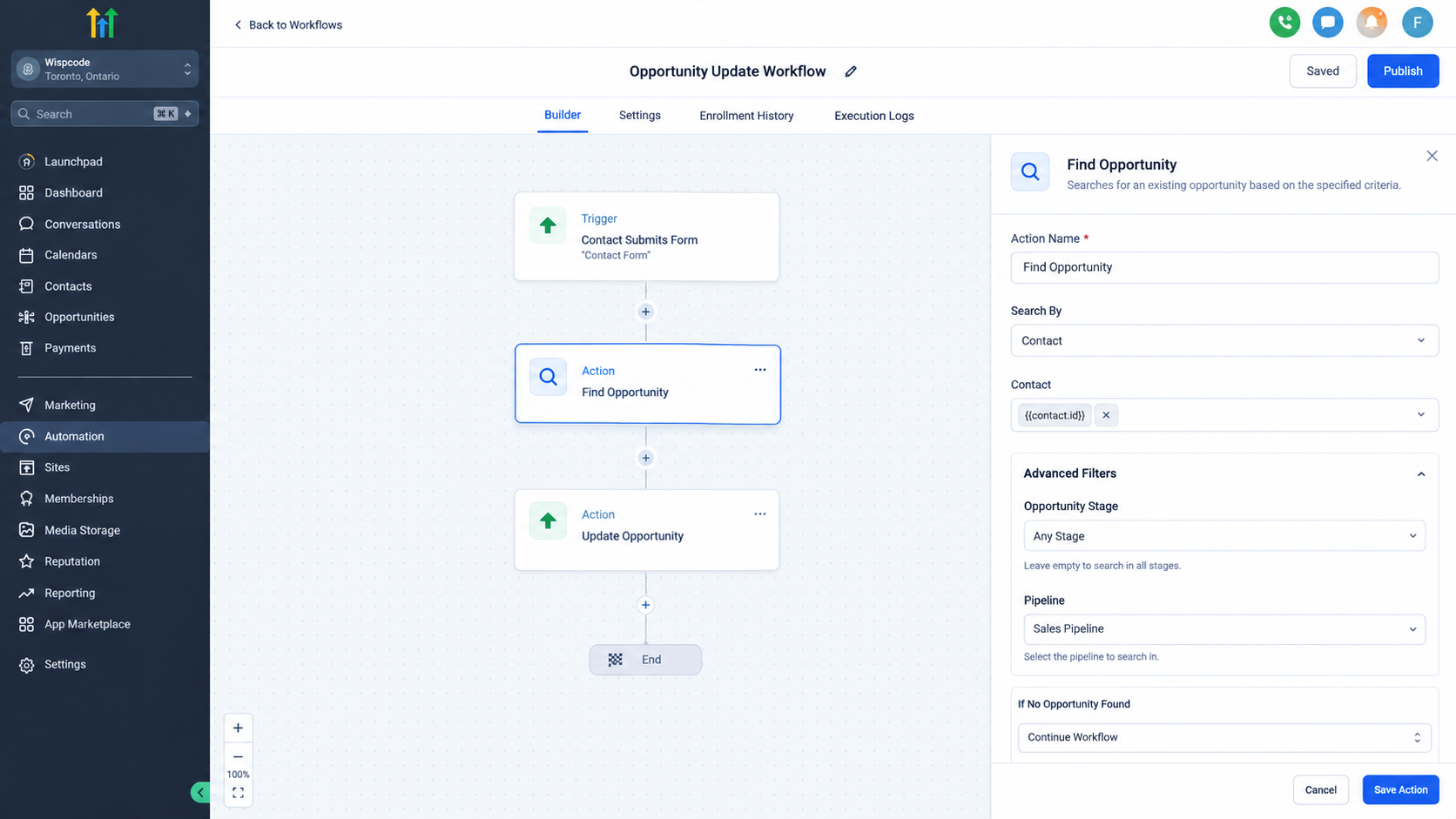
Find an Opportunity Instead of Creating One
One of the most important distinctions is the difference between finding and creating an opportunity.
The Find Opportunity action searches for an opportunity that already exists. It does not create a new opportunity when no match is found.
If no suitable opportunity exists, the Opportunity Not Found branch can be used to handle that situation. For example, the workflow could continue to a Create Opportunity action when the business needs a new sales record. HighLevel provides this exact pattern in its documentation.
This separation gives the workflow clearer logic: first check whether the appropriate opportunity exists, then decide what should happen next.
Practical Business Example
Consider a service business that receives appointment requests from existing leads.
A contact submits a new form, entering a workflow. The workflow uses Find Opportunity to search for the contact’s latest opportunity with specific conditions. If the matching opportunity is found, the workflow can continue through the Opportunity Found branch and use an Update Opportunity action to modify the existing record.
If nothing matches, the workflow can move through the Opportunity Not Found branch and create a new opportunity instead.
This approach helps the automation distinguish between an existing sales record and a genuinely new sales opportunity.
Important Considerations
The quality of the search depends on the filters you configure. Since all specified filters must match, adding conditions that are too restrictive can result in no opportunity being found.
You should also decide whether the workflow needs the earliest or latest matching opportunity. That choice matters when a contact has multiple opportunities in the CRM.
Another important consideration is contact context. HighLevel notes that when a workflow does not have a contact, such as an inbound webhook without contact information, the filters need to map relevant fields to the webhook parameters so the action can locate the opportunity.
Final Thoughts
The Find Opportunity action gives GoHighLevel workflows a practical way to locate existing sales opportunities before continuing with opportunity management. By combining precise filters, the appropriate opportunity selection, and separate found and not found paths, businesses can build automation that works with their existing CRM structure instead of blindly creating new records.
For sales teams and agencies, that can make workflow automation more controlled, consistent, and useful across the customer journey.
Frequently Asked Questions (FAQs)
1. What does Find Opportunity do in GoHighLevel?
It searches for an existing opportunity connected to the contact entering the workflow based on configured filters.
2. Is Find Opportunity a workflow trigger?
No. Find Opportunity is a workflow action used after a workflow has started.
3. Can Find Opportunity create a new opportunity?
No. It only searches for an existing opportunity. A separate Create Opportunity action can be used when no match is found.
4. What happens when multiple opportunities match?
The action returns either the earliest or latest matching opportunity, depending on the option selected.
5. What happens when no opportunity is found?
The workflow follows the Opportunity Not Found branch, allowing you to handle the situation separately.
Need Expert Help with GoHighLevel?
New to GoHighLevel and ready to get started? Buy your GoHighLevel account here and launch with confidence.
Already know what you need and want our team to handle everything, from complete setup and customization to funnels, workflows, automations, CRM, and pipelines? Click here.



