

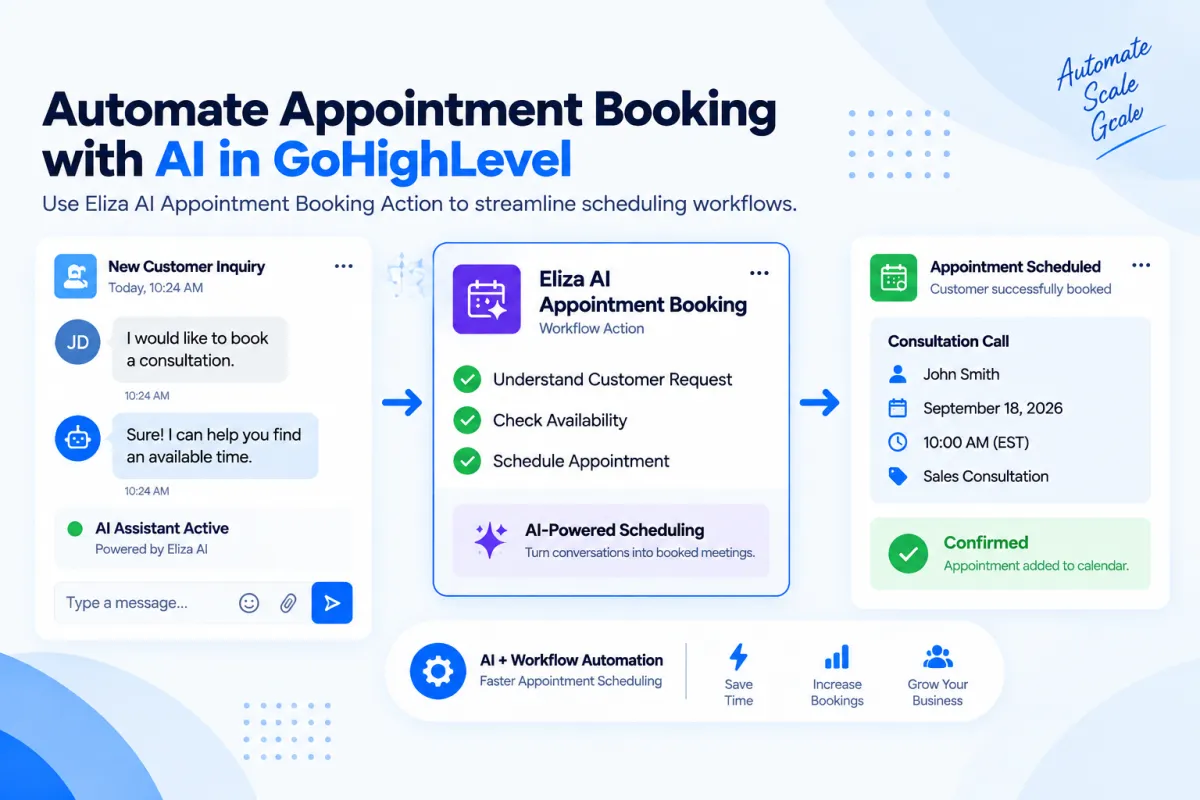
Eliza AI Appointment Booking Action in GoHighLevel: Step-by-Step Guide
How to Automate Appointment Scheduling Using the Eliza AI Appointment Booking Action in GoHighLevel
Introduction
Missed calls, delayed replies, and slow follow-ups are some of the biggest reasons businesses lose potential customers. When someone is ready to book an appointment, they usually expect a quick response. If the business takes hours or days to reply, that opportunity may disappear.
This is where AI-powered appointment automation can help.
GoHighLevel provides tools that allow businesses to automate conversations and improve appointment scheduling workflows. One of these capabilities is the Eliza AI Appointment Booking Action, which helps businesses streamline appointment booking by allowing AI-powered conversations to guide contacts toward scheduling.
Instead of relying completely on manual replies, businesses can create workflows where contacts receive automated assistance during the booking process. This can help reduce repetitive scheduling tasks, improve response times, and create a smoother customer experience.
In this guide, we will explain what the Eliza AI Appointment Booking Action in GoHighLevel is, how it works, how to set it up, practical use cases, and best practices for building effective appointment automation workflows.
What Is the Eliza AI Appointment Booking Action in GoHighLevel?
The Eliza AI Appointment Booking Action is a workflow action in GoHighLevel designed to help automate appointment booking conversations.
When a contact reaches this action inside a workflow, the AI assistant can help guide the contact through the appointment scheduling process based on the configured booking setup.
Instead of a team member manually handling every scheduling conversation, businesses can use automation to assist contacts with moving toward an appointment.
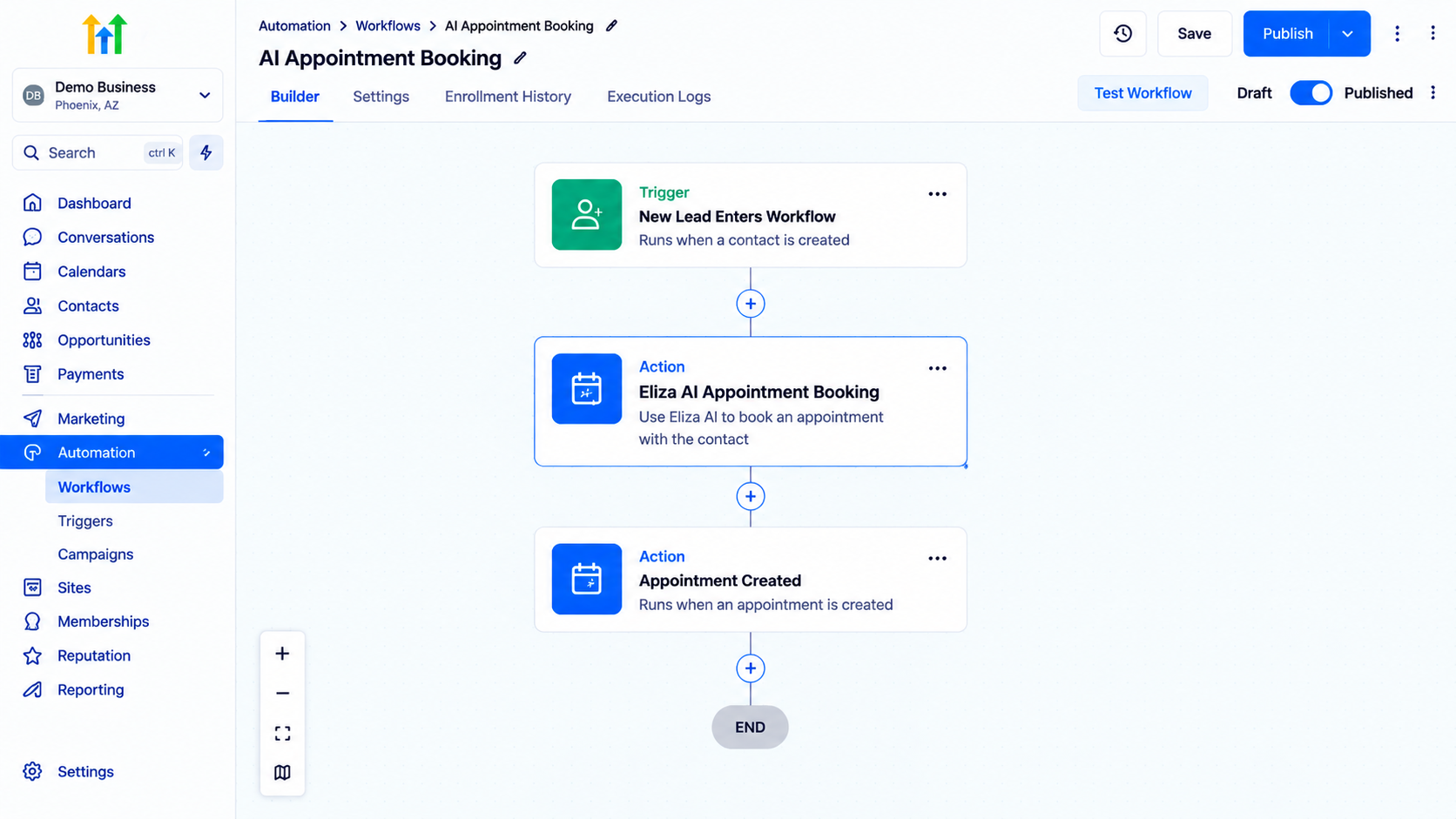
A simple workflow structure can look like this:
New Lead Enters Workflow
↓
AI Appointment Booking Action
↓
Contact Receives Scheduling Assistance
↓
Appointment Created
The purpose is to make the appointment process faster and more efficient while reducing repetitive manual work.
Why Automate Appointment Scheduling?
Appointment scheduling is often one of the most repetitive tasks for businesses.
A potential customer may ask:
What times are available?
Can I schedule a consultation?
Can I reschedule my appointment?
What information do you need before booking?
Handling these conversations manually takes time, especially when a business receives many inquiries.
Automating appointment scheduling can help businesses:
Improve Response Speed
Customers often want immediate answers. Automated appointment workflows allow businesses to respond faster without requiring someone to monitor conversations constantly.
Reduce Manual Scheduling Tasks
Teams can spend less time coordinating calendars and more time focusing on sales, service delivery, and customer relationships.
Create Consistent Booking Experiences
Automation ensures every contact follows the same scheduling process instead of depending on how quickly different team members respond.
Capture More Opportunities
When scheduling assistance is available quickly, fewer potential customers are left waiting.
How the Eliza AI Appointment Booking Action Works
The Eliza AI Appointment Booking Action works as part of a GoHighLevel workflow.
A contact first enters a workflow through a trigger, such as:
Form submission
Lead capture
Customer inquiry
Other supported workflow triggers
After entering the workflow, the contact reaches the AI appointment booking action.
The action then helps guide the contact toward the appointment process based on the configured workflow setup.
The general flow looks like:
Lead Captured
↓
Workflow Starts
↓
Eliza AI Appointment Booking Action
↓
AI-Assisted Scheduling Process
↓
Appointment Outcome
The exact behavior depends on how the workflow, calendar, and AI settings are configured.
Step-by-Step: How to Add Eliza AI Appointment Booking Action in GoHighLevel
Step 1: Open GoHighLevel Workflow Builder
First, navigate to:
Automation → Workflows
Create a new workflow or open an existing workflow where you want to add appointment scheduling automation.
Before adding the AI booking action, define:
Who should enter the workflow
When the appointment process should begin
What outcome you want the automation to achieve
For example:
A website visitor submits a consultation form.
The workflow starts.
The AI appointment booking action helps the visitor schedule a consultation.
Step 2: Select Your Workflow Trigger
The trigger determines when a contact enters the workflow.
Common examples include:
Contact submitted a form
Contact received a tag
Contact entered a pipeline stage
Choose a trigger that matches your appointment process.
For example:
Trigger: New Lead Form Submitted
This allows every new inquiry to enter the scheduling workflow automatically.
Step 3: Add the Eliza AI Appointment Booking Action
Inside the workflow builder:
Click the + Action button.
Search for the appointment booking action.
Select the Eliza AI Appointment Booking Action.
Configure the required settings.
The action should be placed at the point where you want the AI scheduling process to begin.
Example:
New Lead Trigger
↓
Send Welcome Message
↓
Eliza AI Appointment Booking Action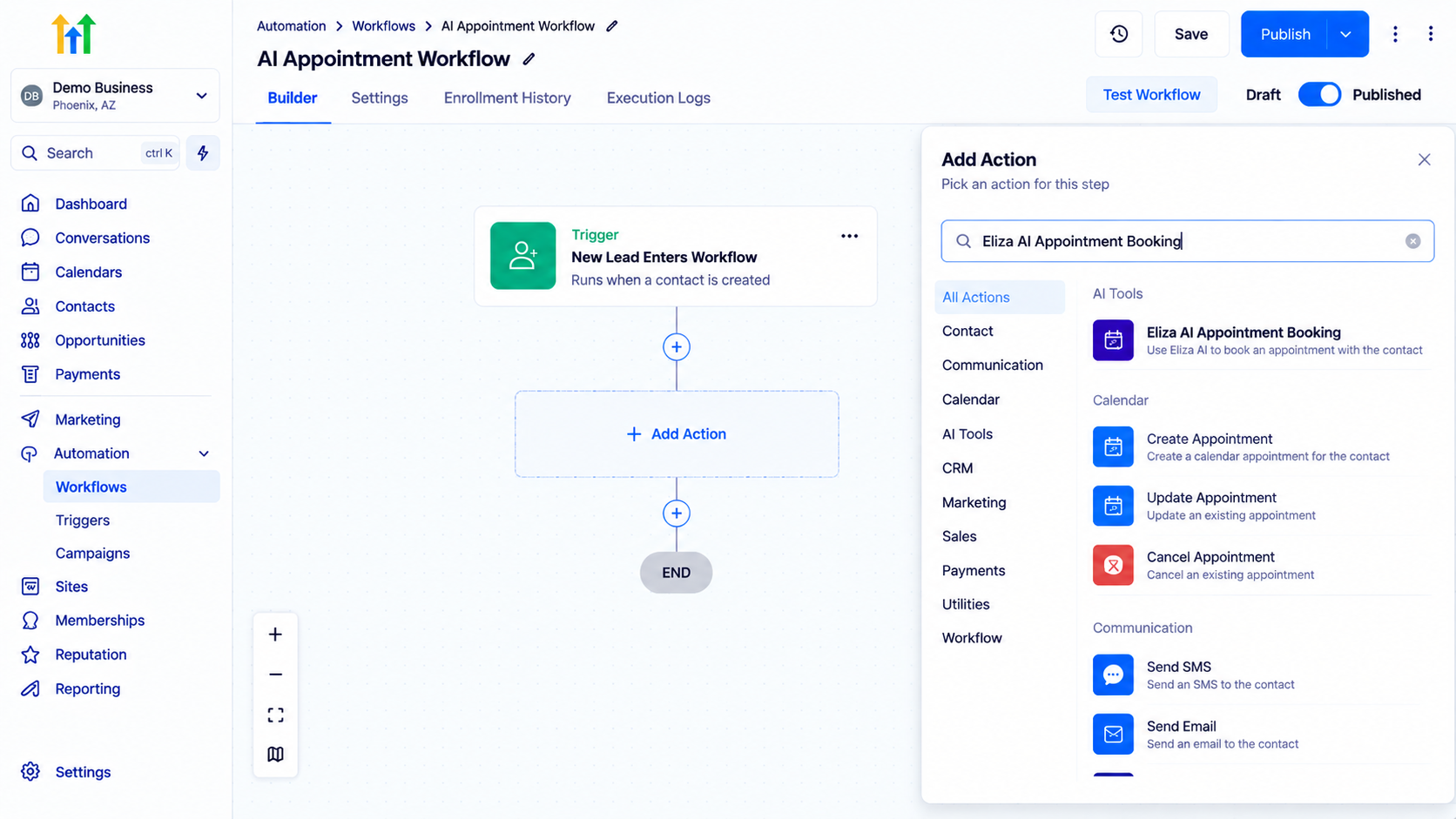
GoHighLevel workflow builder displaying the Add Action configuration panel to integrate Eliza AI Appointment Booking into automated contact workflows.
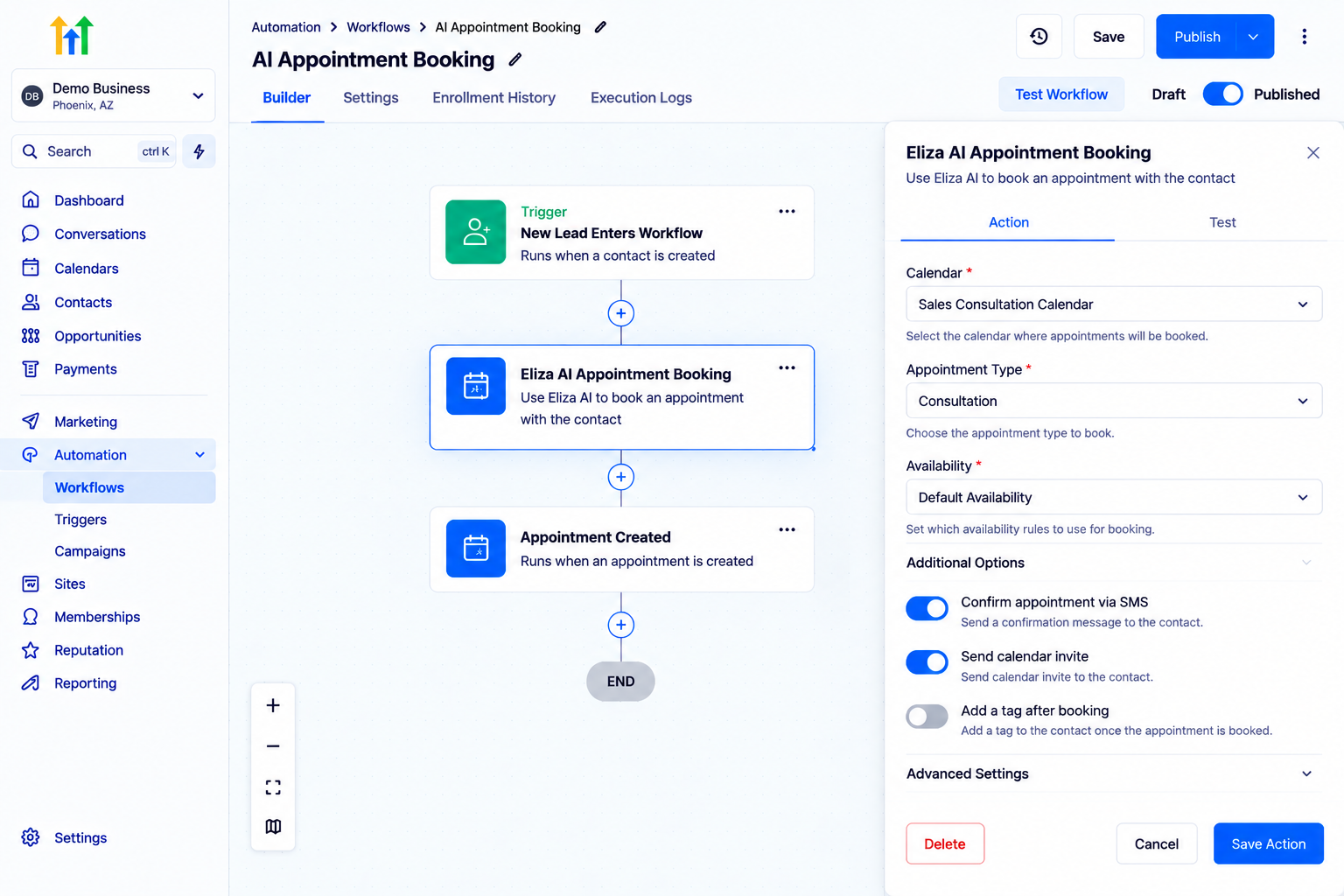
Step 4: Configure Appointment Settings
Before activating the workflow, review your appointment configuration.
Make sure your scheduling process has:
The correct calendar
Proper availability settings
Appropriate appointment type
Clear booking information
A well-configured calendar is important because the AI scheduling experience depends on accurate availability.
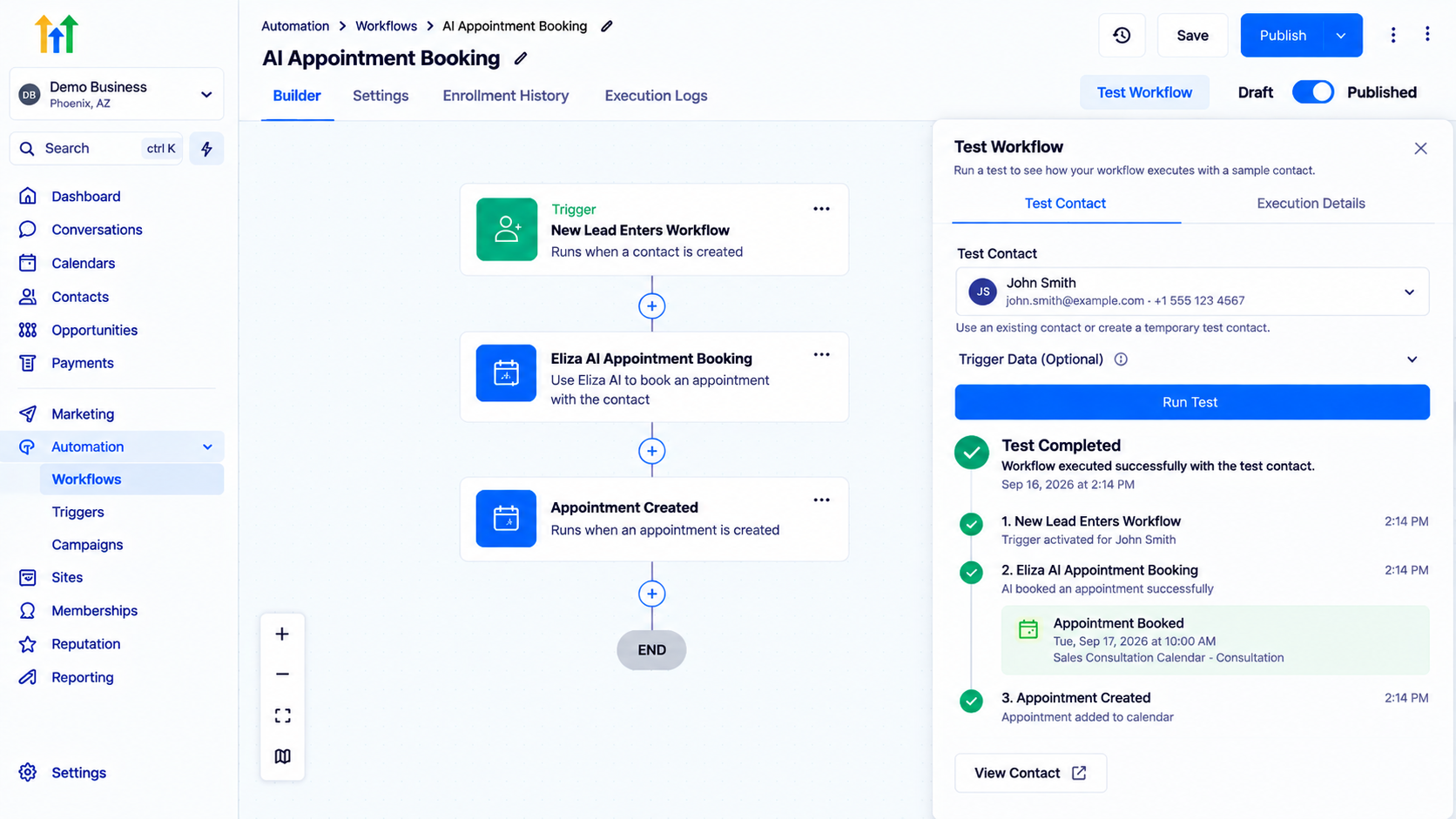
Step 5: Test the Workflow
Testing is one of the most important steps before launching automation.
Use a test contact and verify:
The workflow starts correctly
The AI action triggers properly
The scheduling process works as expected
Appointment information is handled correctly
Testing helps identify issues before real leads enter the system.
Step 6: Activate the Workflow
After testing everything:
Review the workflow steps
Confirm the settings
Publish or activate the workflow
Once active, new contacts who meet the trigger conditions can move through the automated appointment scheduling process.
Practical Use Cases for Eliza AI Appointment Booking
1. Service-Based Businesses
Businesses such as:
Consultants
Agencies
Coaches
Healthcare providers
Local service companies
often receive appointment requests daily.
An AI booking workflow can help guide leads toward scheduling without requiring constant manual replies.
Example:
A visitor requests a consultation.
The workflow starts.
AI helps move the conversation toward booking.
2. Sales Consultation Booking
Sales teams often lose opportunities when leads wait too long for responses.
A scheduling workflow can help qualified prospects move from interest to booked meetings faster.
Example:
New Sales Lead
↓
AI Appointment Booking
↓
Sales Consultation Scheduled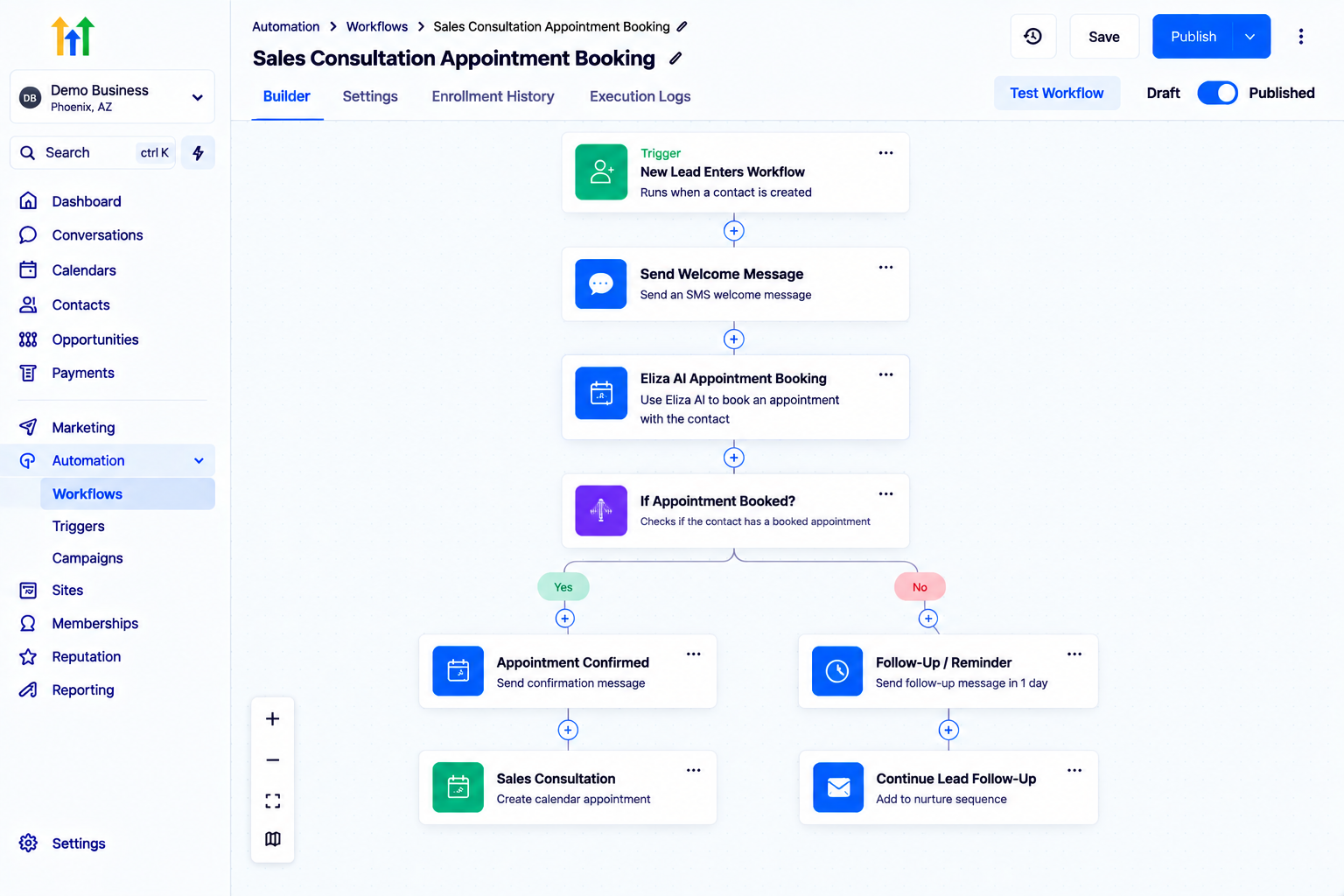
GoHighLevel workflow builder displaying a complete Sales Consultation Appointment Booking automation sequence featuring trigger events, Eliza AI booking, and conditional branch actions.
3. After-Hours Appointment Requests
Many customers submit inquiries outside business hours.
Automated appointment workflows allow businesses to continue handling scheduling requests even when staff members are unavailable.
This creates a better customer experience without requiring someone to monitor conversations 24/7.
4. Lead Follow-Up Automation
Some leads need additional encouragement before booking.
Businesses can combine appointment automation with follow-up workflows.
Example:
New Lead
↓
AI Appointment Assistance
↓
Follow-Up Workflow
This creates a structured journey from inquiry to appointment.
Best Practices for Using AI Appointment Booking Automation
Keep Your Calendar Updated
AI scheduling depends on accurate availability.
Make sure your calendar settings, availability, and appointment details are regularly reviewed.
Create Clear Conversation Goals
Your automation should have a clear purpose.
For example:
Book a consultation
Schedule a demo
Arrange a service appointment
Avoid creating unclear scheduling journeys.
Test Different Scenarios
Test different customer situations:
New booking requests
Appointment questions
Scheduling problems
Follow-up conversations
This helps ensure your workflow handles different situations properly.
Combine AI With Human Support
Automation works best when it supports your team.
Some conversations may require human assistance, especially when customers have complex questions or specific requirements.
Common Mistakes to Avoid
1. Poor Calendar Configuration
Incorrect availability settings can create scheduling problems.
Always verify your calendar before activating automation.
2. Skipping Testing
Launching without testing can create customer-facing issues.
Always test the workflow with sample contacts.
3. Making the Process Too Complicated
A simple scheduling workflow is often easier to maintain.
Avoid adding unnecessary steps that make the customer journey confusing.
4. Ignoring Human Handoff Needs
AI automation should support customer conversations, but businesses should still have a process for situations that require human attention.
Frequently Asked Questions(FAQ's)
1. What is the Eliza AI Appointment Booking Action in GoHighLevel?
It is a workflow action that helps automate appointment scheduling conversations inside GoHighLevel.
2. Can Eliza AI help businesses book appointments automatically?
Yes, it can assist contacts through the appointment booking process when properly configured.
3. Do I need a calendar setup for AI appointment booking?
Yes, appointment scheduling requires the correct calendar and availability configuration.
4. Can I use AI appointment booking for different industries?
Yes, businesses such as agencies, consultants, coaches, and service providers can use appointment automation workflows.
5. Should I still provide human support with AI booking?
Yes. AI can handle scheduling tasks, while human support can manage complex customer situations.
Conclusion
The "Eliza AI Appointment Booking Action" in GoHighLevel helps businesses create smoother appointment scheduling experiences by combining workflow automation with AI-assisted conversations.
Instead of manually handling every booking request, businesses can create automated processes that guide contacts toward scheduling appointments more efficiently.
A successful appointment automation system depends on more than just adding an AI action. Businesses should also maintain accurate calendars, create clear workflows, test different scenarios, and provide human support when needed.
When implemented correctly, AI appointment scheduling can reduce repetitive tasks, improve response times, and create a better experience for potential customers.
By using GoHighLevel workflow automation strategically, businesses can build a more organized and scalable appointment booking process.
Need Expert Help with GoHighLevel?
New to GoHighLevel and ready to get started? Buy your GoHighLevel account here and launch with confidence.
Already know what you need and want our team to handle everything, from complete setup and customization to funnels, workflows, automations, CRM, and pipelines? Click here.



