

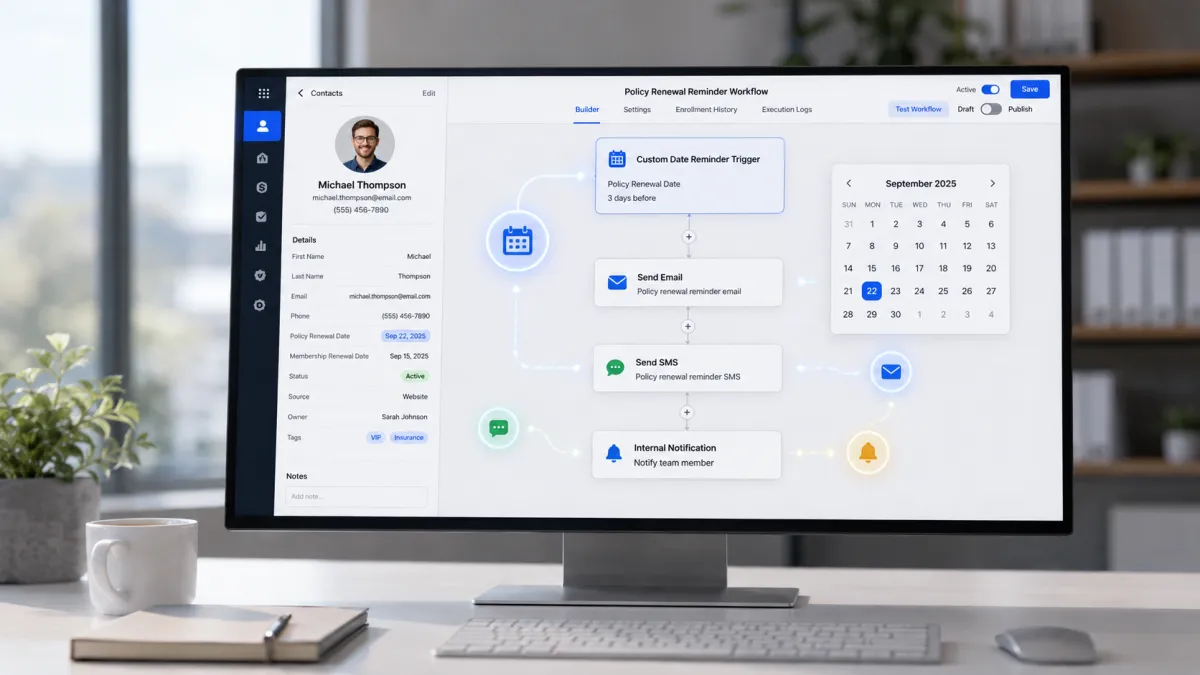
Custom Date Reminders
How to Automate Renewal Reminders Using the Custom Date Reminder Trigger in GoHighLevel
What if you never had to worry about missing another customer renewal date? Whether it's an insurance policy, membership, subscription, warranty, or annual service, keeping track of recurring dates manually becomes nearly impossible as your customer base grows. A single missed reminder can lead to lost revenue, unhappy customers, and unnecessary administrative work.
Fortunately, the GoHighLevel Custom Date Reminder Trigger eliminates that risk by automatically starting workflows based on dates stored in your CRM. Instead of relying on spreadsheets or calendars, you can deliver timely reminders, improve customer retention, and ensure every important renewal is handled automatically.
What Is the Custom Date Reminder Trigger in GoHighLevel?
The GoHighLevel Custom Date Reminder Trigger is a workflow trigger that starts an automation based on a Custom Date Field saved on a contact record.
Instead of relying on appointments or birthdays, this trigger watches a specific custom date that you define. When the reminder timing for that date is reached, the workflow begins and performs the actions you have configured.
This makes it ideal for businesses that need automated reminders for important customer specific dates that are not covered by GoHighLevel's built in reminder triggers.
The trigger depends entirely on a valid custom date field. If no date is stored for the contact, the workflow has nothing to monitor and will not start.

Why Businesses Need Renewal Reminder Automation
Many businesses still rely on calendars, sticky notes, or manual follow ups to manage renewals. While this may work for a small customer list, it quickly becomes difficult as the business grows.
A missed renewal reminder can mean losing a customer who simply forgot to renew their service.
With GoHighLevel Automation, the reminder process becomes automatic. Once the renewal date is saved in the CRM, the workflow handles the communication without requiring someone to remember every upcoming deadline.
This creates a more reliable customer experience while reducing the workload for your team.
How the Custom Date Reminder Trigger Works
The automation process is straightforward and easy to understand.
Step 1: Create a Custom Date Field
First, create a Custom Date Field inside GoHighLevel. This field stores the important date that you want the system to monitor.
Examples include:
Policy Renewal Date
Membership Expiration Date
Warranty End Date
Annual Service Date
Contract Renewal Date

Date Picker fields allow businesses to save important renewal and expiration dates for each contact.
Step 2: Save the Date in the Contact Record
Whenever a customer signs up or renews a service, enter the relevant date into the custom field on their contact record.
Keeping this information accurate is essential because the workflow depends on this value.
Step 3: Configure the Workflow Trigger
Create a new GoHighLevel Workflow and select the Custom Date Reminder Trigger.
Choose the custom date field you want the workflow to monitor and define when the reminder should occur, such as several days before the stored date.

Step 4: The Trigger Activates
When the configured reminder timing is reached for a contact's custom date, the trigger fires automatically.
This starts the workflow without any manual action from your team.
Step 5: Workflow Actions Execute
Once the workflow begins, it performs the actions you have added.
These may include sending reminder emails, sending SMS notifications, notifying internal staff, updating contact information, or performing other workflow actions that support your renewal process.

How It Differs From Other Reminder Triggers
The Custom Date Reminder Trigger is designed specifically for dates stored in custom contact fields.
Unlike appointment related triggers, it does not depend on calendar bookings.
Unlike the Birthday Reminder Trigger, it is not tied to a contact's birthday.
Instead, it gives businesses complete flexibility by allowing automation around virtually any important customer date that can be stored in a custom date field.
This flexibility makes it useful across many industries with unique renewal schedules.
Real World Business Use Cases
Insurance Policy Renewals
Insurance agencies can store each customer's policy renewal date and automatically remind clients before coverage expires. This encourages timely renewals and reduces policy lapses.
Membership Renewals
Gyms, clubs, and associations can remind members that their membership is approaching expiration, giving them enough time to renew without interruption.
Subscription Renewals
Businesses offering recurring services can notify customers before their subscription renewal date, improving customer retention and reducing missed payments.
Warranty Expiration
Retailers and service providers can remind customers when product warranties are about to expire, creating opportunities to offer extended warranty plans or replacement services.
Annual Maintenance
Companies that perform yearly inspections or maintenance can schedule re minders before the next service is due, helping customers stay on schedule.
Contract Renewals
Consulting firms, agencies, and service providers can automate reminders before client contracts expire, making renewal discussions much easier.
License Renewals
Organizations managing certifications, permits, or professional licenses can notify customers before renewal deadlines arrive.
Service Renewals
Businesses providing recurring maintenance or support services can keep customers informed well before their renewal dates, improving long term relationships.
Benefits of Using the Trigger
Using the GoHighLevel Custom Date Reminder Trigger provides several practical advantages.
It saves time by removing repetitive manual follow ups.
It helps prevent missed renewals that could result in lost revenue.
Customers receive reminders at the right time, creating a better overall experience.
Your CRM stays organized because important dates are stored directly on contact records.
Automation creates consistent communication across every customer.
It also improves operational efficiency by allowing your team to focus on higher value work instead of monitoring calendars.

Best Practices
Choose meaningful custom date field names so they are easy to identify later.
Keep customer records updated with accurate renewal dates.
Combine reminder emails with SMS notifications when appropriate to increase visibility.
Schedule reminders before the actual renewal date so customers have enough time to respond.
If your process requires multiple touchpoints, create reminder intervals that fit your customer journey.
Always test your workflow with sample contacts before publishing it.
Review workflow performance regularly to ensure reminders continue working as expected.
Common Mistakes to Avoid
One common mistake is selecting the wrong custom date field, which causes the workflow to monitor the wrong information.
Another issue is leaving the custom date field empty. Without a stored date, the trigger cannot activate.
Some users build an excellent workflow but forget to publish it, preventing any automation from running.
Incorrect workflow conditions can also stop contacts from entering the workflow when expected.
Poor reminder timing may notify customers too late to take action.
Finally, always test your automation before using it with real customers. A simple test helps confirm that the trigger, timing, and workflow actions all work together correctly.
Final Thoughts
The GoHighLevel Custom Date Reminder Trigger is a powerful tool for businesses that depend on recurring dates and timely customer communication. By combining a well managed Custom Date Field with GoHighLevel Workflow Automation, you can automate renewal reminders, reduce manual work, and deliver a more consistent customer experience.
Whether you manage insurance policies, memberships, subscriptions, contracts, warranties, or annual services, this trigger helps ensure that important dates never go unnoticed. With accurate customer data, thoughtful reminder timing, and properly tested workflows, you can build dependable CRM Workflow automations that improve retention, streamline operations, and make your renewal process far more efficient.
Frequently Asked Questions (FAQs)
1. What is the Custom Date Reminder Trigger in GoHighLevel?
It starts a workflow based on a custom date field stored in a contact's record.
2. Can I send renewal reminders automatically?
Yes. You can automate email, SMS, and other reminder actions before or on the stored date.
3. What types of dates can this trigger monitor?
It can monitor any custom date, such as policy renewals, memberships, subscriptions, warranties, or contracts.
4. Do I need a custom date field for this trigger?
Yes. The trigger only works when a valid custom date field is assigned to the contact.
5. Can I remind customers before the renewal date?
Yes. You can configure the workflow to run days or weeks before the stored date.
Need Expert Help with GoHighLevel?
New to GoHighLevel and ready to get started? Buy your GoHighLevel account here and launch with confidence.
Already know what you need and want our team to handle everything, from complete setup and customization to funnels, workflows, automations, CRM, and pipelines? Click here.



