


Turn TikTok Ad Leads Into CRM Contacts Instantly
How to Connect TikTok Lead Forms to GoHighLevel
TikTok ads can generate leads fast, but speed only helps if those leads land somewhere you can act on them. A lead sitting in TikTok Ads Manager is a lead going cold. When you connect TikTok lead forms to GoHighLevel, every submission flows straight into your CRM the moment someone taps submit, ready for an instant text, email or call.
This guide covers the full setup, from authorising your TikTok business account to mapping fields and firing an automated follow up. None of it requires code, and once it is running it keeps working in the background for every campaign you launch. Set it up once and every future ad benefits from the same instant handoff into your CRM.
Why route TikTok leads into your CRM
The value of this connection comes down to speed and organisation. Leads that get a reply within five minutes are far more likely to convert than leads contacted an hour later, and manual exports simply cannot keep that pace.
Sending TikTok leads into GoHighLevel gives you a few clear wins:
Every lead is contacted automatically within seconds
Contact details land in one place instead of a spreadsheet
Follow up happens the same way every time, day or night
You can track which campaigns actually produce booked calls
Once the pipe is connected, your ad spend and your follow up finally work as one system rather than two disconnected halves. Just as important, no lead slips through a gap between two tools, because there is no manual step left for anyone to forget on a busy day.
Step 1: Connect your TikTok business account
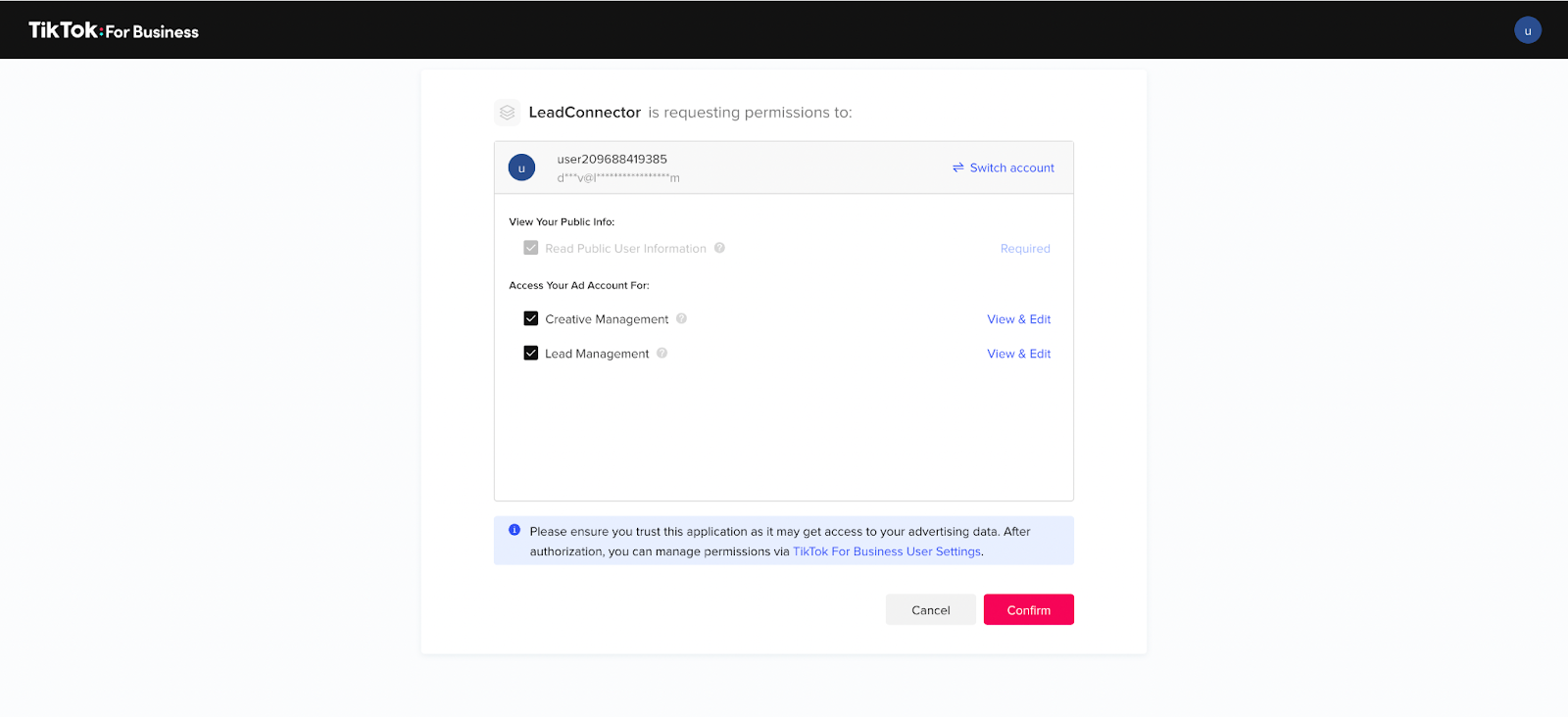
Inside your sub-account, open Settings and go to Integrations. Find TikTok in the list and start the connection. A TikTok for Business window appears asking you to approve a set of permissions, including lead management access.
Leave the requested permissions enabled, since the integration needs them to read your forms and pull leads, then click Confirm. If you are not already signed in, TikTok will ask you to log in to the business account that runs your ads first.

Step 2: Choose the right advertiser account
Many businesses have more than one advertiser account under a single TikTok login. After you confirm permissions, GoHighLevel asks which advertiser account to connect. Pick the one that runs the campaigns whose leads you want to capture.
This step is easy to rush, so slow down for a second. Connecting the wrong advertiser account is the most common reason leads never show up later, and it is a quiet failure because nothing on screen looks broken.
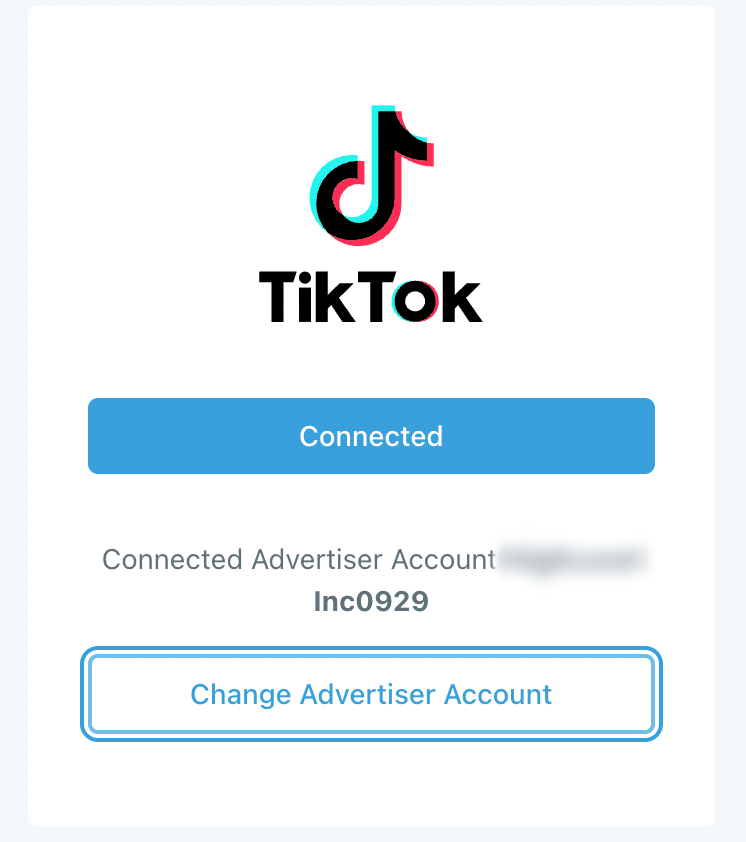
Once connected, you will see a confirmation with the account name and a Change Advertiser Account button. If you ever switch which account runs your ads, this is where you repoint the integration.
Step 3: Find your forms in the mapping tab
With the account linked, open the TikTok Form Fields Mapping tab. GoHighLevel lists every lead form it can see on the connected advertiser account, each with its form name, page ID and advertiser ID.
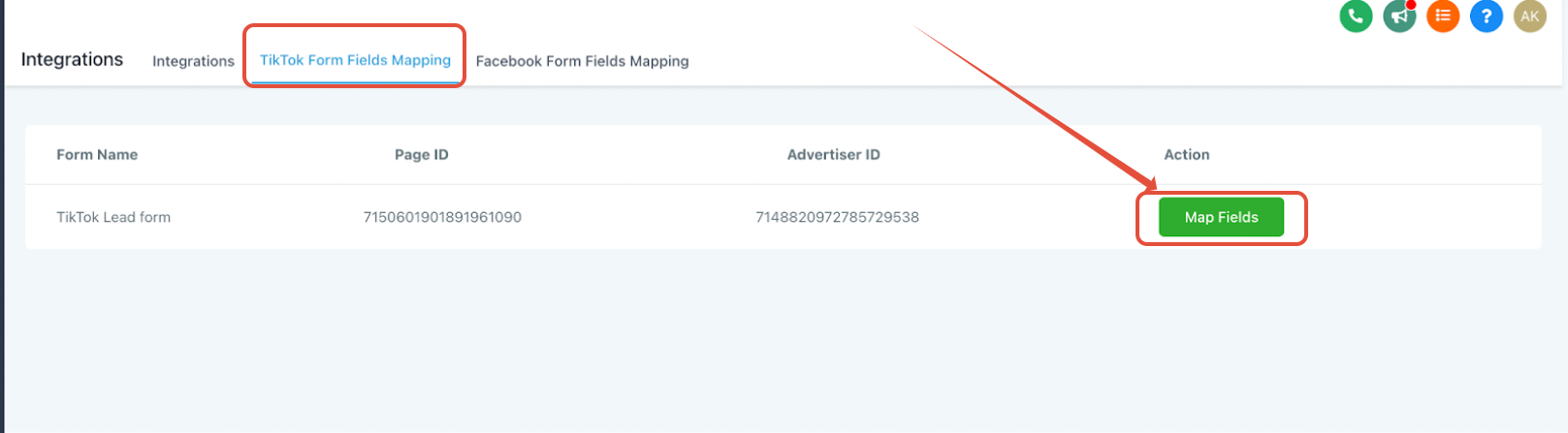
If a form is missing here, it almost always means it lives on a different advertiser account, which points right back to the previous step. When the form you want is showing, click Map Fields next to it to open the mapping window.
Step 4: Map form fields to CRM fields
Mapping tells GoHighLevel where each answer should go. On the left you see the fields from your TikTok form, and on the right you match each one to a field in your CRM.
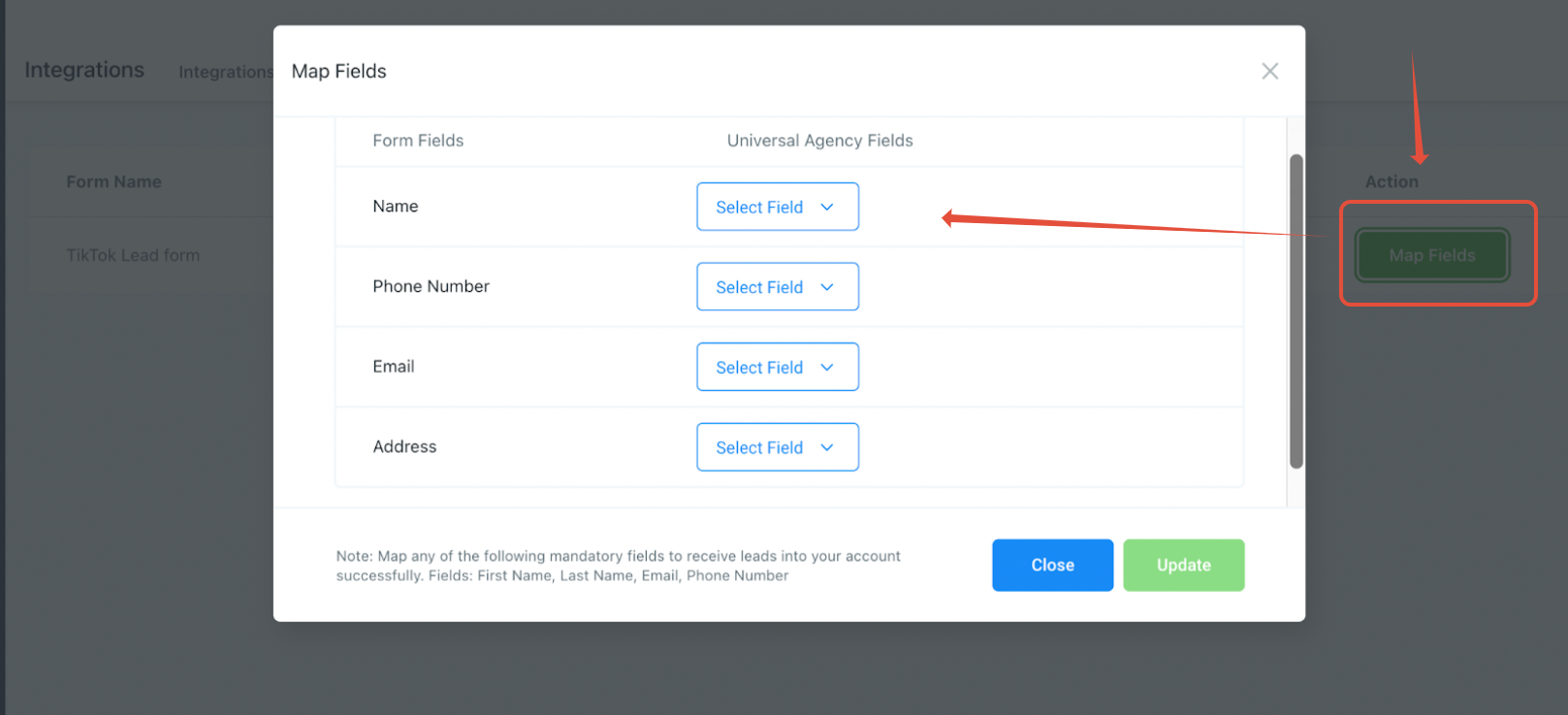
At a minimum, map the essentials so leads are usable: name, email and phone number. You can also send custom answers into custom fields, which is handy when your form asks qualifying questions. GoHighLevel supports common field types like text, number, phone, date and single choice options. When everything lines up, click Update to save the mapping and subscribe to the form. From that point, new submissions start flowing in.
Step 5: Automate the follow up
Capturing the lead is half the job. The real payoff is what happens next. GoHighLevel includes a TikTok Form Submitted trigger that starts a workflow the instant a form comes in.
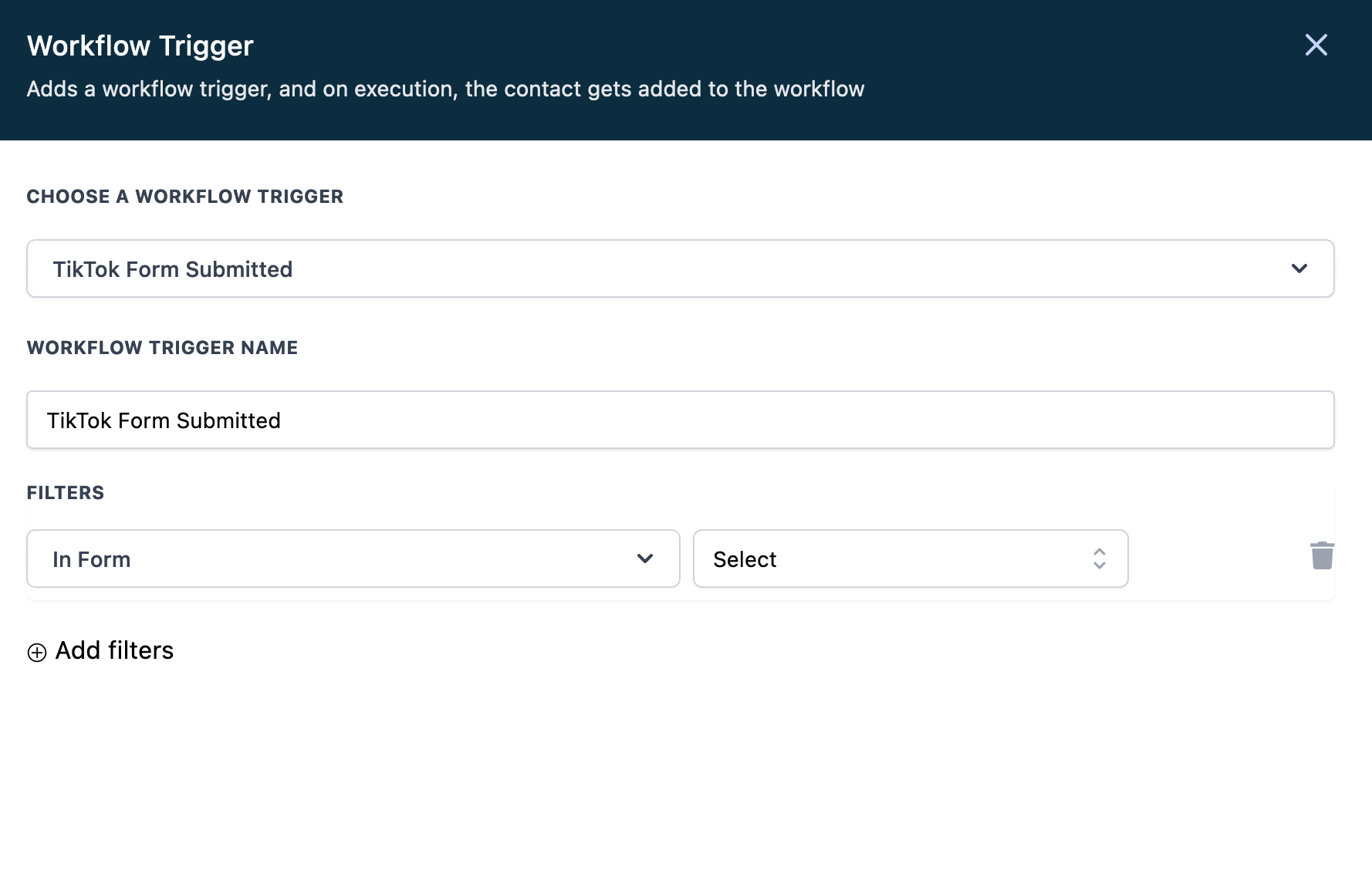
Create a workflow, add the TikTok Form Submitted trigger, and use the In Form filter if you want it to fire for one specific form rather than all of them. From there, build the follow up you want: an instant welcome text, an email with more detail, a task for your sales rep, or a booking link that lets the lead schedule a call on their own. This is where a raw lead becomes a real conversation.
Keep your TikTok leads clean and trackable
Once leads are flowing, a little organisation goes a long way. Adding a source tag to every TikTok lead lets you see at a glance which contacts came from TikTok rather than your other channels, and it makes reporting far simpler when you want to compare cost per booked call across platforms.
You can apply that tag inside the same workflow that runs your follow up, so it happens automatically on every submission with no extra effort. From there you can build TikTok specific views, pipelines or reports, which turns a pile of raw leads into numbers you can actually act on when you decide where to spend next month.
Test it, and know the limits
Before you trust it with live spend, submit a test lead through your TikTok form and confirm the contact appears in GoHighLevel with the right fields filled in. It is worth watching one full cycle, from submission to the first automated message, so you know the whole chain works.
Two limits are worth noting. Multi select form questions are not fully supported yet, so lean on single choice options for anything you plan to map. And if you ever need to pause incoming leads without disconnecting, you can switch the form status off in the mapping tab rather than tearing down the whole setup. Turning it back on later is just as simple, so this is the safe way to stop leads during a campaign break without losing your mapping.
Frequently Asked Questions
Do leads appear in GoHighLevel instantly?
Yes. Once the form is mapped and subscribed, submissions flow in within seconds, which is what makes automated instant follow up possible.
Why are my TikTok forms not showing up?
Almost always because the wrong advertiser account is connected, or the form lives on a different account. Check the connected advertiser account first, then confirm the form actually exists there.
Do I need to map every single field?
No. You only need the essentials like name, email and phone for a lead to be usable. Extra fields are optional and can flow into custom fields whenever you want them.
Can I follow up automatically after a form is submitted?
Yes. The TikTok Form Submitted trigger can launch a workflow that sends a text or email, assigns a task or shares a booking link, all within seconds of the submission.
Can Wispcode set up my TikTok integration?
Yes. Wispcode can connect your account, map your forms and build the follow up automation end to end, so every TikTok lead gets contacted the moment it arrives.
Need Expert Help with GoHighLevel?
New to GoHighLevel and ready to get started? Buy your GoHighLevel account here and launch with confidence.
Already know what you need and want our team to handle everything, from complete setup and customization to funnels, workflows, automations, CRM, and pipelines? Click here.



