

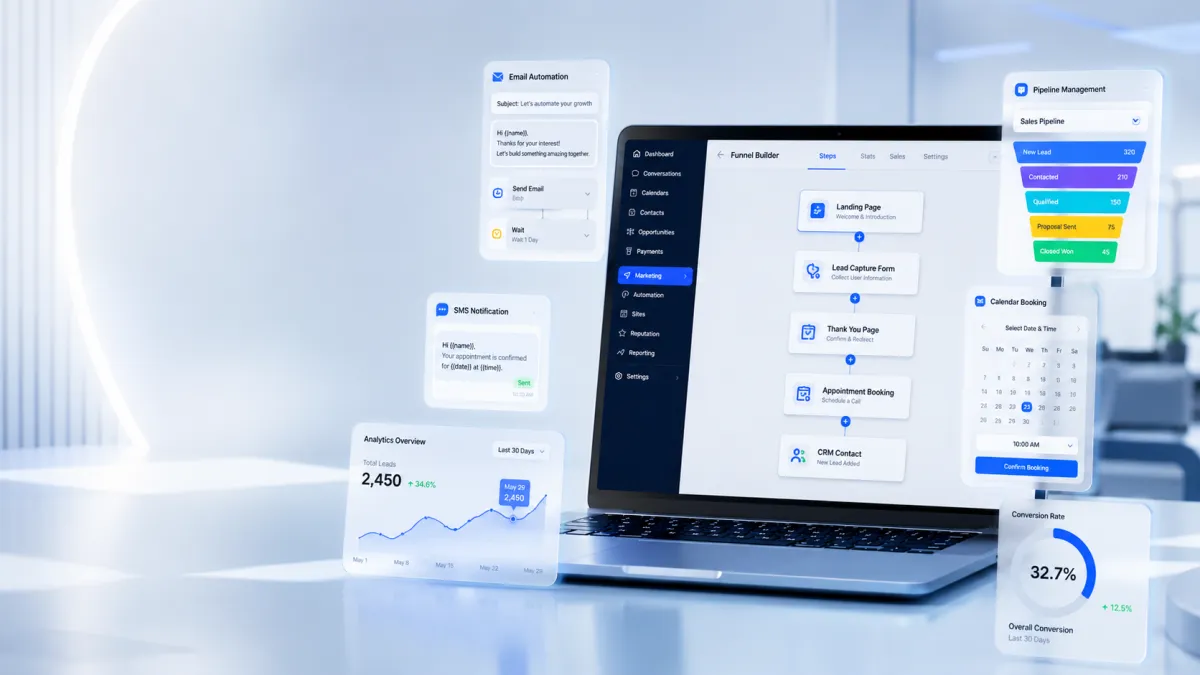
GoHighLevel Funnel Builder
Complete Guide to GoHighLevel Funnels
Introduction
Generating traffic is only half the battle. The real challenge is turning visitors into leads, customers, or booked appointments. Without a structured sales process, potential customers often leave your website without taking action. That's where GoHighLevel Funnels make a significant difference.
Unlike traditional websites that encourage visitors to browse multiple pages, funnels guide users through a focused journey designed to achieve one specific goal. Whether you want to capture leads, schedule appointments, sell products, or promote services, GoHighLevel provides all the tools you need within a single platform.
In this Complete Guide to GoHighLevel Funnels, you'll learn what funnels are, why businesses rely on them, the different funnel types you can build, how to create your own funnel, and the best practices for maximizing conversions.

What Are GoHighLevel Funnels?
A funnel is a sequence of pages that leads visitors toward a single desired action. Instead of giving users endless navigation options, a funnel removes distractions and focuses attention on one conversion goal.
For example, a visitor may:
Click an advertisement
Land on a dedicated landing page
Submit a contact form
Book an appointment
Receive a confirmation page
This streamlined experience often converts better than a traditional website.
The biggest difference between a website and a funnel is purpose. A website is built for exploration, while a funnel is designed for conversion. Visitors can browse a website freely, but a funnel guides them through a carefully planned path.
Businesses use Sales Funnels in GoHighLevel because they improve lead generation, simplify customer journeys, and create predictable conversion processes that are easier to optimize over time.

Why Use GoHighLevel Funnels?
The GoHighLevel Funnel Builder combines page creation with CRM, automation, and marketing tools, allowing businesses to manage their entire customer journey from one platform.
Some of its biggest advantages include:
Drag-and-Drop Funnel Builder
Build professional funnels without coding using an intuitive visual editor.
Landing Pages and Thank-You Pages
Create focused GoHighLevel Landing Pages that capture leads and thank-you pages that confirm successful submissions or guide visitors to the next step.
Order Forms
Businesses selling products or services can include order forms within their funnels for a smoother purchasing experience.
Upsell Opportunities
Where appropriate, businesses can add additional offers after an initial purchase to increase order value.
Built-In CRM Integration
Every lead automatically enters the GoHighLevel CRM, making it easier to organize contacts, track conversations, and manage follow-ups.
Appointment Booking
Connect calendars directly inside your funnel so visitors can schedule meetings without leaving the page.
Email and SMS Automation
After someone submits a form or books an appointment, GoHighLevel Automation can send confirmation emails, reminders, or follow-up SMS messages automatically.
Workflow Integration
Funnels work seamlessly with GoHighLevel workflows, allowing businesses to automate nurturing, lead assignment, and customer communication.
Analytics
Track page performance, conversions, and visitor activity to identify areas for improvement.
Mobile Responsiveness and Customization
Funnels are designed to work across devices, and every page can be customized to match your branding.

Key Funnel Types You Can Build
Different businesses use different funnel strategies depending on their goals.
Lead Generation Funnel
Perfect for real estate agencies, insurance brokers, and marketing agencies that want to collect contact information through forms.
Appointment Booking Funnel
Ideal for consultants, coaches, dentists, salons, and healthcare providers who want prospects to schedule appointments online.
Sales Funnel
Designed for businesses selling products or services by guiding visitors from product information to checkout.
Webinar Funnel
A great option for educators, coaches, and software companies promoting live or recorded webinars.
Product Funnel
Suitable for eCommerce businesses that want dedicated product pages with streamlined purchasing experiences.
Membership Funnel
Useful for creators, educators, and businesses offering online courses or member-exclusive content.
Service Funnel
Service-based businesses such as agencies, accountants, contractors, and legal firms can showcase their services while encouraging visitors to request consultations.
How to Build a Funnel in GoHighLevel
Creating a funnel is straightforward, even for beginners.
Step 1: Create a Funnel
Open the Funnel Builder and create a new funnel based on your business objective.
Step 2: Choose a Template
Select one of GoHighLevel's available templates or start with a blank design.
Step 3: Customize Pages
Edit headlines, images, colors, buttons, and layouts to match your brand and offer.
Step 4: Add Forms
Insert forms to capture contact information and automatically store submissions inside the CRM.

Step 5: Connect Your Calendar
If your goal is appointment booking, integrate your calendar so visitors can reserve available time slots.
Step 6: Configure Automations
Create workflows that send emails, SMS reminders, or assign leads after a form submission or booking.
Step 7: Publish
Review your funnel, connect your domain if needed, and publish it for visitors.
Funnel Best Practices
Building a funnel is only the first step. Optimizing it is what improves results.
Some proven best practices include:
Write clear, benefit-driven headlines.
Keep forms as short as possible.
Focus on one primary call-to-action per page.
Optimize every page for mobile devices.
Include testimonials or social proof to build trust.
Track conversion rates regularly.
Use automation for immediate follow-up.
Remove unnecessary links and distractions.
Test different headlines, layouts, or offers to improve performance over time.
Small improvements across these areas can significantly increase conversion rates.
Common Funnel Mistakes to Avoid
Many funnels fail because of avoidable mistakes.
Using multiple CTA buttons can confuse visitors and reduce conversions. Long forms often discourage users from completing submissions, while weak headlines fail to capture attention quickly.
Slow-loading pages and poor mobile optimization can also cause visitors to leave before taking action. Another common mistake is forgetting to automate follow-ups, allowing valuable leads to go cold.
Skipping a thank-you page is another missed opportunity, as it can reinforce trust and guide users toward the next step.
Finally, ignoring analytics makes it difficult to understand what's working and what needs improvement. GoHighLevel helps address these challenges by combining funnel analytics, CRM tracking, workflows, and automation in one place.
Why GoHighLevel Funnels Stand Out
Many businesses use separate tools for landing pages, CRM, email marketing, scheduling, and reporting. Managing multiple platforms often increases costs and creates disconnected customer experiences.
GoHighLevel simplifies this by bringing together:
Funnel Builder
GoHighLevel CRM
Email Marketing
SMS Messaging
Calendar Booking
Automation Workflows
Forms
Surveys
Pipeline Management
Reporting
Having these tools in one platform reduces manual work, improves team efficiency, and provides a more connected customer journey from the first visit to the final conversion.
Conclusion
GoHighLevel Funnels provide businesses with a practical way to generate leads, book appointments, sell products, and automate customer communication—all from a single platform.
Whether you're building a simple lead capture page or a complete multi-step marketing funnel, GoHighLevel offers the flexibility to create conversion-focused experiences without relying on multiple disconnected tools.
By following the best practices in this guide, avoiding common mistakes, and continuously optimizing your funnels, you can create a smoother customer journey and make every visitor more likely to become a valuable lead or customer. As your business grows, your funnels can grow with it, making GoHighLevel a reliable solution for long-term marketing success.
Frequently Asked Questions (FAQs)
1. What is a GoHighLevel funnel?
A GoHighLevel funnel is a series of pages designed to guide visitors toward a specific goal, such as capturing leads or booking appointments.
2. How is a funnel different from a website?
A website is built for browsing, while a funnel focuses on a single conversion goal with fewer distractions.
3. Can I build funnels without coding?
Yes. GoHighLevel includes a drag-and-drop funnel builder that requires no coding skills.
4. What types of funnels can I create?
You can build lead generation, sales, appointment booking, webinar, membership, product, and service funnels.
5. Can GoHighLevel funnels automate follow-ups?
Yes. You can automate emails, SMS messages, and workflows after a visitor submits a form or books an appointment.
Need Expert Help with GoHighLevel?
New to GoHighLevel and ready to get started? Buy your GoHighLevel account here and launch with confidence.
Already know what you need and want our team to handle everything, from complete setup and customization to funnels, workflows, automations, CRM, and pipelines? Click here.



