

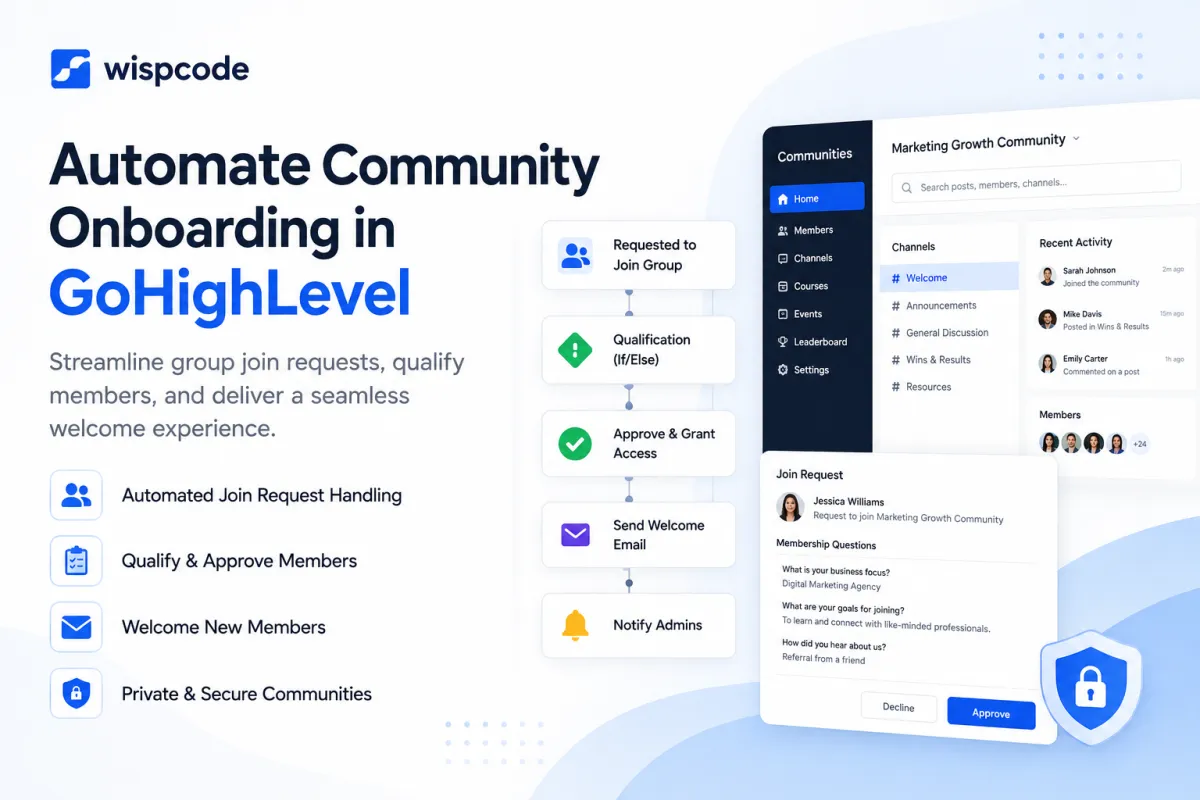
How to Streamline Community Join Request Onboarding in GoHighLevel
How to Streamline Community Onboarding When Someone Requests to Join a Group Using GoHighLevel
Growing an online community is exciting, but growth also creates operational work. Every new join request may need to be reviewed, approved, welcomed, given the right information, and encouraged to participate.
Handled manually, these steps can quickly become inconsistent. This is where GoHighLevel community onboarding can help. By combining GoHighLevel Communities with CRM data and workflows, community owners can build a more structured onboarding process while keeping human review where it matters.
Why Community Onboarding Matters
A member's first experience can shape how they interact with your community afterward. Someone who receives clear instructions and knows where to start is more likely to participate than someone who joins and hears nothing.
Good community member onboarding should answer a few simple questions: Was my request accepted? Where should I start? What resources are available? What should I do next?
GoHighLevel Communities supports public and private groups. Private groups can require approval, and group owners can also configure membership questions to collect information from people requesting access. This gives community managers useful context before deciding who should join.
The Problem With Manual Community Onboarding
Manual onboarding may work when a community has ten members. It becomes much harder when requests arrive regularly.
Common problems include:
Join requests sitting unanswered
Different members receiving different instructions
Welcome messages being forgotten
New members not knowing where to begin
Teams spending time repeating administrative tasks
The goal of automation should not be to remove every human interaction. Instead, it should remove predictable repetitive work while allowing administrators to focus on decisions and conversations that require judgment.
How GoHighLevel Community Onboarding Can Streamline the Process
GoHighLevel brings several useful capabilities into the same ecosystem: GoHighLevel Communities, CRM contacts, tags, custom fields, workflows, email/SMS communication, and internal automation.
Importantly, HighLevel now supports a Requested to Join Group workflow trigger. It can use filters including the selected group and responses to membership questions, allowing workflows to process join requests based on defined criteria. HighLevel documents this functionality for automatically reviewing and processing group membership requests.
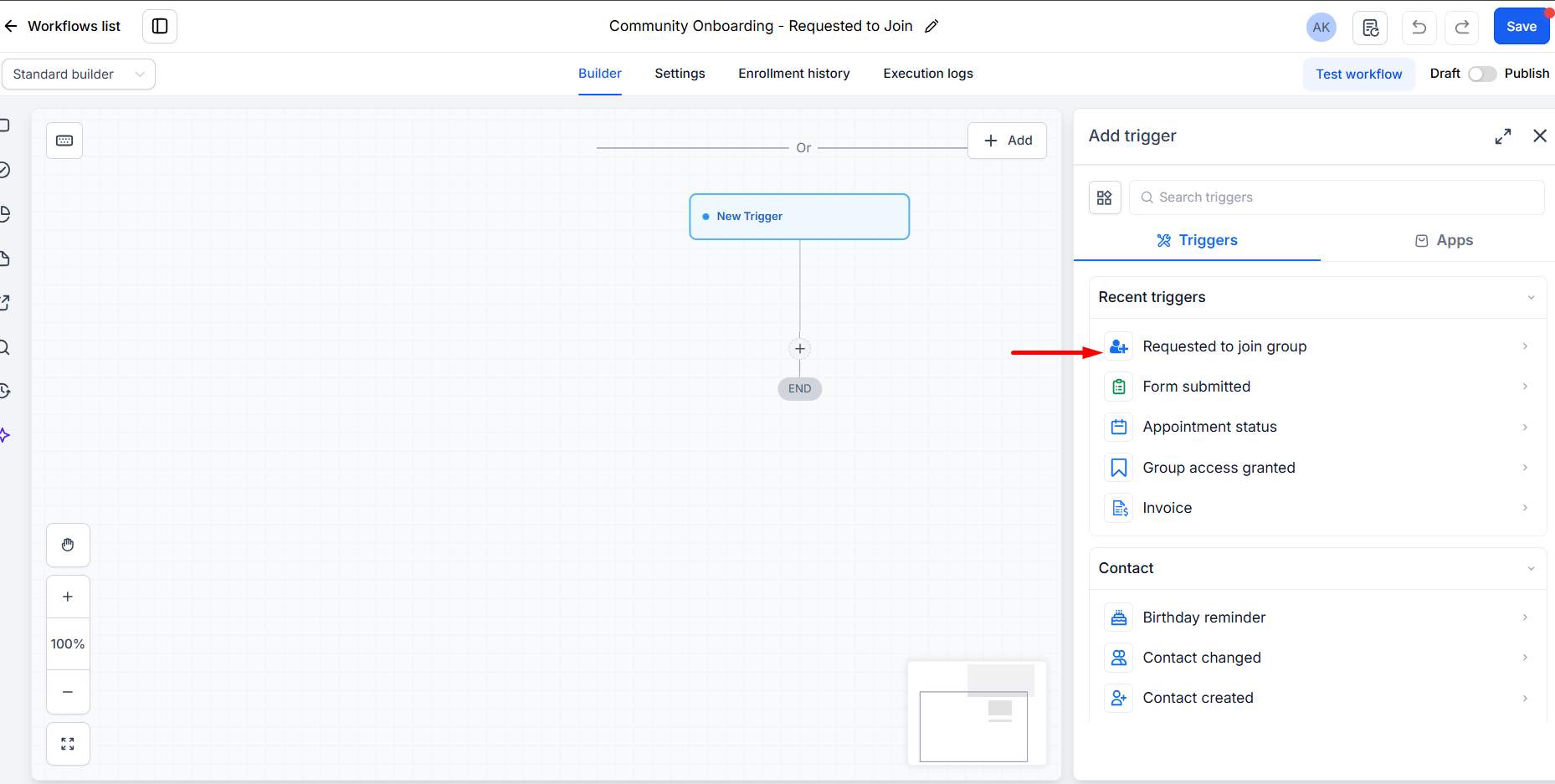
For scenarios that still require human judgment, private-group requests can also be manually approved or declined from the Requested members area.
After access is granted, the Group Access Granted workflow trigger can start additional automation, such as onboarding communication or other workflow steps.
A Practical Community Onboarding Workflow
A practical GoHighLevel community automation could look like this:
1. Join Interest or Request
A prospect requests to join a private GoHighLevel Community and answers configured membership questions. Alternatively, businesses can collect qualification information through a GoHighLevel form before directing someone toward the community.
2. Review or Qualification
Use the Requested to Join Group trigger and available membership-question filters when the approval criteria are clear enough for automation. More sensitive or complex applications can remain under manual review.
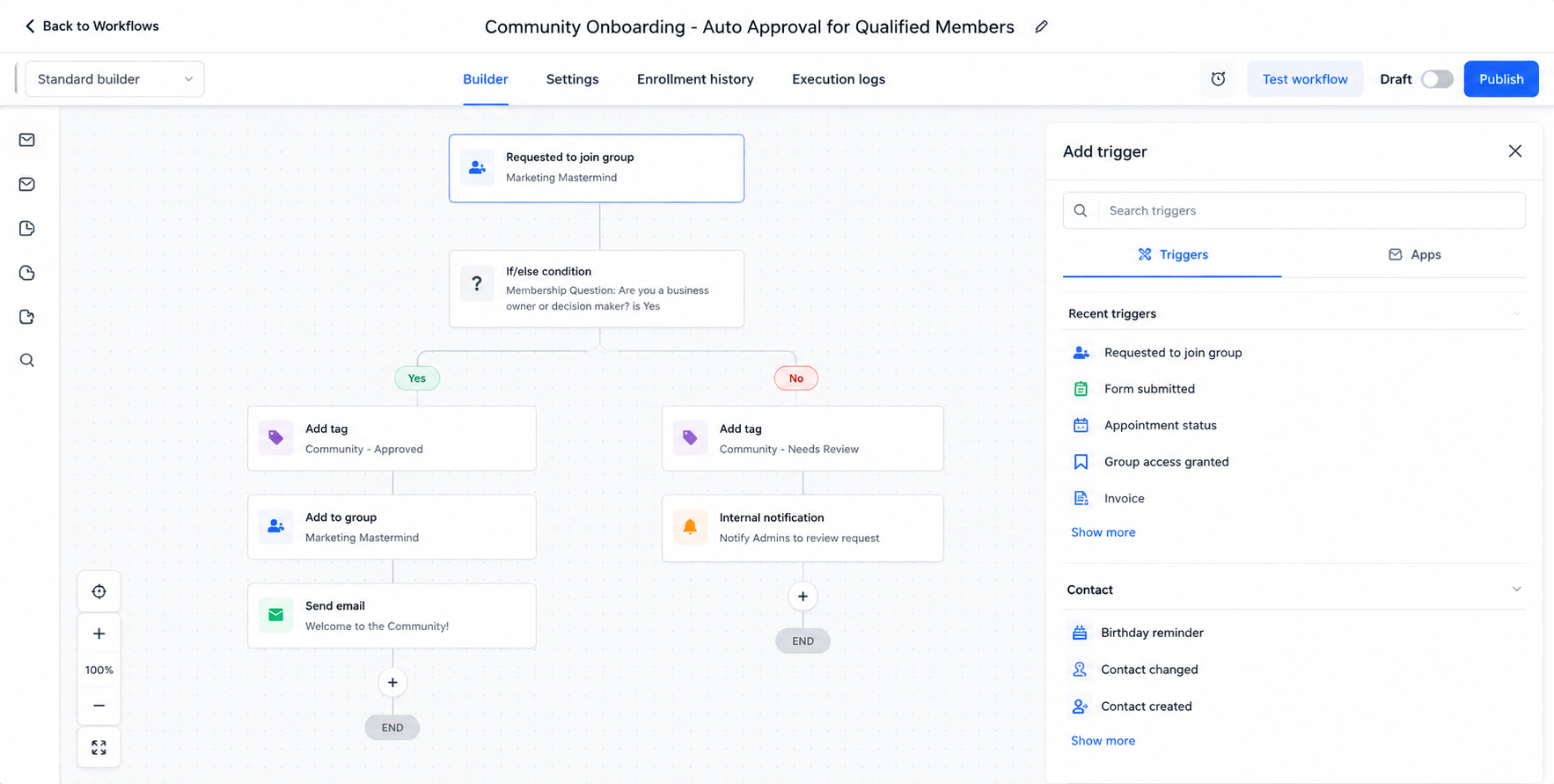
3. Approval and Access
Once the member qualifies, their request can move through the appropriate approval process. HighLevel also provides community access management capabilities through contacts and workflows.
4. Welcome Communication
Once group access is granted, a workflow can respond to the Group Access Granted event. This is an ideal point to deliver onboarding communication and explain where the member should begin.
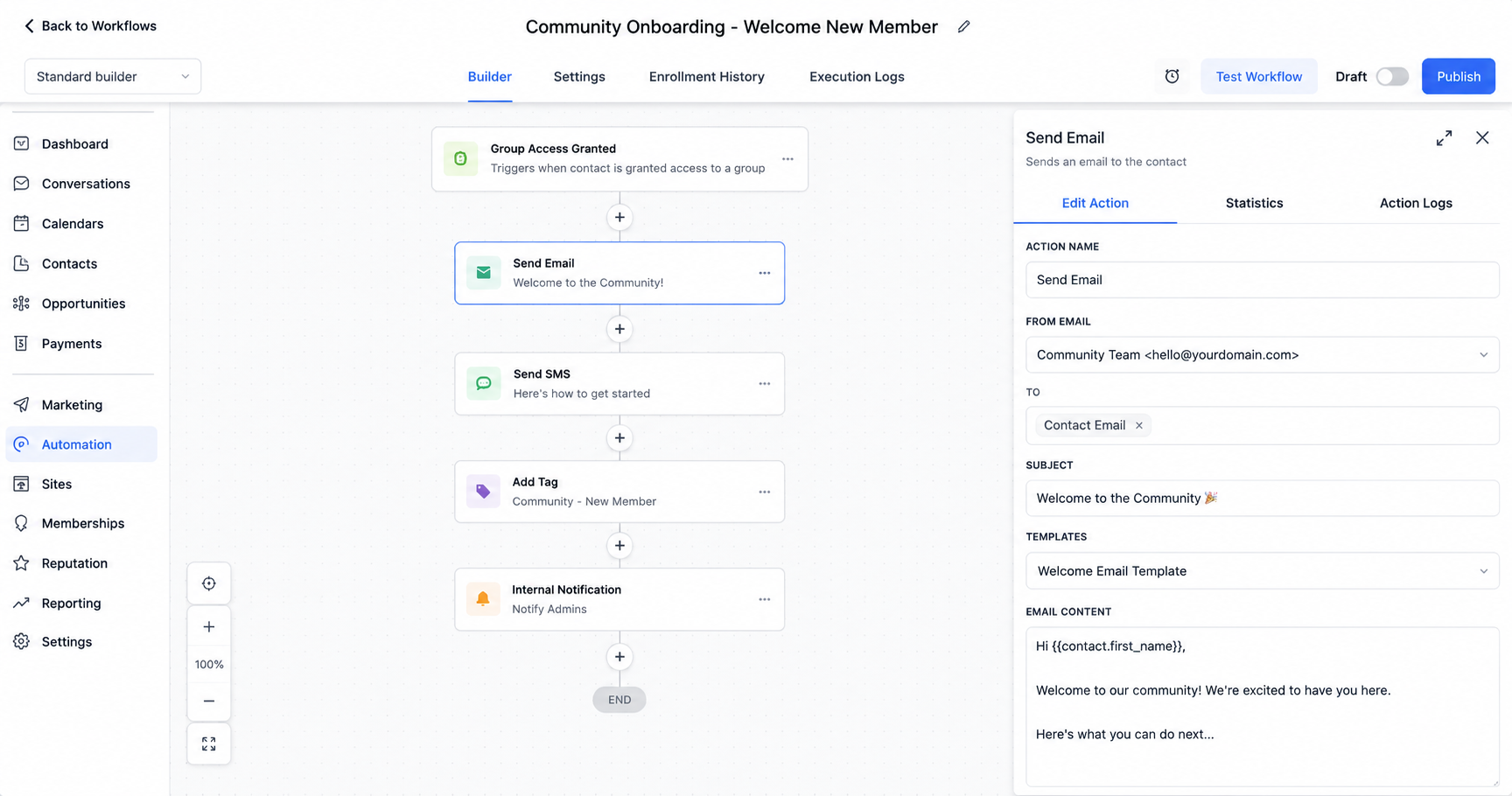
5. Follow-Up and Engagement
Use subsequent workflow steps to provide helpful reminders, resources, or next actions rather than overwhelming members with everything immediately.
This creates a journey of Request → Qualification → Approval → Welcome → Instructions → Follow-Up → Engagement.
Personalizing the Member Experience
Automation does not have to mean sending everyone identical messages.
The GoHighLevel CRM can organize contacts using information such as tags and relevant contact data. Tags can also be added through workflows and used for segmentation or automation logic.
For example, a coaching business might separate clients from free-community members. A SaaS company could distinguish trial users from paying customers. A course creator might organize members according to the program they purchased.
That information can help GoHighLevel workflows deliver more relevant onboarding communication.
Improving Early Member Engagement
Getting someone into a group is only the beginning. Effective onboarding should encourage the member to take a useful first action.
A welcome sequence might direct members toward community guidelines, a getting-started post, an introductory channel, an upcoming event, or a valuable resource.
Keep the sequence focused. Instead of sending five messages immediately, give members one clear action at a time. The purpose of community engagement automation is to create momentum, not notification fatigue.
Benefits Across Different Industries
The same structure can support different business models. A coach can qualify applicants and guide approved members toward introductory resources. An agency can onboard clients into a private support community. Course creators can connect students with the appropriate learning environment.
Fitness and wellness businesses can use onboarding to explain community expectations and resources, while professional membership organizations can collect membership information before approval. SaaS and service businesses can segment customers so onboarding communication reflects the product, service, or membership they use.
The underlying process remains similar, while the qualification rules and messaging change.
Best Practices for GoHighLevel Community Automation
Keep onboarding simple and define exactly what should happen before and after approval. Use membership questions only when they help make a meaningful decision, maintain clear CRM tags and contact data, and test workflows before relying on them.
Most importantly, automate predictable administrative steps while preserving human involvement for exceptions, high-value members, or requests requiring judgment.
Conclusion
Effective GoHighLevel community onboarding is not about automating every interaction. It is about creating a reliable system around the member's first experience.
By combining GoHighLevel Communities, CRM information, membership questions, workflows, segmentation, and communication tools, businesses can reduce repetitive onboarding work while giving new members clearer direction. The result is a process that can scale without making the community experience feel impersonal.
Frequently Asked Questions
1. Can you automate community onboarding in GoHighLevel?
Yes. GoHighLevel workflows can automate several onboarding steps, including processing eligible join requests, sending communications, applying tags, and triggering follow-ups.
2. Can GoHighLevel automatically approve community join requests?
Yes, GoHighLevel supports a Requested to Join Group workflow trigger that can be used with membership-question filters to process requests based on defined criteria. Manual approval can still be used when human review is needed.
3. How can I welcome new community members in GoHighLevel?
You can use the Group Access Granted workflow trigger to start onboarding actions after access is granted, such as sending welcome communication and getting-started instructions.
4. Can I personalize GoHighLevel community onboarding?
Yes. CRM data, tags, custom fields, and segmentation can help you tailor onboarding workflows and communications to different types of members.
5. What should a community onboarding sequence include?
A simple sequence can include approval confirmation, a welcome message, community guidelines, useful resources, a clear first action, and a follow-up reminder.
6. Should every community onboarding step be automated?
No. Automate repetitive and predictable steps, but keep manual review for applications, exceptions, or situations where human judgment is important.
Need Expert Help with GoHighLevel?
New to GoHighLevel and ready to get started? Buy your GoHighLevel account here and launch with confidence.
Already know what you need and want our team to handle everything, from complete setup and customization to funnels, workflows, automations, CRM, and pipelines? Click here.



