

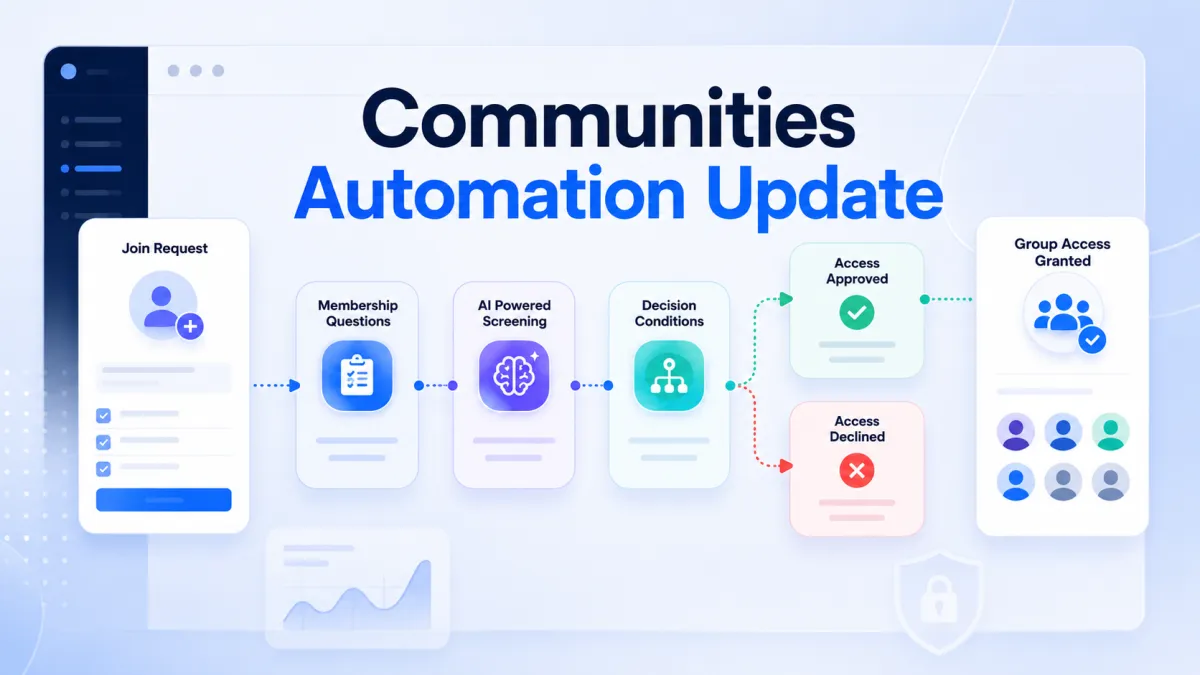
Smarter Community Join Requests
Communities: Smarter Join Request Management With Workflow Automation
A growing community is a sign of engagement, but managing that growth can bring a new challenge: handling an increasing number of join requests. Every request may require an admin to review membership question responses, decide whether the applicant should receive access, and determine whether further review is needed. When these submissions start increasing, manually reviewing each one can take valuable time and make community management more difficult.
GoHighLevel is making this process more structured with the new Requested to Join Group workflow trigger for GoHighLevel Communities. Instead of treating every join request as a separate manual task, admins can now connect submitted membership question responses with workflow automation and create a defined process for what happens next. Responses can be used as filters, evaluated with GPT when needed, and routed through If Else conditions to determine the appropriate action. Whether a request should move toward group access or be sent for manual review, the workflow can help organize the process behind the scenes while the member facing join request experience remains unchanged.
What Is the Requested to Join Group Trigger?
The Requested to Join Group trigger fires whenever a user submits a request to join a community group.
The process begins by selecting the group the workflow should monitor. Once the group is selected, the membership questions configured for that group automatically become available as filter fields.
This means the workflow can work with the actual answers submitted by users during the request process. Admins can build conditions around those responses.
How Membership Question Responses Work
Membership questions can provide useful information for evaluating join requests. With this update, those responses can be connected directly to GoHighLevel workflows.
Admins can then use the response values within the workflow. This creates a connection between what a user submits while requesting access and what the workflow does next.

Adding GPT for AI Powered Request Screening
The update also allows membership question responses to be passed into GPT prompts inside workflows.

For example, GPT can evaluate submitted answers to determine whether they appear to be spam, gibberish, or low quality. The GPT output can then provide information that the workflow uses when deciding which path to take next.
This creates an AI powered screening option based specifically on the answers submitted by the applicant.
Using If Else Conditions to Decide What Happens Next
After the GPT action, an If Else condition can determine the next step based on the GPT output or response values.
A workflow could evaluate a membership question response and then branch into different paths. One path could continue toward granting access, while another could send the request for manual review.
This gives community admins a way to structure approval and screening flows without changing how users submit their requests.
A Simple GoHighLevel Communities Workflow Example
A practical workflow can be set up in five steps:

Create a new workflow and add the Requested to Join Group trigger.
Select the target group. Its configured membership questions automatically appear as available filters.
Optionally add a GPT action to evaluate the membership question responses.
Add an If Else condition based on the GPT output or response values.
Add actions such as Grant Group Access, sending a welcome message, or tagging the contact.
For example, an applicant submits an answer to a membership question. The workflow can pass that response to GPT for evaluation. The output can then be checked through an If Else condition. Depending on the condition, the workflow can grant group access or route the request for manual review.
The Member Experience Stays the Same
There are no changes to the member facing experience.
Users continue to submit join requests in the same way. The automation operates behind the scenes after a request is submitted.
Why This Update Matters for Community Admins
As communities grow, manually reviewing every submission can become harder to manage. Membership questions already give admins a way to collect responses from people requesting access. The new trigger connects those responses to workflow automation.
Admins can create more organized screening and approval flows. Instead of manually handling every submission from start to finish, they can define workflow paths based on the information contained in the request.
A workflow can also direct a request to manual review when that is appropriate.
Important Notes Before Using the Trigger
There are a few details GoHighLevel users should keep in mind:
• The trigger fires for join requests, not direct joins.
• The group must have request based access enabled.
• Membership question filters are dynamic and update according to the questions configured for the selected group.
• GPT actions incur additional charges per execution.
A More Structured Approach to Community Management
The new Requested to Join Group trigger gives GoHighLevel Communities admins a way to bring join request data into workflow automation. By combining group selection, membership question responses, optional GPT evaluation, If Else conditions, and actions such as granting access, sending a welcome message, or tagging the contact, admins can create structured processes for incoming requests.
Most importantly, the member facing experience remains unchanged. The automation works behind the scenes, giving admins more options for organizing how requests are reviewed, routed, and acted upon.
For communities that rely on membership questions, this update provides a direct way to connect applicant responses with GoHighLevel workflows and create a more efficient approach to community management automation.
Frequently Asked Questions (FAQs)
1. What is the Requested to Join Group trigger?
It triggers a workflow when a user requests to join a community group.
2. Can membership question responses be used in workflows?
Yes. They can be used as workflow filters.
3. Can GPT evaluate membership responses?
Yes. GPT can evaluate responses for spam, gibberish, or low quality.
4. Can workflows automatically grant group access?
Yes. Workflows can use Grant Group Access based on conditions.
5. Can join requests be sent for manual review?
Yes. An If Else condition can route requests for manual review.
6. Does this change the member experience?
No. Members submit join requests the same way as before.
Need Expert Help with GoHighLevel?
New to GoHighLevel and ready to get started? Buy your GoHighLevel account here and launch with confidence.
Already know what you need and want our team to handle everything, from complete setup and customization to funnels, workflows, automations, CRM, and pipelines? Click here.



