
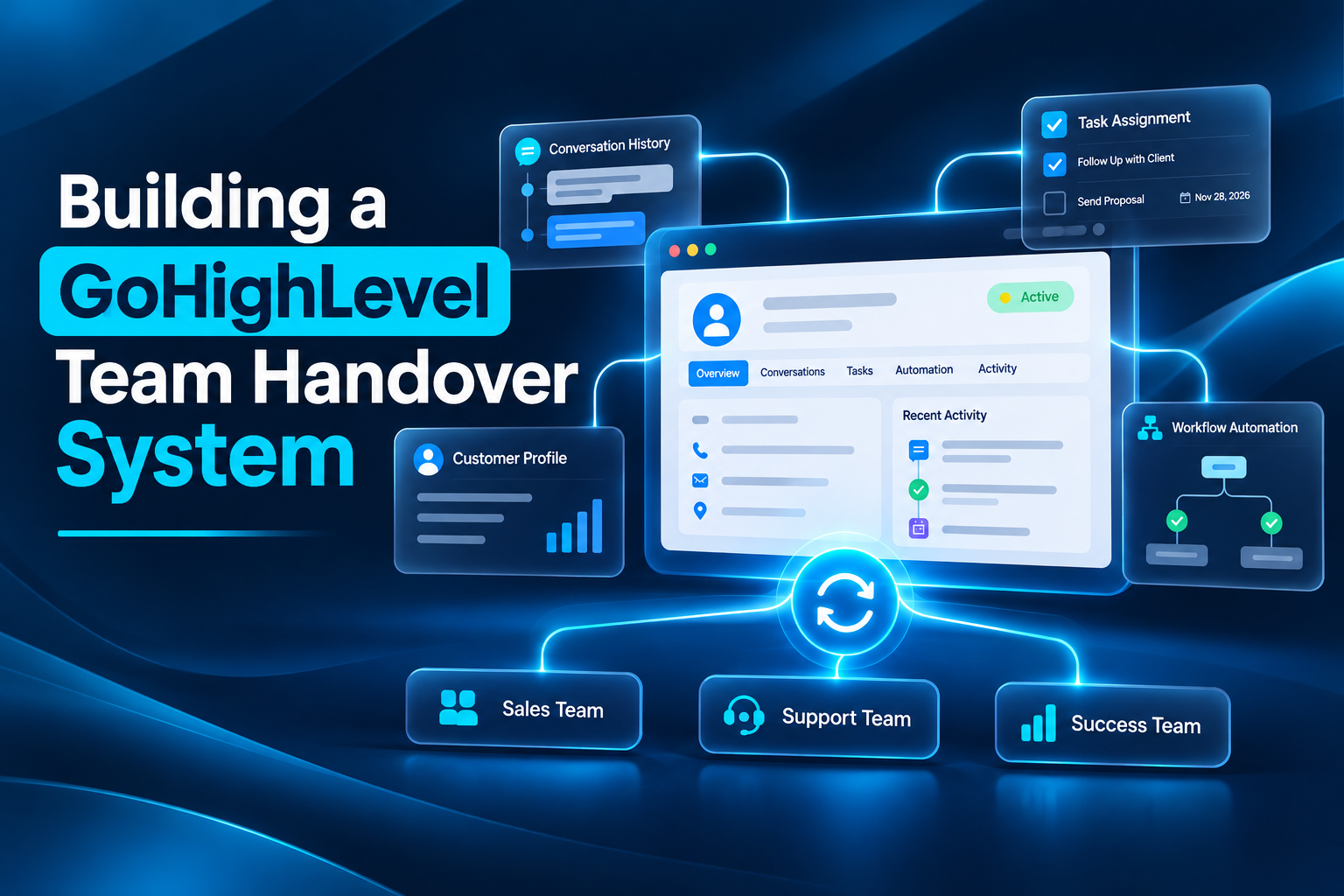
Building a GoHighLevel Team Handover System
How to Build a Communication Handover System Between Team Members
A customer explains their problem to one team member, receives an update, and then gets transferred to someone else. The new team member asks the same questions because they cannot see what was discussed, what the customer needs, or what was promised. The customer has to repeat everything, and the business risks losing trust.
This is a communication handover problem. As businesses grow, conversations move between sales representatives, support teams, account managers, and operations staff. Without a structured process, important information gets lost between people. A properly built GoHighLevel communication handover system helps teams transfer responsibility while keeping customer context, communication history, and pending actions organized.
Why Communication Handovers Fail in Growing Businesses
Many businesses rely on messages, verbal updates, or individual memory to transfer customer information. These methods may work with a small team, but they become unreliable when multiple people handle the same customer.
A handover often fails because the receiving team member does not know what the customer previously discussed, what expectations were established, or what action is still pending. Assignments may change without clear notifications, and managers may have limited visibility into whether the transfer was completed.
A reliable handover requires three things: complete customer context, clear responsibility, and a defined next action.
What Information Should a Team Handover Include?
Before building automation, businesses need to define what information team members must communicate when transferring responsibility.
A structured handover should include:
Customer information: Contact details, relevant preferences, and important business context.
Conversation history: What the customer requested, previous discussions, and important responses.
Current status: Where the customer stands in the process and what has already been completed.
Pending commitments: Promised callbacks, deliverables, meetings, or other outstanding responsibilities.
Next action: The specific task the receiving team member needs to complete.
New responsibility: Who is taking ownership and when the transfer occurs.
These details provide the foundation for consistent team communication management.
How GoHighLevel Supports a Structured Handover System
GoHighLevel can connect customer records, conversations, assignments, tasks, and automation into a shared process. Instead of relying on separate messages between employees, the team can use a central CRM record to document and manage the transition.
1. Organize Customer Information
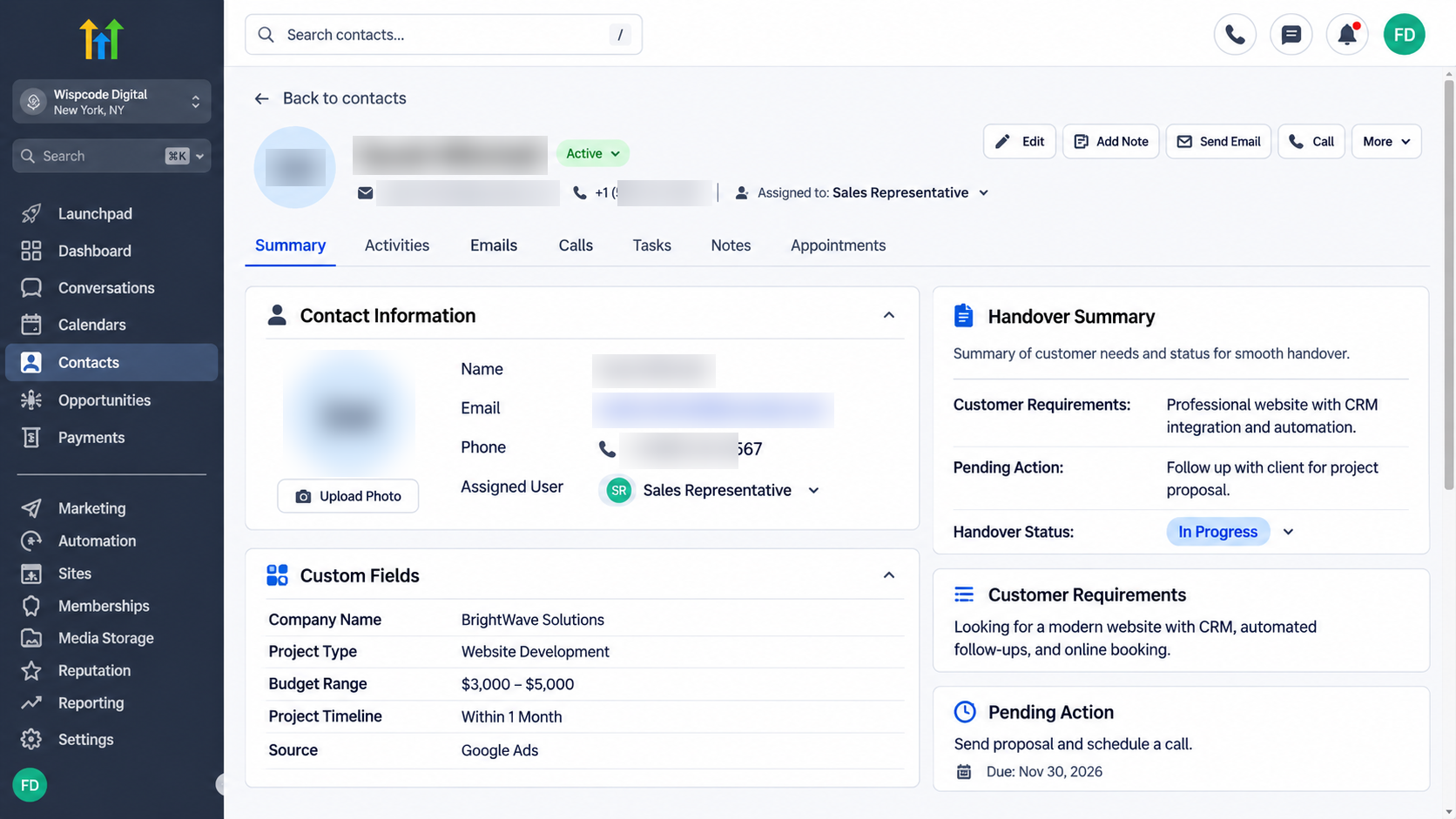
Start with the contact record. Store relevant customer details in contact fields, and use custom fields for information that needs to be consistent across handovers, such as:
Handover summary: A short overview of the current situation.
Customer requirements: The specific needs or requested services.
Pending action: What needs to happen next.
Handover status: Whether the transfer is pending, accepted, or completed, based on the process your team defines.
Custom fields help make important information easier to find and standardize. However, employees must still enter or update the information unless a configured automation can populate it reliably.
2. Keep Conversations and Internal Notes Together
Use the Conversations area to retain accessible communication history across supported channels. Before transferring a customer, the outgoing employee should review the conversation and add an internal note summarizing the situation.
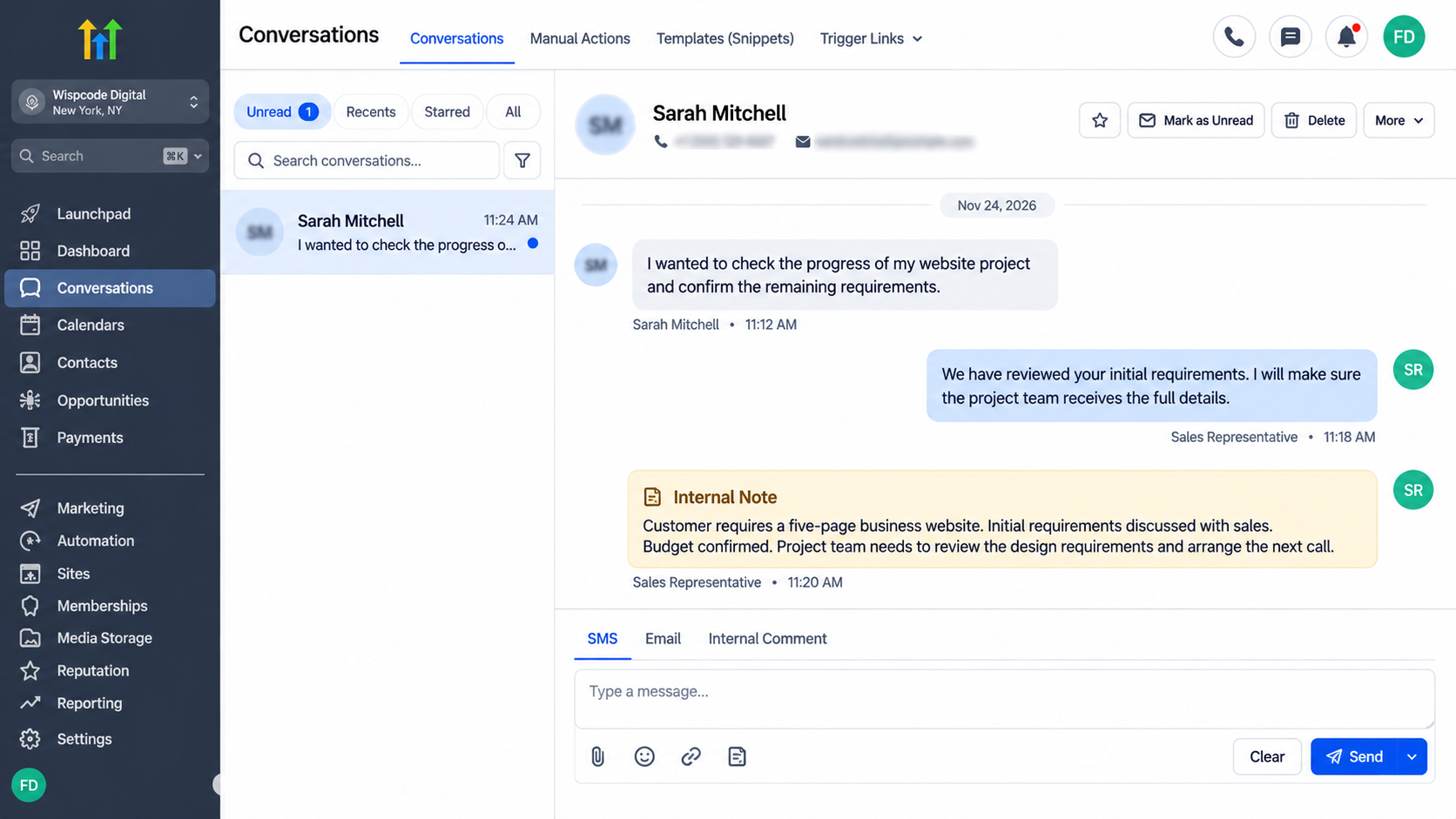
The note should explain what the customer needs, what has already been discussed, any commitments made, and what remains outstanding. This provides additional context without requiring the receiving employee to search through every message.
3. Assign Responsibility and Track Progress
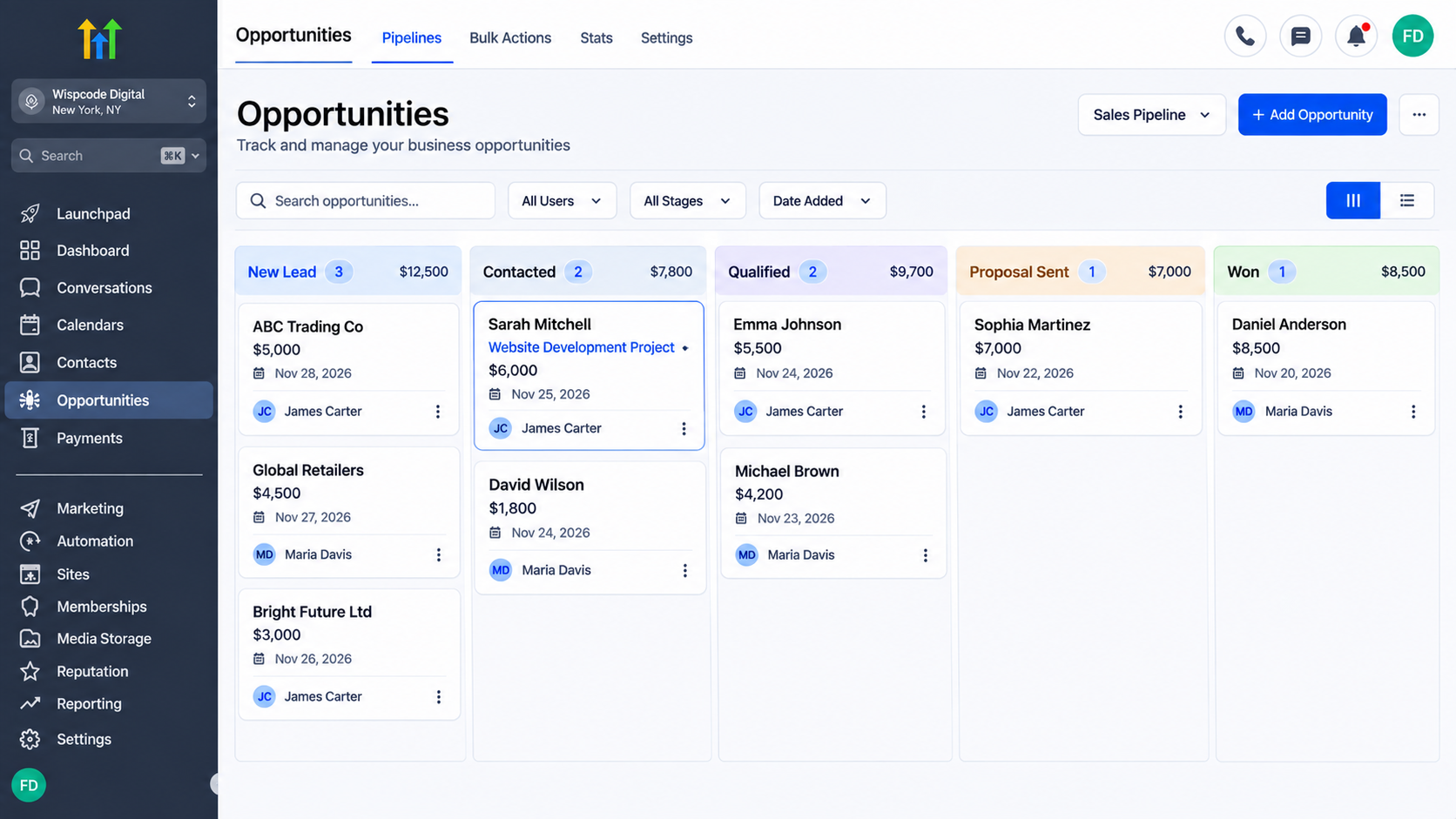
Assign the contact to the appropriate team member. If the customer is connected to an active opportunity, review its assigned user, pipeline, stage, and relevant details as well.
Contact ownership and opportunity ownership are separate considerations. Changing a contact's assigned user should not be assumed to change every opportunity or conversation assignment automatically.
4. Build Workflow Automation for Handover Notifications
Once the documentation and assignment process is established, GoHighLevel workflow automation can help notify the receiving employee.
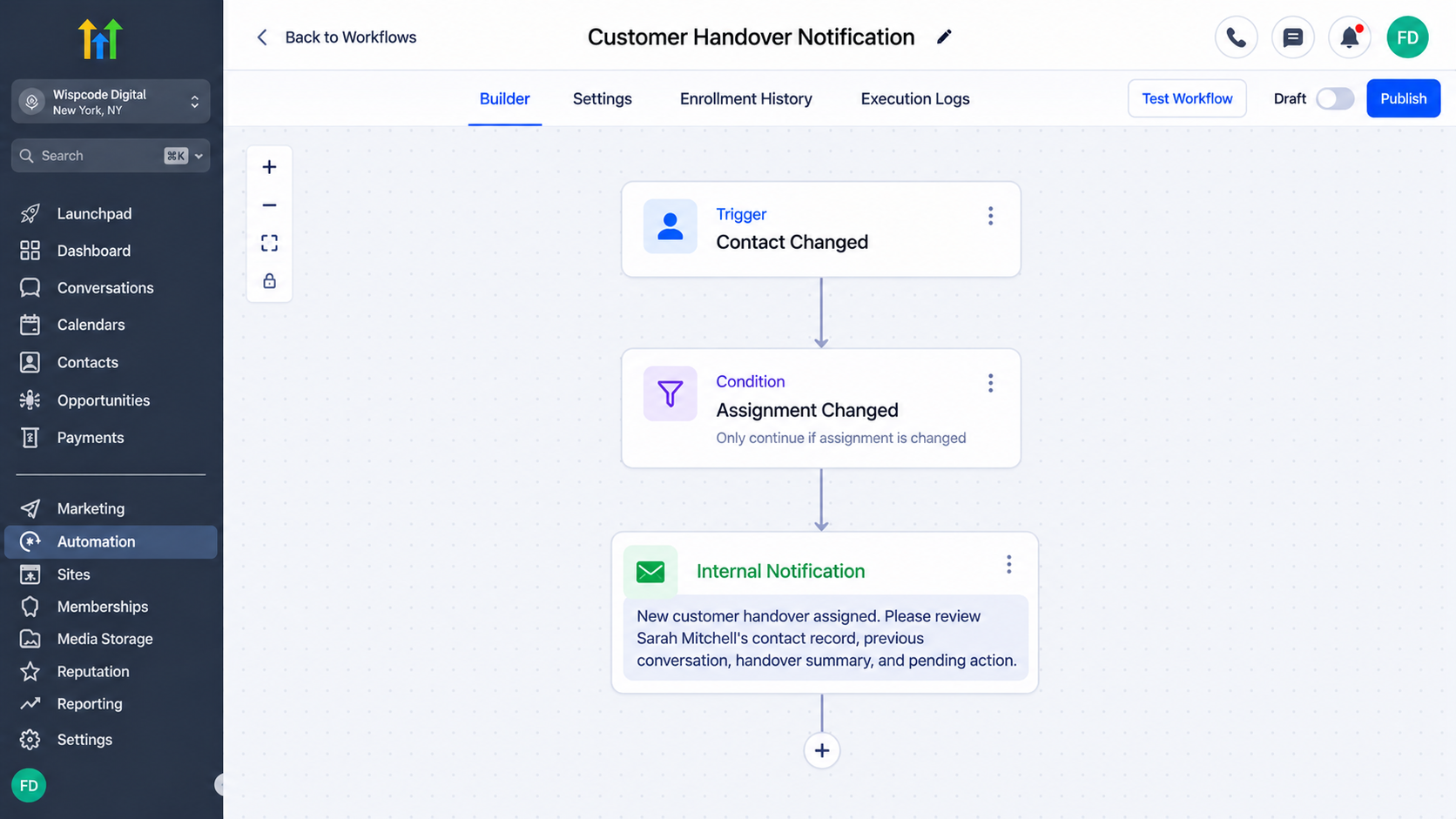
A practical workflow can use the Contact Changed trigger, with an appropriate filter for Assigned User Changed, where available in the account configuration. Alternatively, an Opportunity Changed trigger can be used when the handover concerns an opportunity assignment.
Configure the workflow around the following logic:
Trigger: Detect the relevant contact or opportunity assignment change.
Conditions: Restrict the workflow to relevant handovers, such as a specific team, pipeline, or handover status.
Action: Send an Internal Notification to the appropriate receiving user, using supported recipient options and dynamic values where available.
Follow up: Create a task for the receiving employee if the configuration supports the intended assignment and task details.
Internal Notifications can be configured for supported channels, including in app notifications, email, SMS, or WhatsApp, depending on the setup.
The notification should contain the customer name, handover summary, pending action, and a link or reference to the relevant CRM record when supported. Avoid sending vague alerts that simply say a contact has been reassigned.
Test the workflow before publishing. Trigger availability, filters, dynamic values, and assignment behavior can depend on the current workflow configuration and account permissions.
5. Create Clear Next Actions and Manager Visibility
A handover should not finish when the notification is sent. The receiving employee needs a defined action, preferably with a due date.
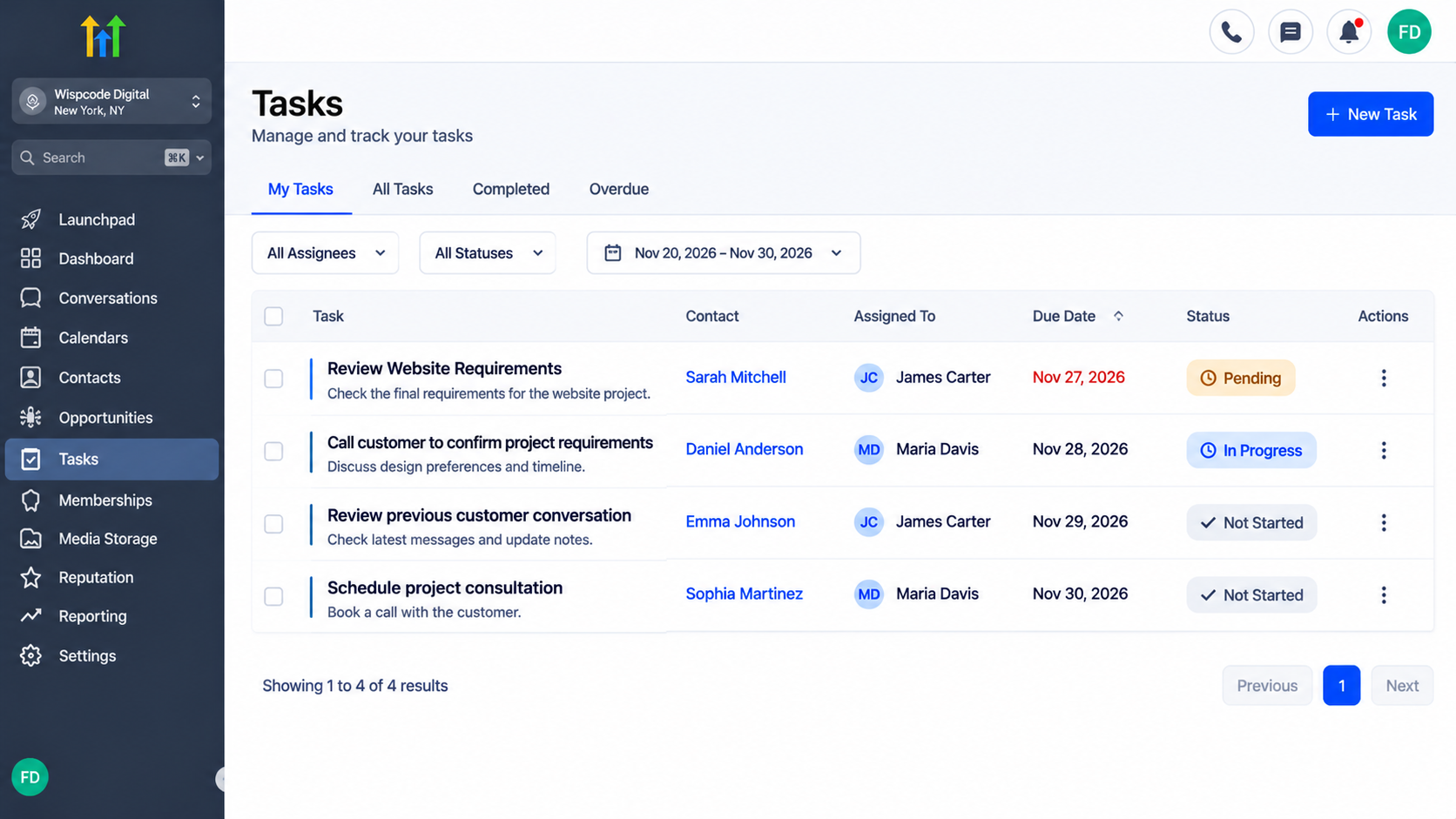
Use contact tasks to assign follow ups such as reviewing a request, calling a customer, or preparing a proposal. A Task Added trigger can also support additional notification automation when configured appropriately.
Managers can monitor contact ownership, pipeline progress, outstanding tasks, and handover related fields to identify records that need attention. Establishing a consistent process for reviewing overdue tasks and incomplete handovers makes accountability part of daily operations.
A Real World Example of a Customer Handover
Imagine a customer contacting a business about a website development service. A sales representative discusses the requirements, budget, and timeline before transferring the customer to the project team.
The sales representative documents the requirements in custom fields, adds an internal note summarizing the discussion, updates the pending action, and assigns responsibility to the appropriate person. The opportunity is updated if the business tracks the project through a pipeline.
When the assignment changes, a configured workflow sends an internal notification to the receiving team member. They review the conversation history, note, and pending task before contacting the customer.
The project team can now continue the conversation without asking the customer to repeat information. The next action is completed and documented in the CRM.
Common Handover Mistakes to Avoid
Changing ownership without context: Assignments alone do not explain what happened previously.
Relying entirely on automation: Workflows cannot replace accurate documentation of discussions and commitments.
Creating vague tasks: Every follow up should have a clear action and appropriate deadline.
Ignoring conversation assignments: Review relevant conversation and opportunity assignments separately when needed.
Failing to test workflows: Test handovers with different users and record types before relying on automation.
Conclusion
A successful communication handover is more than transferring responsibility. It means transferring the customer context, communication history, expectations, and next steps so the receiving team member can continue without unnecessary delays.
With a structured GoHighLevel system, businesses can connect customer records, conversations, assignments, tasks, and workflow automation into a more consistent handover process.
Frequently Asked Questions
1. Can GoHighLevel automatically notify a team member when a contact is reassigned?
Yes. A workflow using the Contact Changed trigger and relevant assignment filters can send an internal notification when a contact's assigned user changes, if configured appropriately.
2. Does changing a contact's assigned user transfer its conversations?
Not necessarily. Contact assignment and conversation assignment may need to be managed separately, depending on your configuration.
3. Can I use custom fields to manage handovers in GoHighLevel?
Yes. Custom fields can store structured information such as handover summaries, pending actions, and handover status.
4. How can managers track incomplete handovers?
Managers can review assigned contacts, opportunities, outstanding tasks, and handover related fields to identify records requiring attention.
5. Can GoHighLevel automate follow up tasks after a handover?
Yes. Workflows can create tasks and send notifications when supported actions and trigger conditions are configured correctly.
Need Expert Help with GoHighLevel?
New to GoHighLevel and ready to get started? Buy your GoHighLevel account here and launch with confidence.
Already know what you need and want our team to handle everything, from complete setup and customization to funnels, workflows, automations, CRM, and pipelines? Click here.