

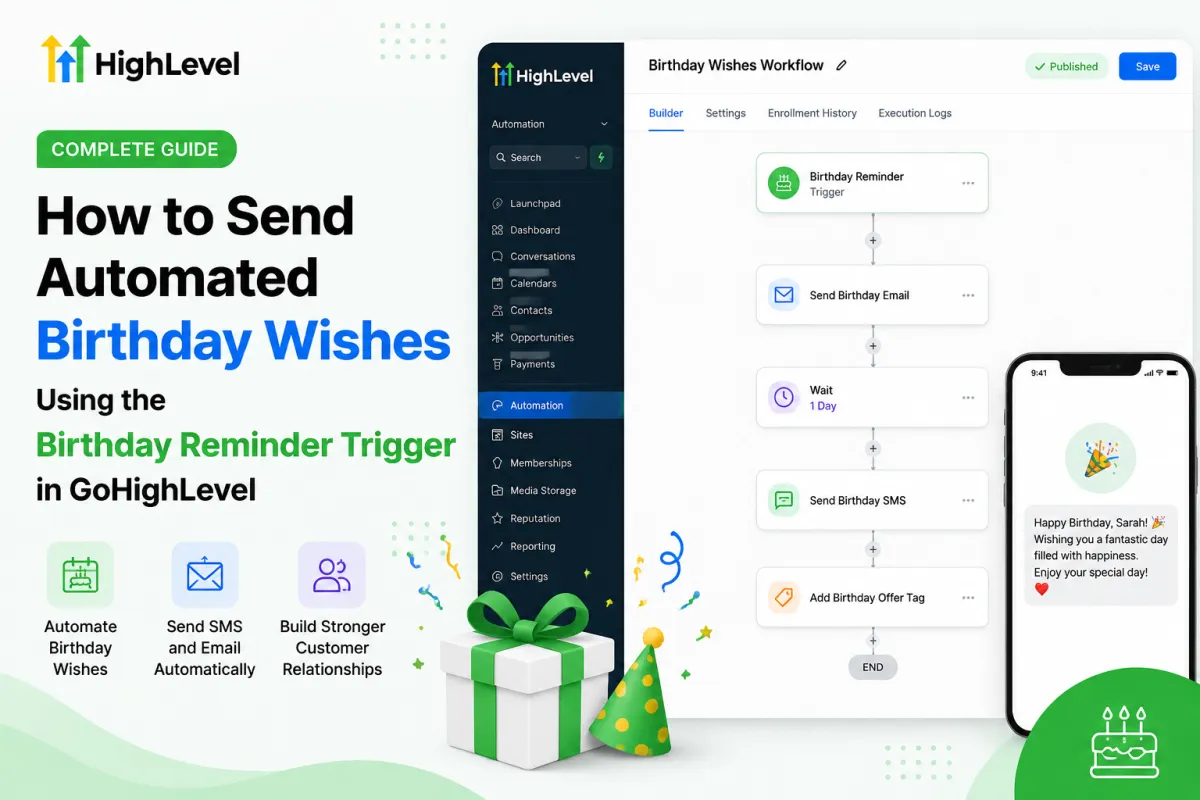
GoHighLevel Birthday Automation
How to Send Automated Birthday Wishes Using the Birthday Reminder Trigger in GoHighLevel
Introduction
Customer birthdays present a simple yet powerful opportunity to strengthen relationships. A personalized birthday message shows customers that your business values them beyond transactions, helping build trust and loyalty over time. However, remembering every customer's birthday and sending messages manually quickly becomes impractical as your contact list grows.
This is where the GoHighLevel Birthday Reminder Trigger becomes incredibly useful. Instead of relying on calendars or manual reminders, you can automate birthday greetings through GoHighLevel Workflows, ensuring every eligible contact receives a timely message without extra effort.
In this guide, you'll learn exactly how the GoHighLevel Birthday Reminder Trigger works, when it fires, why businesses use it, and how to implement it effectively for better customer engagement.
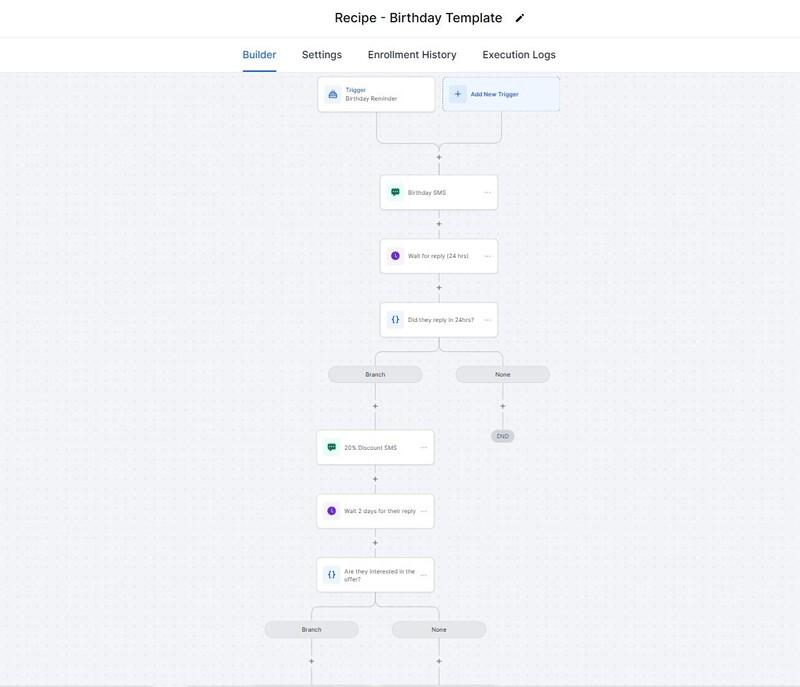
What Is the GoHighLevel Birthday Reminder Trigger?
The GoHighLevel Birthday Reminder Trigger is a workflow trigger that starts an automation when a contact's birthday matches the configured reminder schedule.
For this trigger to work properly, the contact must have a valid birthday stored in their contact record. When the scheduled birthday reminder occurs, GoHighLevel automatically enrolls the contact into the workflow, allowing you to send birthday greetings or perform additional automated actions.
Businesses commonly use this trigger to:
Send automated birthday wishes via SMS or email
Deliver personalized birthday offers or discounts
Strengthen customer relationships
Increase engagement with minimal manual effort
Because the trigger relies on contact data, maintaining accurate birthday information is essential for successful automation.
How the Birthday Reminder Trigger Works
Understanding the workflow makes it easier to build reliable birthday automations.
Step 1: Store Birthday Information
The first requirement is that each contact has a birthday saved in their contact profile. Businesses typically collect this information through forms, surveys, appointments, or during customer onboarding.
Without a birthday value, the trigger has no date to monitor.
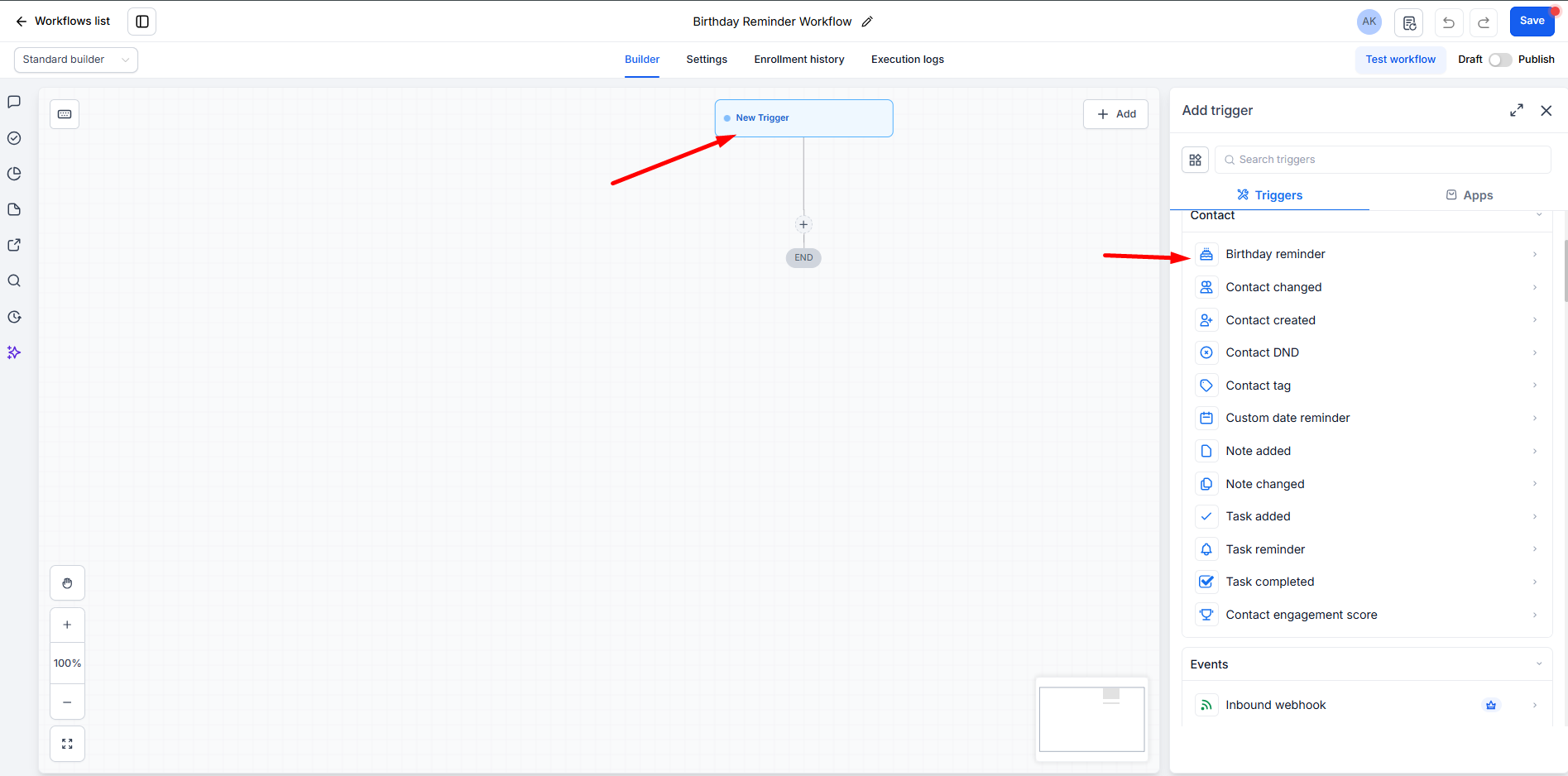
Step 2: Configure the Workflow Trigger
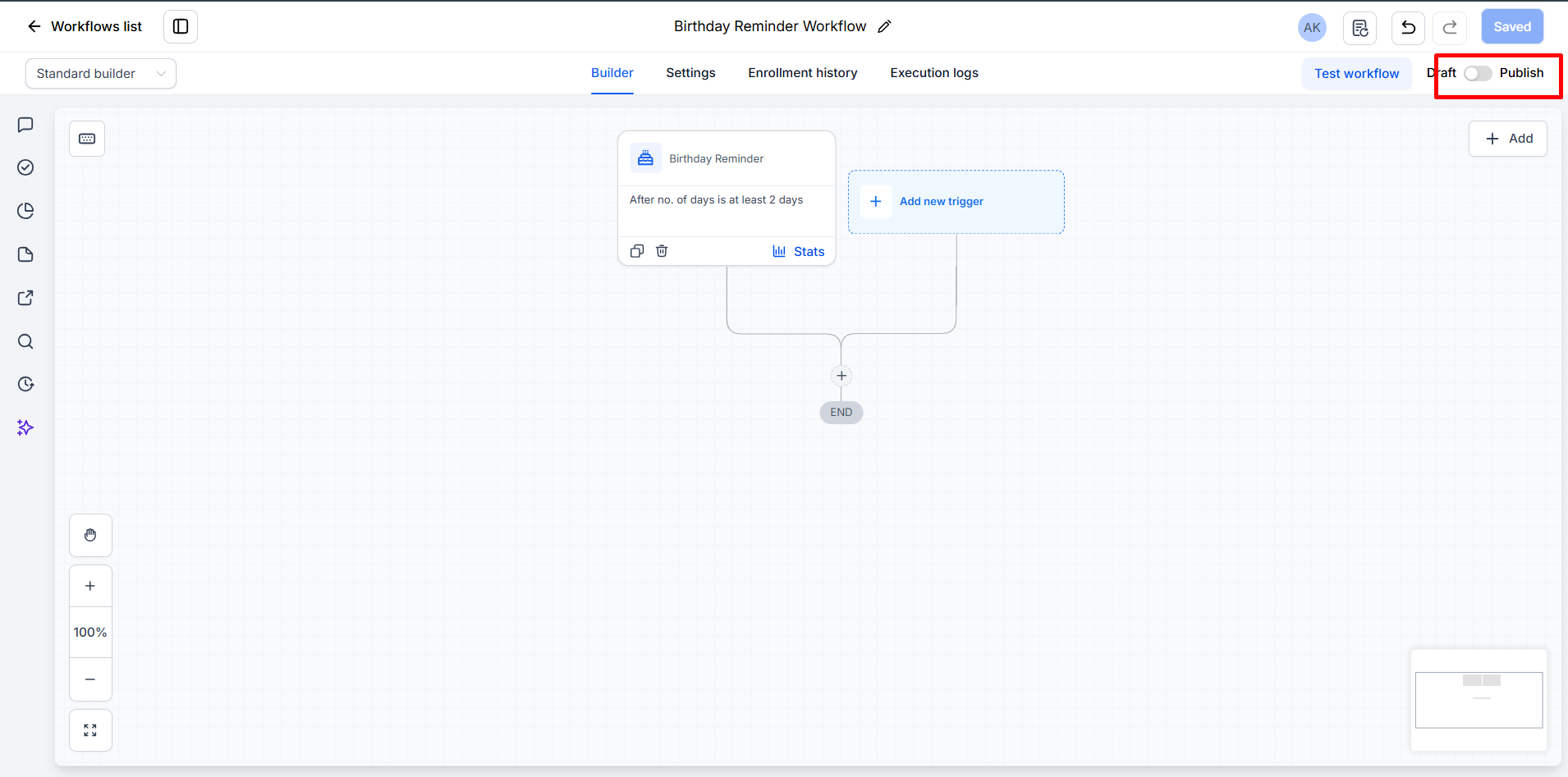
Inside GoHighLevel Workflows, create a new workflow and select the Birthday Reminder Trigger as the starting event.
This tells the workflow to watch for contacts whose birthday reaches the configured reminder timing.
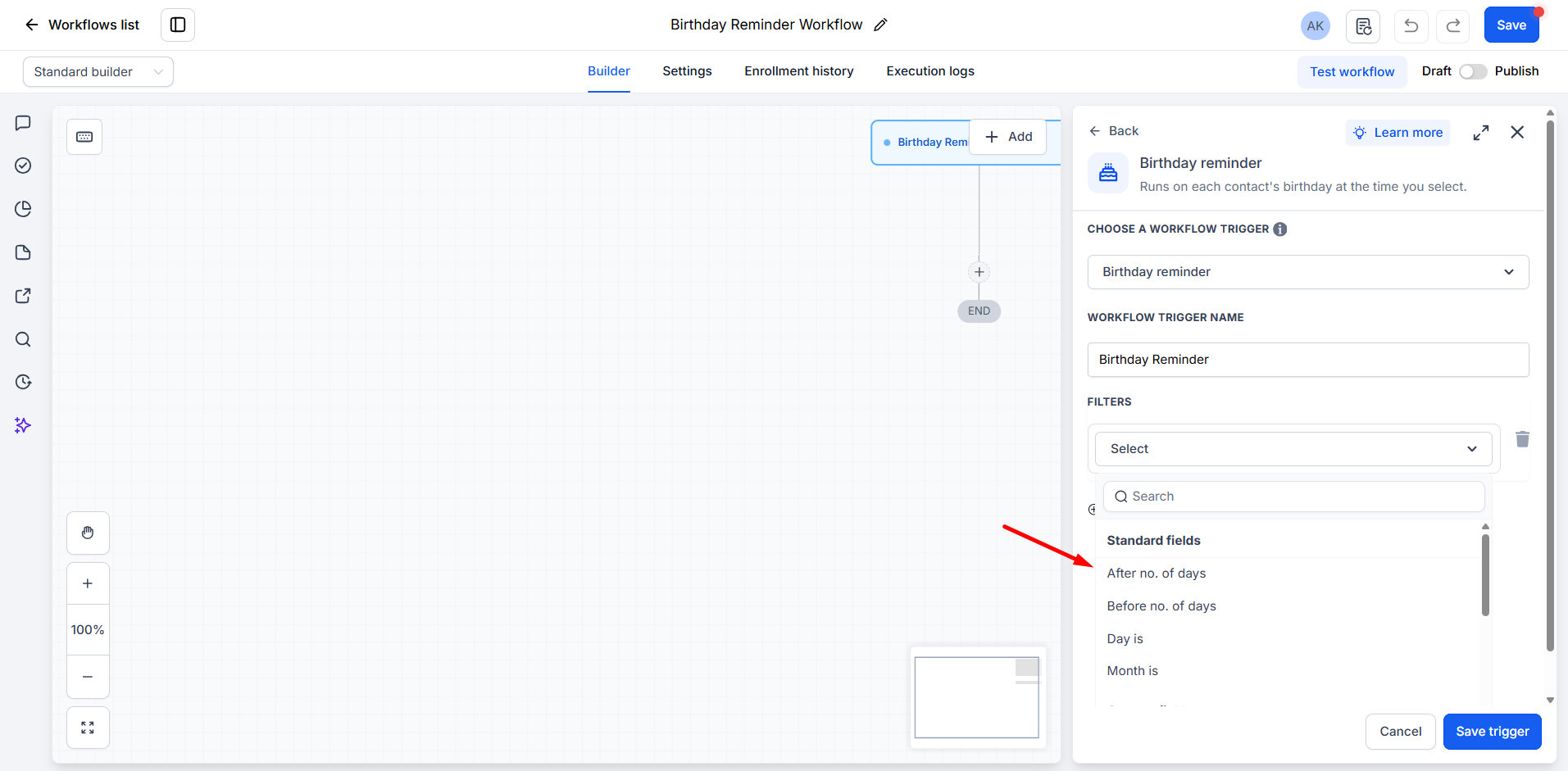
Step 3: Trigger Activation
When the birthday reminder conditions are met, GoHighLevel automatically enrolls the qualifying contact into the workflow.
No manual action is required once the workflow is active.
Step 4: Send Automated Birthday Wishes
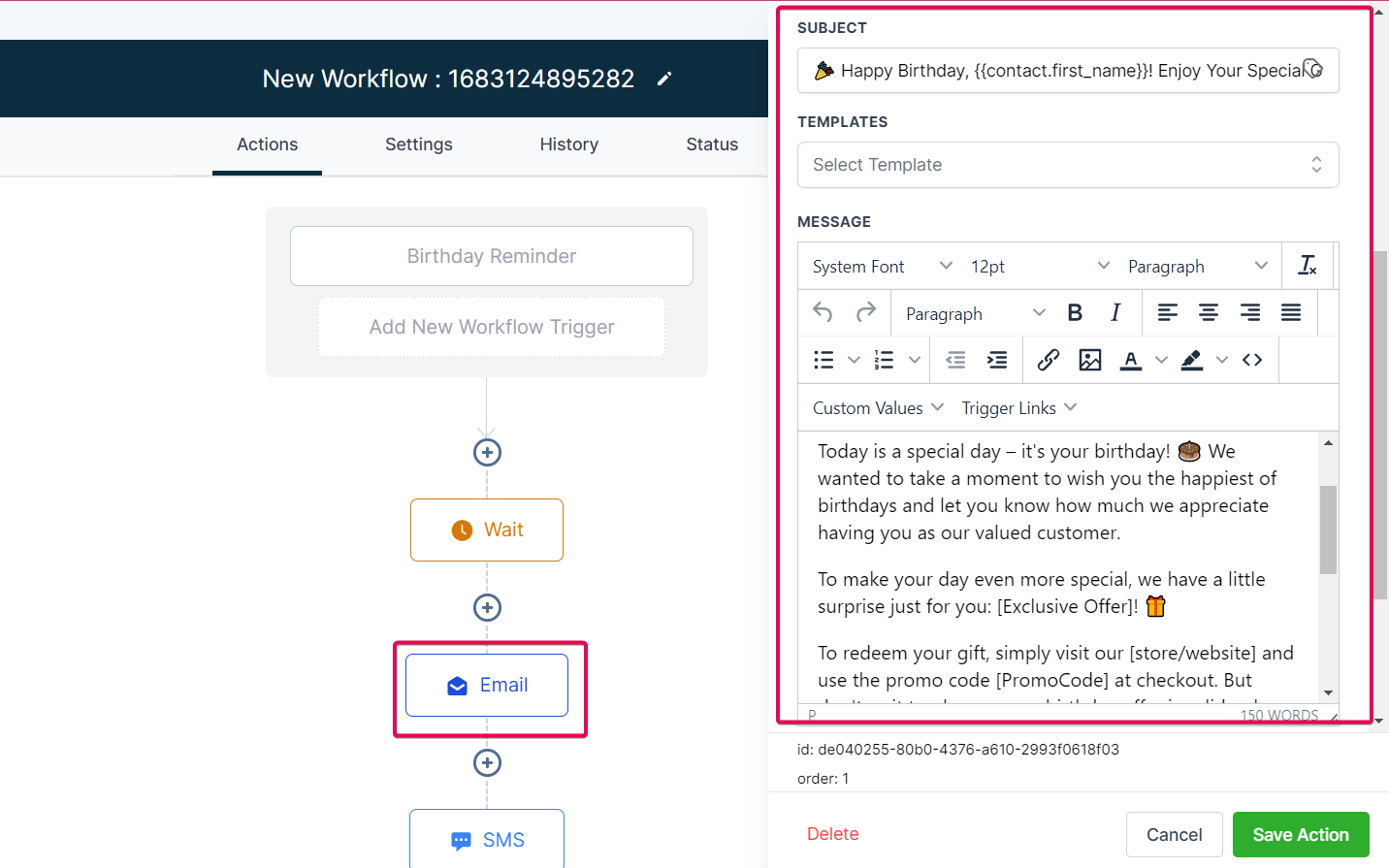
After the trigger fires, the workflow can immediately send a personalized birthday message through supported workflow actions, such as SMS or email.
Using custom values like the contact's first name makes the greeting feel more personal and engaging.
Example Birthday Message
Happy Birthday, Sarah! 🎉 Wishing you a fantastic day filled with happiness. Thank you for being a valued customer!
Step 5: Continue the Customer Journey
The Birthday Reminder Workflow doesn't have to end after the first message.
Depending on your business goals, you can continue the workflow by:
Sending a follow-up email later in the day
Delivering a birthday coupon
Sharing a booking link
Providing a limited-time promotional offer
Sending another reminder before the offer expires
This allows businesses to combine thoughtful customer engagement with marketing automation in a natural, customer-friendly way.
Why Businesses Should Use the Birthday Reminder Trigger
Automating birthday communication offers benefits that extend well beyond convenience.
🎉 Build Stronger Customer Relationships
Personalized birthday messages help customers feel appreciated. Small gestures often leave lasting impressions and encourage long-term loyalty.
📈 Increase Customer Engagement
Birthday emails and SMS messages generally receive higher attention because they're relevant and timely.
⏰ Save Valuable Staff Time
Instead of manually checking birthdays every day, GoHighLevel handles the entire process automatically.
👤 Create Personalized Experiences
Using contact information such as first names makes birthday greetings feel authentic rather than generic.
❤️ Improve Customer Retention
Customers are more likely to return to businesses that consistently provide personalized experiences throughout the customer lifecycle.
Real-World Use Cases
The GoHighLevel Birthday Reminder Trigger works well across many industries.
IndustryExample Use Case💇 SalonsSend birthday wishes with a discount on haircuts, coloring, or spa services.🦷 Dental ClinicsWish patients a happy birthday while encouraging them to schedule their next cleaning appointment.💪 Gyms & Fitness CentersCelebrate members with a complimentary guest pass or discounted personal training session.🎯 Coaches & ConsultantsSend a thoughtful birthday email that strengthens client relationships without feeling overly promotional.📢 Marketing AgenciesMaintain stronger client relationships by sending personalized birthday greetings to business owners and decision-makers.🏡 Real Estate ProfessionalsStay top of mind by sending birthday messages that nurture long-term relationships with past buyers and sellers.🍽 RestaurantsOffer birthday discounts or complimentary desserts that encourage customers to visit during their birthday celebration.🏥 Healthcare PracticesSend warm birthday greetings that reinforce patient care and build trust over time.🛠 Local BusinessesWhether you operate a retail shop, repair service, or local service business, automated birthday messages help create memorable customer experiences.
Best Practices for Using the Birthday Reminder Trigger
To get the best results, follow these practical recommendations:
✅ Collect accurate birth dates during customer registration or onboarding.
✅ Keep contact records updated to avoid incorrect reminders.
✅ Personalize messages using available custom values such as the customer's first name.
✅ Keep birthday greetings warm and genuine instead of overly sales-focused.
✅ Include special birthday offers only when they add value to the customer experience.
✅ Test your workflow before publishing to verify the trigger, timing, and message delivery work as expected.
✅ Periodically review workflow performance and contact data quality.
Common Mistakes to Avoid
Even simple automations can fail if basic details are overlooked.
Avoid these common mistakes:
❌ Missing birthday information in contact records
❌ Incorrect or incomplete birthday dates
❌ Leaving the workflow unpublished or inactive
❌ Skipping workflow testing before launch
❌ Sending generic messages without personalization
❌ Forgetting to verify that message content appears correctly with custom values
Key Takeaways
The Birthday Reminder Trigger automates birthday greetings in GoHighLevel.
Contacts must have a valid birthday stored for the trigger to work.
Birthday automations can send SMS, emails, coupons, and promotional offers.
Personalized messages improve customer engagement and loyalty.
Testing your workflow before publishing helps ensure reliable automation.
Birthday campaigns save time while creating memorable customer experiences.
Conclusion
The GoHighLevel Birthday Reminder Trigger makes it easy to automate one of the simplest yet most meaningful customer touchpoints. Instead of relying on manual reminders, businesses can consistently send personalized birthday wishes that improve customer engagement, strengthen relationships, and save valuable time.
Whether you run a salon, dental clinic, gym, agency, restaurant, real estate business, or another service-based company, automating birthday greetings helps create memorable customer experiences with minimal ongoing effort.
When paired with accurate contact data, personalized messaging, and well-tested workflows, the GoHighLevel Birthday Reminder Trigger becomes a valuable part of your CRM automation strategy allowing you to deliver thoughtful, timely communication that keeps customers connected to your business all year long.
Frequently Asked Questions (FAQs)
1. What is the Birthday Reminder Trigger in GoHighLevel?
The Birthday Reminder Trigger is a workflow trigger that automatically starts an automation when a contact's birthday matches the configured reminder schedule, allowing you to send birthday emails, SMS messages, or promotional offers.
2. Does every contact need a birthday saved?
Yes. The trigger only works for contacts that have a valid birthday stored in their contact record. Without this information, the workflow cannot be triggered.
3. Can I send birthday wishes through SMS and email?
Yes. After the Birthday Reminder Trigger fires, you can add workflow actions to send birthday greetings via SMS, email, or both.
4. Can I include personalized information in birthday messages?
Absolutely. You can use GoHighLevel custom values such as the contact's first name to make birthday messages more personal and engaging.
5. Can I send birthday coupons or discounts automatically?
Yes. Many businesses use the Birthday Reminder Trigger to automatically deliver discount codes, coupons, booking links, or limited-time birthday offers as part of the workflow.
6. Which businesses benefit most from birthday automation?
Birthday automation is useful for salons, dental clinics, gyms, restaurants, marketing agencies, real estate professionals, healthcare practices, coaches, consultants, and almost any business that maintains customer relationships.
7. What happens if a contact doesn't have a birthday saved?
If the birthday field is empty or invalid, the Birthday Reminder Trigger will not activate for that contact. Keeping your contact data accurate is essential for successful automation.
Need Expert Help with GoHighLevel?
New to GoHighLevel and ready to get started? Buy your GoHighLevel account here and launch with confidence.
Already know what you need and want our team to handle everything, from complete setup and customization to funnels, workflows, automations, CRM, and pipelines?Click here.



