

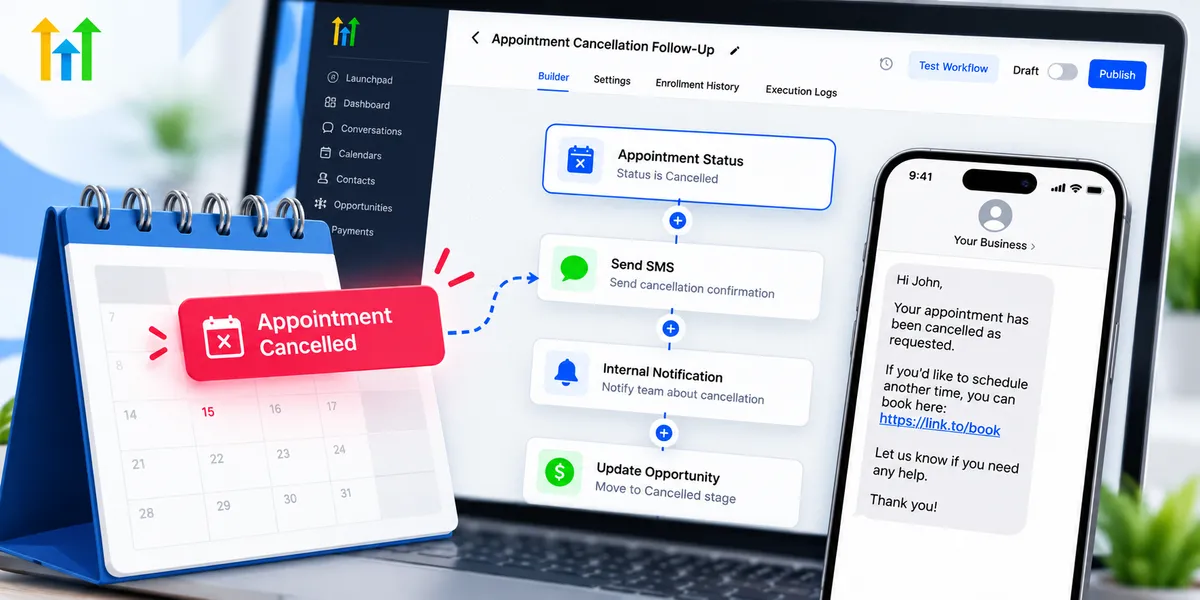
How to Automate Appointment Cancellations in GoHighLevel
How to Manage Appointment Cancellations With Automated Workflows
A customer cancels an appointment just hours before it begins. Your team has already reserved the time, prepared for the meeting, and organized its schedule. Now that slot is empty, and someone must manually update records, notify staff, and contact the customer about rescheduling.
Learning how to manage appointment cancellations with automated workflows can turn this frustrating situation into a more organized process.
With GoHighLevel, businesses can use appointment status triggers, automated messages, and CRM workflows to respond to cancellations promptly. Instead of relying entirely on manual follow-ups, teams can create a consistent system that keeps customers informed and makes rescheduling easier.
Why Appointment Cancellations Create Business Challenges
Appointment cancellations affect more than calendar availability. Without an organized process, they can create operational problems across service-based businesses.
Common challenges include:
Lost availability: Cancelled appointments leave unused time that could potentially accommodate other customers.
Administrative workload: Employees spend time updating schedules and contacting customers.
Missed opportunities: Customers who cancel may never reschedule without appropriate follow-up.
Communication delays: Staff may not learn about cancellations quickly enough.
Scheduling confusion: Outdated appointment information can cause unnecessary preparation or misunderstandings.
For businesses managing multiple daily appointments, these challenges can become increasingly difficult to handle manually.
A reliable CRM appointment management process helps reduce confusion while maintaining professional customer communication.
How GoHighLevel Simplifies Appointment Cancellation Management
GoHighLevel combines calendar scheduling, contact management, and workflow automation within one platform.
Its workflow builder allows businesses to configure actions based on appointment status changes. For example, when an appointment is marked as cancelled, a properly configured workflow can acknowledge the cancellation, notify the team, and provide rescheduling information.
A GoHighLevel appointment cancellation workflow can include automated SMS messages, emails, internal notifications, and conditional follow-ups.
However, these actions must be configured. Changing an appointment's status does not automatically update every related CRM record or opportunity stage.
This flexibility allows businesses to design cancellation processes that match their scheduling requirements.
How to Build an Appointment Cancellation Workflow in GoHighLevel
Creating an effective cancellation workflow involves connecting appointment status changes with appropriate communication actions.
Step 1: Create a New Workflow
Navigate to Automation > Workflows in your GoHighLevel sub-account.
Create a new workflow from scratch and give it a descriptive name, such as "Appointment Cancellation Follow-Up."
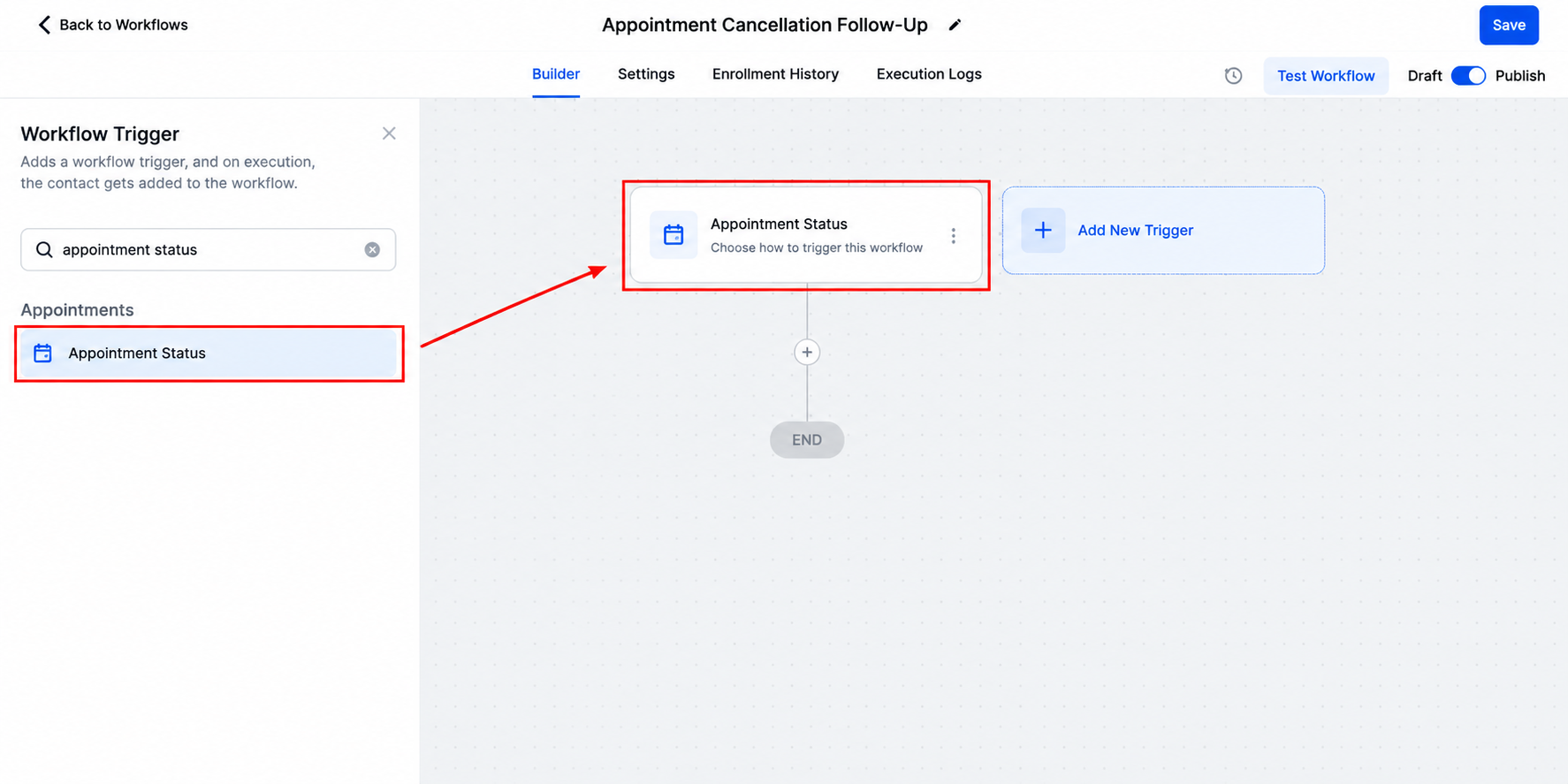
Clear naming makes workflows easier to manage as your automation system expands.
Step 2: Configure the Appointment Status Trigger
Add the Appointment Status workflow trigger.
Configure the trigger filters to target appointments with the Cancelled status. Where appropriate, select the relevant calendar to ensure the automation applies to the intended bookings.
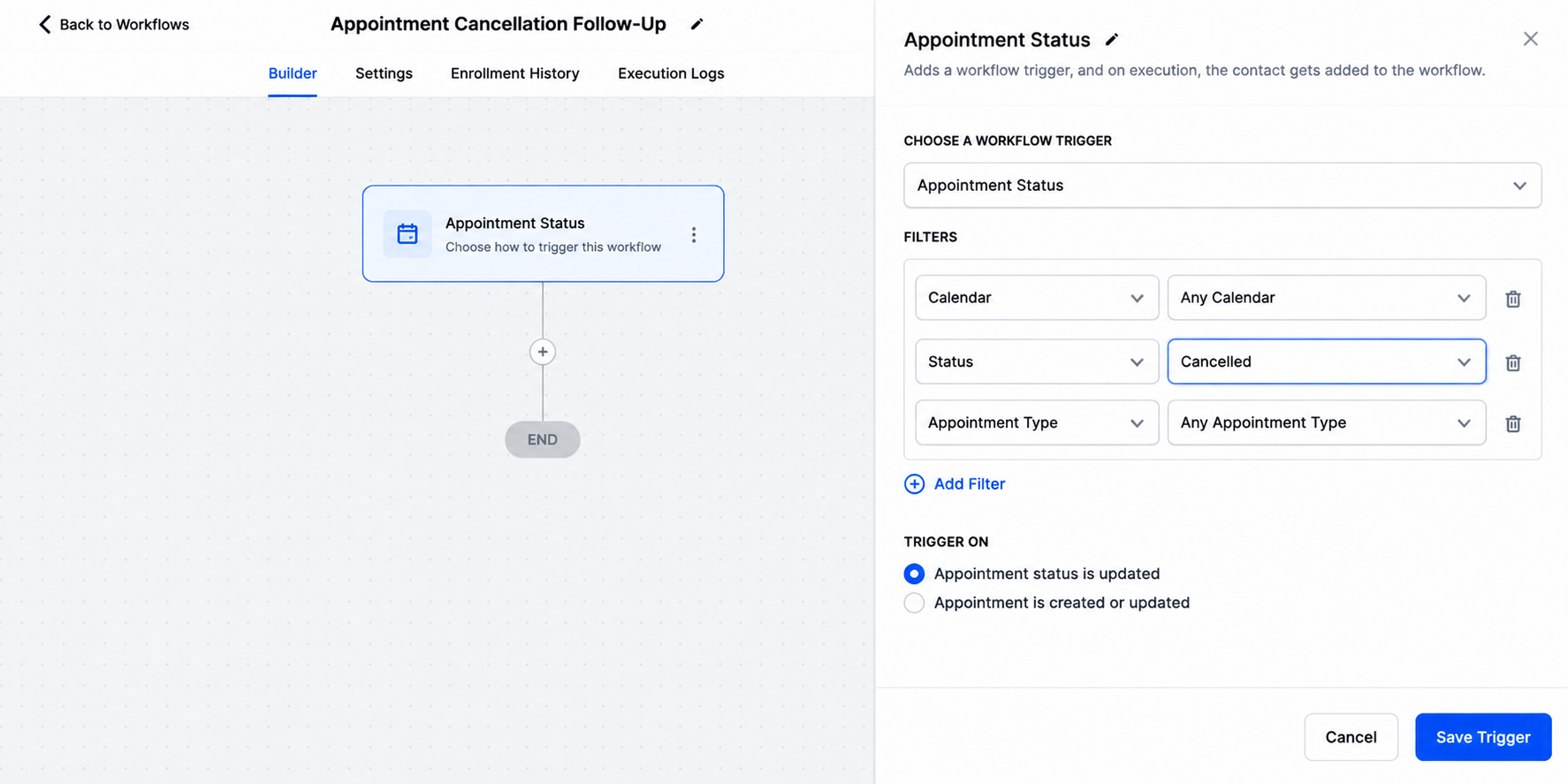
These filters are important because businesses may operate different calendars for consultations, sales calls, and services.
Step 3: Send a Cancellation Confirmation
Add a Send SMS or Send Email action to acknowledge the cancellation.
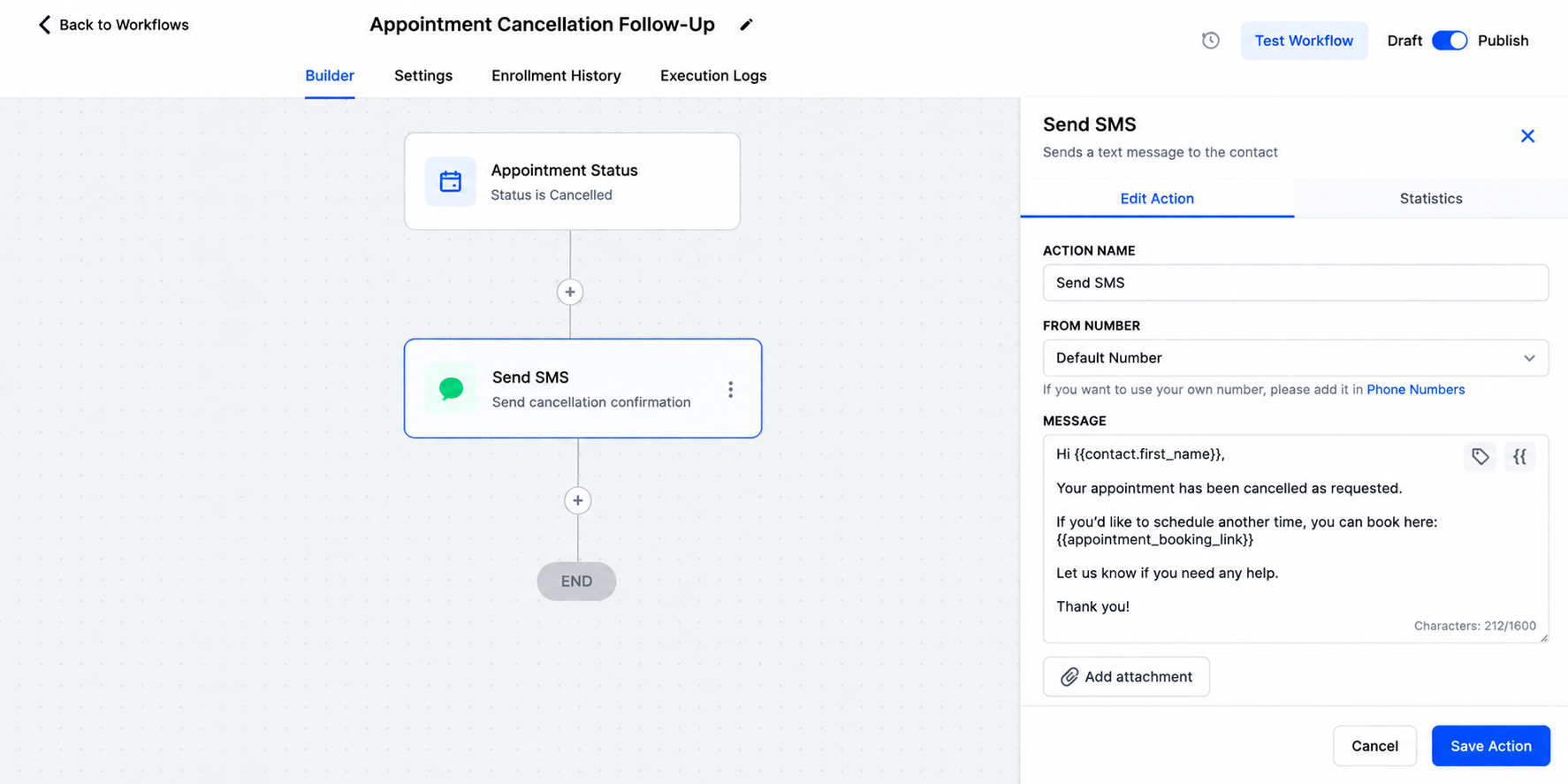
For example:
"Your appointment has been cancelled as requested. If you'd like to schedule another time, you can book here: [Booking Link]."
Keep messages polite, concise, and helpful.
Step 4: Notify Your Team
Add an internal notification action to inform the appropriate staff member about the cancellation.
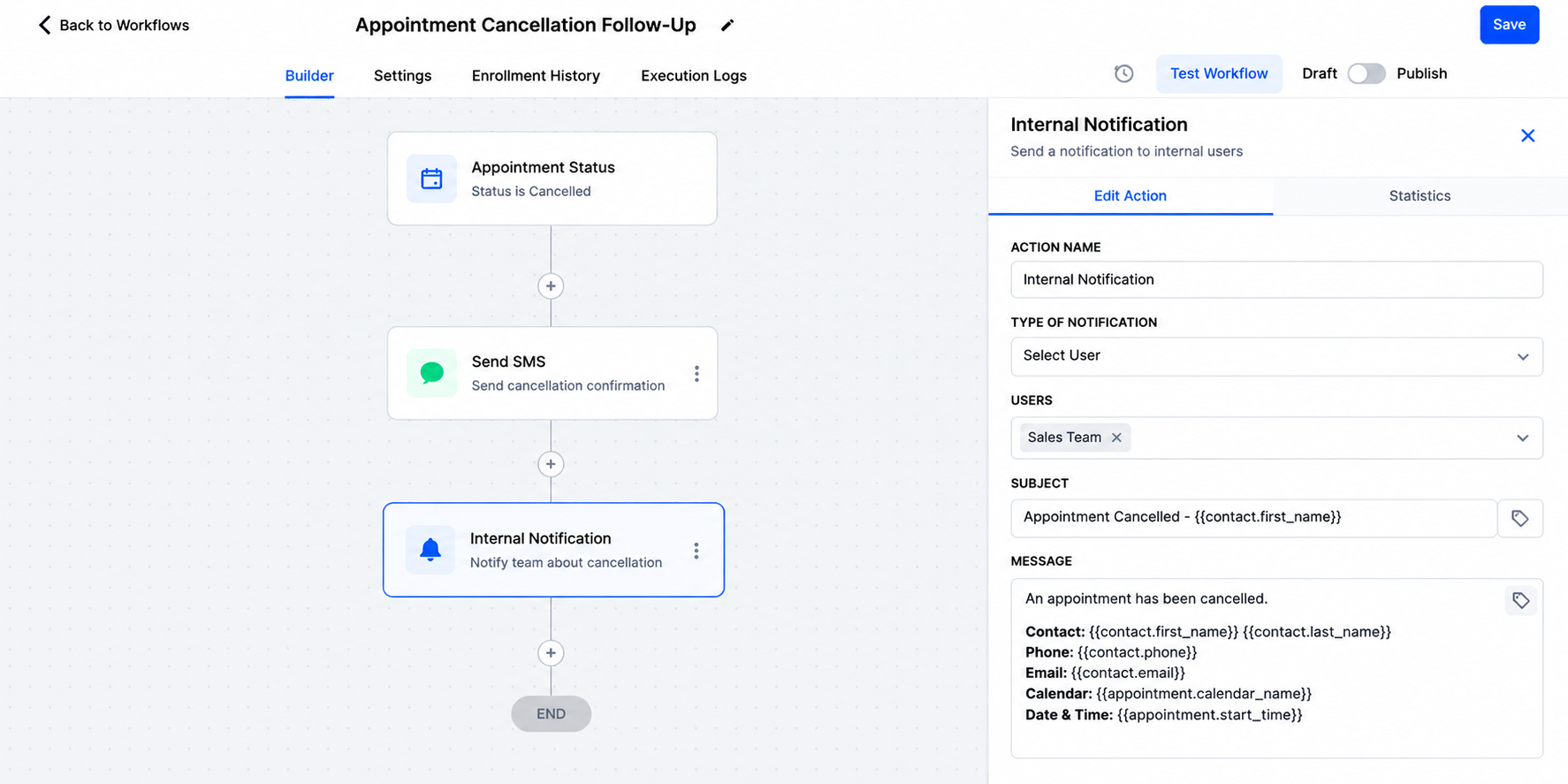
This helps employees adjust their schedules without repeatedly checking calendar records.
Step 5: Add Optional CRM Updates
Depending on your business process, additional actions can apply contact tags or update opportunity information.
For example, an explicitly configured opportunity action can move a relevant opportunity into a cancellation-related pipeline stage.
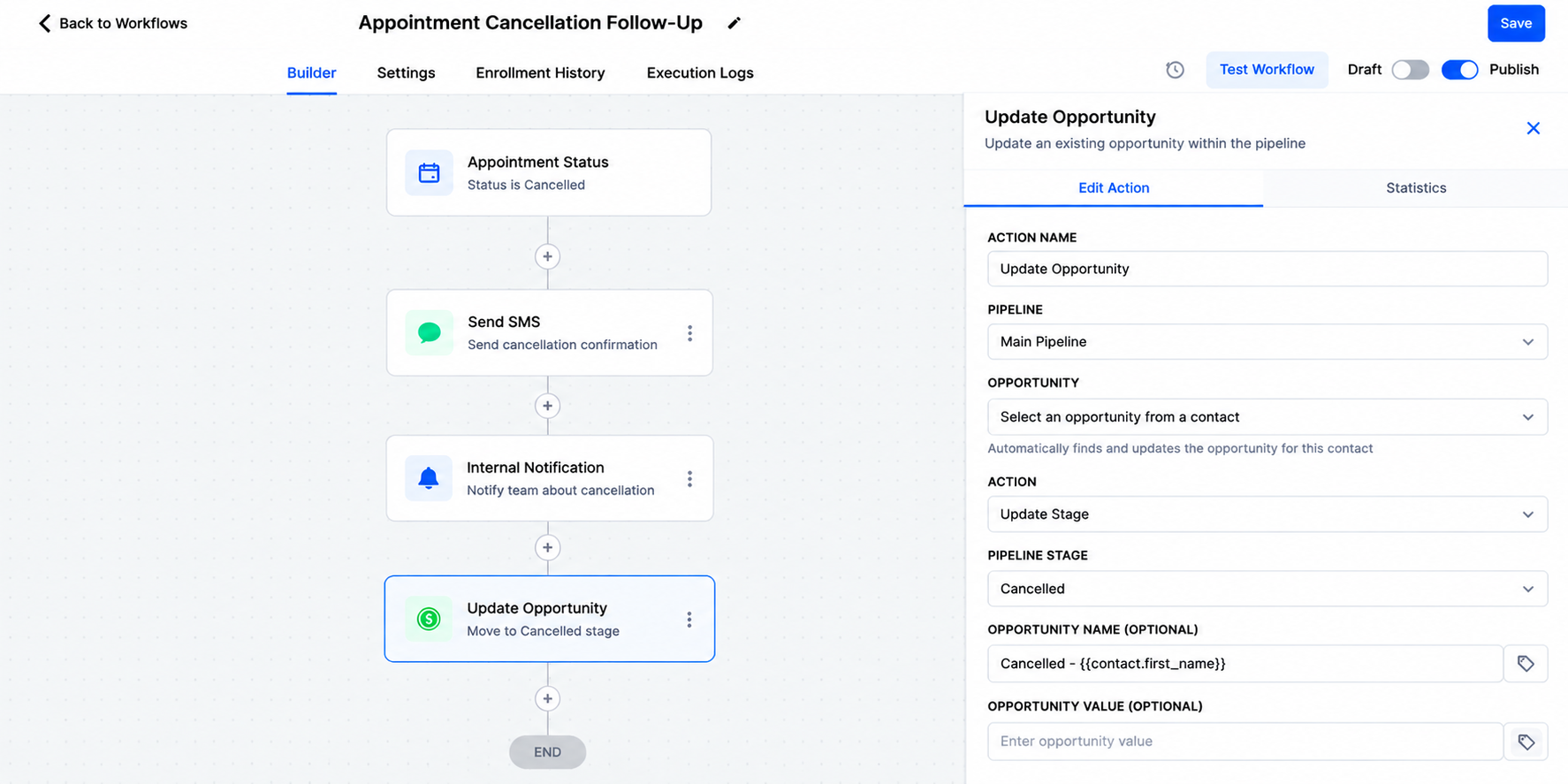
These updates require appropriate workflow configuration and should be tested carefully.
Step 6: Test Before Publishing
Create a test appointment, cancel it, and verify that the workflow executes correctly.
Check message delivery, internal notifications, calendar filters, and any CRM updates before enabling the workflow for customers.
Encourage Rescheduling With Automated Follow-Ups
Acknowledging a cancellation is useful, but offering an easy rescheduling option creates additional value.
Businesses can configure appointment rescheduling automation to send a booking link immediately after cancellation and, when appropriate, a gentle reminder later.
For example, a consulting agency might send an initial confirmation followed by one reminder after a reasonable waiting period.
However, the workflow should check whether the customer has already scheduled another appointment before sending additional messages.
Properly configured If/Else conditions and workflow exit rules can help prevent unnecessary communication.
The objective is to make rescheduling convenient, not overwhelm customers with repeated reminders.
How Different Industries Can Benefit
Cancellation automation can support various service-based industries.
Home Service Companies: Plumbing, remodeling, and painting businesses can notify their teams when estimates or consultations are cancelled and provide customers with another booking opportunity.
Salons and Beauty Businesses: Salons can acknowledge cancelled bookings and share available scheduling options, reducing manual communication.
Consulting Agencies: Agencies can automatically follow up after cancelled discovery calls, helping interested prospects reconnect when their schedules allow.
Each industry can customize its GoHighLevel calendar workflows according to its appointment types and customer expectations.
Best Practices for Reliable Cancellation Workflows
To maintain effective automated appointment cancellation management:
Test cancellation triggers using realistic appointment scenarios.
Apply calendar-specific filters when managing multiple services.
Personalize messages with appropriate contact information.
Avoid duplicate notifications from overlapping workflows.
Check for newly booked appointments before sending reminders.
Respect customer communication preferences and applicable consent requirements.
Review workflow execution history when troubleshooting unexpected behavior.
Regular testing is especially important when external calendar integrations or multiple automation workflows are involved.
Conclusion
Appointment cancellations do not have to create unnecessary administrative work or communication gaps.
With a properly configured GoHighLevel appointment cancellation workflow, businesses can acknowledge cancellations, notify their teams, maintain organized CRM records, and offer convenient rescheduling options.
The greatest benefit comes from building a reliable process that responds appropriately to each customer's situation.
Explore GoHighLevel workflow automation to create a more efficient, consistent, and customer-friendly appointment management experience.
Frequently Asked Questions (FAQs)
1. How can I automate appointment cancellations in GoHighLevel?
You can automate appointment cancellations in GoHighLevel by creating a workflow using the Appointment Status trigger and filtering for cancelled appointments. Once configured, the workflow can automatically send cancellation confirmations, notify team members, and provide customers with a booking link to reschedule.
2. Can GoHighLevel automatically send messages when an appointment is cancelled?
Yes. GoHighLevel allows businesses to configure automated SMS and email notifications when an appointment's status changes to Cancelled. These messages can confirm the cancellation, provide rescheduling instructions, and maintain professional communication without requiring manual follow-up.
3. How do I encourage customers to reschedule cancelled appointments in GoHighLevel?
You can create an appointment cancellation follow-up workflow that sends customers a calendar booking link after cancellation. You can also configure reminder messages and conditional checks to avoid contacting customers who have already booked another appointment.
4. Does GoHighLevel automatically update pipeline stages when an appointment is cancelled?
No. Cancelling an appointment does not automatically change its associated opportunity stage. However, you can configure workflow actions to update the relevant opportunity when a cancellation occurs. This helps businesses maintain accurate sales pipeline records and track cancelled appointments more effectively.
5. What are the benefits of using automated appointment cancellation workflows?
Automated appointment cancellation workflows help businesses reduce manual administrative tasks, improve customer communication, notify staff promptly, and simplify appointment rescheduling. With GoHighLevel appointment automation, businesses can create a more organized scheduling process while minimizing missed follow-up opportunities.
Need Expert Help with GoHighLevel?
New to GoHighLevel and ready to get started? Buy your GoHighLevel account here and launch with confidence.
Already know what you need and want our team to handle everything, from complete setup and customization to funnels, workflows, automations, CRM, and pipelines? Click here.



