

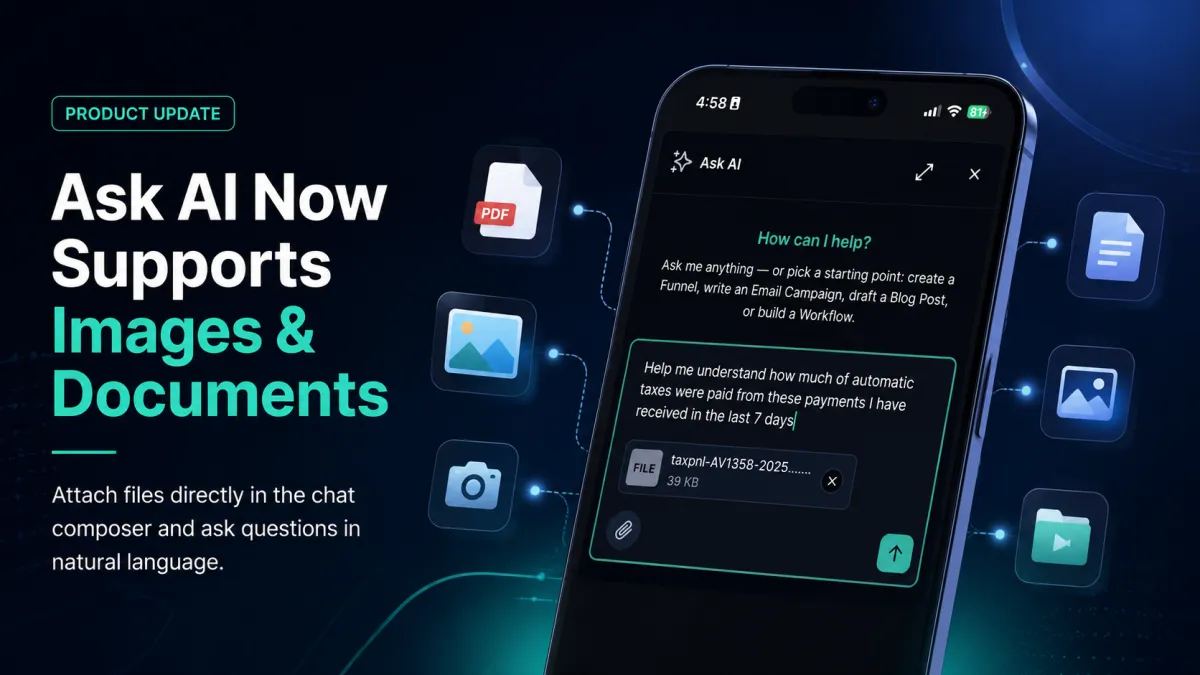
Ask Ai Attachments
Ask AI Now Accepts Images and Documents Right in the Chat Composer
Keeping work moving quickly often means having the right information available at the right time. With the latest GoHighLevel Ask AI update, users can now attach images and documents directly inside the chat composer, making it easier to ask questions about existing files without manually typing everything into the conversation.
Whether you're reviewing a screenshot, referencing a document, or using files already stored in your GoHighLevel Media Library, this update helps simplify everyday tasks while making interactions with GoHighLevel AI more efficient.
Let's explore what this new feature offers and why it matters.
Why This Update Matters
Business owners, agencies, marketers, and CRM users frequently work with files that contain important information. Instead of describing everything manually, users can now attach supported files directly to a conversation with GoHighLevel Ask AI and ask questions using natural language.
This small but meaningful improvement makes conversations with the AI assistant more practical by allowing the attached file to be included with the next message.
The result is a smoother experience that reduces repetitive work and helps users get answers based on the information contained in their attachments.
The Challenge Before This Update
Before this release, Ask AI could only understand what users typed into the chat.
Many users already had valuable information stored inside files such as:
Screenshots of broken funnels
CSV files containing lead information
Signed contract PDFs
Even though these files already contained the necessary details, users still had to manually describe or retype the information before asking Ask AI for help.
This added unnecessary effort and slowed down conversations, especially when working on mobile devices or handling multiple files throughout the day.
How Ask AI Attachments Work
GoHighLevel has introduced a paperclip attachment option directly inside the Ask AI chat composer.
When creating a message, users can tap the paperclip icon and choose the file they want to attach. The upload takes place in the background, allowing them to continue typing while the file is being prepared.
Once uploaded, the attachment appears as a small chip within the conversation. When the message is sent, the attachment is included so GoHighLevel AI can read it alongside the user's question.
This creates a more natural workflow by letting users reference existing files instead of manually rewriting their contents.

Supported Attachment Sources
The new Ask AI attachments feature supports multiple ways to add files directly from the chat composer.
Users can attach files from:
Camera – Snap a new photo.
Gallery – Select an existing image.
Files – Upload a document stored on the device.
Media Library – Choose an existing file already stored in the GoHighLevel Media Library.
Having several attachment options makes it easy to work with files regardless of where they are stored.

Key Business Benefits
Save Time
One of the biggest advantages of this GoHighLevel AI update is the time it saves.
Instead of manually typing information already visible in screenshots or documents, users can simply attach the file and ask their question. This helps reduce repetitive work and keeps conversations moving.
Improve Mobile Productivity
The feature is especially useful for people working from their phones.
With the GoHighLevel mobile app, users can ask questions about documents and images without switching to a desktop or laptop, making it easier to stay productive while away from the office.
Better Answers
Because Ask AI receives the attached file together with the user's message, responses are based on the information contained in that attachment.
This helps create more relevant conversations by allowing the AI assistant to reference the attached content instead of relying only on manually typed descriptions.
Reuse Existing Files
Many businesses already organize important assets inside the GoHighLevel Media Library.
Rather than uploading the same files again, users can simply select an existing file from the Media Library and attach it directly to the conversation, making file reuse faster and more convenient.
How to Start Using the Feature
Getting started with GoHighLevel images and documents is simple.
Follow these steps:
Open Ask AI.
Start a new conversation or open an existing one.
Tap the paperclip icon.
Choose one of the available attachment sources:
Camera
Gallery
Files
Media Library
Wait for the attachment to finish uploading.
Type your question.
Send your message.

After the file finishes uploading, it appears as an attachment in the conversation, allowing users to ask questions about the attached document using natural language.
Helpful Tip
If you don't have a question immediately, you can simply send the attachment by itself.
Ask AI will analyze the attached file, allowing you to continue the conversation afterward.
Future Improvements on the Roadmap
GoHighLevel has also shared several enhancements currently being explored for future releases.
These include:
Larger document limits
Support for more file types, including spreadsheets
Plain text files
Markdown files
In-app attachment previews
Attachment history
Reusing attachments across sessions
These roadmap items provide a glimpse into how the attachment experience may continue evolving while building on the current functionality.
Final Thoughts
The ability to attach images and documents directly inside the chat composer is a practical improvement that makes GoHighLevel Ask AI easier to use in everyday situations.
By allowing users to attach files from their Camera, Gallery, Files, or GoHighLevel Media Library, this update removes the need to manually retype information that already exists inside documents and images. The background upload process, simple attachment workflow, and support for natural language questions all contribute to a smoother experience.
Whether you're reviewing screenshots, referencing documents, or reusing files you've already stored, this GoHighLevel AI assistant update helps streamline conversations and improve productivity without adding unnecessary complexity.
As future enhancements such as additional file types, larger document limits, attachment previews, and reusable attachments are explored, this feature lays the foundation for an even more convenient way to interact with GoHighLevel AI while staying focused on the work that matters most.
Frequently Asked Questions (FAQs)
1. What is the new Ask AI attachment feature in GoHighLevel?
It lets you attach images and documents directly in the Ask AI chat composer.
2. What file sources are supported?
You can attach files from your Camera, Gallery, Files, or Media Library.
3. Can I ask questions about attached files?
Yes. Ask AI analyzes the attached file along with your message.
4. Can I use this feature on mobile?
Yes, it's available in the GoHighLevel mobile app.
5. Do attachments upload before I send the message?
Yes. Files upload in the background while you type.
6. Can I send a file without asking a question?
Yes. You can send the attachment first and ask questions afterward.
Watch This GoHighLevel Update in Action
Want a quick overview of this new GoHighLevel feature? We’ve created a short video explaining the update, its benefits, and how you can use it effectively.
Click below to watch the video and stay ahead with the latest GoHighLevel updates.
Need Expert Help with GoHighLevel?
New to GoHighLevel and ready to get started? Buy your GoHighLevel account here and launch with confidence.
Already know what you need and want our team to handle everything, from complete setup and customization to funnels, workflows, automations, CRM, and pipelines? Click here.



