

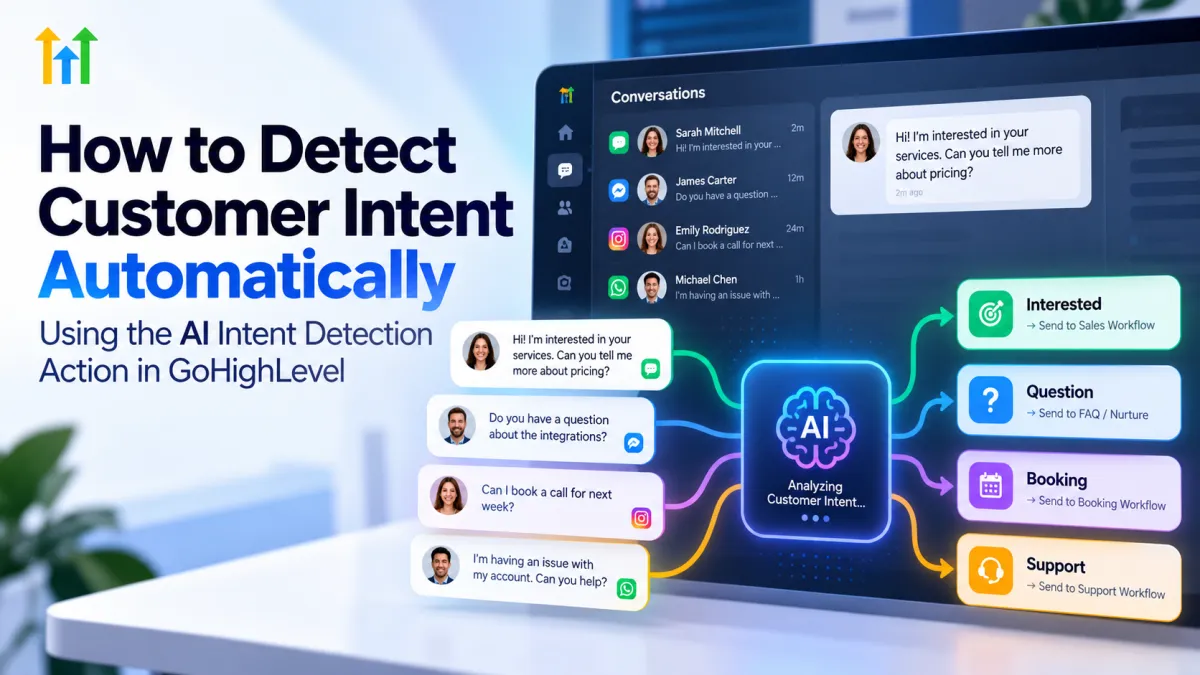
How to Detect Customer Intent Automatically with AI Intent Detection in GoHighLevel
How to Detect Customer Intent Automatically Using the AI Intent Detection Action in GoHighLevel
Every customer reply tells you something but not every reply means the same thing.
One lead might respond, “Yes, I’m interested.” Another may say, “No thanks, not right now.” A third might send a response that does not clearly indicate either direction. If every contact continues through the same automated follow-up, the conversation can quickly feel disconnected from what the person actually said.
That is where GoHighLevel AI Intent Detection can help. Inside GoHighLevel workflows, the AI Intent Detection Action can analyze text and route a contact according to the detected overall sentiment. This gives businesses a practical way to make automation react differently to positive, negative, or unclear responses.
What Is AI Intent Detection in GoHighLevel?
The AI Intent Detection Action is an AI-powered workflow action that evaluates text and classifies it into one of three branches: POSITIVE, NEGATIVE, or NONE.
POSITIVE represents text expressing positive sentiment, satisfaction, or agreement. NEGATIVE covers negative sentiment, dissatisfaction, or disagreement. NONE is used when the text is neutral or the system cannot confidently place it into the other two categories.
Rather than relying only on manually selected keywords, it analyzes supplied text and routes the workflow through the appropriate predefined branch. The input can include an incoming customer message or other text available to the workflow.
Why Customer Intent Matters in Automation
Imagine sending the same “Are you interested?” message to someone who just replied enthusiastically and someone who has already declined. The automation may be running, but the experience is disconnected.
Customer intent detection gives the workflow another decision point. A positive response can move through one path, a negative response through another, and an unclear response through a third.
That makes automated lead follow-up more responsive to what the contact actually communicated rather than treating every reply identically.
How the AI Intent Detection Action Works
The basic process looks like this:
Customer text → GoHighLevel workflow → AI Intent Detection → POSITIVE, NEGATIVE, or NONE → Relevant workflow actions
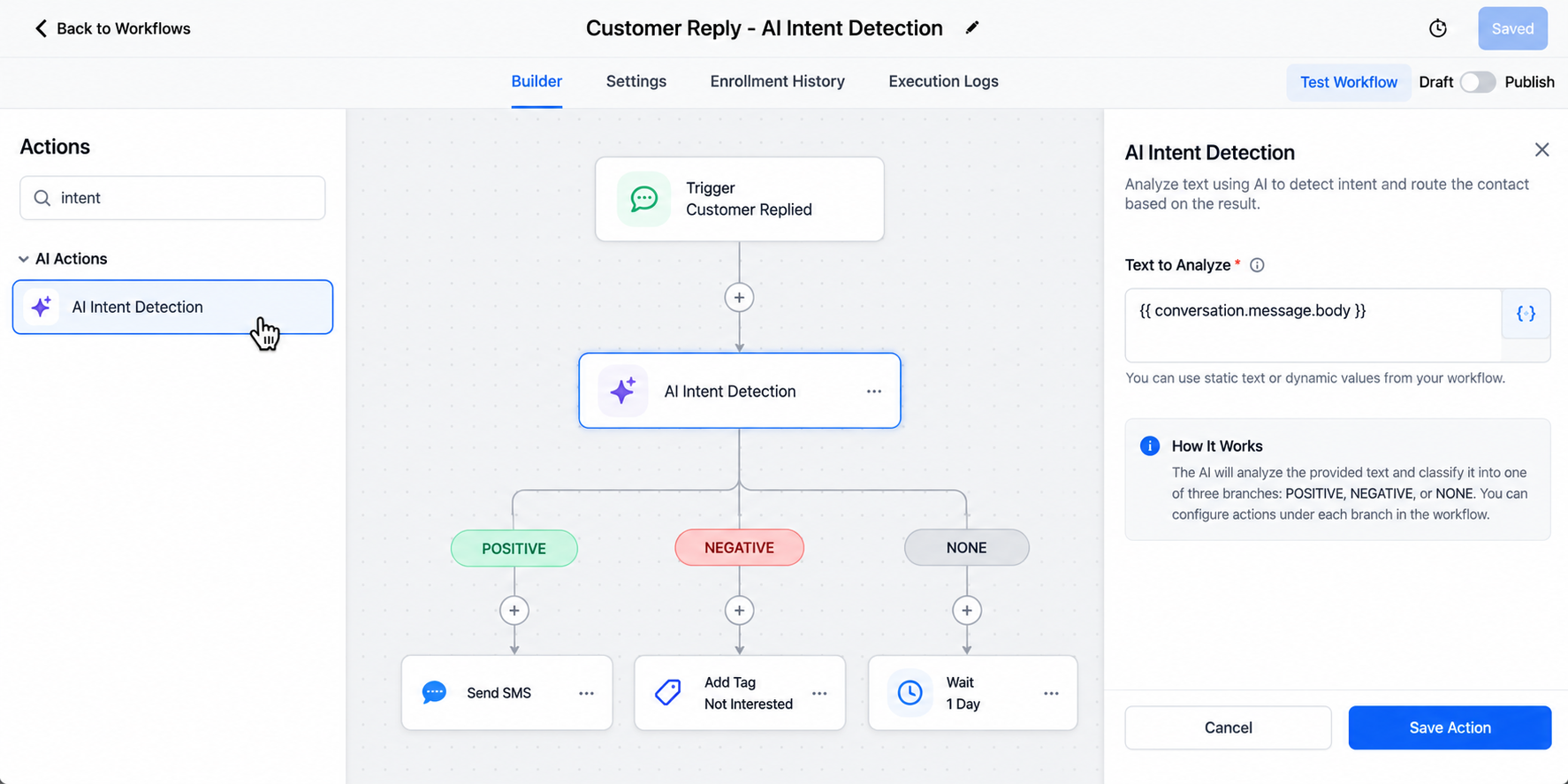
In the Workflow Builder, you add the AI Intent Detection Action where you want the text analyzed. HighLevel allows the action to evaluate a static value or a dynamic text variable. For an incoming customer message, for example, the message body can be supplied as the input.
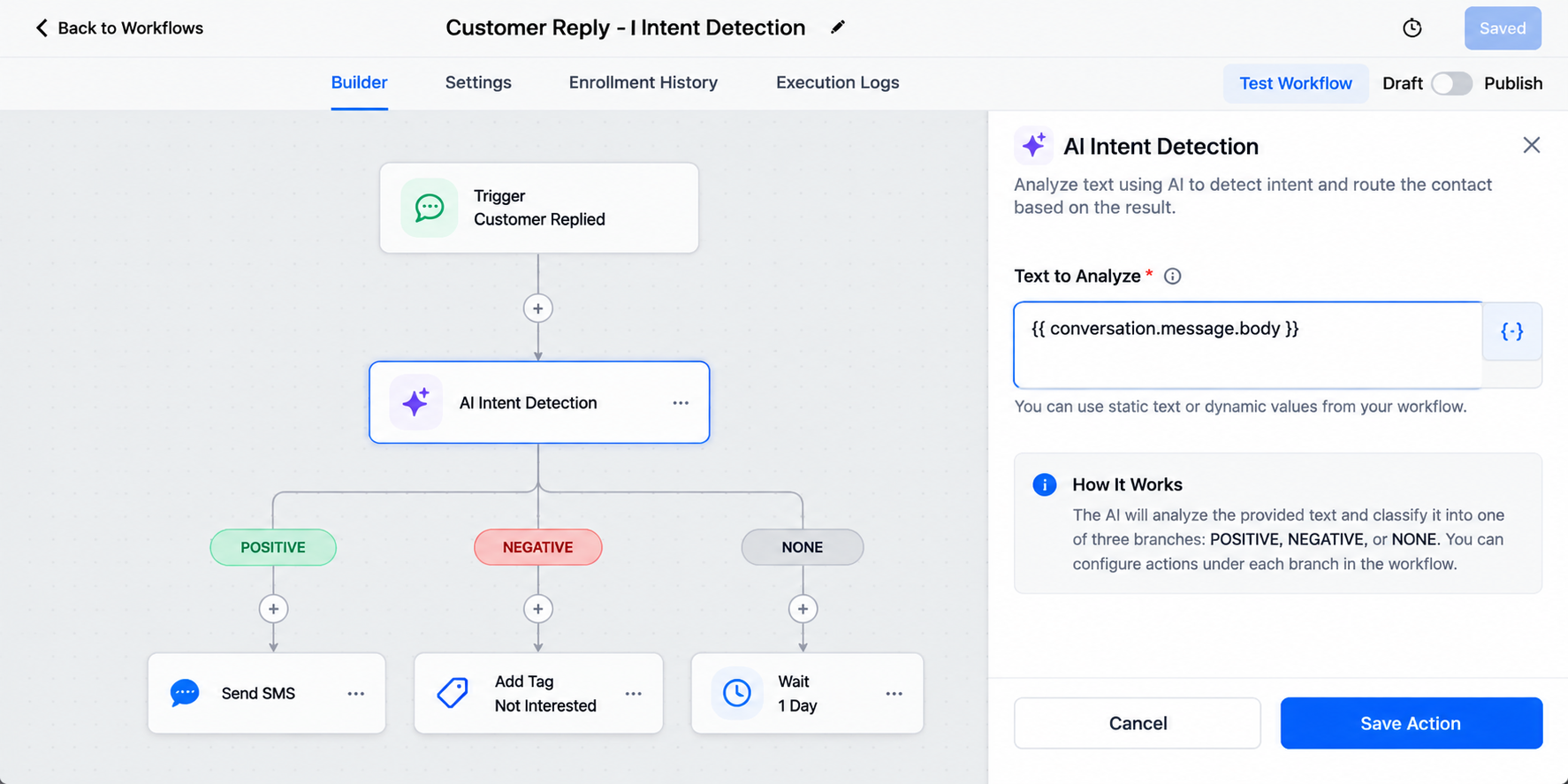
Once configured, the action automatically creates the three routing branches. You can then place suitable workflow actions beneath each branch.
Instead of building phrase-based conditions for many variations of “yes” or “no,” the action can evaluate the overall text and select one of its three supported categories.
Practical Business Use Cases
For local service businesses, agencies, real estate teams, and appointment-based companies, the action can help separate favorable engagement from negative or unclear responses.
This is especially useful when people express agreement, interest, dissatisfaction, or rejection in many different ways and the next workflow step should reflect that difference.
For example, an agency following up with prospects could use sentiment detection to separate favorable replies from people declining the offer. A local service business could use similar logic after sending follow-up communication to an inquiry.
The goal is not to make AI handle every conversation. It is to give GoHighLevel customer conversations a more relevant automated path when sentiment provides useful context.
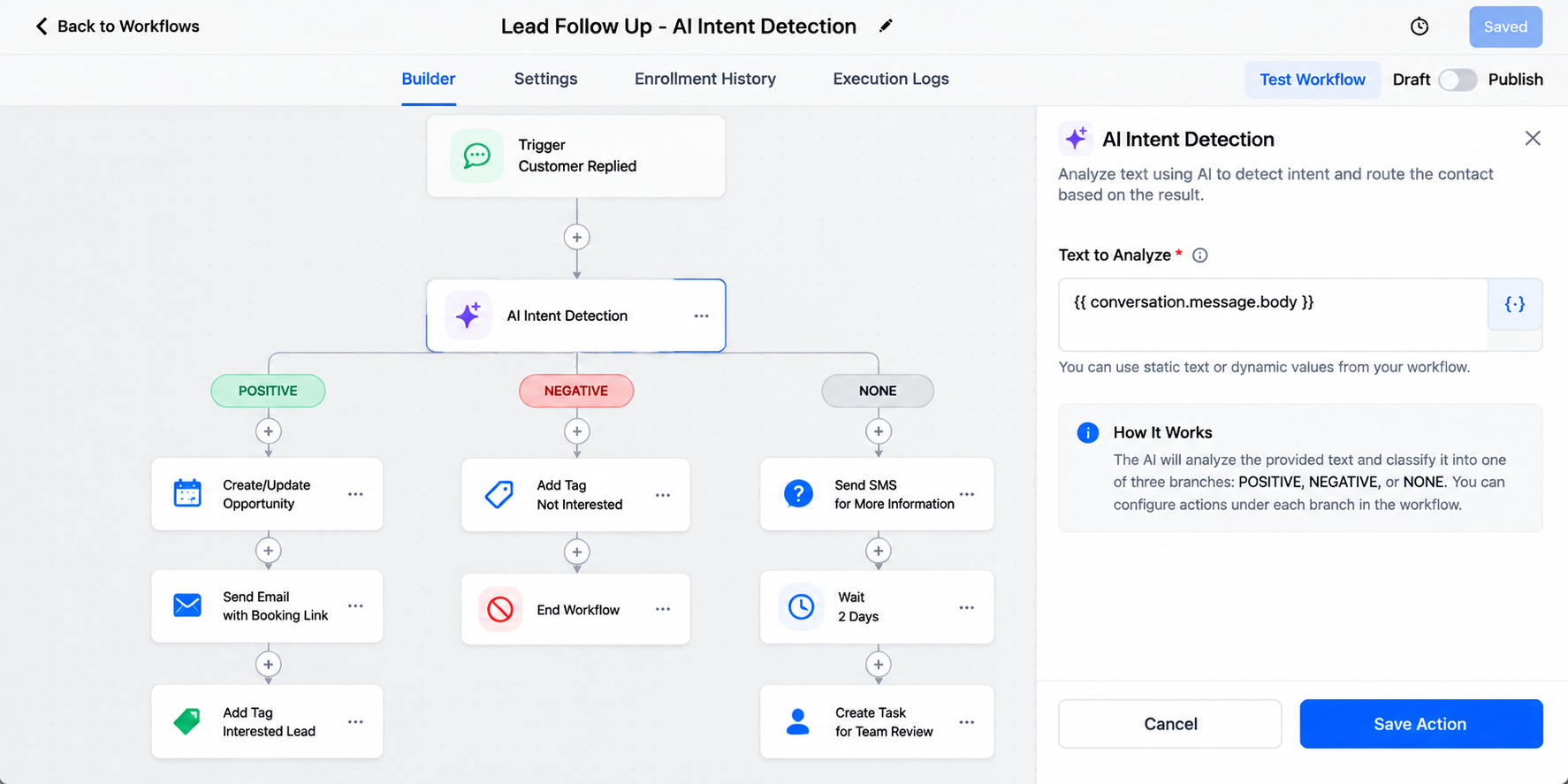
Example of an AI Intent Detection Workflow
Suppose a business sends a follow-up message and a lead replies:
“Yeah, I’d like to learn more. Can someone explain how this works?”
The workflow can pass that message into the AI Intent Detection Action. If it is classified as POSITIVE, the contact follows the positive branch, where the business can configure the appropriate next step.
Now compare that with:
“Thanks, but I’m not interested right now.”
A NEGATIVE classification allows that contact to follow a different path rather than receiving the exact same continuation as the interested lead.
If the reply is ambiguous, the NONE branch gives the business a separate route for handling text that is neutral or cannot be confidently categorized.
Benefits of AI Intent Detection
Used thoughtfully, GoHighLevel AI automation can make workflow routing more relevant without requiring a team member to manually review every routine response.
The AI Intent Detection Action can reduce dependence on rigid keyword matching where sentiment is the real decision factor. It also creates cleaner workflow paths, enables faster handling of common responses, and makes AI workflow automation easier to scale as conversation volume grows.
Importantly, it should support not blindly replace human judgment. Complex, sensitive, or ambiguous conversations may still need personal attention.
Best Practices for Reliable Automation
Start by deciding where positive, negative, and unclear sentiment actually changes your business process. Keep each branch purposeful rather than adding automation simply because you can.
Test the workflow with realistic variations of customer messages before publishing it. Pay special attention to mixed or ambiguous language, because AI classification is not infallible. Mixed sentiment may be classified according to the dominant sentiment, while text without a clear classification can follow the NONE branch.
It is also wise to review unusual conversations and keep human intervention available when judgment, context, or personal attention matters.
Smarter Automation Starts With Better Context
Useful automation is not about sending more messages. It is about making the next action fit what the customer has communicated.
GoHighLevel AI Intent Detection adds a practical layer of context to AI-powered CRM automation by allowing workflows to respond differently to positive, negative, and unclear text. When paired with well-designed GoHighLevel workflows and sensible human oversight, it can make automated customer journeys far more relevant.
If your current automations treat every reply the same, explore the AI Intent Detection Action and identify where sentiment-based routing could make your next workflow more responsive.
Conclusion
The AI Intent Detection Action in GoHighLevel gives businesses a practical way to make workflows respond more intelligently to customer messages. Instead of sending every contact through the same follow-up path, businesses can use AI-powered routing to distinguish between positive, negative, and unclear responses.
When used correctly, this can make GoHighLevel workflows more relevant, reduce unnecessary manual review, and improve how automated conversations are handled at scale. However, AI intent detection works best as part of a thoughtfully designed automation strategy, with human involvement available for complex or ambiguous conversations.
If your workflows currently treat every customer reply the same way, the AI Intent Detection Action can be a useful step toward building more context-aware and responsive automation.
Frequently Asked Questions
1. What is the AI Intent Detection Action in GoHighLevel?
The AI Intent Detection Action is a workflow action that analyzes provided text and routes the contact into one of three branches: POSITIVE, NEGATIVE, or NONE. This allows businesses to create different workflow paths based on the detected sentiment of a customer message.
2. What types of intent can GoHighLevel AI Intent Detection identify?
Currently, the action focuses on three classifications: POSITIVE, NEGATIVE, and NONE. It should not be confused with a system that automatically creates custom intent categories such as pricing, support, booking, or cancellation.
3. Can AI Intent Detection be used with customer replies?
Yes. A workflow can use text from an incoming customer message as the input for the AI Intent Detection Action, allowing the workflow to route the contact based on the detected sentiment.
4. Is AI Intent Detection better than keyword-based automation?
It can be useful when customers express the same general sentiment using different wording. Instead of creating conditions for many specific phrases, AI Intent Detection can evaluate the overall text. However, keyword-based conditions may still be useful for situations where specific words or phrases need to trigger a precise action.
5. Should AI Intent Detection completely replace human review?
No. AI classification is not perfect, especially when messages contain mixed, unclear, sarcastic, or highly contextual language. Businesses should test their workflows carefully and keep human review available when a conversation requires judgment or personal attention.
Need Expert Help with GoHighLevel?
New to GoHighLevel and ready to get started? Buy your GoHighLevel account here and launch with confidence.
Already know what you need and want our team to handle everything, from complete setup and customization to funnels, workflows, automations, CRM, and pipelines? Click here.



