

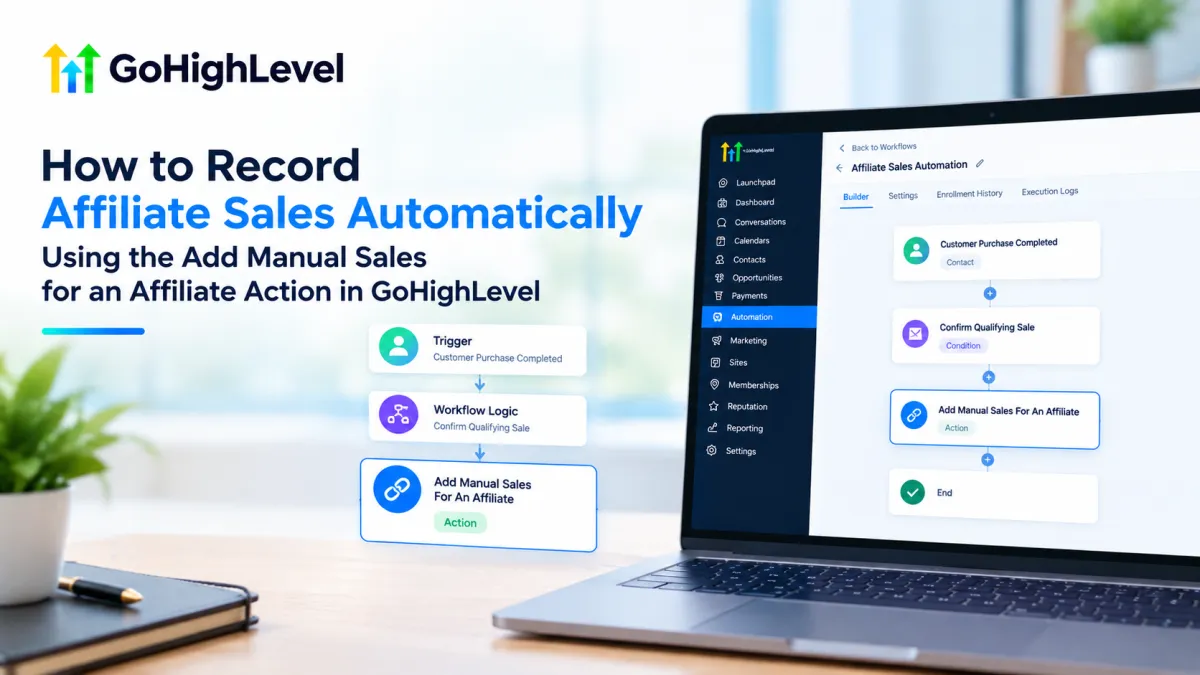
How to Record Affiliate Sales Using GoHighLevel
How to Record Affiliate Sales Automatically Using the Add Manual Sales for an Affiliate Action in GoHighLevel
Affiliate programs can generate valuable sales, but keeping those sales accurately attributed becomes more difficult when some transactions do not follow the usual affiliate-tracking path. Offline purchases, missed referral links, or other qualifying events may require a business to manually associate revenue with an affiliate.
GoHighLevel provides a workflow action specifically for this purpose: Add Manual Sales For An Affiliate. Instead of relying on someone to enter every qualifying sale manually, you can place this action inside a workflow and have it record affiliate sales when a defined workflow event occurs. HighLevel documents the action as a way to assign manual sales to an affiliate within a selected affiliate campaign.
What Is the Add Manual Sales for an Affiliate Action?
Add Manual Sales For An Affiliate is a workflow action, not a workflow trigger. A trigger determines when a workflow starts, while an action is a step performed after the workflow has started.
The action allows a workflow to add a manual sale for an affiliate associated with an affiliate campaign. HighLevel's documentation states that the action can record the transaction revenue and optionally include an event date and Event ID, such as a reference or transaction ID.
The action can also work with affiliate attribution. When AUTO-TRACK AFFILIATE VIA ATTRIBUTION is enabled, HighLevel can use the affiliate attribution associated with the contact rather than requiring separate workflow branches for individual affiliates. The documented configuration allows the workflow to consider either the contact's first or latest attribution.
This distinction is important: the action records the affiliate sale within the affiliate system; it is not itself the event that starts the workflow.
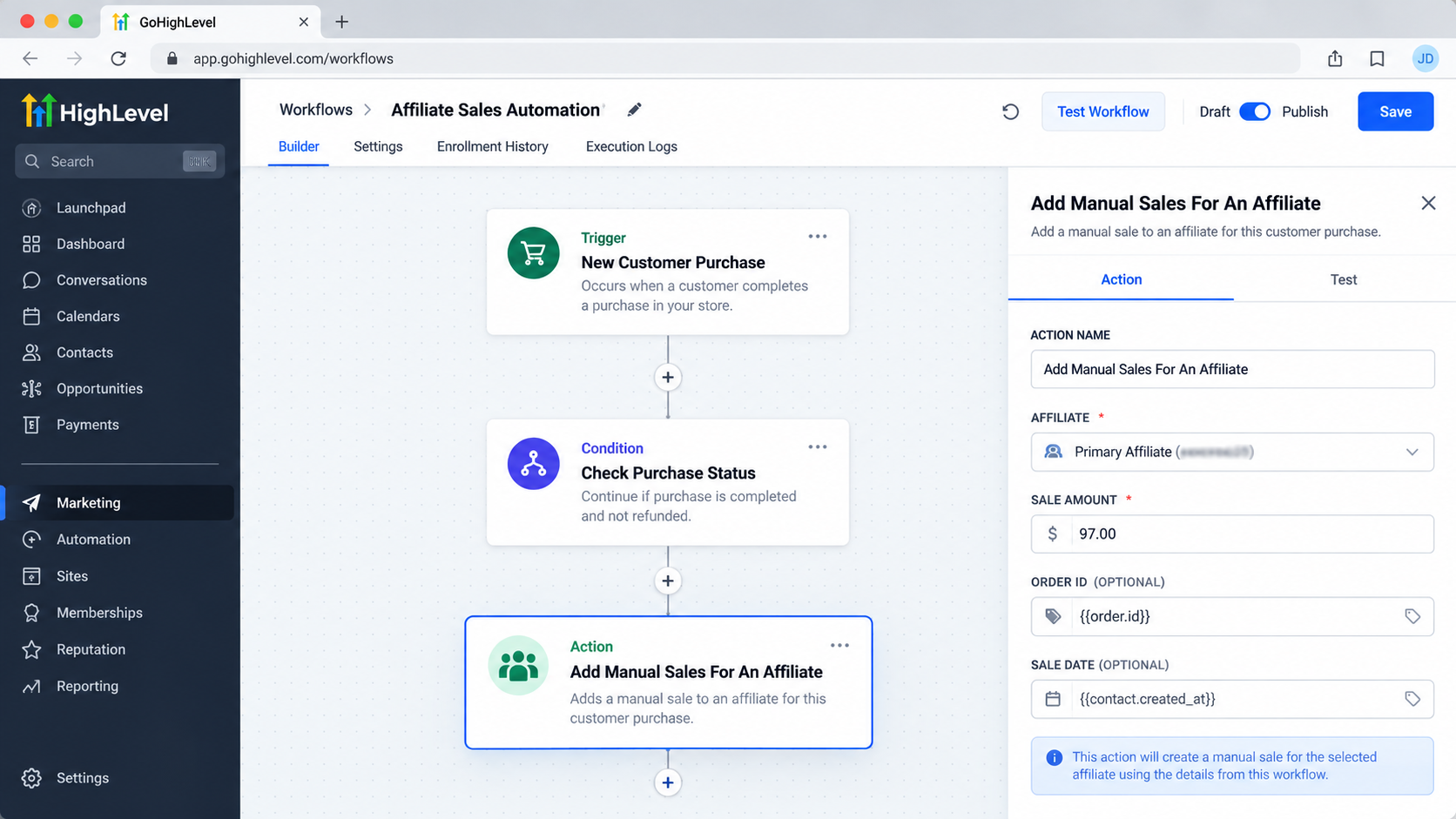
Why Use This Action?
Manual affiliate sales are useful when a sale needs to be attributed to an affiliate but is not being captured through the standard sales-tracking path.
For example, a business may receive a customer through an affiliate referral, but the eventual transaction could occur through a process where the normal affiliate link is not what records the sale. HighLevel specifically identifies offline and otherwise untracked sales as use cases for manual sale attribution.
Using a workflow action can make this process more consistent. Instead of relying on an administrator to remember to add every applicable sale, a qualifying CRM event can start a workflow that reaches the manual-sales action.
How the Automation Works
A typical setup follows a straightforward workflow structure:
A relevant trigger starts the workflow.
The trigger should represent an event that indicates the sale or qualifying transaction has occurred.The workflow applies any required logic.
Conditions, branches, or other workflow steps can be used when the business needs to determine whether the transaction should be treated as an affiliate sale.The Add Manual Sales For An Affiliate action runs.
The action records the manual sale using the affiliate campaign and sale information configured in the action.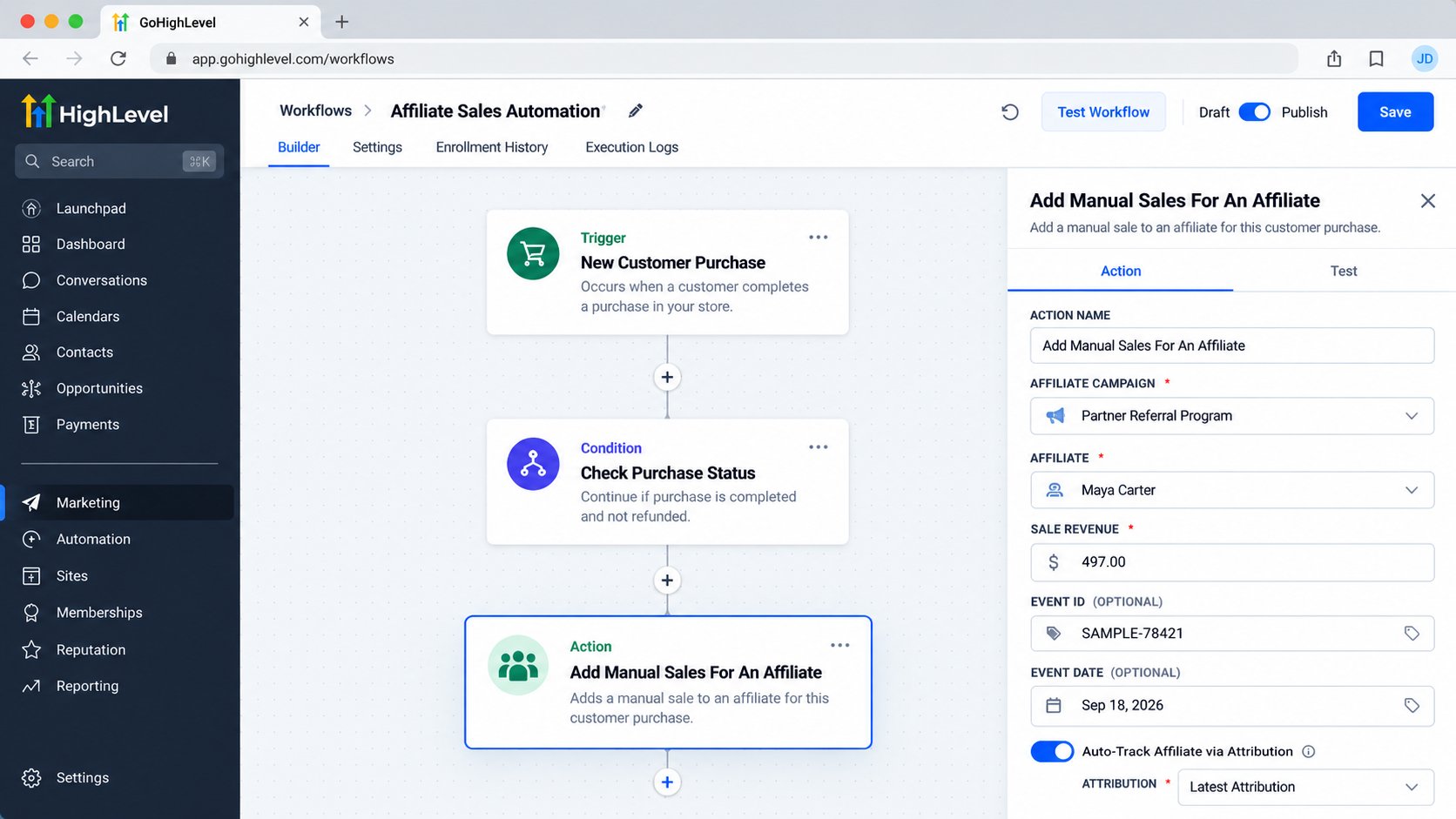
Configure the affiliate campaign, sale revenue, attribution, and optional event details inside the Add Manual Sales For An Affiliate workflow action. Affiliate attribution is applied when configured.
With automatic affiliate attribution enabled, the action can use the contact's first or latest attribution to determine the relevant affiliate. Alternatively, the workflow can be configured to select an affiliate directly from the selected campaign.The sale is recorded using the supplied revenue information.
HighLevel states that the commission is calculated according to the selected affiliate campaign's default commission settings.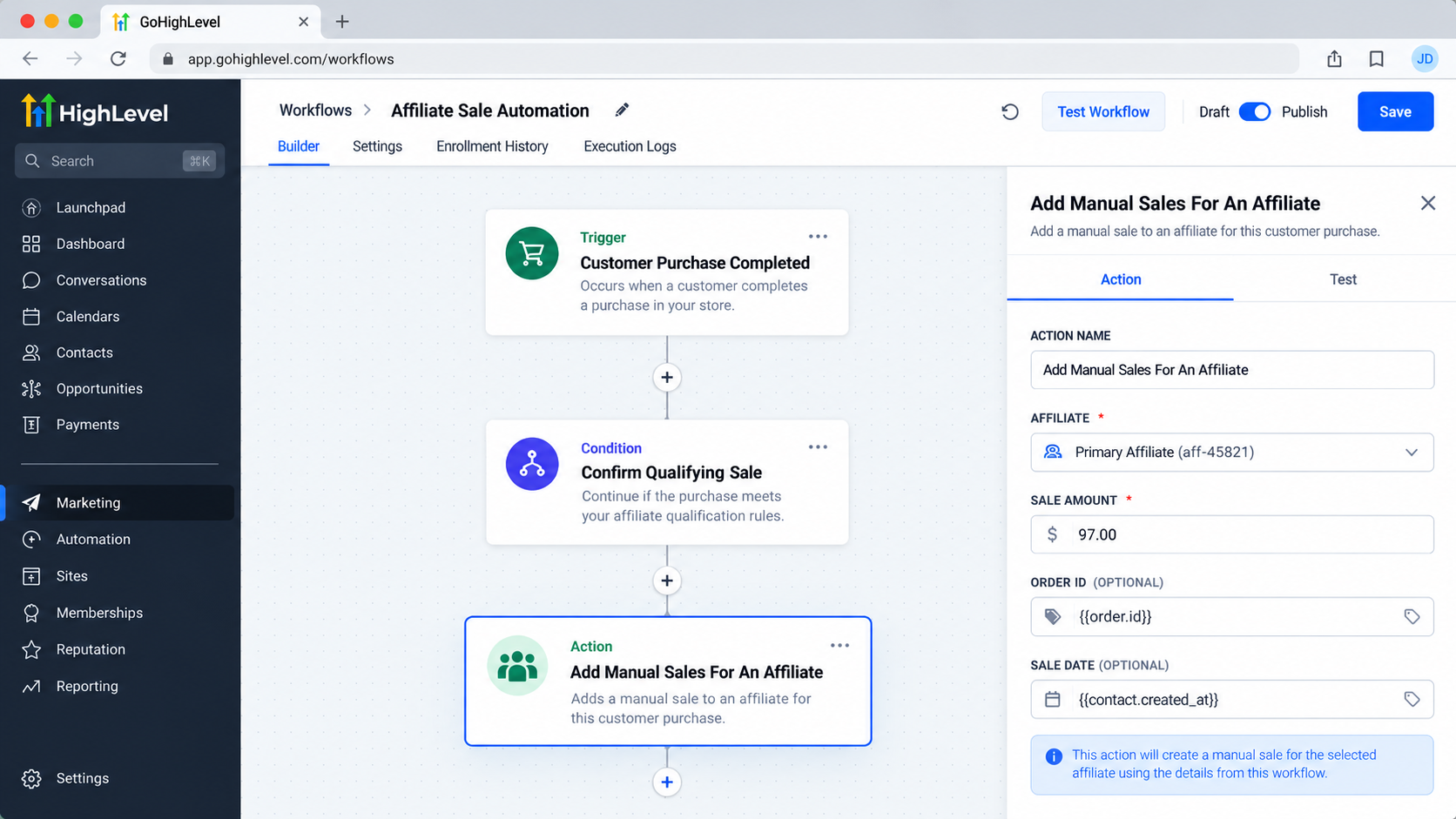
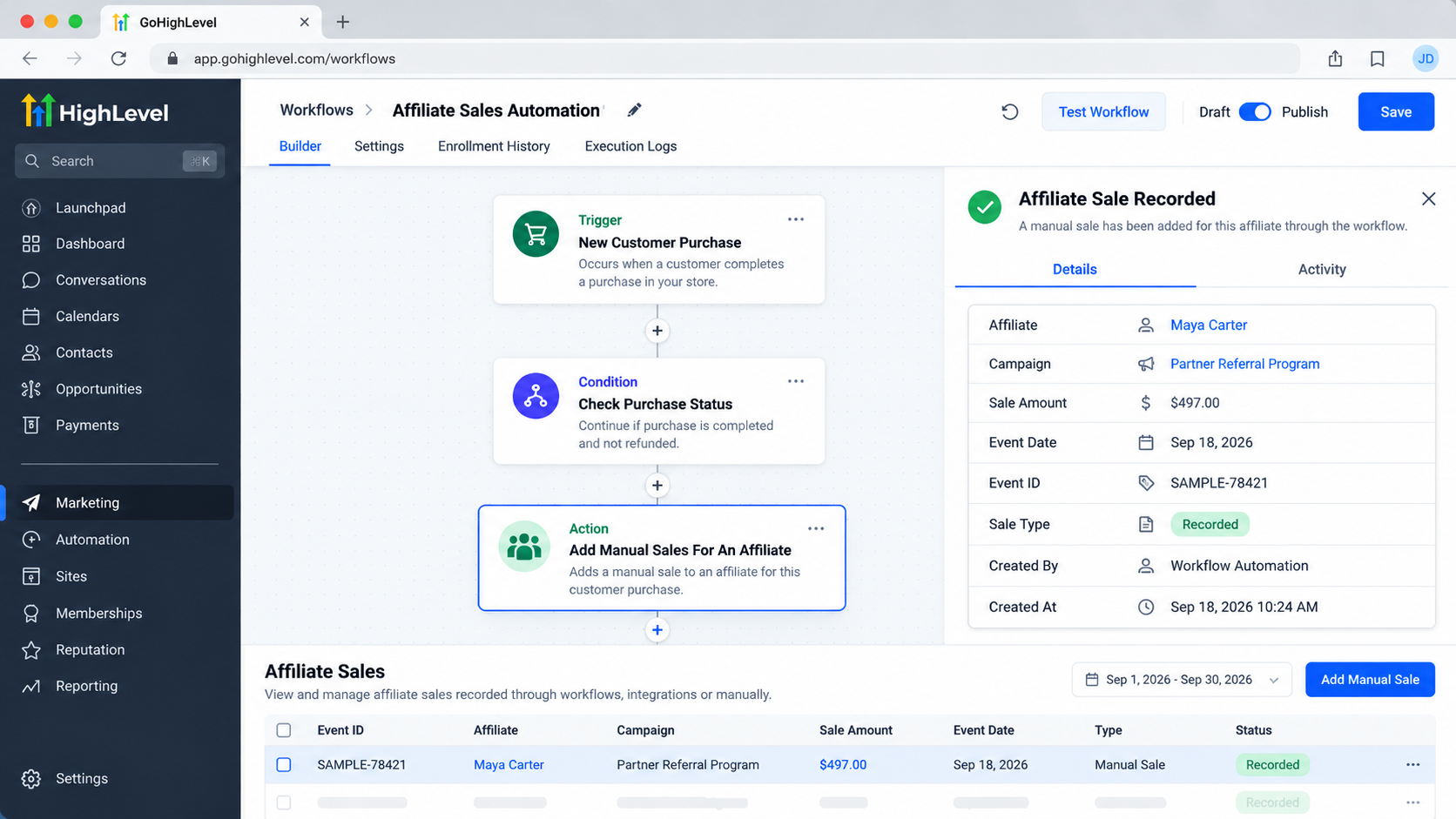
A qualifying CRM event can move through workflow logic before the affiliate sale is recorded automatically.
The exact workflow structure should depend on the business's actual sales process rather than assuming that every sale should automatically become an affiliate sale.
Practical Example
Consider a fictional coaching business called Northstar Coaching. It runs an affiliate campaign and has an affiliate named Maya Carter.
A customer referred by Maya completes a qualifying purchase. The business has a workflow designed to respond to the relevant CRM event. Once the workflow determines that the transaction qualifies, it reaches Add Manual Sales For An Affiliate.
The action is configured for the appropriate affiliate campaign and the transaction's revenue amount. If the workflow uses affiliate attribution, it can use the documented first or latest attribution method to identify the affiliate. If attribution tracking is not being used, the action can instead be configured with the affiliate associated with the selected campaign.
This gives the business a repeatable way to record the sale without requiring someone to enter the same information manually after every qualifying event.
Important Considerations
A reliable setup depends on getting the underlying workflow logic right.
Confirm the affiliate. Make sure the affiliate selected directly or identified through attribution is the affiliate who should receive credit for the transaction.
Use accurate revenue information. The action uses the sale or revenue amount provided in its configuration. Incorrect values can result in incorrect affiliate-sale records.
Consider timing carefully. The action should occur only after the workflow has enough information to establish that the transaction qualifies.
Avoid duplicate records. If another process already records the same affiliate sale, adding this action without appropriate safeguards could result in unintended duplicate attribution. Review the complete workflow before activating it.
Separate sale recording from payout handling. Recording a manual sale and calculating the applicable commission are part of the affiliate workflow functionality, but that should not be confused with the separate process of actually paying an affiliate. HighLevel documents affiliate payout functionality separately.
Best Practices for Affiliate Sale Automation
For dependable GoHighLevel affiliate automation:
Build the workflow around a clearly defined qualifying event.
Verify that the selected affiliate campaign is the correct one.
Use attribution only when the business's tracking process supports it.
Choose first or latest attribution deliberately based on how the business wants attribution handled.
Include an Event ID or reference information when it is useful for identifying the underlying transaction.
Test the workflow with sample transactions before relying on it for live affiliate sales.
Review existing affiliate automations to ensure another workflow is not recording the same sale.
Conclusion
The Add Manual Sales For An Affiliate action provides a practical way to incorporate manual affiliate sales recording into GoHighLevel workflows. It can connect a qualifying CRM event with affiliate-sale attribution, while the selected campaign's default commission settings determine the applicable commission calculation.
For businesses managing affiliate programs, the main value is consistency: once the workflow logic is correctly designed, qualifying sales can be recorded as part of an automated process instead of depending entirely on repetitive manual entry.
Frequently Asked Questions
What is the Add Manual Sales for an Affiliate action in GoHighLevel?
The Add Manual Sales for an Affiliate action is a GoHighLevel workflow action used to record a manual sale for an affiliate within an affiliate campaign. It can be added to a workflow so a qualifying event can lead to an affiliate sale being recorded automatically.
Is Add Manual Sales for an Affiliate a trigger?
No. Add Manual Sales for an Affiliate is a workflow action, not a trigger. A trigger starts the workflow, while this action runs as one of the steps after the workflow has started.
When should I use the Add Manual Sales for an Affiliate action?
It can be useful when a sale needs to be recorded for an affiliate but is not captured through the normal affiliate sales-tracking process. For example, a qualifying transaction that occurs outside the usual tracked referral process may be recorded through a workflow.
Can GoHighLevel automatically identify the affiliate?
Yes, the action supports automatic affiliate attribution when configured to use it. HighLevel's documented options allow the workflow to use the contact's first or latest affiliate attribution. The appropriate option depends on how the business handles affiliate attribution.
Can I select an affiliate manually?
The action supports selecting an affiliate through the affiliate campaign configuration when automatic attribution is not being used. The available configuration should be checked in the current GoHighLevel account because affiliate settings can depend on the account setup.
Does this action automatically pay the affiliate?
No. Recording a manual affiliate sale should not be confused with paying an affiliate. Affiliate sale recording and affiliate payout processes are separate parts of affiliate management.
Can I use this action with an existing GoHighLevel workflow?
Yes. It is designed to be used as a workflow action, meaning it can follow a suitable workflow trigger and any necessary workflow logic. The workflow should only execute the action when the transaction genuinely qualifies as an affiliate sale.
How can I prevent duplicate affiliate sales?
Build the workflow so the action runs only when the intended qualifying event occurs. Review other workflows and affiliate-tracking processes that may already record the same transaction, and use appropriate workflow logic to avoid triggering the action more than once for the same sale.
Need Expert Help with GoHighLevel?
New to GoHighLevel and ready to get started? Buy your GoHighLevel account here and launch with confidence.
Already know what you need and want our team to handle everything, from complete setup and customization to funnels, workflows, automations, CRM, and pipelines? Click here.



