

Add Contacts to Affiliate Manager in GoHighLevel Automatically: Step-by-Step Guide
How to Add Contacts to Affiliate Management Automatically Using the Add to Affiliate Manager Action in GoHighLevel
Introduction
Managing an affiliate program can become difficult when every new affiliate has to be added manually. As your customer base grows, identifying the right contacts, converting them into affiliates, and keeping the process organized can take unnecessary time.
GoHighLevel provides a workflow action that can automate one important part of this process: "Add To Affiliate Manager". The action can take an existing contact and add them to the Affiliate Manager as an active affiliate.
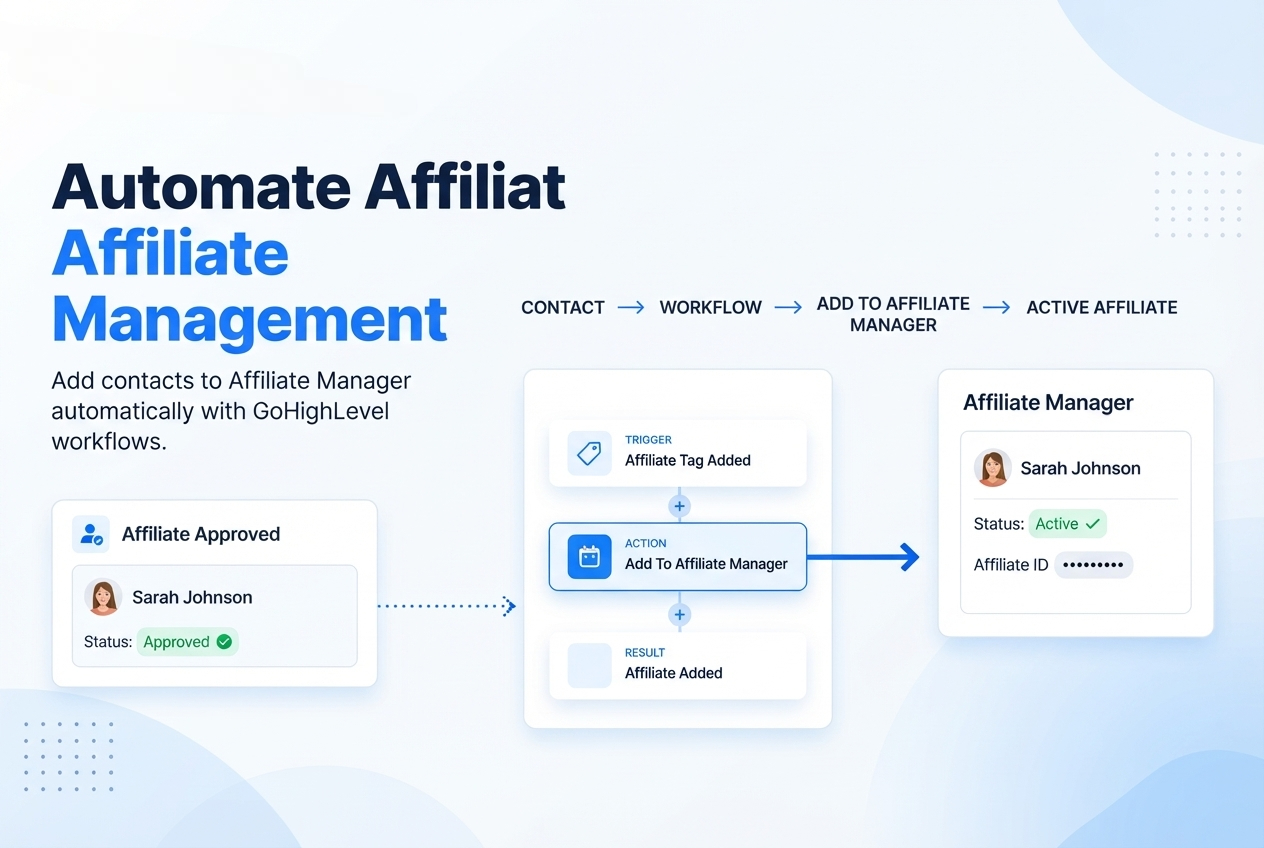
This makes it possible to connect your existing contact database with your affiliate management process. For example, when a contact receives a particular tag, you can trigger a workflow that automatically adds that contact to your Affiliate Manager.
In this guide, you'll learn what the "Add To Affiliate Manager Action in GoHighLevel" does, how to configure it, where it fits into an affiliate workflow, practical use cases, and best practices for keeping your automation organized.
What Is the Add To Affiliate Manager Action in GoHighLevel?
The "Add To Affiliate Manager" is a GoHighLevel workflow action designed to convert an existing contact into an affiliate in the sub-account's Affiliate Manager.
According to HighLevel's documentation, the contact is added to the Affiliates list with an active status by default.
This is different from simply adding a tag to a contact. A tag can help you organize or segment contacts inside the CRM, while the Add To Affiliate Manager action actually adds the contact to the affiliate management system.
A basic automation can look like this:
Contact receives an "Affiliate" tag
↓
GoHighLevel workflow starts
↓
Add To Affiliate Manager
↓
Contact becomes an active affiliate
This approach is useful when your business already has contacts who are potential affiliates, and you want to automate their enrollment.
Why Automate Affiliate Management?
Affiliate management often involves repetitive administrative tasks. Someone may need to identify a potential affiliate, locate the contact, and manually add them to the Affiliate Manager.
Automation can reduce these manual steps.
Save Time on Affiliate Enrollment
Instead of manually adding every eligible contact, you can create a workflow that handles the enrollment when a defined condition occurs.
For example, your team could add an "Affiliate" tag to a contact after approving them. The workflow can then automatically add that contact to Affiliate Manager.
Keep Your CRM and Affiliate Process Connected
Your contacts already exist inside GoHighLevel. Using a workflow action lets you use contact activity as the starting point for affiliate management.
This creates a simple connection between your CRM process and affiliate enrollment.
Create a Repeatable Process
A defined workflow provides a consistent process for contacts who qualify for your affiliate program.
Rather than relying on someone to remember each manual step, the workflow performs the configured action whenever its trigger conditions are met.
How to Set Up Add To Affiliate Manager in GoHighLevel
Setting up this automation starts in the "Workflows" area.
Step 1: Open Workflows
From your GoHighLevel sub-account, open "Automation → Workflows" and create a new workflow or open an existing one.
Your workflow needs a trigger because the trigger determines when the contact enters the automation.
Step 2: Choose Your Trigger
The trigger should represent the event that makes a contact eligible for affiliate enrollment.
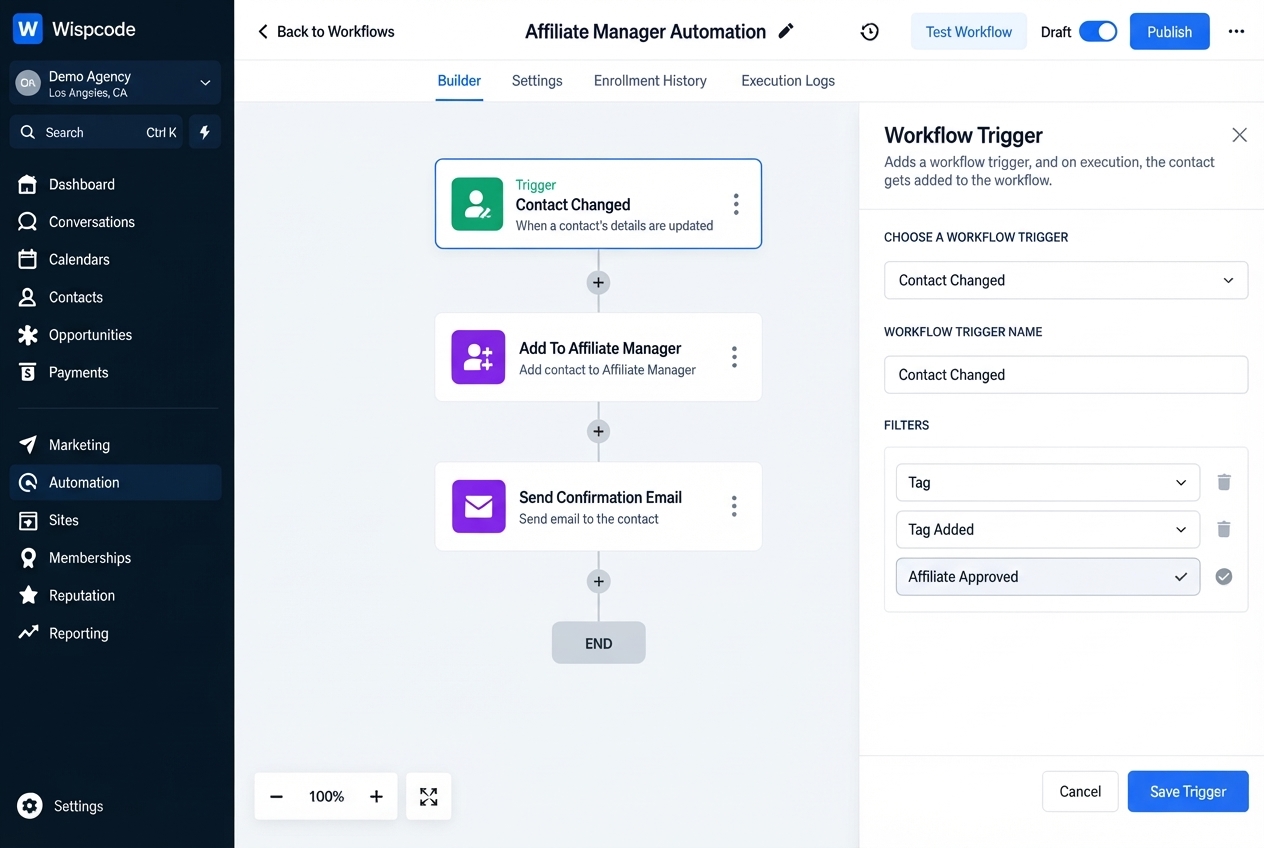
One example documented by HighLevel is using a "Contact Changed" trigger with a filter for a tag being added.
For example:
Trigger: Contact Changed
Filter: Tag added = Affiliate
This means that when the specified tag is added to the contact, the workflow can continue.
The exact trigger you use should match your own affiliate recruitment process.
Step 3: Add the Affiliate Manager Action
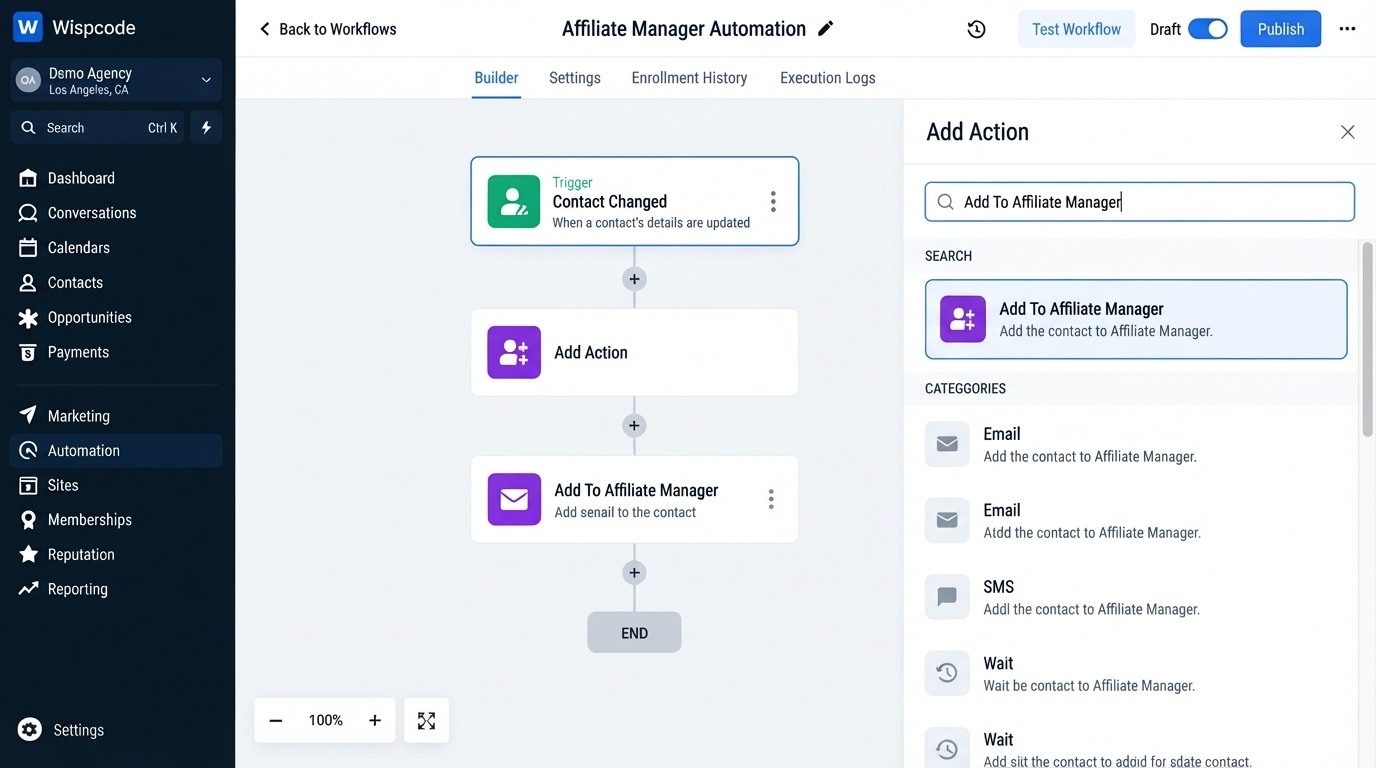
Once your trigger is configured, add an action to the workflow.
Choose:
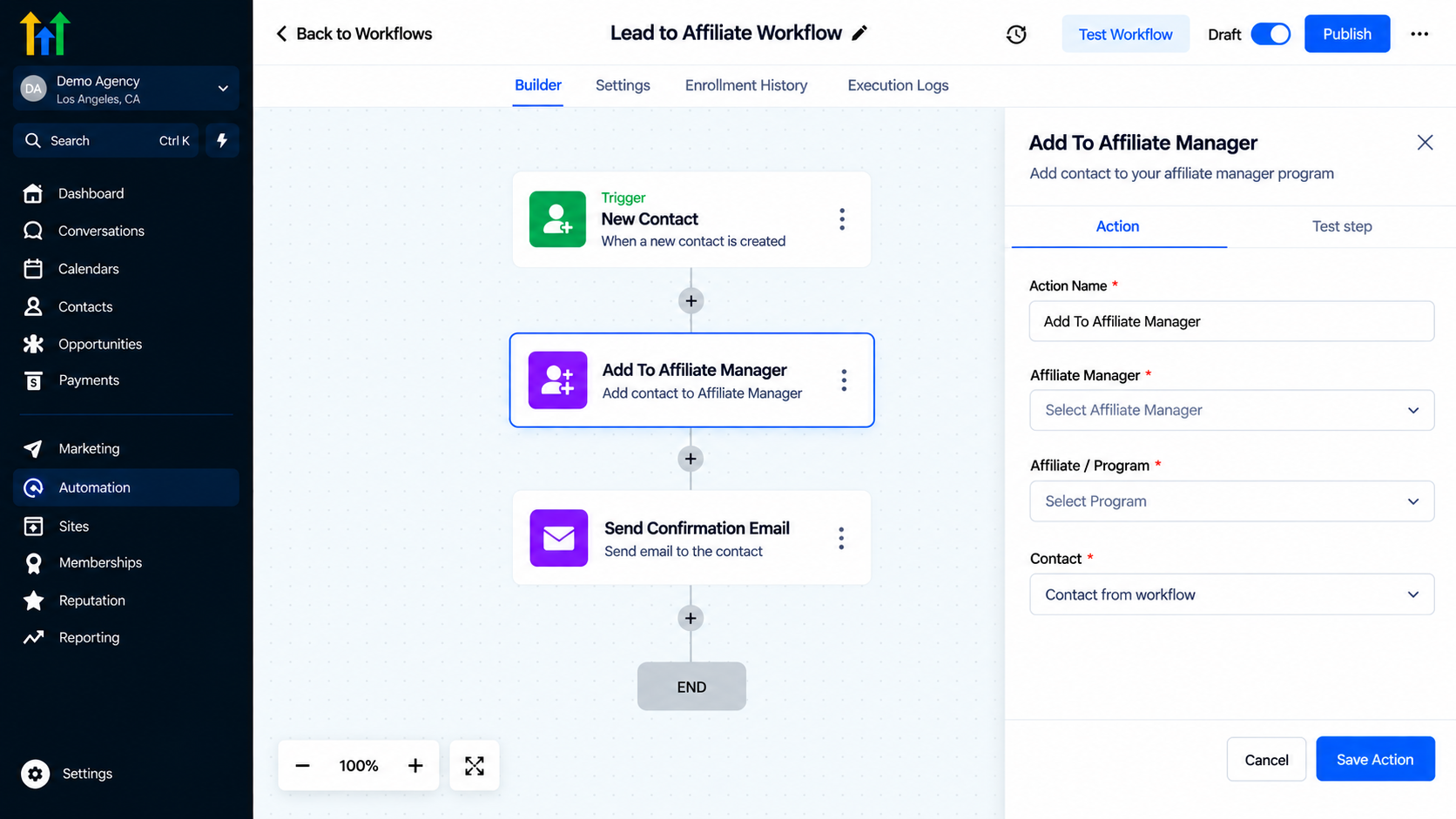
Add To Affiliate Manager
HighLevel's documented setup identifies this as the workflow action used to convert existing contacts into affiliates.
Give the action a descriptive name such as:
Convert Contact to Affiliate
A clear action name makes the workflow easier to understand later.
Step 4: Review the Workflow
Your workflow may now look like:
Contact Changed
↓
Tag Added: Affiliate
↓
Add To Affiliate Manager
The contact enters the workflow when the trigger conditions are met, and the action adds that contact to the Affiliate Manager.
HighLevel's example uses this exact type of tag-based enrollment scenario.
Step 5: Test Before Publishing
Before turning on the workflow, test it with an appropriate contact.
Check that:
The contact meets the trigger conditions.
The workflow executes the Add To Affiliate Manager action.
The contact appears in the Affiliate Manager.
The affiliate status is active.
Testing is especially important when your workflow contains additional conditions or actions.
Practical Use Cases of Affiliate Manager in GoHighLevel
The Add To Affiliate Manager action can be used in several affiliate recruitment processes.
Existing Customers as Affiliates
Suppose you have customers who already know your product and have expressed interest in recommending it.
You could use a tag such as:
Affiliate Approved
When that tag is added, the workflow can automatically add the contact to Affiliate Manager.
This creates a simple customer-to-affiliate enrollment process.
Affiliate Recruitment From a Contact List
Your CRM may contain contacts who have shown interest in becoming partners.
Instead of manually moving each person into Affiliate Manager, you can establish an approval process where an appropriate tag triggers the enrollment workflow.
For example:
Potential Affiliate
↓
Team Reviews Contact
↓
Affiliate Approved Tag
↓
Add To Affiliate Manager
This keeps the decision-making step separate from the actual enrollment automation.
Automatically Enrolling Qualified Contacts
You can also use other workflow logic to determine when a contact should enter the affiliate enrollment process.
For example, your business might have an internal process that applies an affiliate-related tag after a contact completes a particular qualification step.
The workflow can then handle the Affiliate Manager enrollment.
The important principle is to make the trigger reflect the point at which the contact is actually ready to become an affiliate.
Add To Affiliate Manager vs. Add To Affiliate Campaign
These two workflow actions are related, but they serve different purposes.
"Add To Affiliate Manager" adds the contact to the Affiliate Manager as an active affiliate.
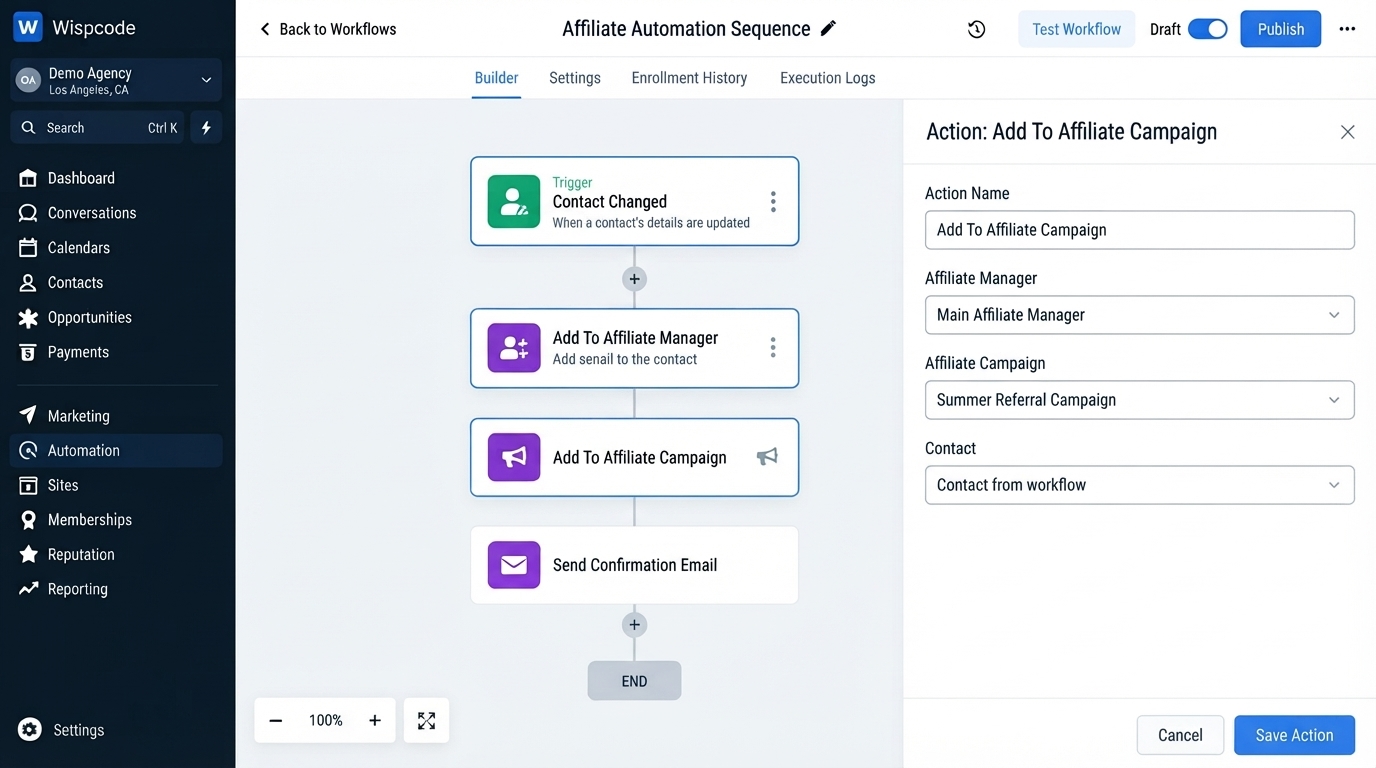
"Add To Affiliate Campaign" takes the affiliate enrollment process one step further by adding the contact to a selected affiliate campaign as an active affiliate.
For example:
Contact
↓
Add To Affiliate Manager
↓
Affiliate Created
↓
Add To Affiliate Campaign
This can be useful when your process requires an affiliate to be enrolled in a particular campaign after being added to the Affiliate Manager.
HighLevel also documents "Affiliate Enrolled In Campaign" as a workflow trigger, which can be used when an affiliate is added to an affiliate campaign.
Build a Complete Affiliate Onboarding Workflow
Adding a contact to Affiliate Manager does not have to be the end of your automation.
You can build additional workflow steps around the enrollment process.
For example:
Affiliate Approved
↓
Add To Affiliate Manager
↓
Add To Affiliate Campaign
↓
Affiliate Onboarding
↓
Internal Notification
This creates a more structured process for managing new affiliates.
HighLevel's Affiliate Manager documentation lists several affiliate-related workflow actions, including "Add To Affiliate Manager", "Update Affiliate", "Add To Affiliate Campaign", and "Remove From Affiliate Campaign".
This means you can build separate automations for different stages of your affiliate management process instead of putting every operation into one complicated workflow.
Best Practices for Affiliate Automation
Use a Clear Enrollment Trigger
Your trigger should represent a genuine affiliate qualification event.
Avoid creating an automation that adds contacts to your affiliate program before they are actually ready.
A clear trigger makes your workflow easier to understand and reduces accidental enrollment.
Use Descriptive Names
Instead of naming an action simply:
Action 1
use something like:
Add Approved Contacts to Affiliate Manager
This makes troubleshooting and future workflow maintenance much easier.
Separate Approval From Enrollment
If your business manually reviews affiliate applications, consider keeping approval separate from enrollment.
For example:
Affiliate Application
↓
Review
↓
Approval
↓
Tag Added
↓
Add To Affiliate Manager
This gives your team a clear checkpoint before the contact becomes an affiliate.
Test With a Controlled Contact
Before publishing your workflow for a larger audience, test the process using an appropriate contact.
Confirm that the contact enters the workflow and appears correctly in Affiliate Manager.
This is especially important when the workflow includes tags, filters, campaigns, or additional automation.
Keep Affiliate Campaigns Organized
If you use affiliate campaigns, decide whether campaign enrollment should happen in the same workflow or a separate one.
Separating these responsibilities can make larger automation systems easier to maintain.
Common Mistakes to Avoid
Adding Contacts Too Early
If your trigger is too broad, contacts may be added to your affiliate program before they have actually been approved.
Using the Wrong Action
Remember that "Add To Affiliate Manager" and "Add To Affiliate Campaign" have different purposes. The first adds the contact to Affiliate Manager; the second enrolls an affiliate into a selected campaign.
Skipping Testing
A workflow can look correct while still having an incorrect trigger or filter. Always test the complete process before publishing.
Making One Workflow Do Everything
As your affiliate system grows, separating enrollment, campaign enrollment, onboarding, and status management can make the automation easier to maintain.
Frequently Asked Questions(FAQ's)
1. What does Add To Affiliate Manager do in GoHighLevel?
It adds an existing contact to the Affiliate Manager and sets the new affiliate as active by default.
2. Can I automatically add contacts as affiliates?
Yes. A workflow can trigger the "Add To Affiliate Manager" action when your selected conditions are met.
3. Does Add To Affiliate Manager add the contact to a campaign?
Not by itself. Use "Add To Affiliate Campaign" when you also want to enroll the affiliate in a specific campaign.
4. Can a tag trigger affiliate enrollment?
Yes. HighLevel documents a tag-based example where adding an "Affiliate" tag triggers the Add To Affiliate Manager action.
5. Can affiliate onboarding be automated after enrollment?
Yes. GoHighLevel provides affiliate-related workflow triggers and actions that can be used to build additional onboarding and management automations.
Conclusion
The "Add To Affiliate Manager Action" in GoHighLevel provides a straightforward way to automate affiliate enrollment from your existing contacts.
Instead of manually adding every approved affiliate, you can create a workflow that responds to a defined trigger, such as an affiliate-related tag, and automatically adds the contact to Affiliate Manager.
For businesses building an affiliate program, this can create a more consistent process while reducing repetitive administrative work. Combined with actions such as "Add To Affiliate Campaign" and other affiliate workflow tools, it can also become part of a broader affiliate management system.
The key is to keep the workflow intentional: use a clear qualification trigger, test the automation, and separate affiliate enrollment from campaign-specific or onboarding steps when appropriate.
Need Expert Help with GoHighLevel?
New to GoHighLevel and ready to get started? Buy your GoHighLevel account here and launch with confidence.
Already know what you need and want our team to handle everything, from complete setup and customization to funnels, workflows, automations, CRM, and pipelines? Click here.



